
After launch the system costs roughly $100 to $200 a month to run for a smaller company, and $2,000 to $3,000 a month at enterprise scale, paid to the hosting providers directly, with no license and no per user fee. That bill does not move when you hire ten more salespeople. It moves when you store more data, send more email or use more AI.
What a custom CRM costs to run each month after launch
/ 29 min read
TL;DR
A custom CRM costs roughly $100 to $200 monthly for small companies and $2,000 to $3,000 for enterprises, paid directly to infrastructure providers with no per seat licensing fees that scale with headcount.
Key takeaways
- Custom CRM costs are driven by infrastructure usage like data storage, email volume, and AI processing rather than licensing or per user fees, making them unpredictable differently than seat based platforms.
- The seven core monthly expenses are hosting, database management, email sending, domain registration, file storage, AI usage, and monitoring with backups, each billed separately by different providers directly to your company.
- Per seat CRM platforms like HubSpot cost $120,000 annually at 100 users while custom infrastructure stays at $2,000 to $3,000 monthly regardless of headcount growth, creating different break even points based on company size.
- A hidden cost of custom CRM ownership is dedicating internal resources to manage and maintain the system beyond just the direct infrastructure bills.
- Custom builds are not always cheaper than established platforms like Zoho for small teams with standard sales processes, requiring evaluation of your specific use case and growth trajectory.
- Budget for year two should include increased database costs from accumulated data, potential AI usage growth, and monitoring expenses rather than assuming flat ongoing costs.
TL. DR
Key takeaways
- The monthly run cost of a custom CRM is infrastructure, not licensing. You are paying a hosting company, a database provider, an email sender and a storage bucket.
- Every account sits in your company's name, on your company's card. The build team is invited in and can be removed.
- Per seat CRM pricing scales with headcount. Infrastructure scales with usage, and usage grows far slower than a sales team does.
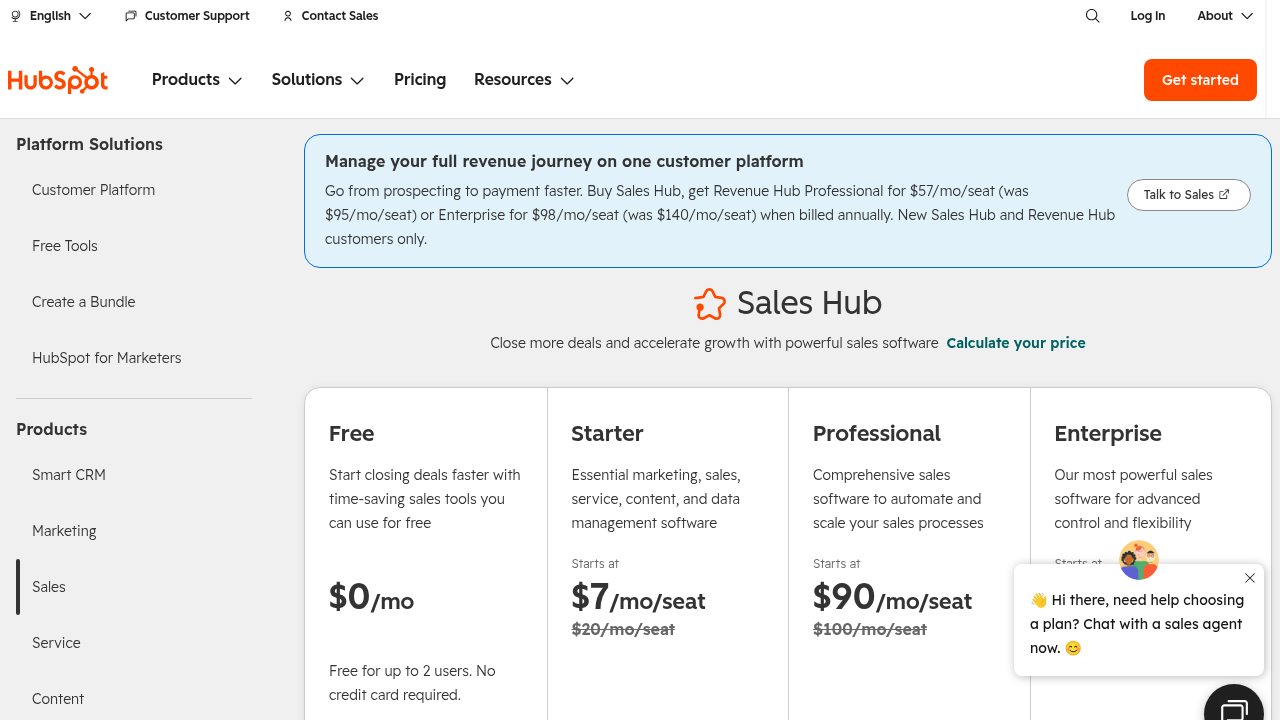
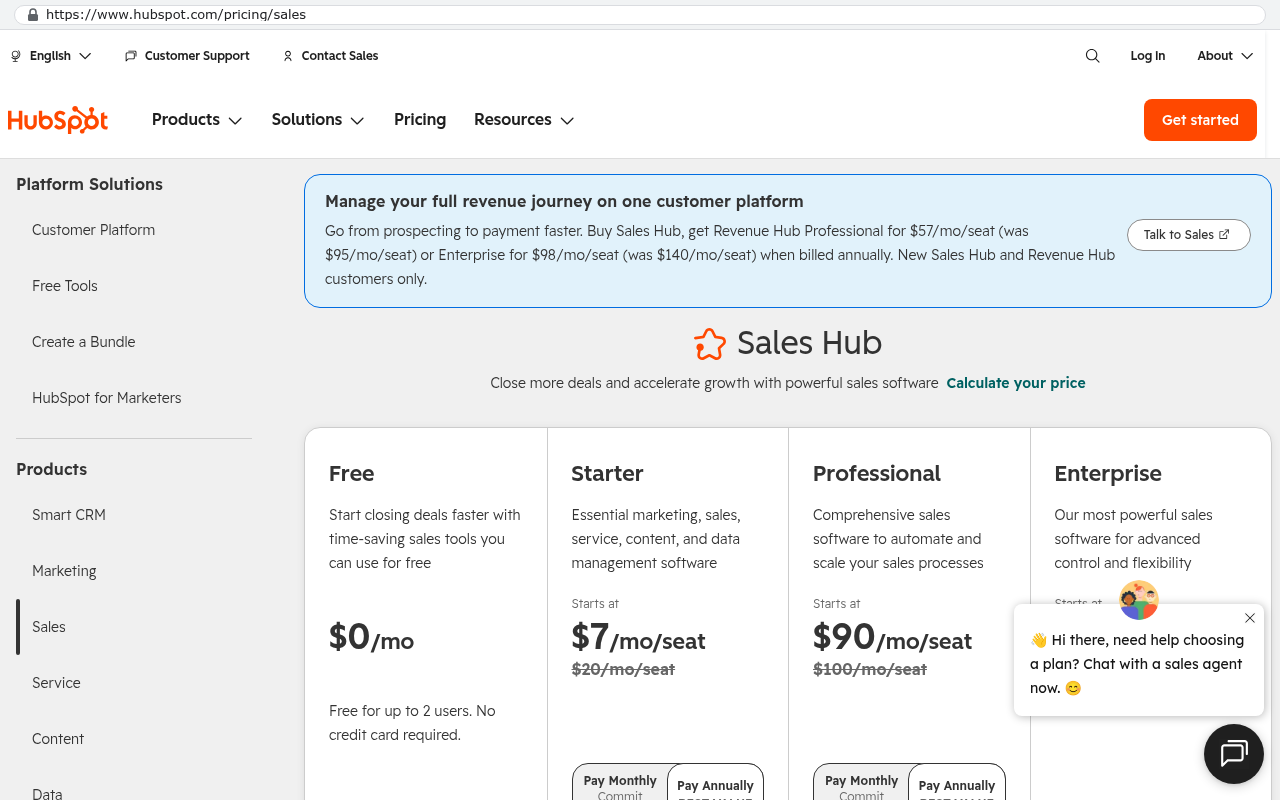
- HubSpot's pricing page lists Sales Hub Professional at $100 per seat per month billed annually, which is $120,000 a year at 100 seats.
- The real hidden cost is a person inside your company who owns the system. Budget the hours, not just the dollars.
- A custom build is not always the cheaper answer. At small headcount on a standard sales process, Zoho is genuinely hard to beat.
What does a custom CRM cost to run each month?
Roughly $100 to $200 a month for a smaller company, and $2,000 to $3,000 a month at enterprise scale. That is the whole bill. There is no license fee and no per user charge sitting underneath it.
Here is the direct answer you can quote. A custom CRM that your company owns outright costs what the servers cost, which is usually $100 to $200 a month for a team under about 50 people and $2,000 to $3,000 a month for a large organisation with redundancy, heavy data volume and real AI usage. You pay those bills directly to the infrastructure providers, in your own company's name, and the number does not change when headcount does.
That is a strange answer if you have only ever bought software per seat. You are used to a line item that grows every time someone joins. Infrastructure does not work that way. A database does not care whether 25 people or 100 people are reading from it. It cares how much data is in it and how hard it is being asked to work.
The rest of this page breaks that number into its parts, shows you who gets paid, and compares it with what HubSpot, Salesforce and Zoho publish on their own pricing pages. It also covers what the run cost does not include, because that is where people get surprised.
Run cost and build cost are two different conversations. This page is about the monthly bill after the system is live. For how the build itself gets scoped and quoted, read the implementation cost guide.
What are you actually paying for each month?
Seven things, and none of them are software licenses. Hosting, the database, email sending, the domain, file storage, AI usage, and monitoring with backups. Each one is a separate account with a separate provider, and each one has published pricing you can look up before you spend a dollar.
Hosting
This is the machine that runs your application code. For a small to mid sized CRM it is usually a container on a managed platform or a small cloud server. Expect something in the range of $25 to $75 a month for a company under 50 users. At enterprise scale you are running multiple instances across availability zones for redundancy, and that climbs into the hundreds.
The thing that drives hosting cost is concurrent load, not user count. A hundred salespeople who each open the CRM twelve times a day put less load on a server than one nightly job that recalculates every pipeline forecast.
The database
This is where your contacts, deals, notes, activity history and custom fields live. Most custom CRMs run on managed PostgreSQL, which means a provider handles patching, failover and backups for you. A starter managed database runs $20 to $50 a month. A production database with a read replica and point in time recovery runs more, and at enterprise scale with large data volumes it becomes the single biggest line on the bill.
Database cost tracks storage and memory. Ten years of CRM history for a 40 person company is usually measured in a few gigabytes of structured data, which is small. The attachments are what get big, and those do not live in the database.
Email sending
Your CRM sends email. Notifications, sequences, quote deliveries, password resets. You pay a transactional email provider per message. Amazon's SES pricing page lists outbound email at $0.10 per 1,000 emails sent, which means a company sending 50,000 messages a month pays five dollars. Providers with more built in analytics and deliverability tooling charge more, often starting around $15 a month for the first 10,000 emails.
This is one of the places where custom systems quietly win. Marketing platforms charge by contact record, not by email sent. Your bill goes up because your list grew, even if you never mail those people.
The domain
Ten to twenty dollars a year for the domain name your CRM lives on. If you already own your company domain, you are using a subdomain and this costs nothing extra. SSL certificates, which are the thing that makes the browser show a padlock, are free through Let's Encrypt and are handled automatically by every modern hosting platform.
File storage
Contracts, signed quotes, site photos, scanned purchase orders. These go into object storage rather than the database. Amazon's S3 pricing page lists S3 Standard at $0.023 per GB per month for the first 50 TB in US East. A company holding 200 GB of attachments pays about five dollars a month. A company holding 5 TB pays about $115.
Storage is cheap right up until you are storing video or high resolution imagery at volume. If your field teams upload hundreds of photos a day, price that properly before launch rather than discovering it in month four.
AI usage
If the system summarises call notes, drafts follow up emails, scores leads or answers questions about your own data, you pay per request to a model provider. This is the most variable line on the whole bill. A small company with modest AI features might spend $10 to $40 a month. A company running AI across every inbound email and every meeting transcript can spend several hundred.
Model pricing is published per million tokens and changes often, usually downward. The practical advice is to put a hard spending cap on the API key from day one and to route cheap tasks to cheap models. Summarising a two paragraph note does not need the most expensive model available.
Monitoring and backups
Error tracking tells you when something broke before a user calls. Uptime monitoring tells you when the site is down. Both have usable free tiers for small systems and cost $25 to $100 a month at scale. Backups are often included in managed database pricing, with longer retention available for a few dollars more.
Do not skip this layer to save thirty dollars. A system nobody is watching fails silently, and silent failure is how a week of lost records happens.
Ask for the infrastructure bill as a line item estimate before the build starts, not after. Any competent team can tell you which providers they plan to use and what each tier costs, because all of it is published. If nobody will give you that list, that is information.
Who do you pay, and whose name is on the accounts?
You pay the providers directly, and every account is created in your company's name. That is the part that matters more than the number.
When the system is set up correctly, your company opens the hosting account, the database account, the code repository and the email sending account. Your card is on file. Your finance team sees the charges on the statement. The build team is invited in as a collaborator and can be removed at any time, the same way you would remove any contractor from any system.
This is the opposite of how a SaaS subscription works. With a vendor platform, the vendor owns the infrastructure, the vendor owns the database, and your access to your own records depends on an active subscription. Stop paying and you get an export window, if you are lucky, and then the lights go out.
The ownership structure also protects you from the build team. If you decide six months from now that you want a different developer, nothing has to be migrated. The new team gets invited to the same accounts. The code is already in a repository you control. There is no handover negotiation because there is nothing to hand over.
If a development firm hosts your system on their account and bills you a monthly fee for it, you do not own the system. You are renting it from a smaller vendor with less accountability than Salesforce. Check whose name is on the hosting account before you sign anything.
Want to go deeper? Read our full guide: What happens to your data when you stop paying a SaaS vendor
How does that compare with per seat CRM licensing?
It compares badly for the vendors, and the gap widens with every hire. Per seat pricing is a headcount tax. Infrastructure pricing is a usage bill.
Start with the published numbers. HubSpot's pricing page lists Sales Hub Professional at $100 per seat per month when billed annually, and Sales Hub Enterprise at $150 per seat per month. Those are list prices before any discount a sales rep negotiates, and before the add ons that most companies end up buying.
Run that against a custom system's infrastructure bill. A 40 person sales team on Sales Hub Professional is $4,000 a month at list. The same company running a custom CRM is paying a hosting provider somewhere between $100 and $200 a month. The licensing line is gone entirely.
Now, that comparison is not the whole story, and anyone who presents it as the whole story is selling you something. The custom system had a build cost. The HubSpot subscription did not, or at least not at the same order of magnitude. What the comparison tells you is the shape of the two curves, not which one is cheaper on day one.
Per seat software has a flat build cost and a steep ongoing cost that climbs with your company. Custom software has a steep build cost and a nearly flat ongoing cost. Somewhere out in year two or year three, the lines cross. Where they cross depends entirely on your headcount and how much you are paying per seat.
The crossover is a headcount question
At five users, almost nothing justifies a custom CRM on cost alone. At 25 users on a mid tier plan, it starts to become a real conversation. At 100 users on an enterprise plan, the arithmetic stops being close.
A company paying $125,000 a year in licensing had its system replaced in six weeks for $85,000, owned outright. That build paid for itself before the first renewal date it would otherwise have faced. A Texas contractor facing a $1.3 million five year Smartsheet contract had the system rebuilt in 16 weeks for $375,000, and the license bill went to zero.
Those are the cases where the math is obvious. Plenty of cases are not obvious, and that is a legitimate reason to stay where you are.
What does the math look like at 25 users and at 100 users?
At 25 users the annual licensing spread across the three major platforms runs from about $12,000 to about $49,500. At 100 users it runs from about $48,000 to about $198,000. The custom system's run cost over the same year is somewhere between $1,200 and $36,000 depending on scale, with nothing tied to seat count.
Here are the published figures those numbers come from. Salesforce's Sales Cloud pricing page lists Enterprise edition at $165 per user per month billed annually, with Unlimited above it and Starter Suite below it at $25. Salesforce announced list price increases on several editions during 2025, so check the current page before you quote it in a board meeting.
Do the multiplication and it is uncomfortable. Twenty five users on Sales Cloud Enterprise at list is $4,125 a month, or $49,500 a year. A hundred users is $16,500 a month, or $198,000 a year. Those are before Service Cloud, before CPQ, before data storage overages and before the implementation partner who configures it.
The 25 user picture
- Zoho CRM Enterprise at list runs about $12,000 a year for 25 users.
- HubSpot Sales Hub Professional at list runs about $30,000 a year for 25 users.
- Salesforce Sales Cloud Enterprise at list runs about $49,500 a year for 25 users.
- A custom CRM for a company that size typically runs $1,200 to $2,400 a year in infrastructure.
The 100 user picture
- Zoho CRM Enterprise at list runs about $48,000 a year for 100 users.
- HubSpot Sales Hub Professional at list runs about $120,000 a year for 100 users.
- Salesforce Sales Cloud Enterprise at list runs about $198,000 a year for 100 users.
- A custom CRM at that scale, with redundancy and real data volume, typically runs $24,000 to $36,000 a year in infrastructure.
Notice what happened between the two tables. The licensing numbers multiplied by four. The infrastructure numbers went up, but because the data and the load grew, not because the seat count did. If that 100 user company hires 40 more people next year, the Salesforce bill goes up by about $79,000 and the infrastructure bill barely moves.
Before you compare anything, pull your actual invoice rather than the list price. Most companies at 100 seats have negotiated a discount, and most companies are also paying for add ons that never show up in the headline per seat number. Compare real invoice to real estimate.
What can push the run cost up?
Four things, in roughly this order of impact. Data volume, AI usage, redundancy requirements and compliance.
Data volume is the quiet one. A CRM that stores every email thread, every attachment and every call recording accumulates storage every single day. That is fine and the pricing is cheap, but it compounds. A company that adds 50 GB a month is adding about $14 a year to its storage bill every month. Over five years that is a real number.
AI usage is the one that can genuinely surprise you. If you turn on a feature that summarises every inbound email, your cost is now tied to inbound email volume, which you do not control. Put caps on it. Monitor it weekly for the first two months. Route cheap work to cheap models. If a feature costs more to run than the time it saves, turn it off.
Redundancy is a deliberate choice. Running two application instances across two availability zones roughly doubles your hosting line. Adding a standby database adds the cost of a second database. For a 20 person company where an hour of downtime is an inconvenience, skip it. For a 400 person company where an hour of downtime stops field crews from getting work orders, buy it and do not think twice.
Compliance pushes cost up in ways that have nothing to do with servers. SOC 2 evidence collection, log retention requirements, encryption key management, dedicated environments for regulated data. Each one adds infrastructure and tooling. If you are in healthcare or finance, assume your run cost sits at the higher end of whatever range applies to your size.
Integrations add a small amount
Connecting your CRM to accounting, email, calendar, e-signature or a phone system sometimes adds a per API or per message cost. Most of these are small. A phone system that charges per minute is a usage cost you were already paying. An integration platform that charges per task can add up, which is an argument for writing the integration directly rather than renting a middleman.
Want to go deeper? Read our full guide: Can a custom system connect to QuickBooks Online
What stops costing you money after launch?
The things that make a SaaS bill grow without warning. Per seat fees, contact tier upgrades, storage overage charges, sandbox fees, API call limits, premium support tiers and annual uplifts.
Per seat fees are the obvious one. Hire a salesperson, add a seat, add the cost. Hire a seasonal team of twelve for Q4 and you are negotiating with a vendor about mid term seat additions, which almost never get prorated in your favour.
Contact tier upgrades are the one that catches marketing teams. Your database grew past a threshold and your bill jumped a tier. You did not ship a single extra email. Custom systems charge storage by the gigabyte, and a million contact records is not a lot of gigabytes.
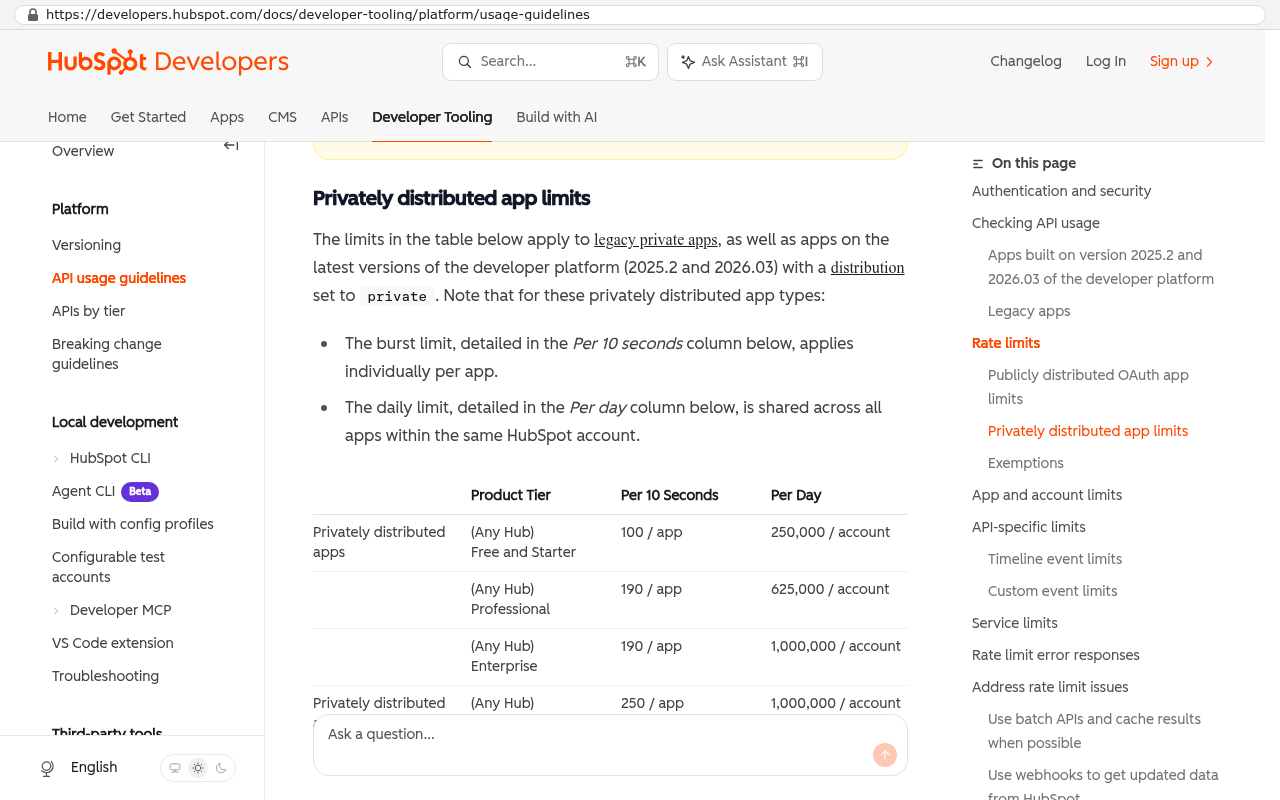
API call limits are the one that catches operations teams. Vendor platforms meter how many times other systems can talk to theirs, and if you build integrations that actually move data, you hit the ceiling. Then the answer is a higher tier. In a system you own, the API is yours and there is no meter.
Annual uplifts are the one that catches CFOs. Multi year contracts frequently include a built in percentage increase each year, which means your year three cost was never the number you signed up for. In an infrastructure bill, the trend has historically run the other way. Compute and storage have gotten cheaper over time, not more expensive.
Want to go deeper? Read our full guide: What questions should you ask before signing a five year software contract
What about support and changes after launch?
Support after launch is an optional plan, and it is a process rather than a product. It is not bundled into the run cost, and it is not something you have to buy.
Here is how it works in practice. After launch, three categories of work show up. Something broke and needs fixing. Something changed in your business and the system needs to follow. Something new needs building that nobody thought of during discovery.
The first category should be rare and should be covered by whatever warranty terms were agreed at the end of the build. A bug in delivered work is a bug in delivered work.
The second and third categories are ordinary. Your commission structure changes. A new division needs a different pipeline. A regulator wants a report in a new format. These get handled through the same process the build used. Someone describes what they need, the change gets scoped, you get a fixed quote, and you decide yes or no with a real number in front of you.
A support plan is a standing arrangement for that work. It usually covers monitoring, dependency updates, security patches and a block of change capacity each month. Some companies want it. Some companies have an internal developer and only want help on bigger pieces. Both are fine. The thing that is not fine is being told you must buy a support plan to keep your own system running, because you do not. The system runs on infrastructure in your name whether anyone supports it or not.
The four honest answers to a feature request
Every request after launch gets one of four responses. Yes, it is small and goes in the next batch. Yes, it is bigger and here is the scope and the quote. No, because the business reason behind it is better solved another way. Or no, because the cost does not justify the benefit and here is why.
That fourth answer is the one that separates a build partner from a vendor. A vendor has no incentive to tell you a feature is not worth building. A fixed scope arrangement does.
Do not accept a support arrangement that is priced as a percentage of the build cost with no defined scope. That structure guarantees you pay the same amount in a quiet month as in a busy one. Ask what is actually included and what triggers a separate quote.
Is there a cost nobody mentions?
Yes. A person inside your company who owns the system. This is the single most underestimated cost of running any business software, custom or purchased, and it is almost never on a quote.
Somebody has to be the one who knows how the CRM works. Who decides what the pipeline stages mean. Who onboards new users and explains why the quote tool asks for a margin before it asks for a price. Who collects the twelve small requests from the sales team and turns them into three coherent changes. Who notices that nobody has used the renewal dashboard in four months and asks why.
For a company under 50 people, this is a few hours a week on top of someone's existing job. An operations manager or a sales ops person usually. For a company over 200 people, it is a meaningful part of a role, sometimes a full one.
If nobody owns the system, it decays. Fields get filled in inconsistently. Workflows get worked around. Within eighteen months, half the team keeps a private spreadsheet and the CRM is a place where data goes to be ignored. That happens with Salesforce too. It is not a custom software problem. It is an ownership problem.
The honest version of the budget sentence is this. Infrastructure costs $100 to $200 a month for a smaller company and $2,000 to $3,000 at enterprise scale, plus a few hours a week of an internal person's time, plus whatever change work you decide to commission. The first number is small. The second is real. The third is a choice.
Name the internal system owner before the build starts, not after launch. Get them into the design reviews. The companies that get the most out of a custom system are the ones where one person understood every decision from the beginning.
What does the run cost not include?
A lot, and this is the section worth reading twice if you are building a budget.
The run cost does not include the build. That is a separate, larger, one time number, and it is the number that determines whether this whole approach makes sense for you. A build gets scoped in a conversation, locked into a fixed scope and quoted as a fixed price. You can read more about how that works in the implementation cost guide.
The run cost does not include data migration. Getting ten years of records out of an existing platform is real work. Exports are often incomplete. Attachments usually need a scripted pull rather than a download. Custom fields and record relationships have to be mapped by hand. Budget this as part of the build, not as a weekend task.
The run cost does not include training. Any system change costs your team productivity for a few weeks while people learn new habits. That cost is invisible on a spreadsheet and very visible in a sales manager's week.
The run cost does not include third party services you choose to keep. If your team uses a dialer, an e-signature tool, a data enrichment service or a scheduling link, those bills continue. A custom CRM replaces the CRM, not your entire tool stack. Some companies fold three or four of those tools into the build. Most keep at least a couple, and that is usually the right call.
The run cost also does not include whatever you spend recovering from a bad build. That is not a line item anyone quotes, but it is real. A system built by a team that disappears, with no documentation and no access to the accounts, costs more to fix than it cost to build. The account ownership structure described earlier is the protection against that, and it is worth more than any discount.
Want to go deeper? Read our full guide: How do you migrate ten years of data out of a SaaS platform
When is a per seat CRM still the cheaper answer?
Often. If your sales process is standard, your headcount is small and your per seat price is low, buying beats building and it is not close.
Zoho's CRM pricing page lists the Enterprise plan at $40 per user per month billed annually, with Professional at $23 and Standard at $14. A twelve person team on Zoho Standard pays about $2,000 a year. No build cost in the world competes with that, and anyone who tells you otherwise is not doing you a favour.
The cases where buying wins look like this. Your process is a normal pipeline with normal stages. You need contact management, deal tracking, email logging and a forecast. You are under about 30 people. You have no unusual pricing logic, no complicated multi party approvals and no operational workflow that lives outside sales. The platform does what you need out of the box and you are not fighting it.
The cases where building wins look different. You are paying six figures a year in licensing. Your process does not match the platform and you have built an elaborate structure of custom objects, automations and workarounds to make it fit. You are paying for seats that only need read access. Your data lives in four systems and the integrations between them keep breaking. Or you are facing a multi year renewal that locks in a number you already think is too high.
There is a third case worth naming. Sometimes the right answer is to stay on your current platform and fix how you use it. Cleaning up a messy Salesforce instance is cheaper than replacing it, and if the problem is process rather than software, new software will not fix it.
Want to go deeper? Read our full guide: When staying on your current platform is the right call
How do you budget for year two and beyond?
Treat the infrastructure bill as a slow growth line and the change work as a discretionary line. Those are two different conversations with your CFO and they should be two different budget items.
For infrastructure, take your launch month bill and assume it grows with data volume. A reasonable planning assumption is 10 to 25 percent a year for a growing company, driven mostly by storage and database size. If you have heavy AI features, model that separately and watch it monthly, because it moves with usage rather than with time.
For change work, pick a number you are comfortable spending each year on improving the system and treat it as a capacity budget rather than a maintenance fee. Some years you spend all of it on a new division's workflow. Some years you spend almost none because the system is doing its job. The point is that you decide, with a quote in front of you, rather than receiving an invoice you did not approve.
The comparison that matters at renewal time is total cost over the horizon you care about, usually five years. Put the licensing path and the ownership path side by side. On the licensing path, write down the per seat cost, the headcount you expect, the annual uplift in your contract and the add ons you will probably buy. On the ownership path, write down the build cost once, the infrastructure bill with growth, the internal owner's time and a realistic change budget.
Run that for five years and the shape becomes obvious. The licensing line goes up every year. The ownership line is a spike followed by a nearly flat tail. Whether the total favours one or the other depends on your numbers, and sometimes it genuinely favours staying put.
One thing to put in the model that people forget
Your exit cost. If you leave a platform in year four, you pay migration costs then. If you build in year one, you pay them now. Either way, the cost exists. Leaving it out of the licensing column makes that column look cheaper than it is.
How do you get a run cost figure for your own system?
Scope the system first, then price the infrastructure, because the infrastructure follows the design. Anyone who gives you a run cost before they know what the system does is guessing.
The scoping conversation covers what the system has to do, how many people use it, how much data it holds, how fast it has to be, what it connects to and what happens if it goes down for an hour. Those answers determine every line on the monthly bill. A system with no redundancy requirement and modest data costs a fraction of one with a standby database and five terabytes of attachments.
Once the design is set, the infrastructure estimate is straightforward arithmetic against published pricing pages. Hosting tier, database tier, expected email volume, expected storage, expected AI calls, monitoring. Every one of those has a public price. Add them up and you have your number, with a buffer for growth.
Across 467 projects delivered, the pattern holds. Smaller companies land in the $100 to $200 a month range. Large organisations with redundancy, compliance requirements and heavy data land in the $2,000 to $3,000 range. The outliers are the ones with unusual data volume or unusually heavy AI usage, and those get identified during scoping rather than discovered in production.
If you want to see what a client owned CRM looks like in practice, the CRM page covers how these systems get built and what replaces what. The broader custom software page covers the same ground for operations systems that are not CRMs.
What is the next step?
Get the two numbers side by side. Pull your current invoice, not the list price. Count your seats, including the ones that only read. Then get an honest estimate of what a system you own would cost to build and to run.
That is a conversation, and it should include the possibility that the answer is no. Plenty of companies should renew. A small team on a cheap plan with a process that fits the platform is already in the right place. A company that needs to fix its process before it fixes its software should fix the process first.
If you want to work through the arithmetic for your own situation, book a free strategy session and bring your current invoice and your seat count. The output is a straight answer about whether a build makes sense, including the case where it does not.
Read this next
What questions should you ask before signing a five year software contract. If a renewal is what put you on this page, that is the one to read before you sign anything.
Related articles
- What happens to your data when you stop paying a SaaS vendor
- How do you migrate ten years of data out of a SaaS platform
- When staying on your current platform is the right call
- How long does it take to replace a project management platform
- What does an AI powered internal app actually do for an operations team
FAQ
Does the monthly cost go up when we hire more people?
No, and that is the main structural difference from per seat software. Infrastructure cost tracks data volume and server load, not headcount. Adding twenty salespeople to a custom CRM adds a small amount of data and a small amount of load. Adding twenty seats to Salesforce Sales Cloud Enterprise at list price adds $3,300 a month.
Who pays the hosting bills, us or the developer?
You do, directly, on an account in your company's name. The developer is invited in as a collaborator. If a firm wants to host your system on their account and bill you for it, that is a rental arrangement, not ownership, and you should treat it as such.
What happens if we stop working with the people who built it?
Nothing happens to the system. It keeps running on infrastructure you own and pay for. You remove their access, invite someone else in, and hand them the repository. There is no migration and no negotiation because every account was already yours.
Is $100 to $200 a month really the whole bill for a smaller company?
For infrastructure, yes. Hosting, database, email, domain, storage, monitoring and modest AI usage land in that range for a company under about 50 users with ordinary data volume. What it does not include is the build cost, the internal person who owns the system and any change work you commission later.
How much does AI usage actually add?
It depends entirely on what the AI does and how often. A system that summarises notes on demand might add $10 to $40 a month. A system that processes every inbound email automatically can add several hundred. Put a spending cap on the API key and watch it weekly for the first two months.
Do we have to buy a support plan?
No. The system runs whether anyone supports it or not, because it runs on your infrastructure. A support plan is an optional standing arrangement for monitoring, updates and change capacity. Some companies want it and some have an internal developer and only call for bigger pieces.
How does this compare with HubSpot at our size?
HubSpot's pricing page lists Sales Hub Professional at $100 per seat per month billed annually. Multiply that by your seat count and compare it to your estimated infrastructure bill plus an amortised build cost. At 25 seats the licensing is about $30,000 a year. At 100 seats it is about $120,000 a year.
Is staying on Zoho the right call for a small team?
Probably, if the platform fits your process. Zoho's pricing page lists Standard at $14 per user per month billed annually, which is about $2,000 a year for a twelve person team. That is hard to beat on cost, and if the tool does what you need, replacing it is not a good use of money.
Questions
Frequently asked questions
Does the monthly cost of a custom CRM go up when we hire more people?
No. The monthly bill is based on infrastructure usage, not headcount. You pay hosting providers for servers, databases, and services based on data storage and processing load, not the number of users. A hundred salespeople accessing the system costs the same as twenty-five if they use it the same way. Costs only increase when you store significantly more data, send more email, or use more AI features.
What does a custom CRM actually cost to run each month?
Roughly $100 to $200 a month for a smaller company under about fifty people, and $2,000 to $3,000 a month for enterprise scale with redundancy and heavy data volume. There is no license fee or per user charge underneath that number. You pay these bills directly to infrastructure providers in your company's name, and the amount does not change when headcount grows.
Who pays the hosting bills for a custom CRM?
Your company pays the bills directly to the infrastructure providers, in your own company's name. Each component sits on a separate account with a separate provider: hosting, database, email sending, domain, file storage, AI usage, and monitoring. The development team is invited into these accounts and can be removed. You maintain complete ownership and control.
What exactly am I paying for each month with a custom CRM?
Seven separate infrastructure costs: hosting the application servers, the managed database for your data, transactional email sending, the domain name, object storage for file attachments, AI usage for features like summarization or lead scoring, and monitoring with backups. Each is a standalone service from a different provider with published pricing you can research before spending anything.
How much does AI usage actually add to monthly costs?
The article identifies AI usage as a variable cost you pay per request to model providers. However, the specific pricing impact depends entirely on how much you use AI features like call note summarization, follow up email drafting, lead scoring, or data queries. This is one of the most variable line items, so you should price it properly before launch.
Is a custom CRM cheaper than HubSpot at enterprise scale?
At one hundred users, HubSpot's Sales Hub Professional costs $120,000 a year at $100 per seat per month. A custom CRM at enterprise scale runs $2,000 to $3,000 monthly, or $24,000 to $36,000 annually. The infrastructure cost is significantly lower, but you must also budget for a person inside your company who owns and manages the system long term.
When should we stay with Zoho instead of building a custom CRM?
At small headcount on a standard sales process, Zoho is genuinely hard to beat. A custom CRM build is not always the cheaper answer, especially for smaller teams with straightforward workflows. You should compare the total cost of ownership, including the internal person who will manage your system, against what packaged solutions cost before committing to a custom build.
Read this next
What to do when your team has outgrown spreadsheets but not enough for an ERP
Your team has outgrown the shared workbook, but an ERP is overkill. Here's how to tell the difference, what the real middle options are, and when owning a custom system actually costs less.
If this is your situation
Talk it through on a call
Thirty minutes over video with the person who would run the build. You talk, we ask questions, and you leave with a plain read on whether custom software makes sense for you. If the answer is that your current tool is fine and badly configured, you will hear that.
Who wrote this

David Verneuille
Founder, Black Badger Software Solutions
David Verneuille founded Black Badger after 18 years as a project manager and years implementing Smartsheet, monday.com, Wrike and Zoho for clients. He now builds custom systems that clients own outright, which is why the writing here is specific about where each platform fits and where it stops fitting.
Drafted with AI assistance, then checked, edited, and approved by a person before publishing. The facts, opinions, and recommendations are ours.