Skip to content
BlackBadger

Blog / Custom software

What questions should you ask before signing a five-year software contract?

/ 10 min read

HubSpot Developers API usage guidelines page displaying a table with product tier, per 10 seconds, and per day columns listing rate limits for Privately distributed apps and apps with API limit increase across Free, Starter, Professional, and Enterprise tiers

TL;DR

A five-year software contract is a significant commitment that often locks companies into expensive renewals, making it essential to ask hard questions about total costs, data portability, and exit terms before signing.

Key takeaways

  • Read the order form instead of the sales deck and verify four critical elements: term length, auto-renewal clauses, cancellation notice windows, and seat minimums that you must pay for regardless of usage.
  • Calculate the true five-year cost including annual price escalators typically between 3 and 7 percent, implementation fees, premium support, and add-ons rather than comparing only the discounted first-year price.
  • Request specific details about data export capabilities in writing, including whether attachments remain linked to parent records, whether API access is included, and whether the vendor charges fees for data extraction at exit.
  • Set cancellation notice reminders in multiple places like shared calendars and finance tracking systems with a 30-day buffer because missing renewal windows in 90-day notice periods can lock you into another full year.
  • Test your ability to export and migrate data with a real sample during the trial period to verify that whoever rebuilds your reporting can understand what connects to what before you lose negotiating power.

A five-year software contract is a bet. You're betting that the business you run in 2030 wants the same software you want right now. Sometimes that bet pays off. Often it doesn't, and the penalty shows up as a renewal quote you can't argue with, because your data, your workflows, and your team's habits all live inside someone else's product.

We've helped companies untangle these deals after the fact. It's always cheaper to ask the hard questions before you sign. Here are the ones that matter.

What am I actually committing to, in writing?

Read the order form, not the sales deck. The order form is the one-page document with the numbers on it, and it controls everything. The pretty proposal doesn't.

You're looking for four things. The term length. The auto-renewal clause. The notice window for cancelling. And the seat minimum, which is the number of user licenses you must pay for whether you use them or not.

That last one bites people. A company signs for 80 seats during a growth year. Two years later they're running lean with 55 people. The contract doesn't care. They pay for 80 anyway, because most enterprise agreements let you add seats mid-term but never remove them.

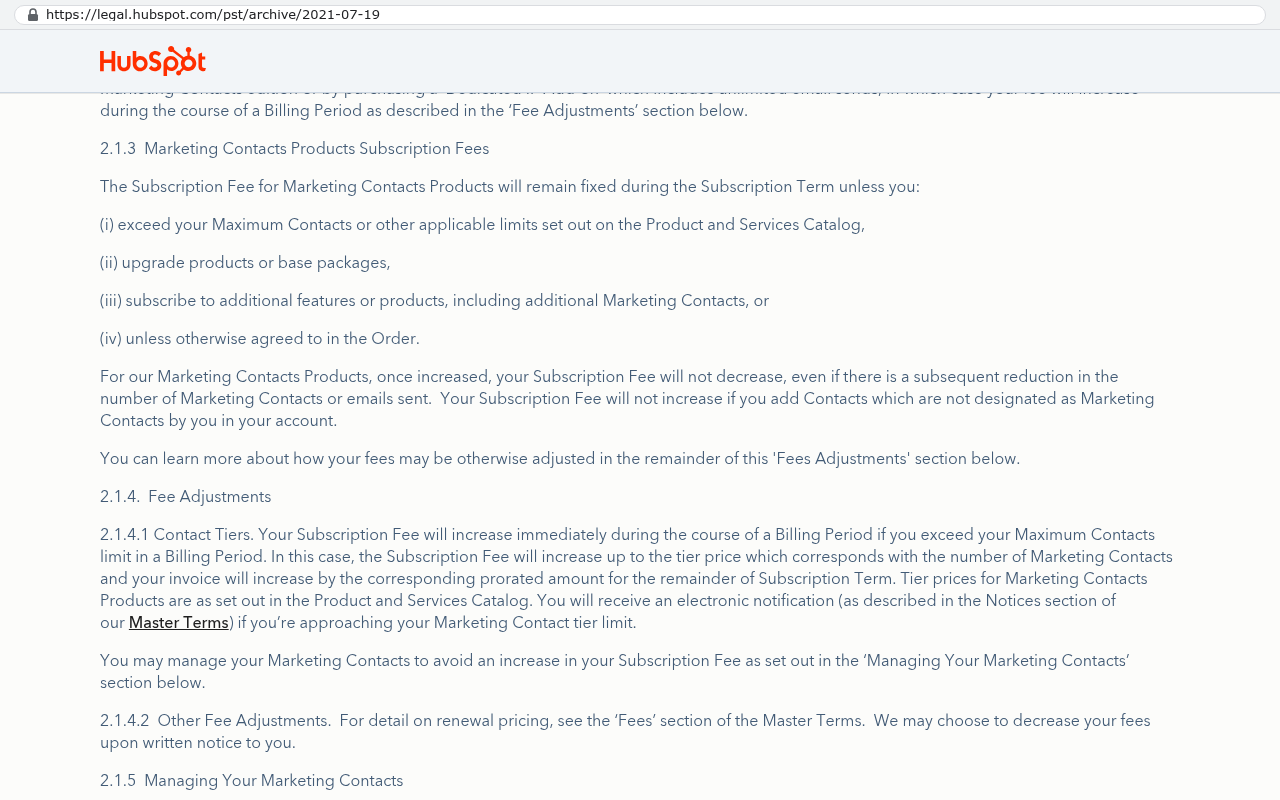
HubSpot legal terms page displaying section 2.1.3 on Marketing Contacts Products Subscription Fees, explaining that subscription quantities can be increased during a billing period but reductions do not occur mid-term
HubSpot's legal archive page shows the Marketing Contacts Products section explaining that subscription fees remain fixed unless maximum contacts are exceeded or products are upgraded, and that once increased the subscription fee will not decrease even if contacts are subsequently reduced. Source: legal.hubspot.com/pst/archive/2021-07-19

Ask these directly and get the answers in the contract, not in an email:

  • Can I reduce seat count at renewal, and by how much without penalty?
  • What's the exact notice period to cancel, and what date does the clock start?
  • Does the contract auto-renew, and for how long if I miss the window?
  • If I stop paying mid-term, do I owe the full remaining balance?

The notice window is where most companies get trapped. A 90-day notice requirement on a contract that auto-renews for another 12 months means one missed calendar reminder costs you a full year.

Put the cancellation notice date in three places the day you sign. A shared company calendar, your own calendar, and the renewal tracker your finance team keeps. Set it for 30 days before the actual deadline. We've watched a client pay for an extra year of a platform they'd already replaced because the reminder lived in one person's Outlook and that person left.

What does year five cost, not year one?

Vendors discount the first year hard. That's not generosity, it's amortization. They know the real money is in years three through five, when switching feels impossible.

Suppose you're quoted a platform at $85 per user per month for 60 users. That's $5,100 a month, or $61,200 a year. Sounds manageable. Now add the things that aren't on the first page.

The annual price escalator, usually 3 to 7 percent. A one-time implementation fee paid to a consulting partner, which is often 50 to 150 percent of your first-year license cost. Premium support, because standard support means a ticket queue. The integration connector that costs extra per month. Storage overage once your attachments pile up.

Run the five-year total. With a 5 percent annual escalator, that $61,200 becomes roughly $338,000 over five years in license fees alone. Add a $70,000 implementation and a few hundred dollars a month in connectors and add-ons, and you're past $425,000 before anyone has customized a single report.

None of that is fraud. It's normal SaaS pricing. But the number you should be comparing against alternatives is $425,000, not $61,200.

Ask the vendor to write out the five-year total cost including escalators, and ask what percentage increase they've applied at renewal to existing customers over the last three years. If they dodge the second question, that's your answer.

How do I get my data out?

This question separates vendors who expect to earn your business from vendors who expect to keep it by default. Don't ask if you can export your data. Everyone says yes. Ask how.

There's a big difference between a full structured export and a CSV dump. A CSV file gives you rows of text. It doesn't give you the relationships between records, the file attachments, the comment threads, the audit history, or the automation logic. We've done migrations where the customer records came out clean and the 40,000 attached PDFs required a scripted pull against the vendor's API, one file at a time, over several days, throttled by rate limits.

Specific things to nail down before you sign:

  • Can I export every object type, including custom fields I create later?
  • Do attachments and documents come out with their links to parent records intact?
  • Is API access included in my tier, and what are the request limits?
  • After I terminate, how long do I keep read access or export ability?
  • Does the vendor charge a fee for a full data extract?
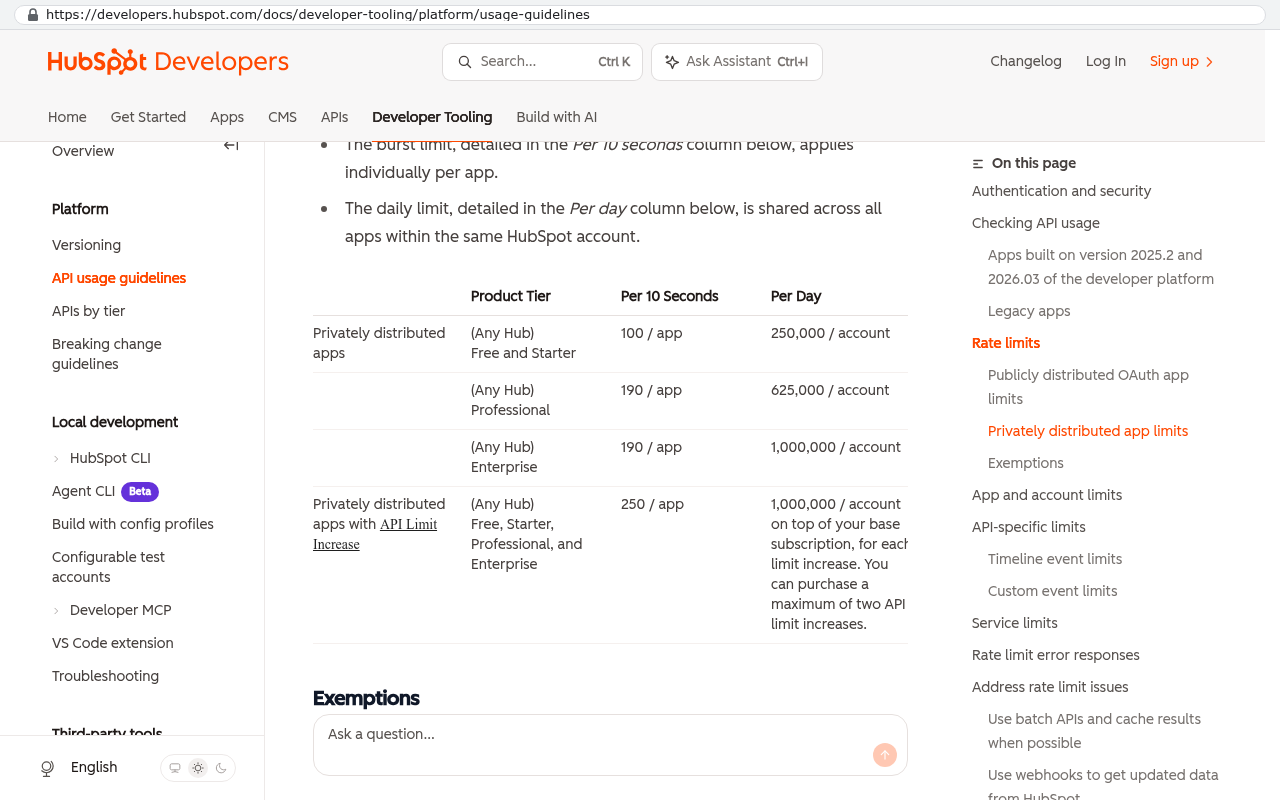
HubSpot Developers API usage guidelines page displaying a table with product tier, per 10 seconds, and per day columns listing rate limits for Privately distributed apps and apps with API limit increase across Free, Starter, Professional, and Enterprise tiers
HubSpot Developers API usage guidelines page showing a table with product tiers, per 10 seconds rate limits, and per day call limits for different subscription levels including Free and Starter, Professional, and Enterprise Source: developers.hubspot.com/docs/developer-tooling/platform/usage-guidelines

That last one exists more often than you'd think. Some vendors quote a data extraction service fee at exit. Get it in writing that there isn't one.

Ask for a sample export during the trial, before you sign anything. Take one week of real data, export it, and hand the files to whoever would rebuild your reporting. If they can't tell what connects to what, you've learned something important while you still have bargaining power.

Who owns the work built on top of the platform?

You'll spend real money configuring this thing. Custom fields, workflow rules, dashboards, integration scripts, report templates. That work has value. The question is whether you can take it with you or even see it.

Configuration inside a proprietary platform generally can't move. That's just reality. A workflow rule written in a vendor's automation builder means nothing outside that vendor. Accept it and price it as a sunk cost.

What you can protect is the code written around the platform. If a consultant builds an integration between the new system and your accounting software, ask who owns that code. Ask for repository access, which means access to the actual source files, not just a working connection. Plenty of firms build integrations, keep the code on their own systems, and charge you again when something breaks.

Same goes for the documentation. Field mappings, data dictionaries, the logic behind how quotes turn into jobs. Ask for it as a deliverable in writing. Get it before final payment, because you will never get it after.

What happens when the vendor changes?

Five years is long enough for the company you signed with to become a different company. Private equity buys it. A competitor acquires it. The product you loved gets folded into a suite you didn't want.

We've seen a mid-sized services firm sign a three-year deal, get acquired-vendor pricing at renewal that nearly doubled, and discover their older edition was being sunset in favor of a rebuilt version with a different data model. Migrating within the same vendor cost them almost as much as leaving would have.

Ask what happens if the product line is discontinued. Ask whether you're guaranteed the current edition for the full term or whether the vendor can force a version migration. Ask about the service level agreement, the written promise about uptime, and what you actually receive if they miss it. Usually it's a small service credit, which is worth mentioning because most owners assume there's meaningful compensation for downtime. There isn't.

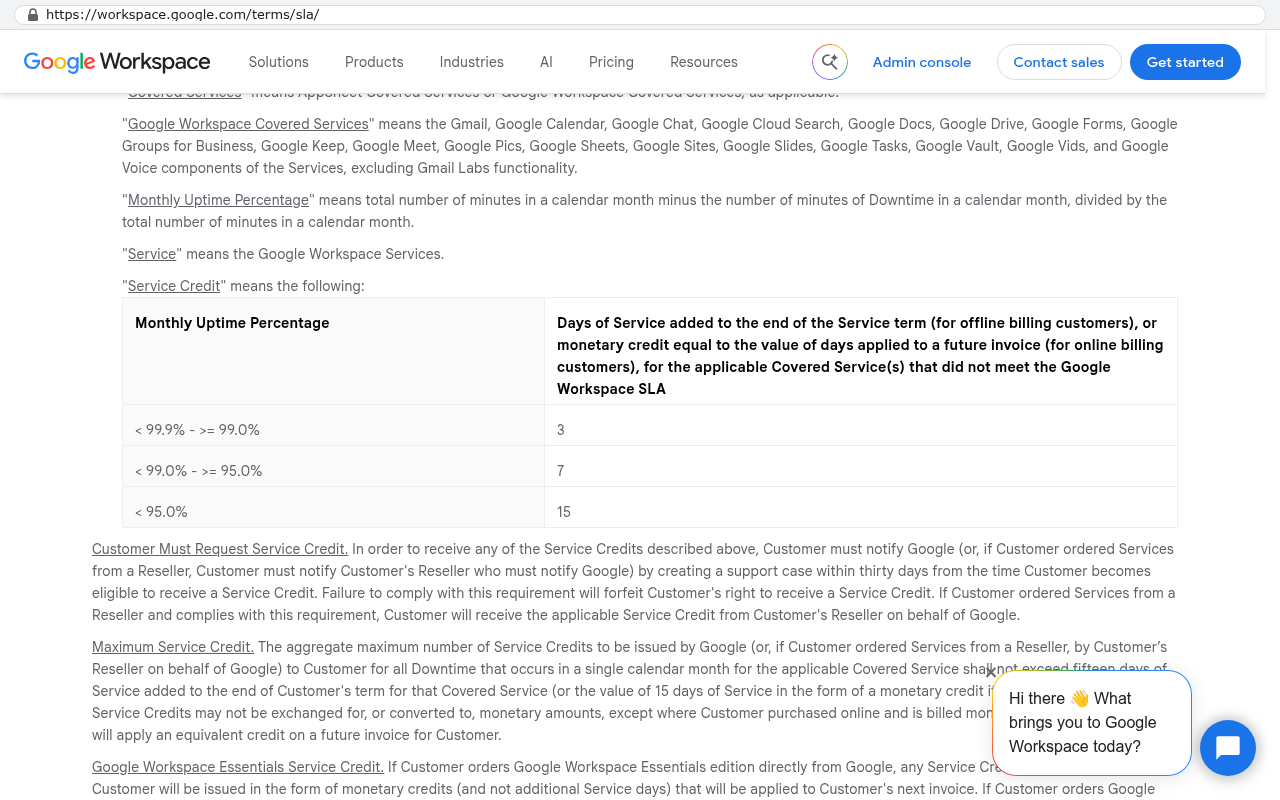
Google Workspace SLA terms page showing uptime percentage tiers and corresponding service credit days granted for downtime compensation
Google Workspace SLA page displays the 99.9% uptime commitment and a table showing service credits of 3 to 15 days for monthly uptime failures. Source: workspace.google.com/terms/sla

When the five-year deal is fine, and when ownership wins

Long contracts aren't automatically bad. If a platform does exactly what you need and the discount for committing is real, sign it. Accounting systems, payroll, email, document storage, e-signature tools. These are solved problems. Nobody should build their own general ledger, and we'd tell you not to hire us for that.

The math changes when the platform doesn't fit and you're paying to work around it. That's the pattern we see most in Pinellas and Hillsborough counties. A company runs field service, or specialty manufacturing, or multi-stage construction. They bought a general platform, then bought three add-ons, then hired a coordinator whose whole job is moving data between systems and cleaning up what the software can't handle.

Running the arithmetic honestly

Take that $425,000 five-year figure from earlier. Add the salary of the person doing manual workaround labor. Say that's a coordinator at $58,000 a year, half of whose time goes to reconciliation. That's another $145,000 over five years. Now you're at $570,000 in five-year spend for a system that doesn't match how you work.

Against that, a custom system you own has a build cost and then ongoing hosting and maintenance. Hosting for a business application with a few dozen users is genuinely inexpensive, often a few hundred dollars a month. Maintenance is real and continuing, and I'd rather be blunt about that than pretend otherwise. But the license fee goes to zero, and it stays at zero in year six, seven, and eight, where the SaaS renewal keeps climbing.

Do this arithmetic with actual numbers from your own invoices before you renew. Not vendor estimates. Your invoices, including add-ons and the consulting hours you paid last year.

The break-even question isn't "is custom cheaper than SaaS." It's "how many years of renewal fees equal the build." If the answer is two or three years and you plan to be in business for ten, ownership wins. If the answer is eight years, renew and stop thinking about it.

The honest limits of walking away

Custom software isn't a free escape from vendor problems. It trades one set of risks for another, and you should know both.

You become responsible for the system. No vendor support line to call at 2am. That means you need either an internal person who understands it or a maintenance relationship with whoever built it. Either way, it's a line item.

You don't get free feature updates. When a SaaS vendor ships a new capability, every customer gets it. With a custom system, new capability means new work. Sometimes that's fine, because most vendor updates are features you'll never touch. Sometimes it means you're behind on something genuinely useful.

Some categories are bad candidates for building. Anything with heavy regulatory maintenance, like payroll tax tables or tax filing rules, where a vendor absorbs the cost of tracking changes across jurisdictions. Anything where the value comes from a network you don't own, like a marketplace or a shared industry portal. And anything where your clients already work inside the vendor's tool and expect to keep doing that. If half your customer relationships run through live shared access to a platform, moving off it has a real cost that has nothing to do with software.

Migration itself is work. Twelve years of records, attachments, and half-documented custom fields don't move with a copy and paste. They move with a scripted export, a mapping exercise, and a period where you run both systems in parallel. Anyone who tells you otherwise hasn't done it.

The worst outcome is building a custom system and then treating it like shelfware. If nobody inside the company owns it, nobody keeps it current, and in four years you're shopping for SaaS again. Ownership only pays off if someone on your side actually owns it.

Before you sign, do these four things

Pull your last twelve months of invoices for the current system. All of them, including consulting hours and add-ons. That's your real baseline.

Ask the vendor for the written five-year total with escalators included, and for their average renewal increase over the past three years.

Request a test export during the evaluation period and have someone technical look at it.

Write down the three workflows your team complains about most. If the new platform can't handle them without a workaround, a five-year term means five years of that workaround.

If the arithmetic points toward owning your system instead of renting it, we're glad to walk through the numbers with you honestly, including the cases where renewing is the smarter move. Book a free strategy session at our contact page and bring your invoices.

Questions

Frequently asked questions

What should I check in the order form before signing a five-year software contract?

Read the order form, not the sales deck, as it controls everything. Look for four key things: the term length, auto-renewal clause, notice window for cancelling, and seat minimum. The seat minimum is the number of user licenses you must pay for regardless of whether you use them. Get direct answers about reducing seat count at renewal, exact notice periods, auto-renewal terms, and whether you owe the full remaining balance if you stop paying mid-term.

How much will a five-year software contract actually cost?

Vendors typically discount year one heavily. Calculate the true cost by adding the annual price escalator (usually 3 to 7 percent), one-time implementation fees (50 to 150 percent of first-year cost), premium support, integration connectors, and storage overages. With a 5 percent escalator, a $61,200 annual cost becomes roughly $338,000 over five years in licenses alone. Always compare alternatives against the full five-year total, not just the first-year price.

What's the difference between exporting data as CSV versus a full structured export?

A CSV file provides only rows of text without relationships between records, file attachments, comment threads, audit history, or automation logic. A full structured export maintains these connections. Before signing, confirm you can export every object type including custom fields, that attachments keep their links to parent records, that API access is included with request limits defined, and that there's no data extraction fee after termination.

Who owns custom code and integrations built on the vendor's platform?

Configuration inside a proprietary platform generally cannot move and should be priced as a sunk cost. However, you can protect code written around the platform. If a consultant builds integrations between systems, ask who owns that code and request repository access to actual source files. Also obtain documentation including field mappings, data dictionaries, and the logic behind your workflows.

When is a missed cancellation notice deadline most likely to trap you?

The notice window causes most problems. A 90-day notice requirement on a contract that auto-renews for another 12 months means missing one calendar reminder costs you a full year of payments. Put the cancellation notice date in three places when you sign: a shared company calendar, your personal calendar, and your finance team's renewal tracker. Set a reminder for 30 days before the actual deadline.

What percentage increase should I expect when renewing my software contract?

Ask the vendor what percentage increase they've applied at renewal to existing customers over the last three years. If they avoid answering this question, that itself is your answer. Understanding historical renewal increases helps you budget accurately and negotiate better terms before signing a five-year commitment.

Read this next

What happens to your data when you stop paying a SaaS vendor

Cancel a SaaS subscription and your data doesn't vanish, it gets locked behind a login. Here's what an export really gives you, what never comes out, and when owning the system is cheaper.

If this is your situation

Talk it through on a call

Thirty minutes over video with the person who would run the build. You talk, we ask questions, and you leave with a plain read on whether custom software makes sense for you. If the answer is that your current tool is fine and badly configured, you will hear that.

Book a strategy call

Who wrote this

David Verneuille

David Verneuille

Founder, Black Badger Software Solutions

David Verneuille founded Black Badger after 18 years as a project manager and years implementing Smartsheet, monday.com, Wrike and Zoho for clients. He now builds custom systems that clients own outright, which is why the writing here is specific about where each platform fits and where it stops fitting.

About Black Badger

Drafted with AI assistance, then checked, edited, and approved by a person before publishing. The facts, opinions, and recommendations are ours.

Related

More on custom software

Want this looked at properly?

An article can only go so far without knowing your systems. Book a strategy call, walk us through what is breaking, and you will get a straight read on whether custom software is the right answer.