Skip to content
BlackBadger

Blog / Custom software

Is a client portal worth building, or should you buy one?

/ 8 min read

Clinked pricing page showing Start Up Standard Premium Enterprise and VDR plans with monthly costs included member counts and storage allocations

TL;DR

Client portals fail when nobody uses them, so the decision to build or buy depends entirely on whether your clients will actually log in to do something faster than emailing you.

Key takeaways

  • Fix your underlying data problems before building or buying a portal, because showing clients stale or inconsistent data defeats the entire purpose.
  • Buy an off-the-shelf portal when your needs are ordinary, your data lives in one system, you have fewer than a few hundred users, and you lack internal software project ownership.
  • Build a custom portal when it becomes the product experience itself, when your workflow is genuinely unique compared to competitors, or when you need to pull data from multiple systems simultaneously.
  • Calculate the true cost of per-seat pricing over five years by multiplying your vendor's per-user price by your client count and accounting for annual subscription increases before comparing it to a custom build.
  • Custom portals win on user economics when you have large client counts because per-seat pricing from vendors becomes prohibitively expensive at scale.
  • Vendors handle authentication, permission levels, and security infrastructure thousands of times over, making built solutions stronger in these trivial but critical areas than rebuilding them yourself.

Most client portals fail for a boring reason. Nobody logs in. You pay for the software, you configure it, you send the invitation emails, and three months later your clients are still emailing you PDFs. So before you compare vendors or ask what a custom build costs, answer a harder question. What will your clients actually do inside this thing, and will it be faster for them than sending you an email?

That question decides everything else. Get it right and either path works. Get it wrong and you've bought an expensive login screen.

What a client portal really is

Strip away the marketing and a portal is a window. Your clients see a slice of the data you already have, and they can do a small number of things with it. Check a project status. Download an invoice. Upload a signed document. Approve a proof. Submit a request.

That's it. Everything else is decoration.

The reason this matters is that the window is the easy part. The data behind it is the hard part. If your project status lives in three places, and two of them are spreadsheets that Karen updates on Fridays, no portal will fix that. You'll just be showing your clients stale data faster.

We've walked into this exact situation more than once. A company wants a portal. What they need first is one reliable source for the numbers they plan to show. Sometimes that work is the whole project, and the portal is a small layer on top when it's done.

If your team can't answer "what's the status of this job?" in under thirty seconds without opening four tabs, you have a data problem, not a portal problem. Fix the data first or your clients will see the mess you see.

When buying is the right call

Buy when your needs are ordinary. That's not an insult. Most portal needs genuinely are ordinary, and paying a vendor to solve an ordinary problem is smart.

Off-the-shelf portals are strong in a few specific cases. Accounting firms sharing tax documents. Agencies sharing project boards. Anyone who needs a secure file exchange with an audit trail. Tools like Clinked, SuiteDash, Copilot, HubSpot's customer portal, and the client portals baked into Karbon or Accelo cover these patterns well. They handle the tedious parts you'd otherwise rebuild badly. Password resets. Two-factor login. Permission levels. Email notifications. Mobile layouts. File versioning.

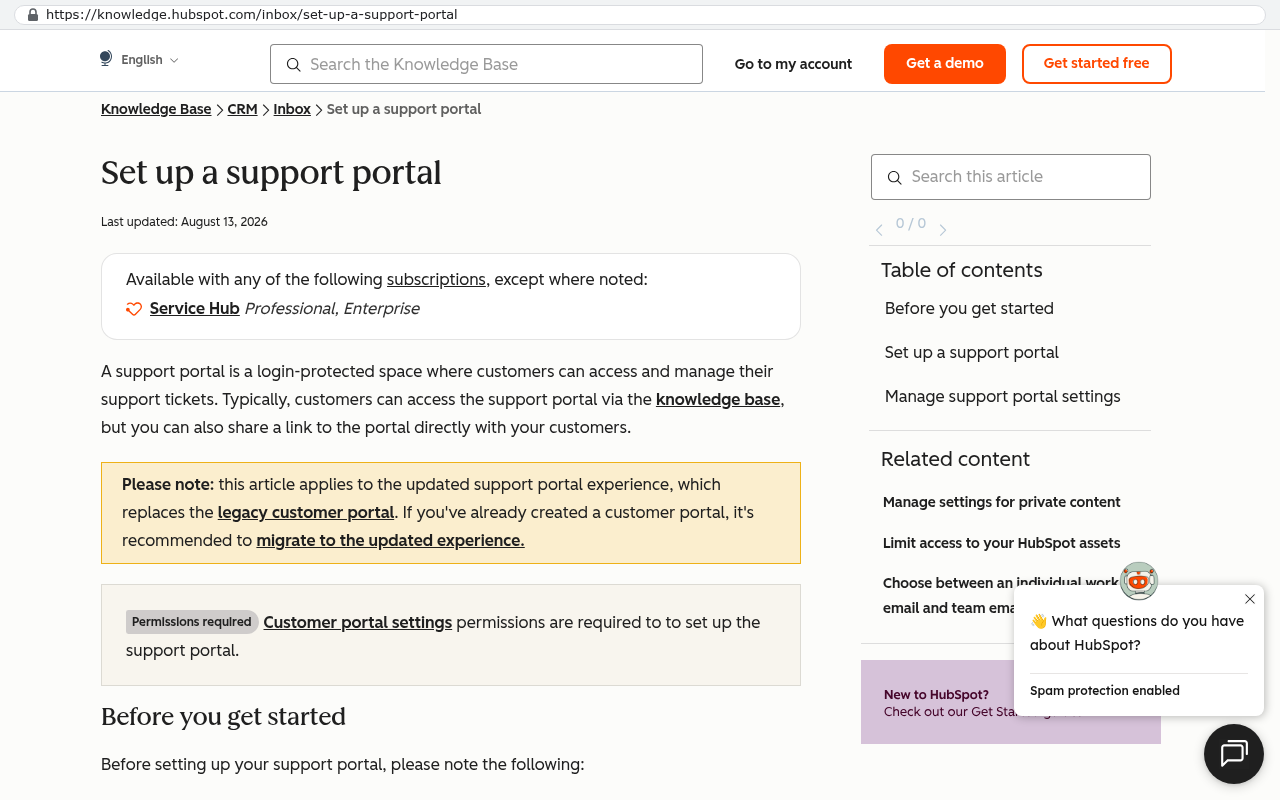
HubSpot Knowledge Base article titled Set up a support portal displaying information about the login-protected customer support portal features including permissions and ticket management capabilities
HubSpot's Knowledge Base article on setting up a support portal shows that the portal is a login-protected space where customers can access and manage support tickets with built-in permissions and settings. Source: knowledge.hubspot.com/inbox/set-up-a-support-portal

Those pieces sound trivial. They're not. Getting authentication right, meaning the system that verifies who someone is before letting them see anything, takes real care. A vendor has already done it thousands of times.

Buy also when speed matters more than fit. If you need something live this quarter to win a specific contract, a subscription portal gets you there. You can always replace it later.

The signs you should just buy

  • Your clients need to see and share documents, and not much else.
  • Your data already lives in one system that has a portal add-on.
  • You have fewer than a few hundred client users.
  • Nothing about your workflow is unusual compared to competitors.
  • You don't have anyone internally who can own a software project.
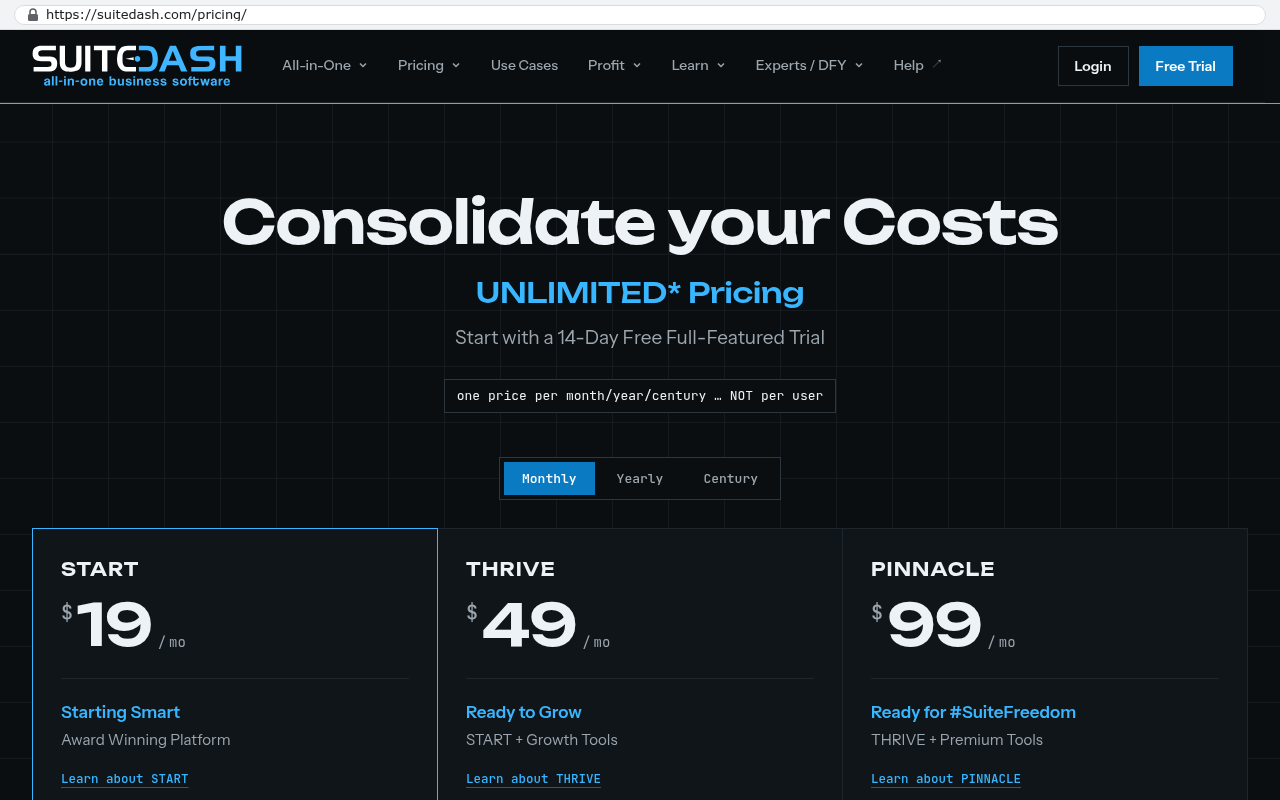
SuiteDash pricing page displaying monthly plan options START THRIVE and PINNACLE with monthly costs of 19 49 and 99 dollars respectively and descriptions of included features for each tier.
SuiteDash pricing page showing three monthly subscription tiers named START at 19 dollars per month THRIVE at 49 dollars per month and PINNACLE at 99 dollars per month with features listed for each plan. Source: suitedash.com/pricing

That last one is real. A custom build needs a person on your side who makes decisions and answers questions. Without that person, custom projects drift.

When building wins

Build when the portal is the product experience, not a side dish. If your clients judge you partly by how it feels to work with you, and the portal is where that judgment happens, generic software will hold you back.

Here's the pattern we see most. A company has a workflow that's genuinely theirs. A specialty insurance broker with a quoting flow no carrier portal supports. A manufacturer whose customers need to see production stages tied to real machine data. A logistics firm whose clients want a live map and a document packet in the same view. In each case, the off-the-shelf tool gets you to about seventy percent, and the last thirty percent is the part clients care about.

Build also when the portal has to read from several systems at once. Your ERP holds inventory. Your accounting system holds invoices. Your CRM holds contacts. A vendor portal usually lives inside one of those and shows you that one. A custom portal sits above all of them and pulls what it needs. That's often the whole reason to build.

And build when your user count is large. This is where the arithmetic turns.

The arithmetic, honestly

Per-seat pricing is the thing that decides most of these calls. Portal vendors typically charge per external user, or they cap external users on a plan and charge to raise the cap. That's fine at fifty clients. At two thousand it's a different business.

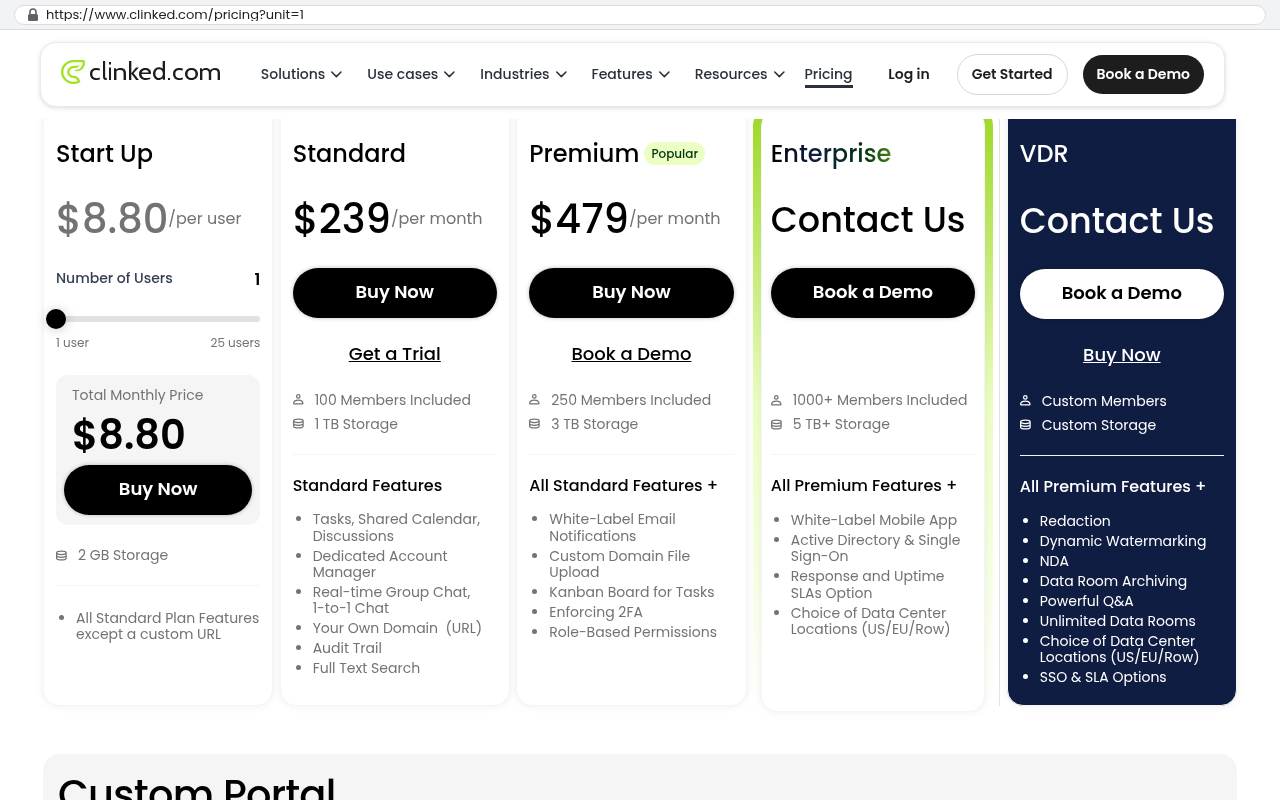
Clinked pricing page showing Start Up Standard Premium Enterprise and VDR plans with monthly costs included member counts and storage allocations
Clinked's pricing page displays five subscription tiers with per-user costs and included member counts ranging from 1 user at 8.80 dollars per month to 1000 plus members in the Enterprise plan. Source: www.clinked.com/pricing

Run the math yourself with real numbers. Take your vendor's per-user price. Multiply by your client count. Multiply by twelve. Then multiply by five years, and add a realistic annual price increase, because software subscriptions go up. Now you have a number to compare against a one-time build plus hosting and maintenance.

Hosting a portal for a few thousand users is not expensive. The recurring cost of a custom system is mostly the maintenance you choose to buy, plus server costs that are usually modest. The build is the big number, and it happens once.

The crossover point depends on your numbers. But the shape is predictable. Small user counts favor buying. Large user counts favor building. Weird workflows favor building at any size. Standard workflows favor buying at almost any size.

Before you compare costs, ask your vendor what happens if your client count doubles. Get the answer in writing. Some plans jump tiers in a way that changes the whole calculation, and you don't want to find that out during a growth year.

One more piece of arithmetic people forget. Configuration is not free. A serious off-the-shelf portal rollout takes real internal hours, and often paid implementation help. That cost is real even though it doesn't show up on the subscription invoice.

What a custom portal can't do for you

A custom build won't rescue a bad process. If your clients are confused about your service today, a portal makes the confusion visible and permanent. Sort out the process on paper first.

It also won't be cheaper in year one. It won't be. You're paying to create something instead of renting something that already exists. The payoff comes later, and only if the thing you built keeps earning its keep.

Custom software needs an owner. Somebody has to decide what happens when a client requests a feature, when a browser update breaks a layout, or when a security patch is due. If nobody at your company will own that, a subscription is the safer bet, because the vendor owns it by default.

Some things are genuinely hard to replicate. Mature portal products have years of small refinements you'd never think to spec. Bulk file uploads that resume after a dropped connection. Accessibility for screen readers. Translations. Notification preferences that stop clients from unsubscribing entirely. You can build all of it. You'll pay for all of it.

And there's the migration problem nobody mentions in the sales meeting. If your clients already use a shared portal and have years of files and comment history in it, moving that out is a scripted export, not a drag and drop. Comment threads and permission histories often don't come along at all. Budget for that honestly or don't move.

A useful middle path exists. Build the custom logic and data layer that's truly yours, and use a proven service for authentication and file storage. You own the part that differentiates you and rent the part that's a solved problem.

How to decide in two weeks

Skip the vendor demos for now. Do this instead.

  1. Call five clients and ask what they'd want to do without emailing you. Write down their exact words.
  2. Count how many of those requests your current systems can already answer with accurate data.
  3. List every system a portal would need to read from. If it's one, lean toward buying.
  4. Get real per-user pricing from two vendors, at your current client count and at double it.
  5. Name the person inside your company who will own this. If you can't, buy.

Then run a pilot. Pick ten clients who already complain the most and give them access to something small. It could be a bought tool on a trial, or a single-screen custom prototype. Watch whether they use it after week two. Adoption in week two tells you more than any feature comparison chart.

Most portals that die had great week one numbers.

What ownership actually buys you

The real argument for building isn't cost. It's control. When you own the system, nobody deprecates a feature you depend on. Nobody raises your price forty percent at renewal. Nobody decides your industry isn't a priority segment anymore and stops shipping updates.

We've seen companies rebuild a portal twice in five years because two vendors changed direction under them. The third build was custom, and it's still running. That's the pattern that pushes people toward ownership, and it's a legitimate reason.

But ownership only pays off if the thing you own is worth owning. A custom portal that mirrors what a $40 per month tool does is a waste of money and effort. Build what's yours. Rent what's everyone's.

Where to go from here

Start with the client conversations. Five calls, real questions, written notes. That research costs you nothing and it kills bad portal projects before they start. If those calls point at something ordinary, buy a tool and move on with your life. If they point at something specific to how you work, and the numbers back it up, a build is worth serious thought.

Black Badger Software Solutions builds systems that clients own outright, from our office in Clearwater, Florida. If you want a straight answer on whether your portal should be bought or built, book a free strategy session at /contact and bring your client notes.

Questions

Frequently asked questions

What is a client portal and what can it actually do?

A client portal is a window into your data that lets clients view a limited slice of information and perform specific tasks like checking project status, downloading invoices, uploading documents, approving proofs, or submitting requests. Everything beyond these core functions is decoration. The critical factor is whether these actions are actually faster for clients than emailing you directly.

When should I buy an off-the-shelf client portal instead of building one?

Buy when your needs are ordinary and match common use cases like document sharing, project board access, or secure file exchange. Buy also when speed matters more than customization, when you have fewer than a few hundred client users, when your workflow isn't unusual compared to competitors, and when you lack internal ownership capacity for a custom software project.

What's the main cost difference between buying and building a portal?

Vendor portals charge per external user or cap users per plan, favoring small user counts. Custom builds have one large upfront cost but modest recurring maintenance and hosting fees. At two thousand clients, per-seat pricing becomes expensive. For large user counts, building typically becomes more economical over a five-year period, especially with typical annual software subscription increases.

When does building a custom portal make sense?

Build when the portal is a core product experience affecting client judgment, when you need to integrate multiple backend systems simultaneously, when user count is very large, or when your workflow is genuinely unique compared to competitors. If an off-the-shelf tool only solves seventy percent of your needs and clients care about the remaining thirty percent, custom building wins.

What problem must I solve before implementing any portal?

You must first ensure you have a single reliable data source. If your project status lives across multiple places including spreadsheets updated inconsistently, no portal fixes that problem. You'll just show clients stale data faster. Fix data integrity first or your portal will expose internal disorganization rather than solving it.

What are the risks of buying an off-the-shelf portal?

Configuration isn't free and requires significant internal hours plus often paid implementation help. Vendor pricing can jump unexpectedly when your client count grows, potentially changing the economic calculation. Additionally, most portals fail simply because clients don't use them, so you must first validate that your intended portal functions will actually be faster than email for your clients.

Read this next

When staying on your current platform is the right call

Custom software isn't always the answer. Here's the arithmetic, the warning signs, and the honest caveats that tell you whether to renew your platform or replace it.

If this is your situation

Talk it through on a call

Thirty minutes over video with the person who would run the build. You talk, we ask questions, and you leave with a plain read on whether custom software makes sense for you. If the answer is that your current tool is fine and badly configured, you will hear that.

Book a strategy call

Who wrote this

David Verneuille

David Verneuille

Founder, Black Badger Software Solutions

David Verneuille founded Black Badger after 18 years as a project manager and years implementing Smartsheet, monday.com, Wrike and Zoho for clients. He now builds custom systems that clients own outright, which is why the writing here is specific about where each platform fits and where it stops fitting.

About Black Badger

Drafted with AI assistance, then checked, edited, and approved by a person before publishing. The facts, opinions, and recommendations are ours.

Related

More on custom software

Want this looked at properly?

An article can only go so far without knowing your systems. Book a strategy call, walk us through what is breaking, and you will get a straight read on whether custom software is the right answer.