Skip to content
BlackBadger

Blog / CRM

Seat counts as a tax on growth: what per-user pricing does to a hiring plan

/ 9 min read

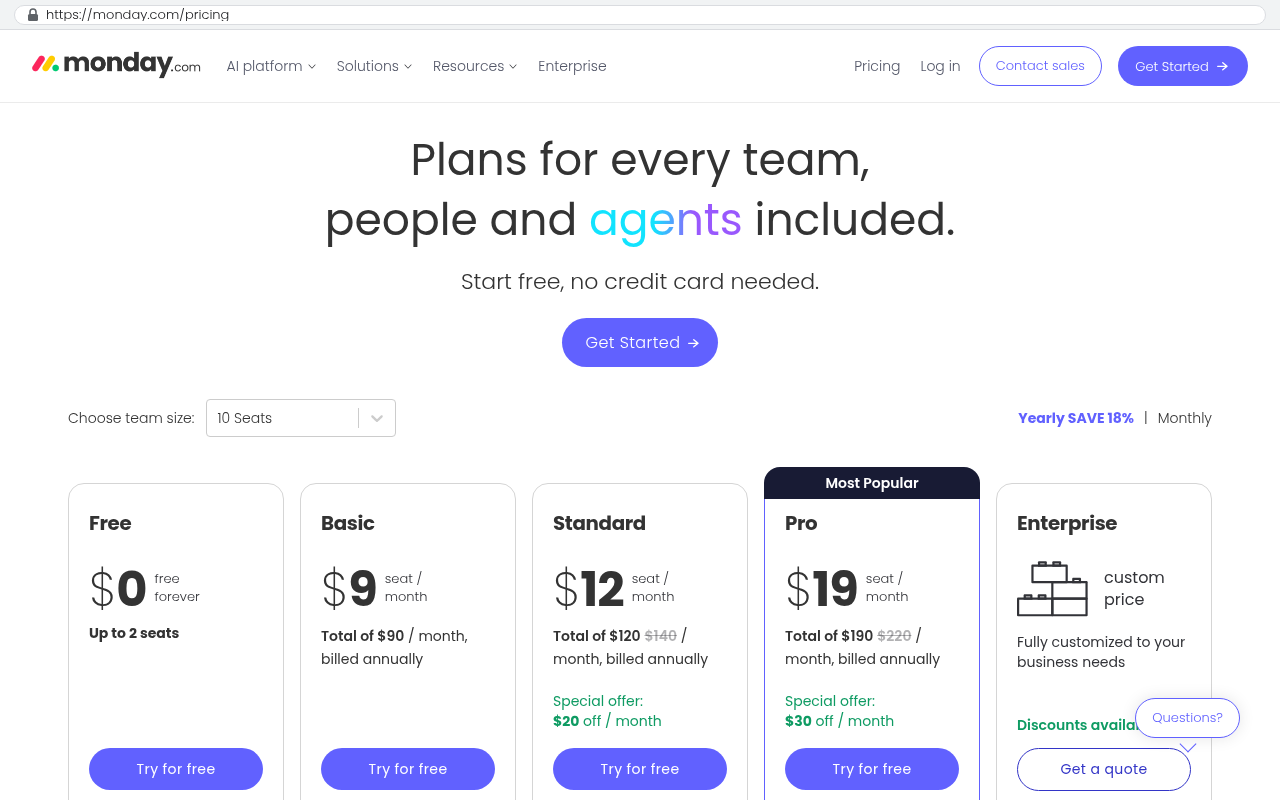
monday.com pricing comparison table showing Free at $0 forever for up to 2 seats, Basic at $9 per seat per month, Standard at $12 per seat per month, Pro at $19 per seat per month marked Most Popular, and Enterprise with custom pricing

TL;DR

Per-user pricing models function as a hidden tax on company growth, forcing organizations to pay increasing software costs with every new hire while creating operational inefficiencies that undermine the systems' actual value.

Key takeaways

  • Every new hire triggers multiple seat costs across tools that rarely appear on hiring requisitions but accumulate substantially on renewal invoices, with a single employee potentially costing hundreds or thousands annually in software fees.
  • Per-user pricing incentivizes seat rationing where finance teams restrict access, leading employees to share logins, work from screenshots, or rebuild operations in spreadsheets rather than use the primary system.
  • The true cost of per-user pricing extends beyond base seats to include tier jumps for needed features, seasonal staff premiums, integration seats for automated systems, and uniform charges for both heavy and occasional users regardless of actual usage patterns.
  • Usage patterns in operational businesses like distributors, contractors, and manufacturers differ fundamentally from software companies with knowledge workers, making per-user pricing models structurally misaligned with how most industries actually work.
  • Custom-built systems distribute software costs differently across capital expenses and time rather than scaling linearly forever, potentially offering better long-term financial value than per-user vendor solutions despite higher upfront investment.

Per-user pricing sounds fair until you try to grow. Then you notice something strange. Every time you hire someone, your software bill goes up, and nobody in the budget meeting connected those two facts. Hiring a warehouse lead costs you a salary, benefits, payroll tax, and about $600 a year in project management seats. Then another $540 for the CRM. Then $300 for the document tool. None of it shows up on the hiring requisition, and all of it shows up on the renewal invoice.

That's a tax on growth. It's small enough to ignore at ten people and big enough to change decisions at eighty.

The math nobody runs before hiring

Take a mid-sized company running one main operations platform. Suppose it's $50 per user per month on the tier that has the automations and dashboards you need. Forty seats is $24,000 a year. Fine. Nobody quits over that.

Now grow. You hire fifteen people over eighteen months, and you add ten more the year after. At sixty-five seats you're paying $39,000. At ninety you're at $54,000. You haven't gotten any new features. You haven't asked for anything. You just hired people, and your vendor billed you for the privilege.

Then add the renewal increase. Vendors raise list prices. If your renewal moves up eight percent, that ninety-seat plan is closer to $58,000 the following year. Stack a CRM and a document platform on top with their own seat counts, and a company of ninety can easily clear six figures a year on software that mostly moves records from one status to another.

Here's the part that stings. Your cost per employee didn't go down as you grew. In every other part of the business, scale saves you money. You negotiate better freight rates. You spread fixed overhead across more revenue. Software seats do the opposite. They scale linearly forever, and the vendor has zero incentive to change that.

Add a line to your hiring template called "software seat cost." Total the per-user price of every tool a new hire needs, multiply by twelve, and put the number next to the salary. Most operations leaders have never seen that figure in one place.

What seat pricing does to how people work

The billing model is annoying. The behavior it creates is worse.

Once seats have a price, somebody starts rationing them. It's always well-intentioned. The controller notices the renewal, asks who really needs access, and suddenly half the company is working from screenshots. I've walked into shops where the shop floor supervisors shared one login because the third seat wasn't approved. Two people editing the same schedule under one account, no audit trail, no idea who changed what. That's not a software problem. That's a pricing problem creating a software problem.

The other pattern is the read-only workaround. Vendors offer cheap viewer or guest tiers, so companies push half their staff onto them. Viewers can look but not update. So the people closest to the work, the technicians, the installers, the field crews, can't touch the record. Somebody with a full seat updates it for them, usually the next morning, usually from a text message. Your system of record becomes a system of secondhand reports.

Then there's the exported spreadsheet. When people can't get into the tool, they rebuild a piece of it in Excel and email it around. Now you're paying $54,000 a year for a platform and running the actual operation out of a workbook named "schedule_v4_FINAL.xlsx." I've seen this at companies that would describe their software as working fine.

Where the extra cost hides

The sticker price per seat is the easy part. The expensive surprises live around it.

  • Tier jumps. The feature you need shows up on the plan that costs twice as much per user, so one requirement doubles your bill across every seat you own.
  • Contractors and seasonal staff. A roofing company staffing up for summer either pays for seats it won't use in January or locks its temps out of the system entirely.
  • Annual commitments with mid-year true-ups. You add people in March, get billed for a full year of seats, and can't remove them until renewal.
  • Integration seats. Some vendors count service accounts, the automated logins your other systems use, against your total. You pay a human price for a robot.
  • Partial users. The bookkeeper who touches the system four times a month costs the same as the project manager who lives in it.
monday.com pricing comparison table showing Free at $0 forever for up to 2 seats, Basic at $9 per seat per month, Standard at $12 per seat per month, Pro at $19 per seat per month marked Most Popular, and Enterprise with custom pricing
monday.com pricing page displays five plan tiers from Free to Enterprise with per-seat costs ranging from $0 to $19 per month, showing Standard at $12 per seat and Pro at $19 per seat. Source: monday.com/pricing

That last one is where per-user pricing breaks down hardest for real companies. Usage isn't uniform. You've got ten heavy users, twenty occasional users, and forty people who need to see one screen and click one button. Seat pricing charges you as if all seventy are power users. The vendor's model assumes a software company full of knowledge workers. You run a distributor, a contractor, a clinic, a manufacturer.

The arithmetic of owning the system instead

A custom system changes the shape of the cost. Not always the size, but the shape, and the shape is what matters over five years.

You pay to build it once. That's a capital expense, and it lands in one or two fiscal years. After that, your recurring costs are hosting, a database, backups, and whatever maintenance and improvement work you want. Hosting an internal application for a hundred users is cheap. It's measured in tens or low hundreds of dollars a month, and it barely moves when you add users, because the cost driver is data and traffic, not headcount.

So the curve flattens. Going from forty users to ninety in a system you own costs you roughly nothing in licensing. You create fifty accounts. That's it. Compare that to the $30,000 a year of additional subscription you'd owe for the same growth.

Run the five-year comparison honestly. On the subscription side, add up your projected seat count each year, multiply by the annual per-user price, and apply a realistic renewal increase. Include every tool the custom system would replace. Include the integration middleware you pay for to keep those tools talking. Include the consultant you hire every time you need a new workflow configured.

On the ownership side, put your build cost in year one, hosting for all five years, and a realistic maintenance budget. Then compare totals. For a company that's growing headcount and running three or four overlapping platforms, ownership usually wins somewhere in year two or three. For a company of twelve that isn't growing, it usually doesn't. Do the math for your numbers, not for the ones in an article.

The most useful number in this analysis is your projected seat count in year three. Not today's count. Subscription costs are a bet on your own growth, and you're the one who knows the hiring plan.

When per-user pricing is the right deal

Plenty of times, honestly. I'd rather tell you that than watch you spend money on a build you don't need.

If your headcount is flat, seat pricing is predictable and cheap. Twenty seats that never change is a rounding error, and the vendor handles security patches, uptime, and mobile apps for you. That's real value.

If the software is highly specialized and heavily regulated, buy it. Payroll, tax filing, medical billing, and accounting all have rules that change every year. A vendor amortizes that compliance work across thousands of customers. You'd be paying a developer to chase IRS updates. Bad trade.

If your team genuinely uses the depth of the product, buy it. Salesforce is enormous because some companies really do use the forecasting, the territory management, and the ecosystem. If you're one of them, a custom rebuild would be a downgrade dressed up as savings.

The candidates for ownership look different. They're companies paying for a lot of seats to use a small slice of a platform, patching between two or three tools, and adding people every year. That's when the seat tax gets loud.

What a custom build won't fix

Owning the system removes the seat tax. It doesn't remove work, and anybody who tells you otherwise is selling.

You inherit responsibility. Nobody else is watching your uptime at 2am. You need a maintenance arrangement, whether that's the firm that built it or someone in-house. Software you own but don't maintain rots quietly for two years and then breaks on the worst possible Tuesday.

Migration is real labor. Moving eight years of records, attachments, and comment history out of a hosted platform takes a scripted export and a lot of validation. Some vendors make bulk export of files genuinely painful. Custom fields don't map cleanly. Historical data always has garbage in it that nobody noticed because nobody ever reported on it.

Monday.com support article titled Export from monday to Excel with navigation breadcrumbs and a tip box about importing data from Excel to monday
Monday.com help center article on exporting boards to Excel shows the heading Export from monday to Excel and begins explaining the export process with a tip about importing from Excel. Source: support.monday.com/hc/en-us/articles/26989749858578-Export-from-monday-to-Excel

You also lose the free feature stream. Your subscription buys you improvements you didn't ask for, and some of them are good. Mobile apps get faster. New integrations appear. A custom system improves when you decide to pay for improvements. That's control, and control means the roadmap is now your job.

And external sharing gets harder. If your clients log into your vendor's platform to see their projects, replacing it means building a client portal. That's doable and often better, but it's scope, and it changes the honest comparison.

The most common mistake is rebuilding every feature of the old platform instead of the ones your team uses. Pull a usage report before you scope anything. Most companies discover they use fifteen percent of what they pay for, and rebuilding the other eighty-five percent is how a smart project turns into an expensive one.

How to decide in the next two weeks

You don't need a consultant to run the first pass. You need an afternoon and your renewal invoices.

  1. List every per-seat tool, its price per user, and its current seat count. Total the annual spend.
  2. Pull your hiring plan for the next three years and recalculate that total at each year's headcount.
  3. Ask each department which screens and reports they use weekly. Write those down. That's your real requirements list.
  4. Note where people share logins, work from exports, or wait on someone else to update a record. Those are the places the seat tax is already costing you accuracy.
  5. Get a build estimate scoped to the requirements list from step three, and compare the five-year totals side by side.

If the numbers are close, stay on the subscription. Close isn't a reason to take on a project. If ownership wins by a wide margin and your headcount is climbing, you're paying a growth tax that compounds every year you wait.

We build these systems in Clearwater for companies across Pinellas and Hillsborough counties, and the first question we ask is always the same one. What does this cost you at your year-three headcount? If you want help running that arithmetic on your own numbers, book a free strategy session at /contact. Bring the invoices and the hiring plan.

Questions

Frequently asked questions

How much does per-user software pricing add to the cost of hiring a new employee?

Per-user pricing adds hidden costs beyond salary and benefits. A new hire might require $600 annually for project management seats, $540 for CRM access, $300 for document tools, and similar costs from other platforms. These expenses don't appear on hiring requisitions but accumulate on renewal invoices, creating an unexpected tax on growth that compounds as companies scale.

What is a seat count tax on growth?

A seat count tax occurs when software costs increase proportionally with headcount. Each new hire triggers additional software licensing fees across multiple platforms. Unlike other business expenses that benefit from economies of scale, per-user pricing scales linearly forever with no cost reduction as the company grows, meaning a company of 90 employees pays significantly more than a company of 40, without receiving new features.

Why do companies use read-only workarounds with per-user pricing?

Companies implement read-only workarounds because seat pricing encourages rationing access. Vendors offer cheap viewer or guest tiers, so organizations push staff onto limited-access accounts. However, this creates operational problems where technicians and field crews can't update records directly, requiring someone with full access to make changes later, often from text messages, undermining system accuracy.

What hidden costs are included in per-user software pricing beyond the listed price?

Hidden costs include tier jumps that double per-user costs when accessing needed features, charges for contractors and seasonal staff year-round, integration seats that bill for automated service accounts at human rates, and annual commitments with mid-year true-ups. Additionally, partial users who barely use the system pay the same as power users, forcing companies to subsidize access they don't fully utilize.

How does a custom-built system change software costs compared to subscription pricing?

Custom systems shift costs from recurring subscriptions to upfront capital expenses. While the initial build investment is significant, ongoing costs are limited to hosting, databases, and maintenance. Adding users in custom systems costs nearly nothing in licensing since cost drivers are data and traffic, not headcount, unlike subscriptions where growing from 40 to 90 users adds $30,000 annually in additional costs.

What problems occur when employees can't access needed software tools?

When seat costs force access rationing, employees work around restrictions by sharing logins without audit trails, exporting data to spreadsheets like Excel, or requesting updates from others. These workarounds eliminate accountability, delay information, and create parallel systems. Companies end up running actual operations from email spreadsheets while paying substantial sums for unused software platforms.

Why doesn't cost per employee decrease with company growth in per-user software pricing?

Per-user pricing scales linearly regardless of company size, meaning vendors have no incentive to reduce per-employee costs as you grow. Unlike other business expenses where scale creates savings through negotiation and overhead spreading, software seat costs remain constant per user. A company of 90 pays proportionally the same per person as a company of 40, eliminating the economic benefits of scale.

Read this next

When staying on your current platform is the right call

Custom software isn't always the answer. Here's the arithmetic, the warning signs, and the honest caveats that tell you whether to renew your platform or replace it.

If this is your situation

Talk it through on a call

Thirty minutes over video with the person who would run the build. You talk, we ask questions, and you leave with a plain read on whether custom software makes sense for you. If the answer is that your current tool is fine and badly configured, you will hear that.

Book a strategy call

Who wrote this

David Verneuille

David Verneuille

Founder, Black Badger Software Solutions

David Verneuille founded Black Badger after 18 years as a project manager and years implementing Smartsheet, monday.com, Wrike and Zoho for clients. He now builds custom systems that clients own outright, which is why the writing here is specific about where each platform fits and where it stops fitting.

About Black Badger

Drafted with AI assistance, then checked, edited, and approved by a person before publishing. The facts, opinions, and recommendations are ours.

More reading

Read this next

Want this looked at properly?

An article can only go so far without knowing your systems. Book a strategy call, walk us through what is breaking, and you will get a straight read on whether custom software is the right answer.