
Custom CRM development means a sales and customer system built around how your company actually sells, hosted on accounts in your name, with no per seat license. You get the pipeline, the dashboard, the portal and the automations. It replaces the subscription, the paid add ons and the connector fees stacked on top of it.
Custom CRM development, what you get and what it replaces
/ 28 min read
TL;DR
Custom CRM development builds a sales and customer system owned outright by your company instead of rented, with no per-seat licenses, replacing subscriptions and add-on fees while matching how your business actually operates.
Key takeaways
- Every custom CRM build includes an executive dashboard, mobile app, client portal, branded email, unlimited users, built-in beta feedback tool, and security audit before launch at no extra cost.
- Custom CRM hosting costs roughly 100 to 200 dollars monthly for smaller companies and 2,000 to 3,000 dollars monthly at enterprise scale, eliminating per-user licensing fees that grow with each new hire.
- Custom development inverts the typical CRM model by making the software adapt to your business processes rather than forcing your team to bend their workflow around a generic platform tool.
- The code repository, database, and email sending accounts exist in your company's name, giving you complete ownership and preventing price increases or feature removals at renewal time.
- A custom CRM replaces not only the main platform license but also paid add-ons, connector subscriptions between systems, and most administrative hours spent maintaining the tool's configuration.
- Modern AI-assisted development has made custom CRM builds economically viable now, whereas the financial case did not work in 2018 due to higher development time and costs.
- Off-the-shelf CRMs remain the right choice for some companies, and custom development works best when your sales process is complex, you have 30 or more users, or a single platform CRM inadequately serves your specific business model.
TL. DR
A custom CRM is software your company owns outright instead of rents. The build covers the same ground as a Salesforce, HubSpot or Zoho setup, and it also covers the spreadsheets and manual steps your team uses to work around those tools. After launch you pay hosting, not licenses, so the cost stops climbing every time you hire someone.
Key takeaways
- Every build ships with an executive dashboard, a mobile app that installs on a phone, a client portal, branded email sent from your own domain, and unlimited users.
- A feedback tool is built into the beta so your team can flag problems from inside the app, and a security audit happens before launch.
- Salesforce's pricing page lists Sales Cloud Enterprise at $165 per user per month billed annually, which is $118,800 a year for 60 people before a single add on.
- A custom CRM replaces the license, the paid add ons, the connector subscriptions between the CRM and accounting, and most of the admin hours spent keeping the CRM tidy.
- After launch the system costs roughly $100 to $200 a month to run for a smaller company, and $2,000 to $3,000 a month at enterprise scale, paid to the hosting providers directly, with no license and no per user fee.
- Off the shelf is still the right answer for some companies, and this page says exactly when.
What is custom CRM development?
Custom CRM development is building a contact, pipeline and customer history system from scratch for one company, instead of configuring a product that thousands of companies share. The data model matches your business. If you sell through dealers, the system has dealers. If a deal has four approval stages and a credit check, the system has four approval stages and a credit check.
That sounds obvious. It matters because every platform CRM starts from a generic shape, and your team spends years bending either the tool or the process until the two meet in the middle. Usually the process bends. Custom development inverts that. The software bends.
The second difference is ownership. The code lives in a repository in your company's name. The database lives in a hosting account in your company's name. The email sending account is yours. Nobody can raise the price, retire a feature, or lock you out of your own records at renewal time.
Modern builds are also AI assisted, which cuts the time and cost of writing software significantly compared to five years ago. That is the reason this conversation is worth having at all now. The arithmetic that didn't work in 2018 often works today.
Custom does not mean exotic. A custom CRM uses the same boring, proven building blocks as the platforms do. A database, a web app, an email service, a hosting provider. The difference is who holds the keys.
What do you get when a CRM is built for your company?
You get a working system with eight things in it as a matter of course, not as upgrades. These are not options on a price sheet. They are what a complete build looks like, and leaving any of them out produces a system people avoid.
Here is what that means in practice.
An executive dashboard
One screen that answers the questions an owner asks on a Monday. Pipeline by stage and by rep. Deals that have gone quiet. Revenue booked against target. Close rates by source. In a platform CRM you often get this after someone spends weeks building reports and then maintaining them. Here it is part of the build, and it reads from the same database as everything else, so there is no refresh lag and no export step.
The important detail is that the dashboard is built from your definitions. If your company counts a deal as won when the deposit clears, not when the contract is signed, the dashboard counts it that way. That one difference is why so many leadership teams quietly keep a parallel spreadsheet next to their CRM.
A mobile app that installs like a native one
Every build ships as a progressive web app, which in plain English means a website that installs on a phone and opens from the home screen like a normal app. No App Store review, no separate Android build, no extra per device license. Your field reps tap the icon and get a full screen app with their accounts, their calls and their notes.
It works on a phone, a tablet and a laptop because it is the same app rendered for the screen in front of it. Updates push instantly, which matters more than people expect. When a sales manager asks for a field to be added on Tuesday, nobody has to chase an app store approval to get it to the team.
A client portal
Your customers get a login to see what they're allowed to see. Quotes, orders, documents, ticket status, invoices, whatever your business shares. This is the single feature that changes how customers feel about working with you, and it is usually the one that costs extra or doesn't exist in the platform you're on now.
The portal uses the same data as the internal app, so nothing is copied or synced. When your team updates an order, the customer sees it. No nightly job, no stale cache.
Want to go deeper? Read our full guide: Is a client portal worth building or should you buy one
Branded email under your own domain
Every email the system sends comes from your domain, not from a vendor's shared sending service with a "powered by" line at the bottom. Quote notifications, portal invitations, reminders, receipts. They land in inboxes looking like they came from your company, because they did.
That requires the sending domain to be authenticated properly, which means DNS records that tell the receiving mail servers your messages are genuine. Those records go into your DNS, under your control. The sending account is created in your name. If you ever move the system elsewhere, the email reputation you built stays with you.
Unlimited users
Add everybody. Warehouse staff, part time admins, the two people in accounting who only need read access, the owner's assistant. In a per seat world you ration logins, and rationing logins is how shadow spreadsheets get born. Someone without a seat needs the data, so somebody with a seat exports it to them.
With no per user fee, the right answer is to give everyone the access their role needs and let the permissions model do the work. Costs go with usage and storage, not headcount, and usage costs scale far more gently than seats do.
A built in feedback tool during the beta
During the beta period, every screen has a feedback button. A user hits it, types what's wrong, and the report arrives with the screen, the record and the context attached. No email chains. No "it broke, I think it was on the quote page, maybe Tuesday."
This sounds small. It is the single most powerful part of a rollout. The gap between a system people tolerate and a system people like is usually twenty or thirty small corrections caught in the first month, and you only catch them if reporting takes four seconds.
A security audit before launch
At the end of the build the system gets audited. Access controls, data exposure, authentication, dependency vulnerabilities, how the portal separates one customer's data from another's. The findings get fixed before go live, not after.
Ask about this specifically with any developer you talk to. Plenty of custom work ships without it, and a client portal with a weak permission boundary is a genuinely bad day waiting to happen.
An optional support plan
After launch you can keep a support arrangement for changes, monitoring and new features, or you can take the code and maintain it with your own team or another firm. Optional means optional. The system runs whether or not anyone is retained, because it is yours and the accounts are in your name.
That is the test for real ownership. If stopping the relationship stops the software, you did not buy software. You bought a subscription with extra steps.
What does a custom CRM replace?
Five things, and most buyers only count the first one. The license is the visible cost. The other four are the ones that make the arithmetic work.
The per seat license goes to zero. That is the headline. The second thing is paid add ons, because the modern CRM business model is to price the core cheaply and charge for the parts you actually need. Quoting, document generation, advanced reporting, extra sandboxes, API call volume, additional contact tiers. By the time a company is three years in, the add ons often cost as much as the seats.
The third is connector subscriptions. Almost every CRM installation has a paid middleman carrying data between the CRM and accounting, or the CRM and the email tool, or the CRM and the ERP. Zapier's pricing page lists its Professional plan starting at $29.99 per month billed annually for 750 tasks, and real integrations burn through task counts faster than anyone estimates. Dedicated connectors for accounting systems typically run on their own monthly subscription on top of that.
In a custom build, the integration is just part of the application. No tasks to meter, no middleman subscription, no third party holding your data in transit.
The fourth is admin hours. Someone at your company spends real time on CRM upkeep. Field changes, permission requests, duplicate merges, report rebuilds, chasing why the sync failed last night. Certified administrators are expensive, and for many mid sized companies that time comes out of an operations manager who would rather be doing operations.
The fifth is the spreadsheet layer. This is the big one. Open any company running a platform CRM and you'll find a commission tracker, a forecast file the sales manager maintains by hand, a renewals list, a quote log, an onboarding checklist. Each one exists because the CRM couldn't hold that shape. In a custom build those become screens, and the rekeying stops.
Before you compare anything, count the spreadsheets. Ask each team to list the files they keep outside the CRM to do their job. That list is the real specification for your replacement, and it is almost always longer than leadership expects.
How does the licensing math actually compare?
Run the numbers against published list prices, because published list prices are the only ones everybody can check. Here are three, each from the vendor's own public pricing page at the time of writing.
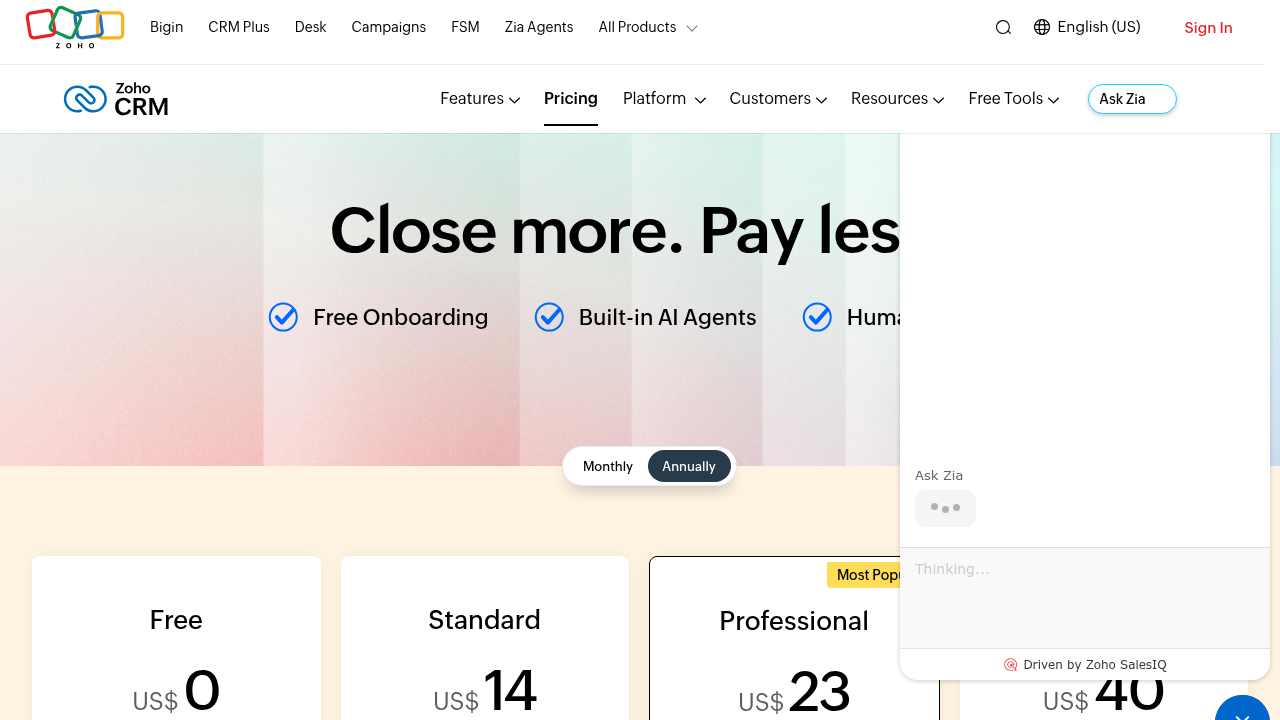
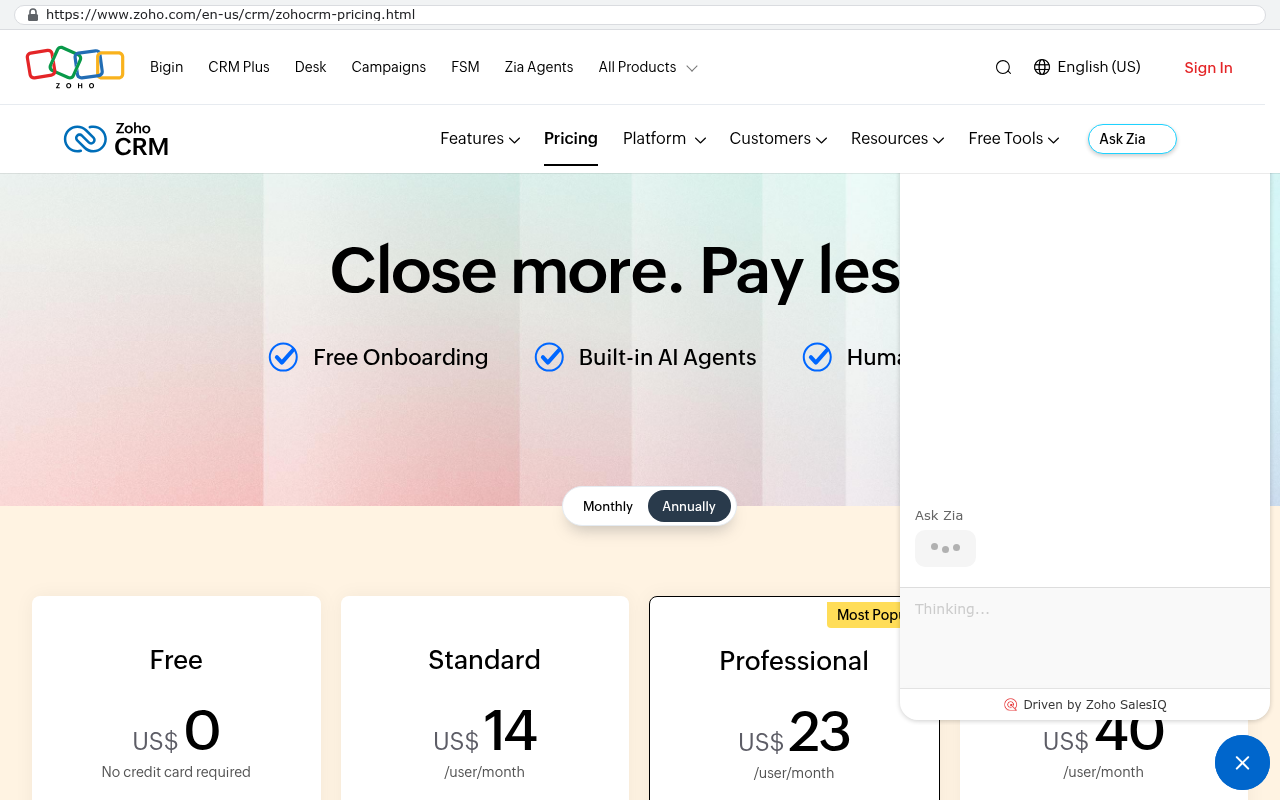
Salesforce's pricing page lists Sales Cloud Enterprise at $165 per user per month billed annually. HubSpot's pricing page lists Sales Hub Professional at $100 per seat per month billed annually, with a one time Professional onboarding fee of $1,500. Zoho's CRM pricing page lists its Enterprise edition at $40 per user per month billed annually, with Professional at $23 and Ultimate at $52.
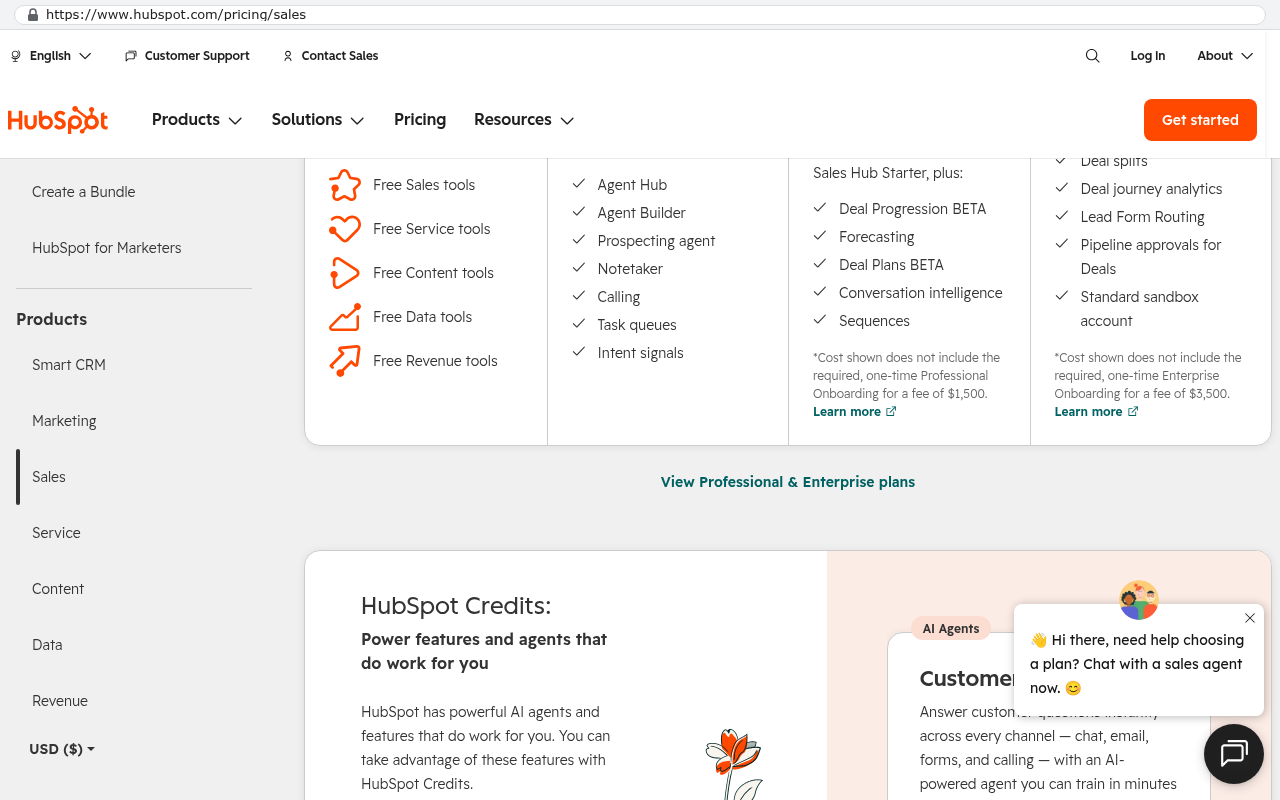
Now put sixty people on each. Salesforce Enterprise comes to $9,900 a month, or $118,800 a year. HubSpot Sales Hub Professional comes to $6,000 a month, or $72,000 a year, plus onboarding in year one. Zoho Enterprise comes to $2,400 a month, or $28,800 a year. Those are before add ons, before the connector subscriptions, and before the admin time.
The add on layer is not a secret either. HubSpot's pricing page sells Marketing Hub separately from Sales Hub, and prices Marketing Hub by marketing contact tiers, so your bill rises as your list grows even if your headcount doesn't. Salesforce's pricing page lists Sales Cloud, Service Cloud and its revenue and platform products as separate per user line items, which is why companies that start with sales licenses rarely end with only sales licenses.
Zoho deserves a fair word here. At $40 per user per month it is genuinely inexpensive compared to the other two, and for a small team with ordinary sales processes it is hard to beat on price. The reason companies leave Zoho usually isn't the sticker. It's that the data model fights their business, the customization hits a ceiling, and the workarounds pile up until the admin burden costs more than the subscription ever did.
Want to go deeper? Read our full guide: What questions should you ask before signing a five year software contract
What the $125,000 a year story looked like
One company was paying $125,000 a year in licensing. The replacement was built in six weeks for $85,000, owned outright, and the license bill went to zero. That is a payback inside the first year, and every year after that is pure retained cash.
That project is one of 467 delivered. Another is a Texas contractor facing a $1.3 million five year Smartsheet contract. That system was rebuilt in 16 weeks for $375,000, and the license bill went to zero there too.
Numbers like that don't apply to every company, and anyone who tells you they do is selling. A ten person team paying $300 a month for Zoho is not going to find a build that pays back in a year. The arithmetic turns when seats are many, add ons are stacked, the contract is long, or the workarounds have grown into a second job for somebody.
Who owns a custom CRM, and what does ownership mean in practice?
You own it, and ownership is a set of specific, checkable facts rather than a feeling. Every account the system runs on is created in your company's name. Code hosting, database, application hosting, email sending. The developer is invited into those accounts as a collaborator and can be removed at any time, by you, without asking.
Check that against how platform ownership works. Your CRM data belongs to you on paper, but the system that makes it useful belongs to the vendor. Stop paying and the screens go dark. You get an export, usually as a pile of CSV files, and the automations, the layouts, the permission rules and the reports are not in that pile. They were configuration inside a product you no longer have.
Ownership also means you can hire anyone to work on it. The code is written in common languages with common frameworks. Any competent development shop can pick it up. You're not locked into one firm any more than owning a building locks you into one contractor.
And it means nobody changes the deal on you. No renewal letter with a 22 percent uplift. No feature you depend on moved to a higher tier. No minimum seat count you have to buy through even after a layoff.
If a development firm hosts your system on their own accounts and bills you monthly for access, that is a subscription with a custom coat of paint. Ask whose name is on the hosting account, whose credit card pays the bill, and whether you can remove the developer's access today. If any answer is "ours", keep looking.
How does a custom CRM build run from first call to launch?
It runs in four stages, and the first one costs nothing. A scoping conversation comes first. That is a working session about how your company sells, what breaks today, what the spreadsheets are doing, and what you'd keep if you could only keep three things.
Out of that comes a fixed scope and a fixed quote. Fixed means fixed. The scope lists what gets built, and the price does not move because a feature turned out harder than expected. That risk sits with the builder, which is where it belongs.
Then the build runs with review sessions where you use the real thing, not a slideshow. Early and often, because the gap between what someone describes in a meeting and what they need on screen is enormous and only closes when they click something.
Every feature request during the build gets one of four honest answers. Yes and it's in scope. Yes and here's what it changes. No and here's why it will hurt you. Or not yet, because it should wait until the core is live. A build that says yes to everything ships late and bloated.
Then beta, with the feedback button on every screen, then the security audit, then training, then launch. The old system usually stays readable for a while during the overlap, which is cheap insurance and reduces the anxiety in the room considerably.
Want to go deeper? Read our full guide: How long does it take to replace a project management platform
What happens to your contacts, pipeline and history?
It all comes across, and this is the part worth being specific about because most migration failures happen here. Contacts, companies, deals, activity history, notes, attachments, custom fields, email threads tied to records. All of it is extractable from the major CRMs through their export tools and their APIs.
Extractable is not the same as easy. Standard objects export cleanly. The trouble lives in the corners. Attachments usually require a scripted pull against the API, one file at a time, because the standard export gives you a reference and not the file. Email history linked to records sometimes lives in a different store than the records themselves. Deleted and archived items may or may not be included depending on which export you run.
Then there's the data quality reckoning. Any CRM that has run for eight years has duplicates, dead contacts, deals stuck in stages that no longer exist, and fields three people filled in three different ways. Migration is the moment that becomes visible. Budget time for cleaning, because loading garbage into a new system teaches your team to distrust it on day one.
The practical approach is to migrate everything into an archive table that stays searchable, and migrate only the clean, current records into the live working data. Your team gets a tidy system plus the full history when they need it.
Want to go deeper? Read our full guides: How do you migrate ten years of data out of a SaaS platform and How to export your data from Zoho CRM
How does a custom CRM connect to accounting, email and the rest?
Through direct API connections, built into the application, with no connector subscription in between. An API is just a published doorway that lets two systems talk, and the major business tools all have one.
QuickBooks Online is the most common request. The custom system pushes invoices when a deal closes, pulls payment status back, and keeps customer records matched on both sides. Your sales team sees whether an account has paid without opening accounting, and your bookkeeper stops rekeying.
Email and calendar connect through Microsoft 365 or Google Workspace. Sent and received mail attaches itself to the right record. Meetings sync. Nobody has to install a browser extension that breaks every third update.
Beyond that the usual list is e signature, payment processing, shipping and tracking, phone systems that log calls, and whatever vertical software your industry runs on. If it has an API, it connects. If it doesn't, there are usually other routes, including scheduled file drops or direct database access, and sometimes the honest answer is that a particular integration isn't worth what it costs.
Want to go deeper? Read our full guide: Can a custom system connect to QuickBooks Online
What can a custom CRM not do, and what are the real trade offs?
Plenty, and pretending otherwise would waste your time. Here are the honest limitations, in the order they matter.
It will not have a marketplace. Platform CRMs have thousands of prebuilt apps. If your business depends on a niche integration that happens to exist as a one click install on the Salesforce AppExchange, a custom build has to construct that connection from scratch. Usually that's fine and sometimes it's a genuine cost.
It will not be free to change. Software needs maintenance regardless of who owns it. Dependencies get security updates, browsers change, APIs you connect to get versioned. You either keep a support arrangement or you keep someone technical available. Owning a building means owning the roof too.
It will not be instant. A platform CRM can be signed up for this afternoon. A custom build is a project with discovery, construction and testing. If you need something running next week because your current contract ends in nine days, buy a subscription for a year and plan the build properly.
It will not fix a broken process. If your sales team doesn't log activity today, they won't log it in a new system either. Software changes the friction. It doesn't change the management problem underneath. The build will expose the process gaps clearly, which is useful, but somebody still has to close them.
It will not pay back at small scale. A six person company paying $14 per user per month on Zoho Standard is spending about $1,000 a year. No custom build competes with that, and nobody honest will say it does.
And there is a real change management cost. Your team learned the old tool. They have habits, keyboard shortcuts and private workarounds in it. Moving people is work, and the first three weeks after launch are always noisier than anyone wants. The feedback button exists precisely because those three weeks decide whether the system sticks.
The most common mistake in a custom CRM project is scope creep dressed up as thoroughness. Every department asks for every field they ever wanted. The result is a system so detailed nobody fills it in. Build the narrow version that covers how deals actually move, launch it, then add. A system in use beats a system in specification every time.
When is an off the shelf CRM still the right answer?
More often than a custom software firm's website would suggest. If your sales process is ordinary, your headcount is low and your subscription costs less than a couple thousand a year, stay where you are. The math is not close.
Stay on the platform if your process genuinely matches the product. Some companies sell in a completely standard way, and HubSpot or Zoho models that standard way well. If your team is happy, the reports are right and nobody is maintaining a shadow spreadsheet, you don't have a problem to solve.
Stay if you are mid implementation. Ripping out a system six months into a rollout burns the goodwill you'll need later. Finish, run it for a year, then evaluate honestly.
Stay if you need something in days. Speed to value beats ownership when the alternative is running the quarter on email.
Stay if the real problem is adoption. A new system does not create discipline. Fix the management issue first, otherwise you'll spend money to recreate the same empty pipeline in nicer software.
The signals that point the other way are specific. Your seat count keeps climbing and so does the bill. You're paying for add ons that cover gaps the core product left. Someone spends a meaningful slice of their week administering the tool. Your team runs the business in spreadsheets and uses the CRM as a filing cabinet. Or a five year renewal just landed with a number on it that made you stop reading.
Want to go deeper? Read our full guide: When staying on your current platform is the right call
What does a custom CRM cost to run after launch?
Hosting, and not much of it. After launch the system costs roughly $100 to $200 a month to run for a smaller company, and $2,000 to $3,000 a month at enterprise scale, paid to the hosting providers directly, with no license and no per user fee.
That cost breaks into application hosting, a database, file storage for documents and attachments, and an email sending service. You pay those vendors directly, on your own accounts, and you can see every line of the bill.
Notice what it does not do. It does not go up when you hire five people. It does not go up when your contact list crosses a tier boundary. It does not go up 9 percent at renewal because the vendor's investors need it to. Usage based hosting rises with actual load, which for a CRM is modest and predictable.
The build cost itself is a different conversation, and it depends entirely on what you're replacing. That's what the scoping session is for. It ends with a fixed scope and a fixed quote, so you're comparing a known number against a known subscription rather than guessing.
Build your comparison over five years, not one. Take your current annual spend, add the add ons, add the connector subscriptions, add a conservative 7 percent annual uplift, and add the loaded cost of the hours your staff spend administering the tool. Then put the one time build cost plus sixty months of hosting next to it. That's the honest picture, and sometimes it says stay.
How do you know if your company is a real candidate?
Answer four questions and you'll know. None of them are about technology.
- What are you paying this year, counting licenses, add ons, connectors and the hours someone spends administering it?
- How many spreadsheets exist because the CRM can't hold that shape?
- How many times in the last year did a vendor change something you depend on?
- If your subscription ended tomorrow, what could you actually still do with your exported data?
If the first number surprises you, the second is longer than five, the third is more than zero and the fourth is "not much", you're a candidate. If none of that lands, you're not, and you should spend the money elsewhere.
There's a fifth question that's less about arithmetic and more about direction. Is the way your company sells actually a competitive advantage? Some businesses win on a process nobody else runs. Those companies suffer most inside generic software, because the platform keeps pushing them back toward the average. Those are the builds that pay for themselves twice, once in license savings and once in the thing the software lets you do that competitors can't.
What about AI, and does it change the answer?
It changes two things, and it's worth separating them because vendors blur the line deliberately. The first is AI inside the product you use. Lead scoring, email drafting, call summaries, pipeline predictions. Every major CRM sells this now, usually at the top pricing tier or as a per user add on, which is one more reason bills climb.
The second is AI in how software gets written. That's the one that moved the economics. AI assisted development means a custom system that would have taken a large team a long time can now be built by a small team much faster. That's why replacing a six figure license with an owned system is a reasonable conversation in 2025 and was a hard sell a few years ago.
Inside a custom CRM, AI features get built where they earn their keep. Summarizing a long account history before a call. Drafting follow ups from the actual notes. Flagging deals that have gone quiet based on your patterns, not a generic model. Routing inbound leads by reading the message. You pay the model provider for what you use, directly, instead of paying a per seat premium whether anyone uses it or not.
Want to go deeper? Read our full guide: What does an AI powered internal app actually do for an operations team
How do you start?
Start by pulling your real numbers together, because the decision lives or dies on them. Your last twelve months of invoices from the CRM vendor. Every add on line item. Every connector subscription. An honest estimate of the hours your team spends on administration. And the list of spreadsheets each department keeps on the side.
Then have a scoping conversation. It's a working session about how your company sells and what breaks, and it ends with a straight answer about whether a build makes sense. Sometimes it doesn't, and hearing that is worth more than a proposal you'd regret. If it does, it produces a fixed scope and a fixed quote, so you can compare one known number against another.
If you want to see the shape of the work first, the custom CRM page covers what a replacement looks like, and leaving Zoho walks through one of the more common migrations in detail. If you're still gathering evidence, do you need custom software is the short version of the decision.
When you're ready to find out whether the arithmetic works for your company, book a free strategy session. It's a conversation about whether a build makes sense, including the case where the answer is that it doesn't.
Frequently asked questions
How long does a custom CRM build take?
It depends entirely on what you're replacing. A focused sales pipeline with a portal and a QuickBooks connection is a much smaller project than a full operations system with quoting, inventory and field service. The scoping session produces a schedule you can plan around, with review points along the way so you see progress rather than waiting for a reveal.
Can we run the custom CRM alongside our current one for a while?
Yes, and most companies should. Run both for a few weeks with the old system in read only mode. Your team gets a safety net, you get to compare numbers across both, and you avoid the panic that comes with a hard cutover. The overlap costs one extra month of subscription, which is cheap compared to the alternative.
What happens if the developer disappears?
You still have the system, because every account it runs on is in your name. The code is in your repository. The database is in your hosting account. Any competent development firm can take over. That's the practical difference between owning software and renting access to it.
Will our data really all come across from Salesforce or HubSpot?
The records come across reliably. Contacts, companies, deals, activity, notes and custom fields all export through standard tools and APIs. Attachments usually need a scripted pull rather than a bulk download, and email history can be fiddly depending on how it was stored. Plan for a cleanup pass too, because old CRMs carry duplicates and dead records that nobody wants to inherit.
Is a custom CRM less secure than a big platform?
Not inherently. The hosting providers a custom system runs on are the same ones the big platforms run on. Security comes down to how access controls, authentication and data boundaries are built, which is why a security audit before launch is part of the work rather than an upsell. The smaller attack surface of a private system is a genuine advantage, since it isn't a target the way a shared platform with millions of tenants is.
We already have Zoho and it's cheap. Should we still consider this?
Probably not on price alone. Zoho's pricing page lists Enterprise at $40 per user per month billed annually, which is hard to beat with any build at small headcount. Consider it when the customization ceiling starts costing you more than the subscription saves, or when the spreadsheets around Zoho have become where the work really happens.
Does Black Badger configure or administer our existing CRM?
No. The work is building replacement systems that companies own. Platform configuration, patching, administration and reselling are not services offered here, and partnerships with several of those platforms were cancelled. Where a platform is genuinely the right answer for your situation, you'll be told that directly.
What if we only want to replace part of our CRM?
That's a common and sensible starting point. Plenty of companies build the quoting engine, the client portal or the commission tracker first while keeping the platform CRM for contacts. It connects through the platform's API, proves the approach on a smaller scope, and gives you real information before committing to a full replacement.
Read this next
What happens to your data when you stop paying a SaaS vendor is the article to read before you make any decision about your CRM. It covers what an export actually contains, what it leaves behind, and how long vendors keep your records after the last invoice.
Related articles
- How do you migrate ten years of data out of a SaaS platform
- Is a client portal worth building or should you buy one
- Can a custom system connect to QuickBooks Online
- When staying on your current platform is the right call
- Why platform implementations ask you to change your process
- What a software implementation really costs
Questions
Frequently asked questions
What exactly is custom CRM development and how does it differ from standard platforms?
Custom CRM development builds a contact, pipeline and customer history system from scratch for your company instead of configuring a product shared by thousands. The data model matches your business exactly. Your team doesn't bend the tool or process to fit each other over years. Instead, the software bends to match how you actually sell. You own the code repository, database and hosting account in your company's name, so nobody can raise prices or lock you out at renewal.
What features come standard with a custom CRM build?
Every build includes an executive dashboard showing pipeline, deals gone quiet, and revenue against target. You get a mobile app that installs like a native one, a client portal for customers, branded email from your own domain, unlimited users, a feedback tool built into beta, and a security audit before launch. These are standard inclusions, not paid upgrades.
How much does a custom CRM cost compared to Salesforce or HubSpot?
Salesforce Sales Cloud Enterprise costs $165 per user per month, totaling $118,800 yearly for 60 people before add-ons. A custom CRM replaces the license, add-ons, and connector subscriptions. After launch, you pay roughly $100 to $200 monthly for smaller companies and $2,000 to $3,000 monthly at enterprise scale to hosting providers directly, with no per-user fees.
What does a custom CRM replace beyond just the main platform?
A custom CRM replaces the license subscription, paid add-ons, connector subscriptions between your CRM and accounting, and most admin hours spent maintaining the CRM. It also covers the spreadsheets and manual workarounds your team uses to handle gaps in platform CRMs.
Who owns a custom CRM and what does that mean?
Your company owns the custom CRM outright. The code lives in a repository in your name, the database lives in a hosting account in your name, and the email sending account is yours. Nobody can raise the price, retire a feature, or lock you out of your own records at renewal time. You control all the keys.
How much does it cost to run a custom CRM after it launches?
After launch, you pay hosting costs directly to hosting providers, not license fees. Smaller companies typically pay roughly $100 to $200 monthly, while enterprise scale operations pay $2,000 to $3,000 monthly. There are no per-user fees or license costs that increase when you hire new team members.
Is custom CRM development still a practical option compared to five years ago?
Yes. Modern builds are AI assisted, which significantly cuts the time and cost of writing software compared to 2018. The arithmetic that didn't work five years ago often works today, making this conversation worth having now for companies evaluating their CRM strategy.
What happens to your existing data when migrating to a custom CRM?
Your contacts, pipeline and history transfer to the custom CRM. The portal and internal app read from the same database, so there's no copying or syncing involved. When your team updates information, customers see it immediately with no nightly jobs or stale caches creating delays.
Can a custom CRM connect to your accounting system and email?
Yes, a custom CRM connects to accounting, email and other tools your company uses. One key advantage is that you replace the connector subscriptions between your CRM and accounting that add costs on top of platform CRM fees. Integrations are built directly into your system.
What's included in the client portal that comes with a custom CRM?
Customers get a login to see what they're allowed to view. This typically includes quotes, orders, documents, ticket status, invoices, or whatever your business shares. The portal uses the same data as the internal app, so when your team updates an order, customers see it immediately without delays or syncing issues.
Read this next
What questions should you ask before signing a five-year software contract?
A five-year software contract is a bet that your business won't change. Here are the questions about cost, data exit, and ownership to ask before you sign one.
If this is your situation
Talk it through on a call
Thirty minutes over video with the person who would run the build. You talk, we ask questions, and you leave with a plain read on whether custom software makes sense for you. If the answer is that your current tool is fine and badly configured, you will hear that.
Who wrote this

David Verneuille
Founder, Black Badger Software Solutions
David Verneuille founded Black Badger after 18 years as a project manager and years implementing Smartsheet, monday.com, Wrike and Zoho for clients. He now builds custom systems that clients own outright, which is why the writing here is specific about where each platform fits and where it stops fitting.
Drafted with AI assistance, then checked, edited, and approved by a person before publishing. The facts, opinions, and recommendations are ours.