Skip to content
BlackBadger

Blog / Custom software

How much does custom software cost in 2026?

/ 30 min read

monday.com pricing page showing the Pro plan card highlighted as Most Popular with $19 per seat per month pricing and a total of $190 per month billed annually

TL;DR

Custom software pricing in 2026 depends entirely on project scope rather than a fixed sticker price, with honest developers requiring scoping conversations before providing quotes and running costs typically ranging from $100 to $3,000 monthly depending on company size.

Key takeaways

  • Price follows scope, and any fixed quote must come only after a detailed scoping conversation that maps workflows, data connections, and requirements in plain English.
  • The cost ranges published online without attached scope details are meaningless for budgeting because they provide no information about what is actually being built.
  • Running costs after launch are predictable and relatively small, ranging from $100 to $200 monthly for smaller companies and $2,000 to $3,000 monthly at enterprise scale, paid directly to hosting providers without per-user licensing fees.
  • Your true financial comparison should be build cost plus five years of running expenses versus five years of SaaS subscription renewals at published vendor list prices, not the build cost alone.
  • Custom software is the wrong choice for standard, regulated, commodity work like payroll and accounting ledgers where established SaaS solutions already provide better value.
  • Ownership of custom software means you also own all maintenance responsibilities, which represents a real ongoing cost that buyers frequently overlook in their budgeting.
  • When a developer provides a price before understanding your workflows and data, that number is a sales tactic designed to secure signatures, and scope conversations after the contract become the path to change orders and cost overruns.

TL. DR

Custom software in 2026 is priced by scope, not by a sticker price. The honest sequence is a scoping conversation first, then a fixed scope document, then a fixed quote you can hold someone to. Anyone who gives you a number before they understand your workflows is guessing, and that guess will move.

Here is the part you can quote. Nobody can tell you what custom software costs until they know what it has to do, who uses it, and what it has to connect to. What is knowable in advance is the running cost after launch. After launch the system costs roughly $100 to $200 a month to run for a smaller company, and $2,000 to $3,000 a month at enterprise scale, paid to the hosting providers directly, with no license and no per user fee.

Key takeaways

  • Price follows scope. A fixed quote comes after scoping, never before.
  • The cost ranges you find in other articles are guesses with no scope attached. They are useless for budgeting.
  • Run cost after launch is predictable and small compared with per seat licensing, because you pay hosting providers directly.
  • Your real comparison is not the build number. It is the build plus five years of running cost versus five years of renewals at list price.
  • Vendor list prices are public. Salesforce, HubSpot, monday.com and Smartsheet all publish per seat pricing you can check and multiply yourself.
  • Custom is the wrong buy for standard, regulated, commodity work. Payroll and the accounting ledger are good examples.
  • Ownership means you own maintenance too. That is a real cost, not a footnote.
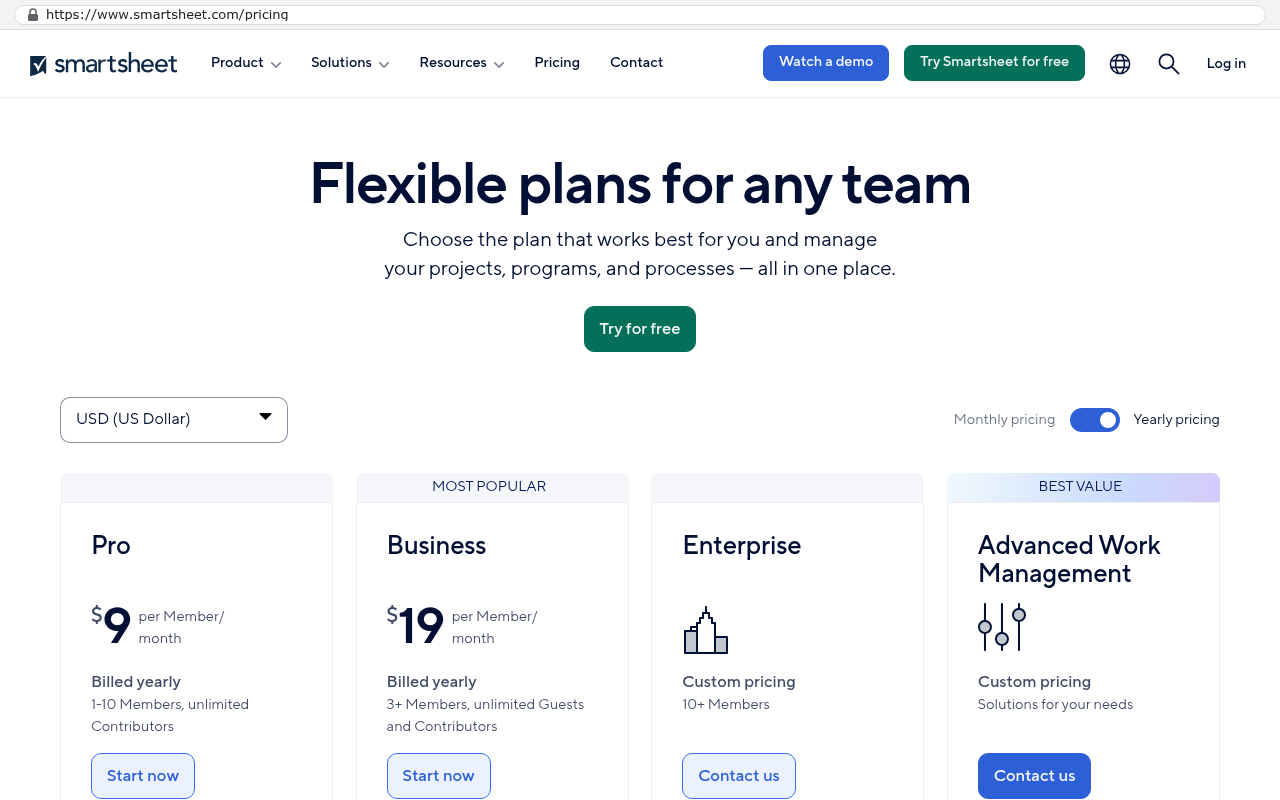
Smartsheet pricing page showing Pro plan at nine dollars per member per month and Business plan at nineteen dollars per member per month with billed yearly details
Smartsheet's pricing page displays flexible plans with per-member monthly pricing of nine dollars for Pro and nineteen dollars for Business. Source: www.smartsheet.com/pricing?srsltid=AU7gw4WHV9xKQv9niqEZ6dsmvhursh0JYmv5Vn234oJUK2dSOJlV6g9n

What does custom software cost in 2026?

It costs whatever the scope costs. That sounds like a dodge. It isn't, and I'll show you why in a minute.

Software pricing works like construction pricing. Nobody asks what a building costs. They ask what a 12,000 square foot warehouse with three dock doors and a 2,000 square foot office costs, on this lot, in this county. Even then the builder walks the site before quoting. Software is the same. The difference is that software buyers have been trained by SaaS pricing pages to expect a number on a web page, and a lot of development shops play along by publishing ranges they have no business publishing.

You've seen those ranges. Simple app, this much. Medium complexity, that much. Enterprise, some six figure band with a shrug attached. Those numbers skip the only variable that matters, which is scope. A "simple" app that has to pull job costing out of a twelve year old ERP, match it against field tickets, and produce a billing packet your general contractor's AP system will accept is not simple. A "complex" app that is really six forms, a dashboard and an email trigger is not complex. The adjectives carry no information.

So the useful question changes shape. Instead of asking what custom software costs, ask three things. What am I paying now, every year, forever. What would I stop paying. And what is the fixed quote for the thing that replaces it. The first two numbers you can get today from your own invoices and a vendor pricing page. The third needs a conversation.

If a development firm gives you a price in the first call, before anyone has mapped your workflows or looked at your data, that price is a sales number. It exists to get a signature. The scope conversation then happens after the contract, which is exactly when change orders become the business model.

Why won't an honest developer quote a price before scoping?

Because the same sentence from two different companies means two different builds. "We need a CRM" is not a specification. It is a category.

Here is what hides inside that sentence. One company means a contact list, a pipeline, and email logging. Another means territory rules, quote approval chains, commission splits, a customer portal, and a two way sync with an accounting system that nobody has touched since 2014. Both say CRM. The second is ten times the work of the first, and no amount of experience lets you guess which one you're talking to from the category name alone.

There's a second reason, and it's the one that costs buyers money. A quote given without scope has to be padded. The developer knows they're guessing, so they add a cushion. If you win, you pay for the cushion. If the cushion wasn't enough, you get change orders, a renegotiation, or a project that quietly gets worse as corners come off to protect the margin. Neither outcome is good for you.

A fixed quote after a scoping conversation works differently. The scope document says what is in and what is out, feature by feature, in plain English. The price attaches to that document. When something new comes up mid build, and something always does, the answer isn't a fight. It's one of four answers, and that's the whole trick.

The four honest answers to a feature request

  • It's already in the fixed scope. It gets built, no change to the price.
  • It's new. It gets priced as a change before anyone writes a line of code, and you decide.
  • It belongs in a later phase, because it doesn't earn its cost yet. It goes on the list.
  • It's a no. Something you already own does it better, and building it again would be waste.

That fourth answer is the one that separates a build partner from a vendor. Plenty of shops will build you anything you ask for, because every yes is revenue. A good one tells you when QuickBooks already does the thing you're describing and the right move is a connection, not a rebuild.

Want to go deeper on the money side of a platform decision? Read our full guide: Implementation cost guide

What happens in a scoping conversation?

Someone sits with the people who do the work and watches what they do. That's the short version, and it's less glamorous than it sounds.

Scoping starts with the current process, not the wish list. The wish list is where people describe the software they imagine. The process is where you find out that the scheduler keeps a spreadsheet nobody knows about, that two departments define "complete" differently, and that the reason invoicing takes nine days is a single approval that only one person can give. Those details decide the shape of the build. A wish list session never surfaces them.

Then come the connections. Every system the new one has to talk to gets written down, along with how it talks. Accounting, payroll, email, e-signature, the customer's own portal, the carrier's EDI feed. Each connection is a chunk of work, and some are far harder than others. A modern system with a documented interface is straightforward. A twenty year old on premise system where the only export is a nightly CSV dropped onto a file share is a different animal, and it needs to be priced as one.

After that, the data. Not whether you have data, but how much and how bad. Ten years of records with duplicate customers, three spellings of the same vendor, and attachments stored as links to a file server that was decommissioned in 2019. Migration is frequently the single most underestimated line in any replacement project. It is also the part where a careful team saves you from a launch disaster.

Last, the people question. Who owns this internally. Who can answer a question in a day instead of three weeks. Who signs off. A build with a decisive internal owner moves. A build where every question goes into a committee costs more, always, because waiting is expensive.

At the end of scoping you should have a written document in language you understand, a list of what is explicitly excluded, and a fixed price against it. If you only get a price and a cheerful summary, push back.

Ask for the exclusions list in writing. The in scope list is easy to produce and easy to agree with. The out of scope list is where disputes actually live, and a firm that writes a serious one is telling you they've been burned before and learned something.

What drives the cost of a build up or down?

Scope size matters less than scope clarity. A big, well understood system is cheaper to build than a small, vague one, because vagueness gets paid for in rework.

The biggest cost drivers in a custom build are fairly consistent across projects. Integrations come first. Every system you connect to adds work, testing, and failure handling, and the failure handling is the expensive part. Anyone can call an interface on a good day. Making it behave when the other end is down for maintenance at 2am is the job.

Number of distinct user types comes second. A system with one kind of user is a straight line. A system where field crews, office staff, finance and external clients each see a different version of the truth is four systems with a shared database underneath. Permissions, screens and workflows multiply per role.

Then there's reporting. People describe reporting as if it were a checkbox. In practice, a report that has to reconcile across three sources and tie to the general ledger is harder than most of the screens in the app.

Here's what pushes cost down, and this part is in your control.

  • A settled process. If the way you work has been stable for two years, it can be specified. If it changes monthly, you're paying to hit a moving target.
  • One internal decision maker who can say yes without a committee.
  • Clean data, or a willingness to clean it before migration rather than during.
  • Phasing. Build the part that hurts most, run it, then extend. Phase one that goes live beats phase one that is perfect.
  • Honest prioritisation. Half the features on a typical wish list get used by nobody. Cutting them before the build is free. Cutting them after is not.

Compliance pushes cost up in a way that's worth naming. HIPAA, SOC 2 expectations from your enterprise customers, PCI if you touch card data, state level contractor record keeping. These aren't just features. They change how the system logs, stores and backs up everything, and they add audit work that has nothing to do with screens your users see.

Has AI assisted development made builds cheaper?

Yes, meaningfully, and less than the marketing suggests. Both things are true and you should price in both.

Where AI assistance genuinely changes the economics is the repetitive middle of a build. Writing the data access layer. Generating the hundred small variations of a form. Producing test coverage that a human would have written slowly and resented. Writing migration scripts to pull twelve years of records out of an old system and reshape them. Documentation, which historically got skipped because it was nobody's favourite afternoon. That work used to eat a large share of a project's hours and it eats less now.

Where it changes nothing is the part that was always the hard part. Deciding what to build. Sitting with the dispatcher and understanding why she overrides the schedule every Thursday. Negotiating which of two departments' definitions of "job complete" wins. No model does that, because the information isn't written down anywhere. It lives in people's heads and you get it by asking.

There's also a cost AI adds, and honest shops admit it. Generated code needs review, and sloppy review produces systems that look finished and fail under load. Code that nobody on the team fully understands is a liability you'll meet later, usually at the worst time. The teams getting real gains treat AI as a fast junior who never gets tired and never gets offended by a rewrite, with a senior engineer reading everything before it ships.

Net effect on your price. Builds that would have been out of reach for a mid sized company a few years ago are now reachable. The ratio between what you'd pay a platform over five years and what a replacement costs has moved in your favour. It has not moved so far that the build is free, and anyone implying otherwise is selling something.

Be careful with firms advertising AI built software at prices that sound impossible. Generating a working demo is easy now. Generating a system that survives contact with real data, real users and real edge cases is not. Ask who reviews the code and what happens in month fourteen when something breaks.

What does custom software cost to run after launch?

This is the number nobody hides, because it's the predictable one. After launch the system costs roughly $100 to $200 a month to run for a smaller company, and $2,000 to $3,000 a month at enterprise scale, paid to the hosting providers directly, with no license and no per user fee.

That range covers the pieces a running system actually needs. Application hosting. A managed database with automated backups. File storage for documents and photos. Transactional email. A domain and certificates. Monitoring so somebody knows before your users do when something is wrong. For a company with forty people and normal volumes, that's a few hundred dollars at most. For an enterprise with heavy traffic, big data volumes, redundancy across regions and stricter uptime requirements, it's a few thousand.

The structural difference from SaaS is where the money goes and how it grows. You pay Amazon or a similar provider directly, on accounts in your own company name. Adding twenty people to the system doesn't change the bill in any way you'd notice, because you're paying for compute and storage, not headcount. That is the single biggest financial difference between owning and renting. In a per seat model, growth is a tax. In a hosting model, growth is rounding.

Then there's maintenance, which is a separate line and shouldn't be hidden inside the hosting number. Dependencies need security updates. Browsers change. A connected system changes its interface and something needs adjusting. Tax rules move. You either keep a developer on a support arrangement, hire internally, or batch the work into occasional blocks. Whatever you choose, budget for it honestly. A system nobody maintains for three years isn't free. It's accruing debt.

Who owns the accounts

Ask this question of any firm you talk to, and listen hard to the answer. Every account the system runs on, meaning code hosting, database, hosting and email, should be created in your company's name, with your billing details, and the development firm invited in as a guest who can be removed at any time. That's how it works here. If the agency owns the accounts and bills you a markup, you don't own your system. You've just swapped one landlord for a smaller one.

How does that compare with what you pay in licensing today?

Pull your renewal invoice. Multiply by five. That's your real comparison number, and most buyers have never written it down.

List prices are public, so you can check this yourself rather than taking anyone's word for it. Salesforce's Sales Cloud pricing page lists the Enterprise edition at $165 per user per month, billed annually, at the time of writing. Seventy five sales users on that edition is $12,375 a month, $148,500 a year, and $742,500 over five years. That's before Service Cloud, before extra sandboxes, before an integration user, and before the implementation partner's fee. It also assumes list price never rises, which it has.

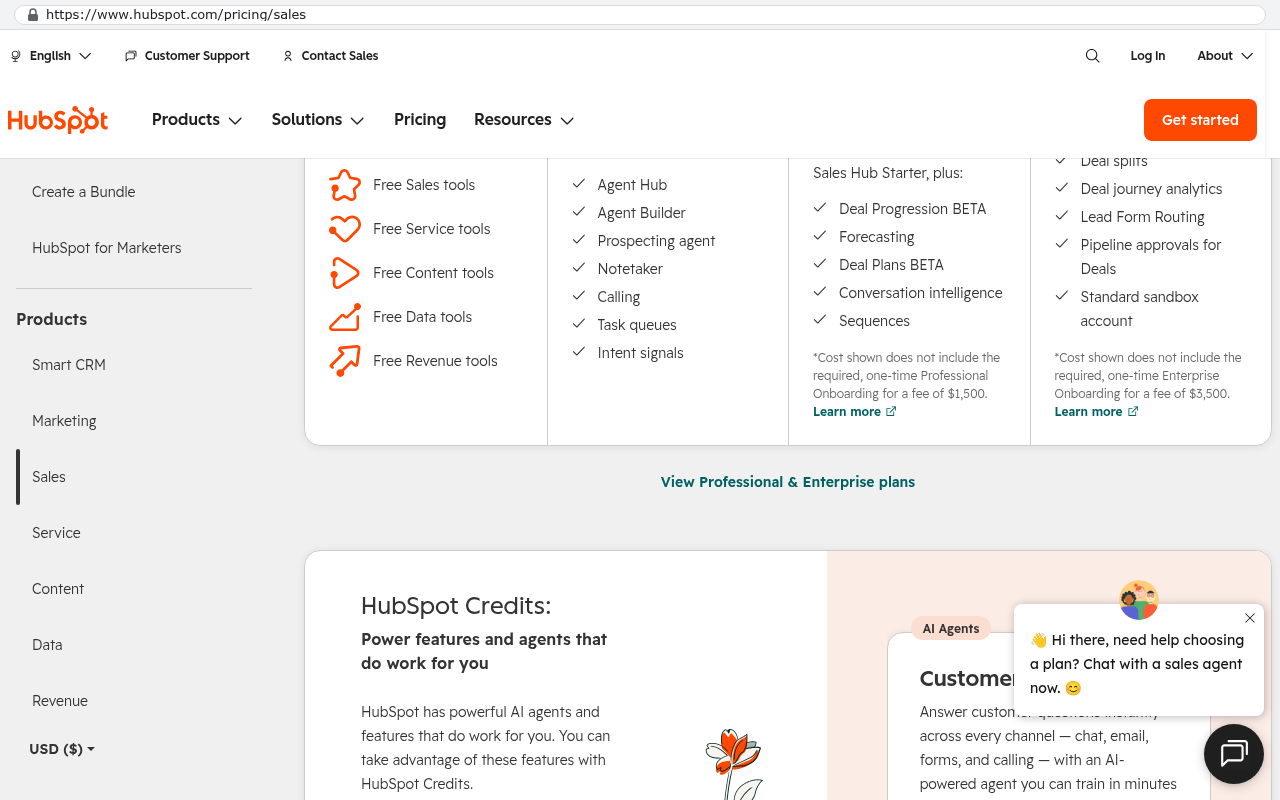
HubSpot's Sales Hub pricing page lists Professional at $100 per seat per month on annual billing, with a one time Professional onboarding fee the page states as required. Twenty five seats is $2,500 a month, $30,000 a year, and $150,000 across five years plus that onboarding. HubSpot's pricing page also lists Enterprise at a higher per seat rate with a larger onboarding fee, and the step between tiers is where most growing companies get caught, because the feature you need sits one tier up.

HubSpot pricing page for Sales Hub showing plan tiers with checkmarked features and onboarding fee information visible despite a chat widget overlay
HubSpot's Sales Hub pricing page displays the Sales Hub Starter plan features and pricing tiers with details about onboarding fees. Source: www.hubspot.com/pricing/sales

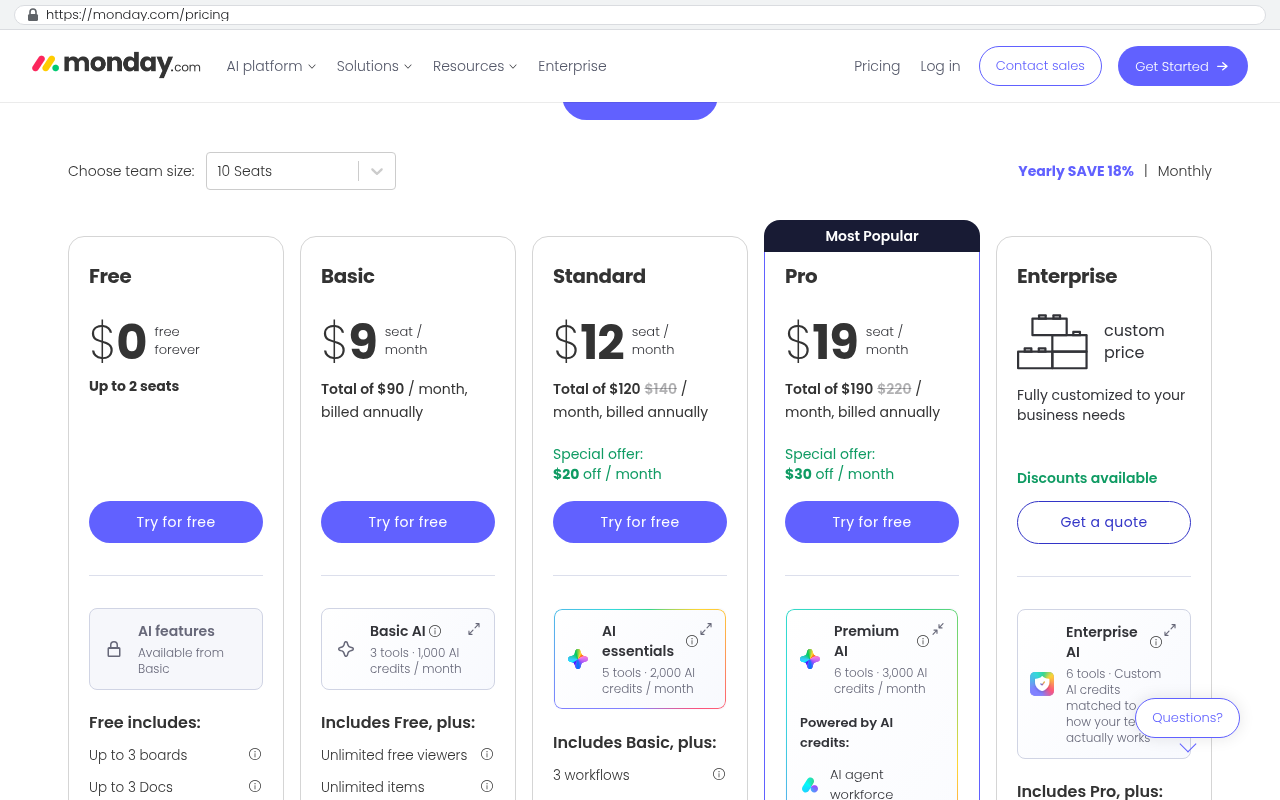
The work management platforms look cheaper per seat and add up faster than people expect, because they spread to everyone. monday.com's pricing page lists the Pro plan at $19 per seat per month billed annually, with a three seat minimum. One hundred and twenty seats is $2,280 a month, $27,360 a year, $136,800 over five years. There's a quirk on that page worth knowing. Seats are sold in tiers, so if you need 22 people in the system you buy the 25 seat block. You pay for three seats nobody uses.

monday.com pricing page showing the Pro plan card highlighted as Most Popular with $19 per seat per month pricing and a total of $190 per month billed annually
monday.com pricing page displays the Pro plan at $19 per seat per month with a total of $190 per month billed annually Source: monday.com/pricing

Smartsheet's pricing page lists the Business plan at $19 per member per month billed annually, and the Pro plan at $9 per member per month with a cap on how many members it allows. Smartsheet's own help documentation explains the user subscription model, where editors and viewers don't consume a paid licence but anyone who creates or owns sheets does. That model is kinder than straight per head pricing, and it still scales with the number of people doing real work. Smartsheet also sells its heavier capabilities inside higher tier packages rather than including them, so the sticker on the pricing page is usually the floor.

NetSuite publishes no price at all. Oracle quotes a base platform fee, plus modules, plus user licences, annually. If you're on NetSuite you already know the number and you already know it goes up.

Check these pages yourself before you use any of these numbers in a board deck. Vendor list prices change, and several of these vendors raised list prices in the last two years. The arithmetic is the point, not the specific figure. Your contracted rate may differ from list, and if it's well below list, ask what happens at renewal when the discount lapses.

What are you really paying, counting everything?

Licence fees are the part you see. The total is usually 1.5 to 2 times bigger, and the extra lives in places nobody adds up.

Start with implementation. Enterprise platforms are rarely usable out of the box for a company with a real process, so there's a partner, a statement of work, and a configuration project. Then admin time. Somebody at your company maintains the thing. If that's half of an operations manager's week, that's a salary line caused by the software. Then connectors. Many companies pay a third party integration service monthly just to move data between tools they already pay for. Then the add ons, the extra storage, the API call limits, the premium support tier that turned out to be necessary.

Then the one that never makes a spreadsheet. The workarounds. The spreadsheet that exists because the platform can't do a thing your business needs. The person who rekeys invoices between two systems every Friday. The report somebody rebuilds by hand each month because the built in reporting won't join those two objects. Those hours are real payroll, spent indefinitely, to compensate for software you already pay for.

I've watched a company add this up for the first time and go quiet. Not because the licence number was shocking. Because the licence number was a third of the total.

Two real examples from the record here, and I'm giving you the licensing figures only, because build prices for someone else's project tell you nothing about yours. A Texas contractor was facing a $1.3 million five year Smartsheet contract. After the replacement went live, the licence bill went to zero. Another company was paying $125,000 a year in licensing. After replacement, that line disappeared from the budget entirely. Those are facts about those two projects. They are not a price list, and anyone who tells you your project will look like someone else's is guessing again.

Why are the cost ranges you find online useless?

They describe adjectives, not systems. "Small app" and "enterprise platform" are not units of measurement, and a price attached to one of them can't be checked, can't be held to, and can't be budgeted against.

Look at how those articles are built. Someone collects a handful of past projects, sorts them into three buckets by gut feel, and publishes the spread. No scope documents, no integration counts, no data volumes, no indication of whether the number included migration or training or testing. Two projects in the same bucket could differ by a factor of five and both would be honest.

There's a worse version, where the range is a lead magnet. A low number pulls in enquiries, and the real number arrives after discovery, once you're emotionally committed and have already told your boss a figure. That's a sales technique, and it's common enough that you should treat any published range as marketing until proven otherwise.

What you should expect instead is a process you can audit. A scoping conversation that produces a written scope. A fixed quote attached to that scope. Clear rules for what happens when the scope changes. If a firm can describe that process clearly and show you a scope document from a previous project with the client details removed, that tells you more than any number on a web page.

You can do your own rough sizing before you talk to anyone, by the way. Count your integrations. Count your distinct user roles. Count the reports that have to be exact. Estimate how many years of data have to move and how dirty it is. Those four counts drive most of the price, and walking into a scoping conversation with them already written down shortens the whole process.

What should a fixed quote include, and what should it leave out?

A fixed quote should cover everything required to get the system into daily use, not everything required to get it to compile. That difference is where most budget overruns are born.

Things that belong inside the quote. The build itself, obviously. Testing, including the kind where real users try to break it before launch. Data migration, with at least one full rehearsal against real data so you find the mess before go live day. The integrations named in the scope. Training materials and sessions for the people who'll use it. Deployment and the first stretch after launch, when small things always surface. Documentation of how the thing works, written for a developer who has never seen it, because one day that will matter.

Things that reasonably sit outside the quote, as long as they're named. Third party costs you pay directly, like hosting and any paid service the system calls. Hardware. Your own team's time, which is substantial and is yours to manage. New features you think of in month three, which get priced as changes. Ongoing maintenance after the post launch period, which should be a separate, clearly described arrangement.

Three clauses worth reading closely in anything you sign. Who owns the code, and when does ownership transfer, and under what conditions. Whose name is on the hosting and service accounts. And what the exit looks like if the relationship ends, including whether you get a full copy of everything, running, with instructions. On an owned system, the answer to all three should be simple and in your favour. If the answers are complicated, you're looking at a rental dressed as a purchase.

Watch for a quote that includes build and excludes migration. It happens often, and it is the single most expensive exclusion in the business. Moving ten years of records, attachments and relationships out of an old platform is a project with its own plan, its own rehearsals and its own failure modes.

What costs do buyers forget to budget for?

Internal time is the big one. Your people will spend real hours in scoping sessions, review calls, testing and training. That time isn't on any invoice, and ignoring it is how a project starts slipping while everyone insists it's on track.

Second is parallel running. For a stretch, you'll be paying your old platform and running the new system at the same time. You cannot cancel the old contract the day the new one launches, because you need a safety net and because your contract probably doesn't let you. Budget for an overlap. Check your renewal date early, because an auto renewal that fires mid project will cost you a full extra year.

Third is data cleanup, which is yours, not the developer's. A migration can transform data, deduplicate it, and flag problems. It cannot decide which of three customer records is the right one. Somebody on your team makes those calls, and on a messy dataset that's weeks of someone's attention.

Fourth is change management. People who've used the same screens for eight years will resist new ones, even better ones. You need a champion in each department, training that happens more than once, and a tolerance for a dip in productivity in the first weeks. Skipping this is how a perfectly good system gets quietly abandoned while everyone returns to their spreadsheets.

Fifth is the usage based bits. Transactional email, SMS, document signing, address lookup, mapping. These are cheap individually and real in aggregate, and they belong in the run cost line from the start.

Want to go deeper? Read our full guide: How do you migrate ten years of data out of a SaaS platform?

When is custom software the wrong buy?

Often. And a firm that won't tell you when is a firm optimising for its own pipeline rather than your outcome.

Custom is wrong for commodity, regulated, standardised work. Payroll is the clearest example. The rules change constantly, the penalties for errors are severe, and ADP or Gusto have already solved it for a tiny fraction of what building it would cost. Same for the accounting ledger. QuickBooks and Xero are cheap, well understood by your accountant, and built to survive an audit. Build around them, connect to them, and leave the ledger alone.

Custom is wrong when the value is the network. If your clients already live inside a platform, collaborate with you there, and would have to change their own habits to work with you, replacing it has a migration cost that is social rather than technical. A custom client portal can absolutely be better than a shared platform seat, and it's still a conversation you have to have with every client. Count that.

Custom is wrong when you're too small for the arithmetic to work. If you're paying a few thousand dollars a year in total software spend, the platform is winning on price and that's the end of it. The maths tips when the licence bill is large, when it grows with headcount, and when you're working around the tool rather than with it.

Custom is wrong when nobody internally will own it. A system without an owner drifts. Requests pile up, nobody prioritises, and in two years it's as stale as the thing it replaced. You need one person with authority, time and interest. If you can't name them, wait.

Custom is wrong when your process genuinely changes every quarter in ways you can't describe. Not when it changes, because all processes change and a built system is easier to change than a configured one. When it changes faster than it can be specified. Settle it first.

And custom is wrong if you're six months from an acquisition, a merger or a major strategy shift. The acquirer will have opinions. Wait and see what they are.

The honest downsides of owning your system

You own the maintenance. There is no vendor rolling out improvements while you sleep. Security patches, dependency updates, browser changes and interface changes at connected systems all land on your desk. That's a standing cost and a standing responsibility.

You own the roadmap too, which sounds great until you realise it means nobody else is thinking about your software. A platform with ten thousand customers ships features you never asked for and sometimes love. Your system does exactly what you specified, and nothing more, until you decide otherwise and pay for it.

There's a key person consideration as well. The team that built it understands it best. Good documentation, clean conventions and standard technologies reduce that risk a lot, and they don't eliminate it. Ask what stack the system is built on, and if the answer isn't something a competent developer anywhere could pick up, ask why.

Finally, the first version will have rough edges. Every system does, bought or built. The difference is that with an owned system you can fix them, rather than filing a feature request into a queue you don't control.

Want to go deeper? Read our full guide: When staying on your current platform is the right call

How do the five year numbers usually come out?

The pattern is consistent, and you can run it on your own numbers in ten minutes with a spreadsheet.

On the rent side, write down your annual licence cost at list or contracted rate. Add your implementation or partner spend, amortised. Add connector subscriptions, add ons, premium support. Add a conservative estimate of internal admin time. Then apply an annual increase, because renewals rise and your headcount grows. Multiply across five years.

On the own side, write down the fixed build quote, once. Add run cost at the published range, times sixty months. Add a maintenance allowance. Add your internal time during the build, and the parallel running overlap. Total it.

Where it breaks down in practice depends almost entirely on seat count and licence tier. A company with fifteen people on a cheap plan will find the platform wins easily. A company with a hundred and fifty people on an enterprise tier, paying a partner to configure it and an ops manager to maintain it, usually finds the lines cross well before year five, and after they cross the gap widens every single year, because one line keeps climbing and the other doesn't.

Run the sensitivity too. What happens if you add thirty people. In the per seat model, your bill goes up by thirty times the seat rate, every month, forever. In the owned model, your hosting bill barely notices. That divergence is the whole argument, and it only shows up when you model growth rather than today.

One caution so this stays honest. Do not model the build as a one time cost and then forget it. Software you own needs investment over time, and a business that treats the launch as the finish line ends up with a five year old system and a familiar complaint. Budget for ongoing improvement. It will still be a fraction of per seat licensing at any meaningful headcount.

How do you get a number for your own situation?

You book a scoping conversation and you bring three things. Your current invoices, your integration list, and the two or three processes that cost you the most time right now.

What happens next is unglamorous and effective. Someone maps what you do today, including the parts that only exist in people's heads. The connections get listed and sized. The data gets looked at, not described. The exclusions get written down as carefully as the inclusions. Then you get a fixed scope and a fixed quote against it, and you decide with real information instead of a range from a blog post.

That conversation should also be allowed to end with a no. Sometimes the right answer is to renegotiate the renewal instead, using what you now know about your own usage. Sometimes it's to drop a tier, or cut unused seats, or connect two systems you already own rather than replacing either. A scoping conversation that honestly concludes you should stay where you are has saved you the cost of a bad project, and that is a good outcome.

For context on where this perspective comes from. 467 projects have been delivered here. The company was a partner of several of the platforms discussed on this page, and those partnerships were cancelled. There's no platform configuration service here, no administration, no reselling. The work is building systems clients own outright, and the honest version of that work includes telling people when they don't need one.

Frequently asked questions

Can you just give me a ballpark?

No, and that's a deliberate answer rather than a coy one. A ballpark given without scope is either padded so high it scares you off something sensible, or set so low it becomes a change order treadmill. What you can have quickly is a scoping conversation that produces a fixed number you can budget against.

Is custom software cheaper than SaaS?

Over five years, at meaningful headcount, usually yes. In year one, usually no, because you're paying for the build up front instead of spreading it across monthly invoices. The crossover point depends on your seat count and licence tier, and the arithmetic above will tell you roughly where yours sits.

What does it cost to run once it's live?

After launch the system costs roughly $100 to $200 a month to run for a smaller company, and $2,000 to $3,000 a month at enterprise scale, paid to the hosting providers directly, with no license and no per user fee. Maintenance is separate and should be budgeted separately.

Why do other sites publish price ranges if they're meaningless?

Because ranges rank well in search and generate enquiries. They're marketing assets. They're built by sorting past projects into buckets with no scope attached, which means two projects in the same bucket can differ enormously and both be reported honestly.

Do I pay per user on a custom system?

No. That's the structural difference. You pay for hosting and compute, so adding people changes your bill by almost nothing. In a per seat model, every new hire raises your software bill permanently.

What if I need a change after launch?

You scope it, price it and build it, the same way as the original work. It's a cost, and it's a cost you control. Compare that with a platform where the feature you need requires a tier upgrade for every seat in the company, whether or not they use it.

Can a custom system work alongside QuickBooks or my ERP?

Yes, and that's usually the right design. The ledger stays where it is and the custom system connects to it. Rebuilding accounting is one of those requests that should get a no.

How long before a replacement is live?

That depends on scope in the same way price does. What's worth knowing is that phased delivery, where the most painful process goes live first, gets value flowing much earlier than a big bang launch. The linked article below covers the timeline question properly.

Who owns the code and the accounts?

You do. Every account the system runs on, meaning code hosting, database, hosting and email, is created in the client's own name. The development team is invited in as a guest and can be removed at any time.

Next steps

Three things you can do this week without talking to anyone. Pull your software invoices and total the annual spend. Check your vendor's public pricing page and multiply your seat count by five years at list, so you know what a lapsed discount would mean. Then write down the processes where your team works around the software instead of inside it, because that list is where the real money is.

When you want a number for your own situation, the way to get one is a scoping conversation that produces a fixed scope and a fixed quote. It's free, it's a conversation about whether a build makes sense for you, and it's allowed to end with the conclusion that it doesn't. If staying put or renegotiating is the better call, you'll hear that. You can book a free strategy session to start it, or read more about how owned systems are built on the custom software page.

Read this next

If timing is your next question after cost, start with How long does it take to replace a project management platform?

Related articles and guides

Questions

Frequently asked questions

Do I need to pay per user for custom software?

No. With custom software, you own the system and pay hosting providers directly, typically $100 to $200 monthly for smaller companies or $2,000 to $3,000 monthly at enterprise scale. There are no per user fees or licensing costs, which makes the long term cost significantly lower than SaaS platforms that charge per seat.

Why won't developers give me a price quote before we talk about what I need?

Because the same request means different things to different companies. Saying you need a CRM is a category, not a specification. One company might build a contact list and pipeline. Another might add territory rules, commission splits, and system integrations. Without understanding your workflows and data, any quote is a guess that developers pad with hidden cushions, leading to change orders and cost overruns.

What is the honest process for getting a fixed quote on custom software?

The honest sequence is scoping first, then a fixed scope document, then a fixed quote. Scoping means someone sits with your team and observes your actual workflows, not just your wish list. The scope document specifies what is in and what is out, feature by feature. The price attaches to that document, so mid project changes are handled as clear options rather than disputes.

Should I compare custom software cost to SaaS based on the build price alone?

No. Your real comparison is the build cost plus five years of running expenses versus five years of SaaS renewals at list price. Custom software costs roughly $100 to $200 monthly to run for smaller companies after launch, paid directly to hosting providers. You need to include this operational cost when weighing custom against SaaS renewals.

Are the cost ranges I see online for custom software useful for budgeting?

No, they are useless. Those ranges label builds as simple, medium, or enterprise without specifying scope, which is the only variable that matters. A simple app requiring complex ERP integration is not actually simple. A complex build with just six forms is not complex. These ranges skip the information you need to budget accurately.

When is custom software the wrong choice?

Custom software is the wrong buy for standard, regulated, commodity work like payroll and accounting ledgers. These are better served by established SaaS solutions. Additionally, owning custom software means you own maintenance too, which is a real ongoing cost. Consider whether your needs truly require customization or if an existing platform would serve you better.

What happens to my custom software when I need changes after launch?

When you request a feature mid project or after launch, there are four honest answers. It is already in the fixed scope and gets built at no extra cost. It is new work and gets priced before anyone codes it so you decide. It belongs in a later phase and goes on a list. Or it is a no, because something you already own does it better and rebuilding would be waste.

Read this next

What questions should you ask before signing a five-year software contract?

A five-year software contract is a bet that your business won't change. Here are the questions about cost, data exit, and ownership to ask before you sign one.

If this is your situation

Talk it through on a call

Thirty minutes over video with the person who would run the build. You talk, we ask questions, and you leave with a plain read on whether custom software makes sense for you. If the answer is that your current tool is fine and badly configured, you will hear that.

Book a strategy call

Who wrote this

David Verneuille

David Verneuille

Founder, Black Badger Software Solutions

David Verneuille founded Black Badger after 18 years as a project manager and years implementing Smartsheet, monday.com, Wrike and Zoho for clients. He now builds custom systems that clients own outright, which is why the writing here is specific about where each platform fits and where it stops fitting.

About Black Badger

Drafted with AI assistance, then checked, edited, and approved by a person before publishing. The facts, opinions, and recommendations are ours.

Related

More on custom software

Custom software /

Build versus buy software in 2026

Buy the commodity, build the edge. A practical walkthrough of the build versus buy decision in 2026, with real vendor pricing facts, five year arithmetic, and the cases where renewing is the right call.

Read it

Want this looked at properly?

An article can only go so far without knowing your systems. Book a strategy call, walk us through what is breaking, and you will get a straight read on whether custom software is the right answer.