Skip to content
BlackBadger

Blog / Custom software

Build versus buy software in 2026

/ 29 min read

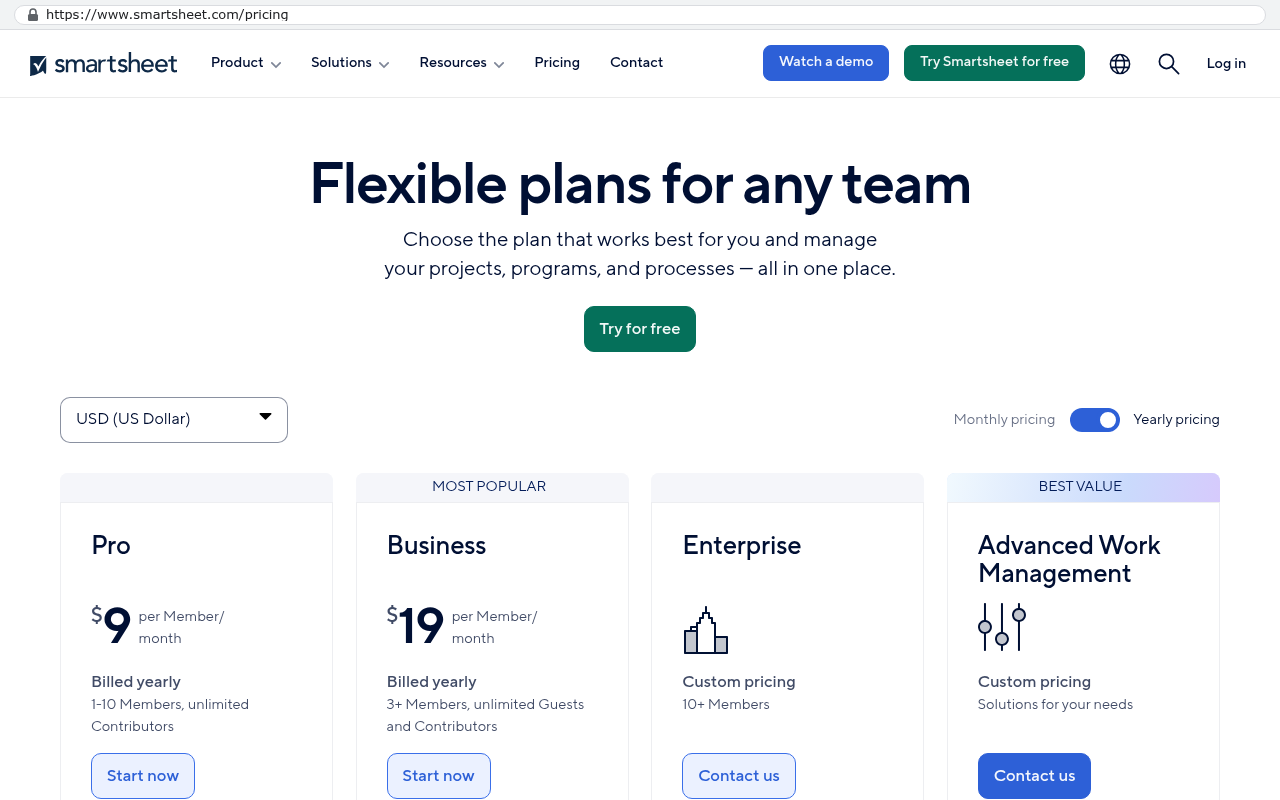
Smartsheet pricing page showing Pro plan limited to one to ten members at nine dollars per member monthly and Business plan starting at nineteen dollars per member monthly with three or more members and unlimited guests

TL;DR

In 2026, businesses should buy commodity software like payroll and email while building custom systems for competitive operations where per-seat pricing has become prohibitively expensive or multiple disconnected tools drain productivity.

Key takeaways

  • Buying remains the right choice for commodity functions like payroll, accounting, email, and file storage because vendors spread compliance costs across thousands of customers and these are not sources of competitive advantage.
  • Building wins when software runs your actual competitive operation, per-seat pricing has become a tax on headcount growth, or multiple tools held together with connectors require constant manual data retyping.
  • AI-assisted development has changed the build equation by making code faster to write, easier to read, and simpler for new developers to maintain, narrowing the cost gap between building and buying.
  • Custom systems typically cost $100 to $200 monthly for smaller companies and $2,000 to $3,000 monthly at enterprise scale for hosting, making the five-year total cost often lower than escalating SaaS subscriptions.
  • Hidden buying costs including renewal increases, seat minimums, API access restrictions on lower tiers, and data lock-in upon contract termination often exceed the initial quoted price of software subscriptions.
  • Building fails when teams are small, processes remain unsettled, clients collaborate within the vendor's platform, or no internal owner can make ongoing decisions about the system.
  • Platform configuration by an independent consultant or in-house admin offers a middle path that replaces some custom builds but leaves license bills unchanged and works best for companies not yet ready to build.

TL. DR

Buy the commodity. Build the thing that makes you money. If a platform runs the process your company competes on, and the bill grows every time you hire someone, a system you own usually wins on cost and fit by year three. Everything else should stay rented.

Here is the answer you can quote to your leadership team. Payroll, accounting, email, file storage, video calls and card processing should be bought, because those problems are solved and the vendor spreads the compliance cost across thousands of customers. Building wins when the software runs your actual operation, when per seat pricing has turned your headcount into a tax, or when three or four tools are held together with connectors and people retyping data.

Key takeaways

  • Buying is still correct for commodity functions. Nobody should write their own payroll engine in 2026.
  • Building wins on four triggers. Process as competitive edge, absurd per seat growth, a patchwork of connected tools, and a vendor roadmap that now dictates yours.
  • AI assisted development changed the math. Code is faster to write, faster to read, and faster for a new developer to pick up.
  • The lock in objection has a concrete answer. Every account sits in the client's name, the code is readable, and the builder can be removed.
  • Run cost is the number people forget. After launch a custom system costs roughly $100 to $200 a month for a smaller company and $2,000 to $3,000 a month at enterprise scale, paid straight to hosting providers.
  • Configuring the platform is a real middle path. It is a job for an independent consultant or an in-house admin, and it leaves the license bill untouched.
  • There are plenty of companies that should renew. Small teams, unsettled processes and client facing collaboration tools are the common cases.

This page walks the whole decision. It covers what to buy, what to build, the five year arithmetic, the risks on both sides, and the cases where a custom build is the wrong answer. Each major section points to a deeper article if you want the detail.

What does build versus buy mean for a business in 2026?

It means choosing between renting software and owning it. Buying means a subscription. You pay per user per month, the vendor runs the servers, and you get what they ship. Building means a system written for your company. You own the code and the accounts it runs on. You pay for hosting, which is the computer time, and nothing else.

Two things moved in the last few years. Per seat pricing kept climbing while vendors repackaged features into higher tiers. At the same time, AI assisted development cut the hours it takes to write and maintain software. The gap between the two options narrowed from both ends.

Most mid sized companies are not choosing between one tool and one build. They are running a stack. A project platform, a CRM, a shared drive, an accounting package, a time tracker, and a few spreadsheets that nobody admits to. People move data between them by hand. That is the real starting point for this decision, and it changes the arithmetic, because a single owned system often replaces three subscriptions at once.

Want to go deeper? Read our full guide: Do you need custom software?

When is buying software still the right call?

Buying wins whenever the software solves a problem that is identical at every company. Payroll is the clearest example. Tax tables change, states change rules, filing deadlines move. A vendor absorbs that work once and divides the cost across every customer. Writing your own would be expensive and slightly worse forever.

The same logic holds for accounting, email and calendars, file storage, video meetings, electronic signatures, card processing and password management. These are commodity functions. They are not how you win work. They have no connection to the thing your customers pay you for. Rent them, keep the subscription, and spend your attention elsewhere.

Microsoft's own Microsoft 365 for business pricing page lists Business Standard at a per user per month rate with an annual commitment, and for email, documents and video calls that is money well spent. You will not beat it. You should not try.

Buying also wins in a few situations that have nothing to do with the category.

  • Your team is small. Twelve people paying a modest monthly bill do not have a problem worth solving with a build.
  • The process is not settled yet. If you changed how you quote jobs twice this year, you are not ready to put it in code.
  • The tool genuinely fits. Some companies run a platform the way the platform was designed and it works fine.
  • You have no internal owner. A build needs one person inside the company who can make decisions. Without that, buying is safer.

There is one more honest case. If a platform is the hub your clients already live in, moving off it carries a real cost in relationships, not just data. A construction firm whose general contractors all send updates through one shared system is not just buying software. It is buying a shared address with its customers.

Want to go deeper? Read our full guide: When staying on your current platform is the right call

When does building win?

Building wins on four triggers. Any one of them is worth a conversation. Two or more and the decision is usually already made, whether or not anyone has said it out loud.

The process is your edge

Some companies win work because of how they do something. A specialty contractor with a bidding method nobody else uses. A distributor whose routing logic beats the competition. A services firm whose intake process closes faster than anyone in its market.

When that process lives in a generic platform, you spend years bending the tool. Custom fields stacked on custom fields. Automations held together with hope. Training time for every new hire on why the system does not match the way you actually work. A system written around your process does the opposite. It makes the thing you are good at faster.

Per seat growth has made the bill absurd

Per seat pricing punishes growth. Every hire adds cost to a system that does not cost the vendor anything extra to run. Most companies tolerate this until a renewal lands and the number no longer looks like software. It looks like a salary.

Salesforce's Sales Cloud pricing page lists the Enterprise edition at $165 per user per month, billed annually. Put eighty people on that and the line item is a six figure annual commitment before a single customization. The platform may be worth it. The point is that the number is now big enough to compare against an asset you keep.

Three or four tools held together by connectors

Watch where your people retype data. A job gets created in the project tool, then the same details get entered in the CRM, then an invoice gets built in accounting from a spreadsheet export. Each handoff is a chance to get it wrong. Each connector is a monthly fee and a thing that breaks quietly on a Friday.

This is the most common reason the companies we see start looking. Not one tool failing. Four tools that each do seventy percent of the job and none of them talk properly.

The vendor's roadmap now sets your roadmap

You asked for a feature two years ago. It is still on the community board with forty upvotes. Meanwhile the vendor moved a feature you rely on into a higher tier, or deprecated the integration you built your month end around. When a vendor's product decisions start deciding what your operations team can do next quarter, you have handed over something more important than money.

Two real numbers from the record. A Texas contractor facing a $1.3 million five year Smartsheet contract had the system rebuilt in 16 weeks for $375,000, and the license bill went to zero. Another company paying $125,000 a year in licensing had it replaced in six weeks for $85,000, owned outright. Those are facts about those projects, and 467 projects have been delivered in total.

Before any build conversation, count three numbers. Your total annual license spend across every tool, your seat count, and your renewal date. Most leaders can name the first one and guess the other two. The guess is usually wrong by a lot, and the renewal date is the one that controls your options.

How has AI assisted development changed the build side of the decision?

It cut the hours, and it made the result easier to hand over. Those are two different wins and the second one matters more than people expect.

On hours, AI writes the repetitive parts fast. Forms, database queries, reports, tests, data import scripts. A developer who knows what to build gets to a working version in a fraction of the time it used to take. The work that remains is the part that was always the hard part. Deciding what the system should do, how the data should be shaped, and what happens when a user does something unexpected.

On handover, AI reads code as well as it writes it. Drop a new developer into an unfamiliar codebase and they can ask the code questions in plain English. What does this function do. Where does an invoice get created. What breaks if I change this field. Five years ago, inheriting someone else's system meant weeks of archaeology. Now it means an afternoon.

That second point is the direct answer to the lock in worry, and it is worth saying plainly. A custom system is only a trap if nobody else can read it. That is no longer true.

What AI does not do

It does not know your business. It cannot tell you that your service managers approve change orders differently from your project managers, or that one customer gets billed on a schedule nobody documented. It will confidently write code against an API that does not exist. It will produce something that runs and quietly does the wrong thing.

Every line still needs review by someone who understands the stakes. Anyone selling you AI built software with no human architecture decisions is selling you a prototype. The cost came down. The judgment did not go away.

What does the five year arithmetic look like?

Run the numbers over five years, not one. One year makes a subscription look cheap and a build look expensive. Five years is how long you will actually keep either one.

Here is a worked example. It is hypothetical, so adjust it with your own figures. Take a company with 60 people on software at a blended $55 per user per month across its main platforms. That is $39,600 in year one. Now add two things that always happen. Seats grow about ten percent a year as the company hires. Prices rise about seven percent a year at renewal.

Year two lands near $46,600. Year three near $54,900. Year four near $64,600. Year five near $76,000. Five year total, roughly $281,000. And that is just license fees. It does not include the connector subscriptions, the admin's time, the implementation consultant you hired in year one, or the three days a month your operations lead spends fixing data that got entered twice.

Now put the other column next to it. A build is a one time cost plus a run cost. The run cost is small and public, because you pay hosting providers directly. The build cost depends entirely on scope, which is why it gets quoted after a scoping conversation and not before.

The honest version of this comparison includes the things that make a build look worse. The money is spent up front, not spread out. Your team gives real hours to discovery and testing. There is a period where you are paying the old license and running the new system in parallel. Budget for all three.

The most common arithmetic mistake is comparing a build quote against this year's license bill instead of the five year total with increases. The second most common is forgetting that the build removes three subscriptions, not one. Add up every tool the new system replaces, including the connector services, before you compare anything.

Want to go deeper? Read our full guide: What custom software implementation actually costs

What are the risks of building, and how are they handled now?

Builds fail in predictable ways. Pretending otherwise would be useless to you, so here are the real risks and what good practice does about each.

Scope creep

The classic failure. Everyone adds one more thing, the finish line moves, and eighteen months later there is no system. The fix is a fixed scope and a fixed quote. Every feature request after that gets one of four honest answers. Yes it is in scope. No it is not. Not yet, it goes in phase two. Or you do not need it, and here is why.

That fourth answer is the one that saves projects. Half of all feature requests are a workaround for a limitation the old platform had. Once the limitation is gone, the request stops making sense.

Nobody can maintain it later

This used to be the strongest argument against building. It is much weaker now. Modern codebases are written in mainstream languages with standard frameworks. AI tooling makes an unfamiliar codebase readable in hours. Any competent developer can pick it up.

Protect yourself anyway. Insist the code lives in a repository in your company's name. Insist on written documentation of how the data is structured. Ask what happens if your builder disappears tomorrow, and listen carefully to the answer.

The cutover goes badly

Data migration is where projects get ugly. Ten years of records, attachments, comment threads and half finished workflows do not copy across with a button. Attachments in particular need a scripted export, because most platforms store them separately from the records they belong to.

The handling is boring and it works. Migrate in stages. Run the old and new systems in parallel for a period. Reconcile record counts and totals before anyone turns anything off. Keep a full export of the old system archived even after you leave.

The team does not adopt it

A system people avoid is a failed system, no matter how good the code is. This is a change management problem, not a technical one. Involve the people who do the work during the build, not at the end. Train in small groups on real tasks. Expect a dip in productivity for a few weeks and plan for it.

Want to go deeper? Read our full guide: How do you migrate ten years of data out of a SaaS platform?

What are the risks of buying that nobody puts in the budget?

Subscriptions have failure modes too, and they rarely show up in the business case. These are the ones that bite real companies, and every one of them is visible on a vendor's own public pages if you go looking.

Renewal increases

Your first term is the cheapest it will ever be. Discounts applied to win the deal fall away at renewal. List prices move. The uplift is often buried in a clause you agreed to three years ago. Check your contract for the auto renewal notice window, because many require written notice thirty to ninety days before the term ends or the next year starts automatically.

Seat minimums and tier caps

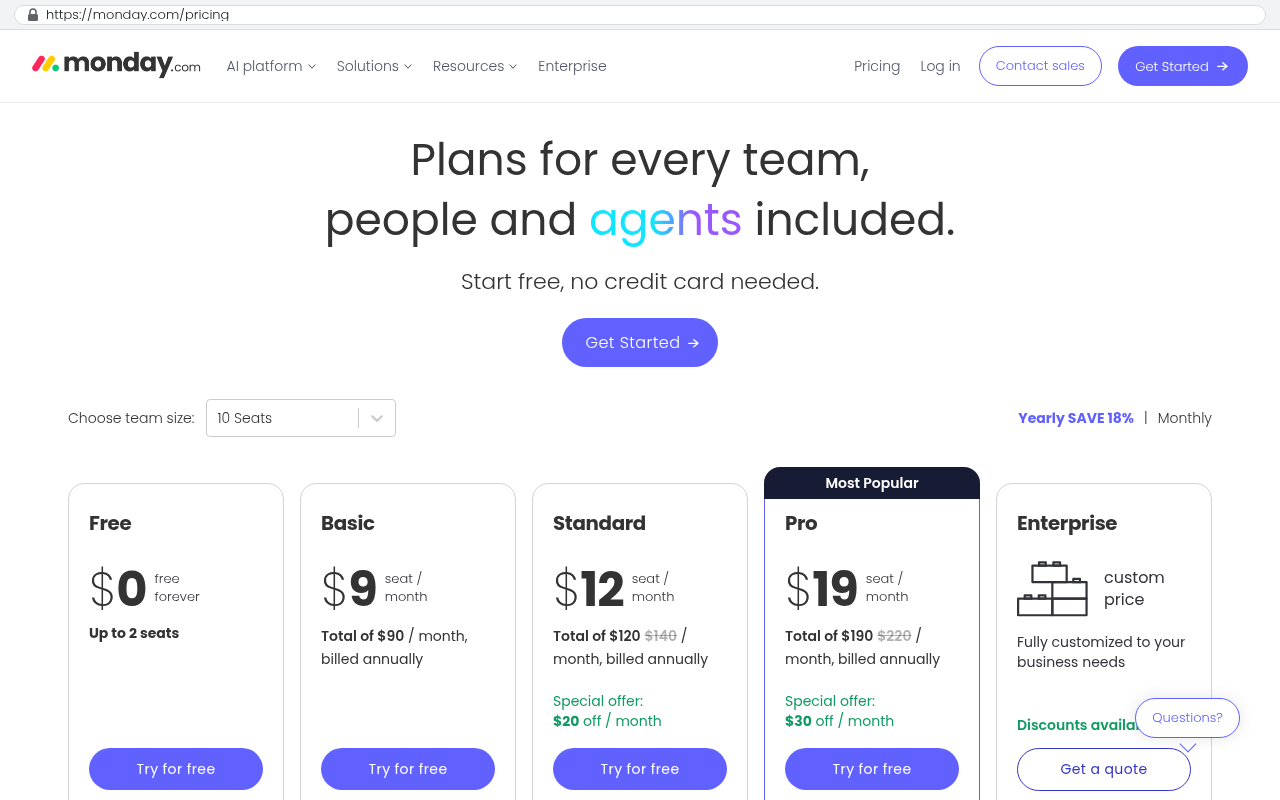
monday.com's pricing page lists its paid plans as per seat per month with a three seat minimum, and seats are purchased in fixed bands rather than one at a time. Smartsheet's pricing page caps its Pro plan at a limited number of members per plan and reserves heavier features for the Business tier. Neither of these is a scandal. They are just structural facts that make the bill move in steps rather than smoothly, and they catch finance teams off guard at renewal.

Smartsheet pricing page showing Pro plan limited to one to ten members at nine dollars per member monthly and Business plan starting at nineteen dollars per member monthly with three or more members and unlimited guests
Smartsheet's pricing page displays the Pro plan at nine dollars per member per month for one to ten members while the Business tier at nineteen dollars offers three or more members and unlimited guests. Source: www.smartsheet.com/pricing?srsltid=AU7gw4WqGVP92uvvM7ih89j1FbwqAa2BpEbtihCOAUorpjePkCPPORP9
monday.com pricing page showing Free, Basic, Standard, Pro and Enterprise plans with per-seat pricing and a 10-seat team size selector
monday.com pricing page displays five plan tiers with per-seat monthly pricing starting at $9 per seat and shows a team size selector defaulted to 10 seats Source: monday.com/pricing

API access gated to higher tiers

This one costs the most and gets noticed the least. The ability to pull your own data out programmatically, or push it into another system, is frequently a feature of a higher plan. Zoho's published API documentation allocates API credits by edition, so a Standard customer and an Enterprise customer have very different ceilings on how much data they can move per day. If you planned to integrate the platform with your accounting system, that ceiling becomes a budget decision.

Onboarding and required services

HubSpot's pricing page lists a one time onboarding fee alongside its Professional tier subscriptions, which means the first year costs more than twelve times the monthly rate. NetSuite, by contrast, publishes no price at all on its site and routes every prospect to a quote request. You cannot plan around a number you cannot see.

What happens to your data when you stop paying

Read the vendor's own retention policy before you sign, not after you cancel. Salesforce's publicly posted Trust and Compliance documentation describes a limited window after a subscription ends during which customer data can be requested, after which it is deleted. Most vendors have some version of this. The window is usually shorter than the time it takes a mid sized company to plan an exit.

Also check what you actually get in an export. Records usually come out fine. Attachments, comment history, automation logic, permission settings and dashboard configurations frequently do not. A clean export of your rows is not the same as getting your system back.

Verify every vendor claim in this section against the vendor's current public pages before you quote it in a board meeting. Pricing, tier limits and retention policies all change, sometimes quietly. The habit of checking the source is worth more than any specific number on this page.

Is a custom system just a different kind of lock in?

It is a fair question and it deserves a specific answer, not reassurance. The honest version is that a custom system can absolutely become a trap. It happens when the code is undocumented, when the accounts sit in the developer's name, and when nobody at the company knows how anything works.

So the answer is structural. Every account the system runs on gets created in the client's own name. The code hosting. The database. The web hosting. The email sending service. The domain. The builder is invited in as a collaborator and can be removed at any time, by the client, without asking anyone.

That changes the relationship completely. A subscription vendor can raise your price and you can either pay or lose your system. An owned system with accounts in your name means the worst case is hiring a different developer. Those are not comparable risks.

The code readability point matters alongside it. Mainstream language, standard framework, documented data model, AI tooling that explains any part of it on request. A new developer can be productive quickly. That was not reliably true a decade ago, and it is the single biggest reason the build side of this decision got stronger.

Ask these three questions of anyone who builds you software, and do not accept a vague answer to any of them.

  • Whose name is on the code hosting account, the database and the production hosting.
  • What documentation exists, and can you read it without a developer in the room.
  • If this relationship ended tomorrow, what exactly would you hand to the next developer.

Is there a middle path, and why does it usually fail?

Yes. The middle path is keeping the platform and configuring or extending it. Hire a consultant or an in-house admin, build custom objects, write scripts inside the vendor's environment, and bend the tool closer to your process. It is a legitimate option and plenty of companies run that way successfully.

Black Badger does not do this work, for anyone. It does not configure, patch, administer or resell any platform. It was a partner of several of these platforms and cancelled those partnerships. So treat this section as a description of your option, not an offer.

The middle path works best when the platform is already about eighty percent right, when your customization is configuration rather than code, and when you have someone in-house who will own it long term. If all three are true, extending is cheaper and faster than replacing.

It fails in four ways worth knowing before you commit.

  • You now pay twice. The license bill is unchanged and a consultant sits on top of it.
  • Customizations break. A vendor update changes behavior and your scripts stop working, usually without warning.
  • The ceiling is still the ceiling. If the platform's data model cannot represent your process, no amount of configuration fixes that.
  • You still do not own it. Every hour spent improving the platform makes leaving harder, which is a good deal for the vendor.

There is a pattern worth watching for. Companies that take the middle path twice usually end up building anyway, having paid for the platform, two rounds of consulting, and the build. If you are on your second major reconfiguration of the same tool, the tool is telling you something.

Want to go deeper? Read our full guide: Why platform implementations ask you to change your process

What does an owned system cost to run?

Less than most people guess, and the costs are transparent because you pay the providers directly. After launch the system costs roughly $100 to $200 a month to run for a smaller company, and $2,000 to $3,000 a month at enterprise scale, paid to the hosting providers directly, with no license and no per user fee.

That bill is made of a few pieces. Hosting, which is the server the application runs on. A database, which is where your records live. File storage for attachments. An email sending service for notifications. A domain name. Backups. All of it billed to your company's own accounts, on your card, visible to your controller.

The important property is that this number does not move when you hire. Add twenty people and your hosting cost barely changes. That is the opposite of per seat pricing, and over five years it is where most of the savings come from.

Maintenance is a separate line and you should budget for it honestly. Software needs security updates, occasional dependency upgrades, and changes as the business changes. You can keep a developer on retainer, hire in-house, or do work in batches as needed. The difference from a subscription is that you choose the amount and the timing, and nobody raises it on you at renewal.

What about the build cost itself

That one gets answered by process, not by a number on a web page, because any number quoted before scope is a guess. The sequence is a scoping conversation to understand the operation, a fixed scope that lists what gets built, a fixed quote against that scope, and four honest answers to every feature request that arrives after. If a firm gives you a price before understanding your process, the price is fiction and the change orders will find you later.

How do you decide for your own company?

Work through it in order. This takes an afternoon and it will tell you more than any vendor demo.

  1. Write down every piece of software the company pays for, with its annual cost and renewal date. Include the small ones. The connector subscriptions and the single seat tools add up.
  2. Add it up and project five years forward with a seven percent annual increase and your expected headcount growth. That is your real buy number.
  3. Mark each tool as commodity or operational. Payroll, accounting, email and storage are commodity. Keep those. The ones that run your actual work are the candidates.
  4. List every place a person retypes data from one system into another. Count the hours per week honestly.
  5. Name the process your company competes on. Then ask whether your current software makes it faster or slower.
  6. Check your contract for the auto renewal notice window and put that date in the calendar with a reminder ninety days before.

Then apply the decision rules. If your operational tools cost under about twenty thousand a year, nobody retypes anything, and the platform fits your process, renew and stop thinking about it. If the five year number is into six figures, people are retyping data daily, and your process fights the tool, you have a build conversation worth having. If you are in the middle, the renewal date decides the timing and a scoping conversation decides the rest.

One more test that cuts through everything. Ask your operations lead what they would change about the current system if they could change anything. If the list is three small annoyances, stay. If the list is the way the system models your work, that is not fixable with configuration.

Start the evaluation at least six months before your renewal date. Not because a build takes a specific amount of time, but because your power to negotiate disappears the week before a contract rolls over. A vendor who knows you have nowhere to go has no reason to move on price.

Where is this advice wrong for you?

Plenty of places. A page that tells you building always wins would be selling, and you would be right to distrust it. Here are the situations where a custom build is the wrong answer, stated plainly.

Your team is small and your bill is small

Fifteen people on a platform costing nine hundred dollars a month have a manageable problem. The five year total is around sixty five thousand before increases. A build does not pay back at that scale unless something else is badly broken. Renew.

Your process changes constantly

Early stage companies and businesses entering new markets rewrite their own operations every few months. Flexible, generic tools are genuinely better during that period. Build when the process stops moving, not before.

Your clients live in the vendor's tool

This is the one people underestimate. If half the value of your platform comes from sharing live views with clients who already have accounts there, replacing it means asking those clients to change. Some will. Some will grumble. A few will treat it as a reason to shop. That is a real cost and it belongs in the business case, not in a footnote. A custom client portal can be excellent, and it is still a change you have to sell to people outside your company.

The software carries certification or regulatory weight

Some industries rely on software that has been certified, audited or approved by a body. Medical billing clearinghouses, certain tax filing systems, specific lab or clinical tools. Rebuilding those means taking on the certification burden yourself. Usually not worth it. Buy the certified piece and build around it.

The migration itself is the hard part

Twelve years of attachments, threaded comments and automation history do not copy across cleanly. Attachments need a scripted export because most platforms store files separately from records. Comment threads often lose their structure. Dashboards and permission schemes have to be rebuilt by hand. None of this is a reason to stay, and all of it is a reason to plan properly and keep the old export archived.

Nobody inside will own it

A build needs one person at your company who can make decisions, answer questions and push back. Not a committee. If that person does not exist or cannot be freed up, the project will drift regardless of who builds it. Fix that first.

If three or more of the situations above describe your company, the right move is to renew and revisit next year. Walking away from a build conversation is a legitimate outcome, and a firm that will not tell you that is not giving you advice.

What if you have already signed a long contract?

You still have options, and the first one is to read the agreement carefully rather than assume you are stuck. Find the term end date, the notice window for cancellation, and any clause covering seat reductions mid term. Many contracts let you reduce seats at renewal but not during the term, which means your headcount decisions and your renewal date should be planned together.

Second, start the replacement work during the term if the arithmetic justifies it. Paying for both for a period is unpleasant and it is often still cheaper than another five year commitment. The Texas contractor case is instructive here, because the comparison was against a $1.3 million five year contract and the rebuild came in at $375,000 with the license bill going to zero afterward.

Third, use the term to get your data out in good order. Export regularly. Keep the exports. Understand which parts of your setup do not export, because those are the parts you will be rebuilding from screenshots if you wait until the final month.

Fourth, negotiate. Vendors discount hardest when they believe you are evaluating alternatives, and that belief needs to be true and early. A vendor contacted ninety days before renewal by a customer with no alternative has every reason to hold firm.

What does a good build actually replace?

Usually more than one tool. That is the part that changes the arithmetic most and the part that gets left out of the comparison most often.

A single owned system commonly absorbs the project platform, the CRM, the shared spreadsheets, the time tracker and two or three connector subscriptions. One place where a job is created, tracked, staffed, billed and reported on. No retyping, because the data was only ever entered once.

Integration with the things you keep is the other half. Accounting stays where it is, and the custom system talks to it. Invoices flow into QuickBooks Online or your ERP without anyone copying numbers. Payroll stays with your payroll provider and receives hours automatically. Email and calendar stay with Microsoft or Google. The build sits in the middle and does the work people were doing by hand.

That is also the honest limit of the integration story. Connections depend on what each vendor's API allows, and some vendors restrict API access to higher plans or impose daily call limits. Those limits are checkable in advance and they occasionally force a design change. Better to find that in scoping than in week six.

Want to go deeper? Read our full guide: Can a custom system connect to QuickBooks Online?

Frequently asked questions

Is custom software more expensive than SaaS?

Up front, yes. Over five years, often not. A subscription spreads the cost and raises it every year. A build concentrates the cost once and then drops to hosting. The crossover depends on your seat count and your license bill, which is why you run the five year projection before deciding anything.

What happens if the company that builds my system disappears?

You keep everything, as long as the accounts were set up correctly. The code hosting, database, hosting and email accounts should all be in your company's name from day one. You hire another developer and give them access. AI tooling makes an unfamiliar codebase readable quickly, so onboarding a replacement is far less painful than it used to be.

Can a custom system really replace a platform like Smartsheet or monday.com?

For internal operations, yes, including the sheets, the dashboards, the automations and the reporting. The harder part is external collaboration. If your clients and subcontractors already have accounts in that platform and use it daily, you are asking them to change too. That is a migration cost worth naming out loud rather than discovering halfway through.

How long does a build take?

It depends entirely on scope, and anyone who answers before understanding your operation is guessing. What you can hold a firm to is the process. A scoping conversation, a fixed scope, a fixed quote, and honest answers about what is in and what is not.

Should I build my own payroll or accounting system?

No. Those are commodity functions with regulatory requirements that change constantly. Buy them, keep them, and connect them to whatever you build. The same goes for email, file storage, video calls and card processing.

What does the system cost to run after launch?

Roughly $100 to $200 a month for a smaller company and $2,000 to $3,000 a month at enterprise scale, paid to the hosting providers directly. No license fee and no per user fee. The number barely moves when you hire.

Can Black Badger just customize our existing platform instead?

No. It does not configure, patch, administer or resell any platform. It was a partner of several of those platforms and cancelled those partnerships. If configuring your current tool is the right answer, hire an independent consultant or an in-house admin for that work.

What if the honest answer is that we should stay?

Then that is the answer you will get. Plenty of companies should renew, and saying so is more useful than selling a project that does not pay back.

Your next step

Start with the afternoon of arithmetic. Total license spend, five year projection, renewal dates, and an honest list of where people retype data. That exercise alone usually settles the question for companies at either end of the range.

If you land in the middle, the next step is a conversation about whether a build makes sense for your specific operation, including the case where it does not. You can book a free strategy session and walk through the numbers with someone who will tell you to stay on your platform if that is the right call. Black Badger is in Clearwater, Florida, serving Pinellas and Hillsborough counties.

Read this next

When staying on your current platform is the right call. It covers the opposite side of this page in detail, which is the set of situations where renewing beats building.

Related articles and guides

Questions

Frequently asked questions

Should we build custom software or buy SaaS in 2026?

Buy commodity functions like payroll, accounting, and email. Build when software runs your actual operation, when per seat pricing has become too expensive, or when you're patching together multiple tools with manual data entry. The decision depends on whether the software is a competitive advantage or a solved problem.

What are the main triggers that make building software the right choice?

Building wins on four triggers: your process is a competitive edge, per seat pricing has grown absurd with headcount, you're using three or four disconnected tools requiring manual data transfer, or a vendor's roadmap dictates yours instead of supporting your needs. Any one trigger warrants serious consideration.

How much does it cost to run a custom system after it launches?

A custom system costs roughly 100 to 200 dollars monthly for smaller companies and 2,000 to 3,000 dollars monthly at enterprise scale. These costs go directly to hosting providers for computer time. This is the number many companies forget when evaluating build versus buy decisions.

How has AI changed the economics of building custom software?

AI assisted development made code faster to write, faster to read, and faster for new developers to pick up. This improved the math for building by reducing development hours and making systems easier to maintain, narrowing the cost gap between building and buying from both ends.

What are the main risks of building custom software?

Key risks include scope creep expanding the project, difficulty maintaining the system later, failed data migration during cutover, and team adoption issues. Additionally, nobody inside may want to own ongoing responsibilities, and systems can become difficult to replace without an internal champion driving decisions and maintenance.

What hidden costs come with buying software that people forget?

Hidden costs include renewal price increases, seat minimums and tier caps limiting flexibility, API access gated behind higher pricing tiers, required onboarding and services fees, and questions about data ownership when you stop paying. These expenses often aren't budgeted upfront but appear once you're locked into a platform.

When should a company definitely stick with buying software?

Buy when your team is small and the bill is modest, processes are unsettled and changing frequently, clients live in the vendor's tool already, your software carries certification or regulatory weight, or nobody inside your company will own a custom system. Also stay if you're genuinely using the platform as designed and it works fine.

Read this next

What questions should you ask before signing a five-year software contract?

A five-year software contract is a bet that your business won't change. Here are the questions about cost, data exit, and ownership to ask before you sign one.

If this is your situation

Talk it through on a call

Thirty minutes over video with the person who would run the build. You talk, we ask questions, and you leave with a plain read on whether custom software makes sense for you. If the answer is that your current tool is fine and badly configured, you will hear that.

Book a strategy call

Who wrote this

David Verneuille

David Verneuille

Founder, Black Badger Software Solutions

David Verneuille founded Black Badger after 18 years as a project manager and years implementing Smartsheet, monday.com, Wrike and Zoho for clients. He now builds custom systems that clients own outright, which is why the writing here is specific about where each platform fits and where it stops fitting.

About Black Badger

Drafted with AI assistance, then checked, edited, and approved by a person before publishing. The facts, opinions, and recommendations are ours.

Related

More on custom software

Custom software /

How much does custom software cost in 2026?

Custom software is priced by scope, so no honest firm quotes before scoping. Here's the real process, the published run cost after launch, and how it compares with five years of per seat licensing.

Read it

Want this looked at properly?

An article can only go so far without knowing your systems. Book a strategy call, walk us through what is breaking, and you will get a straight read on whether custom software is the right answer.