
- Per-seat SaaS pricing assumes a flat headcount. Tourism, hospitality, and event operations are anything but flat.
- Annual discounts lock you into peak-season seat counts during your slowest months.
- Adding and removing seats every season costs staff hours nobody tracks.
- With a custom system you own, adding the fortieth user costs nothing extra.
- Run the twelve-month arithmetic before you talk to anyone about building. If the waste is small, keep renewing.
Why seasonal Tampa Bay businesses overpay for software they only need part of the year
/ 8 min read
TL;DR
Seasonal businesses in Tampa Bay pay for full software seat counts year-round while only using them during peak seasons, wasting significant money through annual contracts, minimum seat requirements, and hidden administrative costs that custom systems can eliminate.
Key takeaways
On this page
If your headcount triples between January and April and collapses in July, your software bill probably doesn't follow the same curve. It should. Most of the time it doesn't, and the gap is real money.
TLDR: Seasonal businesses in Pinellas and Hillsborough pay for software seats twelve months a year while only using them for four or five. Annual contracts, minimum seat counts, and messy offboarding make it worse. A system you own removes user count from the cost equation entirely, but it's only worth building if your seasonal waste is large and repeating.
The staffing curve nobody's software respects
Clearwater Beach in March doesn't look like Clearwater Beach in September. Neither does the payroll.
A charter operation, a catering company, a beach resort, a wedding venue, a pest control firm running snowbird contracts: all of them ride the same wave. Staff count climbs hard in the winter and spring, peaks around spring break, and drops off through the summer. Event companies ride a different curve with the same shape, spiking around conference season and the holidays.
Your operations team feels this. You hire twenty seasonal people. You train them. You give them access to the scheduling system, the CRM, the job tracker, and the field app. Four months later most of them are gone, and you start the cycle again.
The work scales. The software bill doesn't.
How per-seat pricing quietly punishes you
Per-seat means you pay per named user, per month. It's a clean model for a law firm with eleven people who all show up every Monday. For a business whose headcount swings by sixty percent, it's a tax on your busy season that you keep paying in your dead one.
Three things make it stick:
- Annual contracts. The discount for paying yearly is big enough that most operators take it. That locks your seat count at the number you had when you signed, which is usually your peak.
- Minimum seat tiers. Plenty of platforms won't let you drop below a floor, or they kick you to a cheaper plan that loses the features your office staff depend on.
- Upgrade-only mid-term changes. You can add seats on day one of the season. Removing them often waits until renewal. Read your agreement and you'll find that language.
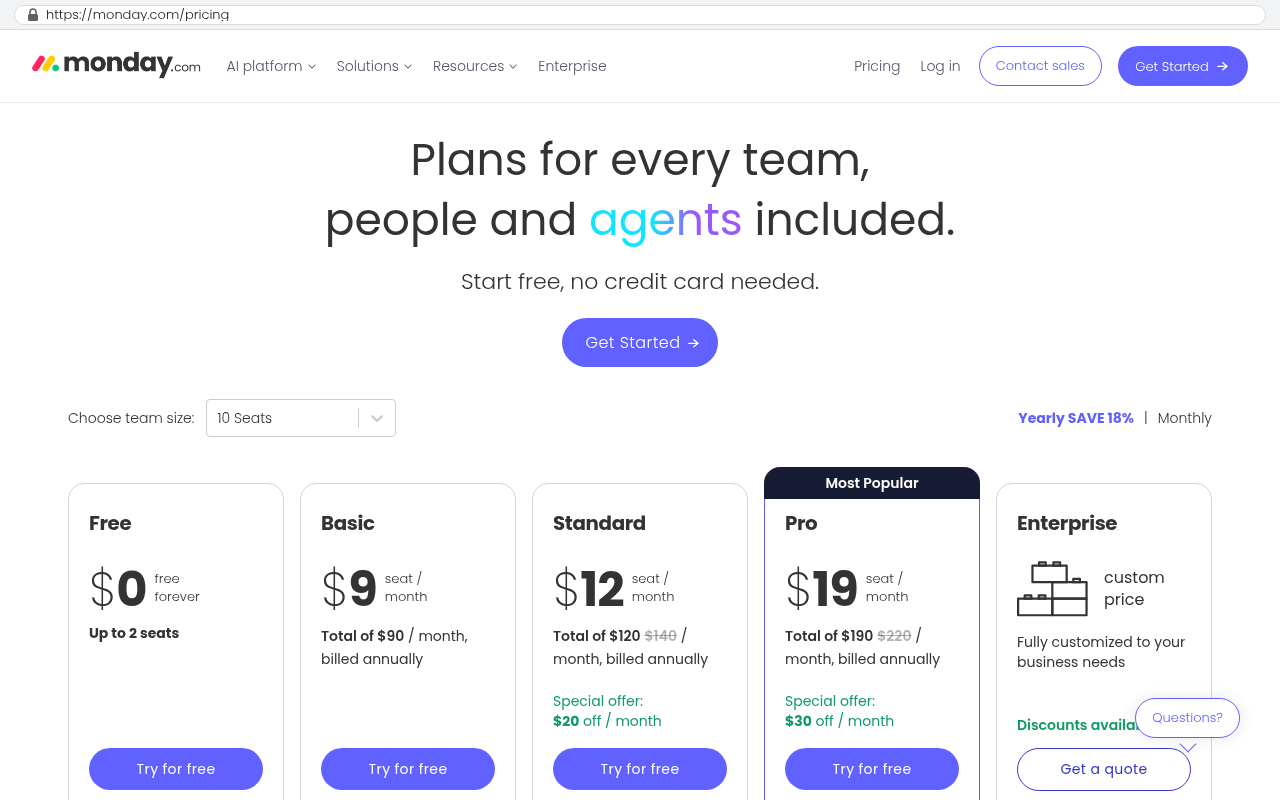
Here's the part that stings. Vendors know the pattern. Seat counts going up mid-term is instant and self-service. Seat counts going down tends to require an email to your account rep.
Before your next renewal, pull your actual monthly active user counts for the last twelve months. Most platforms expose this in an admin or usage report. Compare that curve against the seats you were billed for. The gap between the two lines is what you're buying and not using.
The admin cost you're not counting
Seat math is the visible half. The invisible half is the person in your office who does the provisioning.
Every season, someone creates accounts, assigns permissions, resets passwords, and builds the new hires into the right crews or territories. Then at season's end they deactivate, archive, and reassign records so the departing user's jobs don't vanish from a dashboard. Across four or five platforms, for twenty-plus people, twice a year.
Nobody puts that on a budget line. It still costs you. And when it gets skipped, which it does, you end up paying for ghost seats belonging to people who stopped working for you in May.
Audit your user lists right now. If you find former employees still active, you've found money.
What changes when you own the system
In a custom system you own, user count is a database field. It isn't a billing event.
You pay to build it once. After that your running costs are hosting, a domain, email sending, maybe a payment processor, and whatever maintenance you choose to buy. Adding forty seasonal workers in January changes none of those meaningfully. Removing them in May changes none of them either. Provisioning gets built the way your business works, so a manager can onboard a whole crew from one screen instead of five vendor admin panels.
Run the arithmetic yourself. It's simple:
- List every per-seat platform and its monthly cost per user.
- For each one, write down your peak seat count and your off-season actual usage.
- Multiply the difference by the per-seat price, then by the number of months you're overprovisioned.
- Add the hours your team spends on seasonal provisioning, priced at a loaded hourly rate.
- Project that annual total across three to five years, with a reasonable price increase each year.
An illustrative example. Say you carry forty seats at seventy-five dollars a month, but only eighteen of those are genuinely in use for seven months of the year. That's twenty-two unused seats, times seventy-five, times seven. Roughly eleven and a half thousand dollars of air per year, on one platform. Over five years, with the usual annual increases, that's a build budget sitting inside your overhead.
Do this exercise per platform, not in aggregate. Seasonal waste is almost always concentrated in one or two tools where every field or seasonal worker needs a login. Replacing that one tool often captures most of the savings without touching accounting or payroll.
When a custom build is the wrong answer
Plenty of seasonal operators should keep paying the subscription. Be honest about which group you're in.
If your total seasonal waste is a couple thousand dollars a year, building something custom won't pay back. Small waste stays waste either way. Negotiate your renewal instead and ask for a seasonal seat structure. Some vendors will do it if you ask directly.
If the platform does something genuinely hard, leave it alone. Payroll with multi-state tax filing, card processing, accounting with audit trails. These are regulated and complex, and rebuilding them is a bad use of money.
If your seasonal staff only need the tool for an hour a week, check whether a cheaper read-only or limited tier covers them. Many platforms have one and don't advertise it.
And be realistic about what you take on when you own software. You get the asset and the responsibility. Hosting needs monitoring. Browsers and payment APIs change. Someone has to answer when a crew lead can't log in at six in the morning. That's a maintenance relationship, whether with us or someone else, and it's a real line item.
Practical first steps
Start with data, not vendors. Pull twelve months of usage reports and twelve months of invoices for every platform your seasonal staff touch. Build a one-page table of seats billed versus seats used, month by month.
Then find your renewal dates and put them on a calendar. You have the most power sixty days out, not sixty hours out.
Next, write down what your seasonal workers actually do in each system. Usually it's narrow. They clock in, see a schedule, check off tasks, upload a photo. That narrow slice is the realistic candidate for a custom build, and the office team can stay on the platform they already know.
If the numbers say building makes sense, book a free strategy session and bring the table with you. The conversation goes better when the arithmetic is already on paper.
Read this next
If you're weighing a rebuild against a renewal, the next thing to read is our breakdown of how to calculate total cost of ownership on SaaS subscriptions over a five-year window. It covers the price escalation clauses most people skim past.
Related reading on this site covers per-seat pricing traps in field service software, what a realistic data migration off a SaaS platform involves, and how to scope a first custom build so it stays small.
Frequently asked questions
How much am I overpaying if my headcount changes seasonally?
Per-seat SaaS pricing charges you for peak season staffing year-round. If you have forty seats at seventy-five dollars per month but only use eighteen for seven months, that's roughly eleven thousand dollars annually in unused seats on one platform alone. Over five years with typical price increases, that's a substantial amount sitting in your overhead that could justify building a custom system.
Why does my software bill stay high when my staff shrinks for the off-season?
Annual contracts lock you into peak-season seat counts at discounted rates. Minimum seat tiers prevent you from downgrading without losing features. Removing seats typically requires vendor approval and waits until renewal, while adding them is immediate. This structure means you pay for peak staffing during your slowest months.
What hidden costs come with seasonal staffing in SaaS platforms?
Beyond seat fees, someone on your team provisioning accounts, assigning permissions, and managing seasonal onboarding twice yearly costs real hours nobody budgets for. When offboarding gets skipped, you pay for ghost seats of departed workers. This administrative overhead is invisible but substantial across multiple platforms serving twenty-plus seasonal people.
Does owning a custom system eliminate per-user costs?
Yes. In a system you own, user count is a database field, not a billing event. You pay once to build it, then running costs are hosting, domain, email, and maintenance. Adding forty seasonal workers in January or removing them in May changes your costs meaningfully. Provisioning also gets built to match your workflow, reducing manual admin work.
When should a seasonal business build a custom system instead of using SaaS?
Run the twelve-month arithmetic first. Calculate unused seat costs across all platforms, add administrative provisioning hours, and project over three to five years. If total seasonal waste is several thousand dollars annually, a custom build can pay back. If waste is small, negotiating better renewal terms with vendors makes more sense than building.
Can I negotiate seasonal pricing with my current software vendor?
Some vendors will accommodate seasonal seat structures if you ask at renewal. Before negotiating, pull your actual monthly active user counts for the last twelve months from your admin or usage reports. Compare that curve against your billed seats to document the gap. This data strengthens your case for pricing that matches your actual usage pattern.
What should I do first if I think I'm overpaying for seasonal software?
Audit your user lists immediately to find former employees still active. Check your usage reports for actual monthly active users versus billed seats. List each per-seat platform and calculate wasted seats multiplied by monthly cost and overprovisioned months. Also track hours your team spends on seasonal provisioning. This exercise reveals whether your waste is large enough to justify alternatives.
Share this article
Keep reading
The subscription audit every Tampa Bay business should run this quarter
Most companies pay for six or seven tools nobody opens. Here's how to run a real subscription audit using your card statements, seat reports, and renewal deadlines.
If this is your situation
Talk it through on a call
Thirty minutes over video with the person who would run the build. You talk, we ask questions, and you leave with a plain read on whether custom software makes sense for you. If the answer is that your current tool is fine and badly configured, you will hear that.
Who wrote this

David Verneuille
Founder, Black Badger Software Solutions
David Verneuille founded Black Badger after 18 years as a project manager and years implementing Smartsheet, monday.com, Wrike and Zoho for clients. He now builds custom systems that clients own outright, which is why the writing here is specific about where each platform fits and where it stops fitting.
Drafted with AI assistance, then checked, edited, and approved by a person before publishing. The facts, opinions, and recommendations are ours.