Skip to content
BlackBadger

Blog / CRM

Signs your CRM has outgrown your business instead of the other way around

/ 12 min read

HubSpot knowledge base export article displaying Export button in menu and table of contents for Account data, Revenue data, Content, CRM data, Data management, Marketing content, Reporting, Sales data, Service data, and Workflows sections.

TL;DR

A CRM has outgrown your business when your team shapes processes around software limits rather than customer needs, signaled by shadow spreadsheets, duplicate data entry, and disabled automations that reveal where the platform cannot adapt.

Key takeaways

  • Process changes driven by software constraints rather than business strategy indicate your CRM has become the bottleneck instead of a tool.
  • Shadow spreadsheets, duplicate data entry across systems, repurposed fields with wrong labels, and disabled automations are concrete symptoms that your platform cannot model how your business actually works.
  • Mainstream CRM platforms have real technical ceilings on custom record types, automation runs, and API calls that no configuration can overcome, particularly affecting field service and complex operational needs.
  • A single administrator holding all configuration knowledge creates organizational risk because knowledge gaps cannot be separated from genuine platform limitations.
  • Before renewing licenses, score the gap between what your CRM does and what your business needs, then decide whether to reconfigure the existing platform, switch vendors, or build a custom system you own outright.
  • A successful CRM replacement runs parallel with your old system for a period rather than requiring a sudden cutover, which protects your data and operations during transition.
  • Comparing the total cost of three years of licenses, add-ons, and administrative labor against owning a custom build outright often reveals unexpected economics that favor building instead of renting.

Your CRM was supposed to make selling and serving customers easier. Somewhere along the way, it started making the rules. If your team now shapes its day around what the software will accept, the relationship has flipped. You are no longer running the business in the CRM. You are running the CRM, and the business fits in around it.

TL. DR: A CRM has outgrown you when your process bends to fit the tool. The tells are shadow spreadsheets, duplicate typing, fields repurposed to mean something else, and automations switched off because they fire at the wrong time. Some of that is bad setup and fixable in weeks. Some of it is a hard platform limit, and no amount of configuration will move it. Score the gap before you renew, then decide whether to fix the config, change platforms, or build a system you own.

Key takeaways

  • The clearest warning sign is process change driven by software limits rather than customer or margin reasons.
  • Shadow spreadsheets are data, not disobedience. They show you exactly what the CRM refuses to model.
  • Mainstream platforms have real ceilings on custom record types, automation runs, and API calls. You can hit them.
  • When one admin holds all the configuration knowledge, your risk is a person, not a platform.
  • Compare three years of licences plus add-ons plus admin hours against a build you own outright.
  • A replacement runs in parallel for a while. Nobody flips a switch on a Friday and hopes.

The inversion nobody notices while it happens

Healthy software absorbs how you work. You add a service line, and the system records it. You change how quotes get approved, and the approval follows the new rule. Nothing dramatic happens because the tool is doing its job.

The inversion starts small. A sales manager splits one deal stage into two because the pipeline report only groups by stage. An operations lead stops logging site visits because the activity type list cannot be extended past a certain point. A dispatcher schedules work in a spreadsheet because the CRM calendar cannot show two technicians against one job.

Each workaround makes sense on its own day. Stacked over three years, they become your actual process. And your actual process now exists mostly outside the system you pay for. That is the moment the CRM outgrew the business rather than the reverse.

The symptoms you can see from the floor

You do not need an audit to spot this. Walk the floor and ask people to show you what they really do.

Shadow spreadsheets come first. Someone keeps a sheet for renewals, or for jobs waiting on parts, or for the accounts that need a call before month end. Ask why, and the answer is always the same. The CRM cannot hold that shape of information, so a human made a place for it. Those sheets are a free requirements document. They tell you precisely where the software stops.

Duplicate entry is the next tell. The same customer name gets typed into the CRM, then the accounting system, then a scheduling tool. Nobody enjoys this. It survives because the integration either does not exist or broke and nobody trusted it again. Every duplicate entry point is also a place where your two systems quietly disagree about reality.

Then there are the repurposed fields. A text field called "Industry" now stores a franchise number. A checkbox named "Newsletter" flags accounts under credit hold. This is how reporting dies. New hires read the field label, believe it, and act on it. Six months later, nobody can explain why the segment counts are wrong.

The last symptom is the loudest one. Automations get disabled. A workflow fires a customer email on the wrong trigger, so someone turns it off rather than rebuild it. Over time the automation list becomes a museum of things that used to work. Your team stops trusting anything the system does on its own, which means they check everything by hand.

Collect every shadow spreadsheet in your company this week. Do not scold anyone for having one. Put them in a folder and count the columns that have no home in your CRM. That number is the honest size of your gap.

The ceiling on mainstream platforms is real

Most popular CRMs are excellent at contacts, companies, deals, and activities. They are good enough at tickets and quotes. They start to strain when your business needs record types they never imagined.

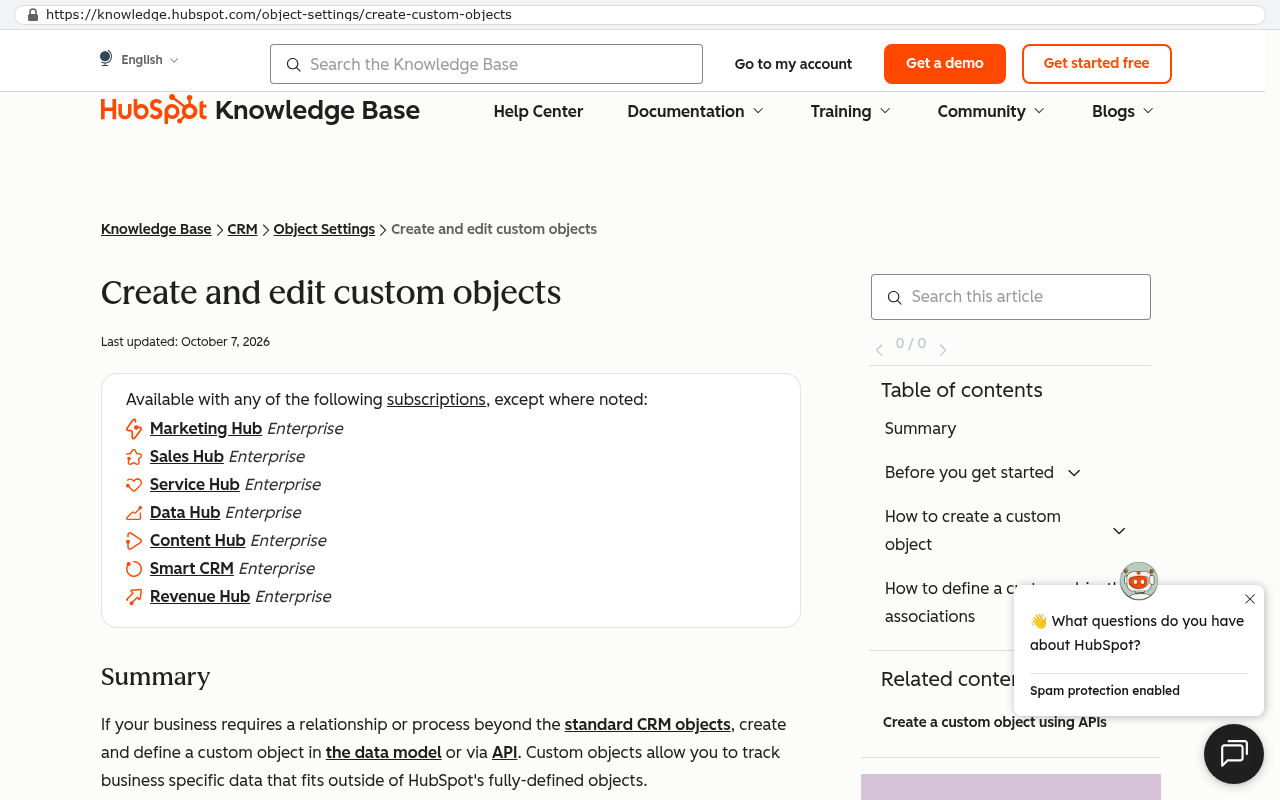
Say you run field service. You need equipment installed at a site, with a warranty, a service history, a parts list, and a maintenance schedule that depends on run hours rather than calendar dates. That is five or six related record types with rules between them. Mainstream platforms let you create extra record types, but the number you get, the way they relate to each other, and how they behave in reports depend heavily on your pricing tier. On several popular platforms, the ability to add meaningful custom record types only appears on the higher plans, and even then the reporting on them is thinner than on the built in objects.

HubSpot Knowledge Base page showing create and edit custom objects documentation with a list indicating the feature is available with various Enterprise subscription tiers
HubSpot Knowledge Base article on creating and editing custom objects lists which subscriptions support the feature including Marketing Hub Enterprise, Sales Hub Enterprise, Service Hub Enterprise, Data Hub Enterprise, Content Hub Enterprise, Smart CRM Enterprise, and Revenue Hub Enterprise. Source: knowledge.hubspot.com/object-settings/create-custom-objects

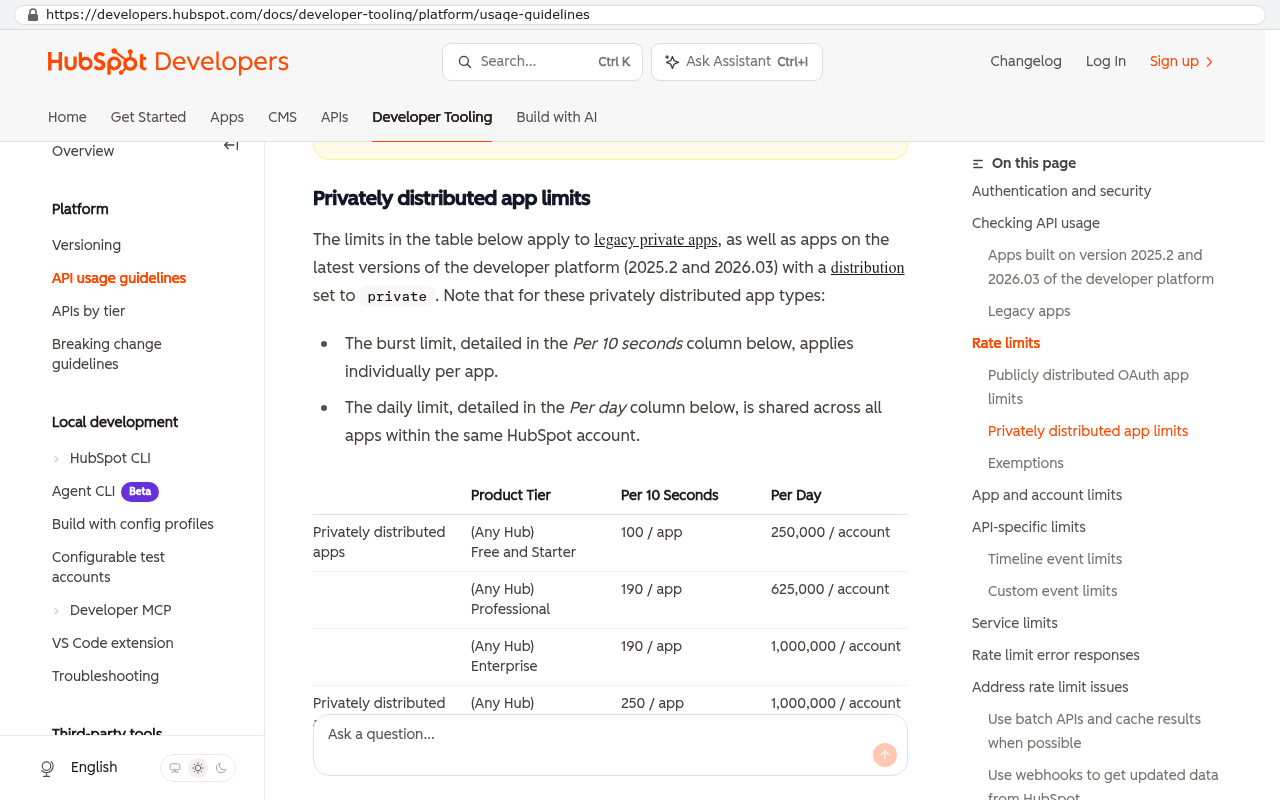
Automation has ceilings too. Platforms cap how many automated actions run per month, how many steps a single workflow can hold, and how many times an integration can call the system per day. Those caps are fine at forty users and twelve workflows. At two hundred users and a hundred workflows, you start hitting them mid afternoon, and jobs silently queue or fail.

HubSpot Developers API usage guidelines table showing privately distributed app limits with columns for Product Tier, Per 10 Seconds rate, and Per Day rate across Free and Starter, Professional, and Enterprise tiers
HubSpot Developers API usage guidelines page shows a table of privately distributed app limits with per 10 seconds and per day rate limits organized by product tier Source: developers.hubspot.com/docs/developer-tooling/platform/usage-guidelines

Here is the part that stings. When you hit a platform ceiling, the fix offered is almost always a higher tier or another add on. You pay more for the same product to do a thing your business needed anyway. That is a reasonable trade once. By the third time, you are funding someone else's roadmap instead of your own.

When one person holds the whole map

Admin dependency forms without anyone deciding on it. One person learns the platform properly. They build the fields, the workflows, the reports. They become the fastest route to any change, so every request goes to them. Within two years, the configuration only makes sense inside their head.

The cost shows up in three ways. Changes queue behind one calendar. Nobody else can safely touch a workflow, because the dependencies are undocumented. And if that person leaves, you are paying a consultant to reverse engineer your own operation.

I have seen this in teams that did everything else right. The problem is not the admin. Good admins are worth keeping. The problem is that no written record exists of why the system behaves the way it does. Ask yourself a simple question. If your admin took a month off, could anyone else change a required field without breaking a report? If the answer is no, the platform is not your only risk.

Before you evaluate any replacement, export your current configuration. Field lists, workflow definitions, report filters, user roles. Vendors make this awkward on purpose, and you will need it whether you migrate or stay. If it lives only in one admin's memory, you do not own your process.

Score your CRM in an afternoon

You can put a number on this without hiring anyone. Score each statement from 0 to 3, where 0 means never and 3 means constantly.

  1. We changed a business process because the software could not support the better version.
  2. Staff keep spreadsheets that contain information the CRM should hold.
  3. The same data gets typed into more than one system.
  4. Fields are used for something other than their label says.
  5. Automations have been switched off rather than fixed.
  6. Leadership does not trust CRM reports and asks for manual numbers instead.
  7. A needed change is blocked by a plan limit, an add on, or a per record cap.
  8. Only one person can safely change the configuration.

Under 8 means your setup needs tidying, not replacing. Between 9 and 16 means you have a configuration problem worth a serious cleanup project, and probably a documented rebuild inside the same platform. Above 17 means the platform itself is the constraint, and more configuration will not save it.

Fix the configuration, or admit the platform is the problem

Most CRMs that feel broken are badly configured. That is good news, because configuration is cheap to fix compared to replacement. If your scores cluster in fields, reports, and automations, do the cleanup. Delete dead fields. Rebuild the workflows you turned off. Write down what each one does and why. You will feel like you bought new software.

Replacement becomes the better answer when the limits are structural. You need record types the platform will not model well. You need approval rules that depend on your own pricing logic. You need to run the same data through operations, billing, and field work without three exports. No amount of admin skill fixes that, because the shape of your business does not match the shape of the product.

Then do the arithmetic, honestly. Take your seat count and your real monthly price per seat, including the tier you had to upgrade to. Add the add ons. Add the integration platform that glues it to accounting. Add the hours your admin spends per month keeping it upright, priced at their loaded cost. Multiply by 36 months, because that is a realistic planning horizon for a renewal decision. A forty seat team on a mid tier plan with two add ons and ten admin hours a month lands at a number most owners have never actually written down. Compare that number to a system your company owns outright, with no per seat fee and no tier gates. Sometimes the subscription still wins. Often it does not, and the difference is not close.

Where a custom build is the wrong call

Custom is not the default answer, and I will not pretend otherwise. If your needs are genuinely standard contacts, deals, and email sequences, a mainstream CRM does that better than anything you would commission. Marketing automation with deliverability at scale, calendar sync with every mail provider, and mobile apps polished by a thousand engineers are not worth rebuilding.

There are other honest caveats. A custom system needs someone accountable for it after launch, whether that is your team or a maintenance arrangement. Migrating years of attachments and email history takes scripted extraction, not copy and paste, and some third party sync data simply does not come out cleanly. If your sales team lives inside a platform marketplace app that has no equivalent elsewhere, that is a real switching cost. And if your leadership cannot commit attention to discovery, a build will reproduce your current mess in a new colour.

What a replacement path actually looks like

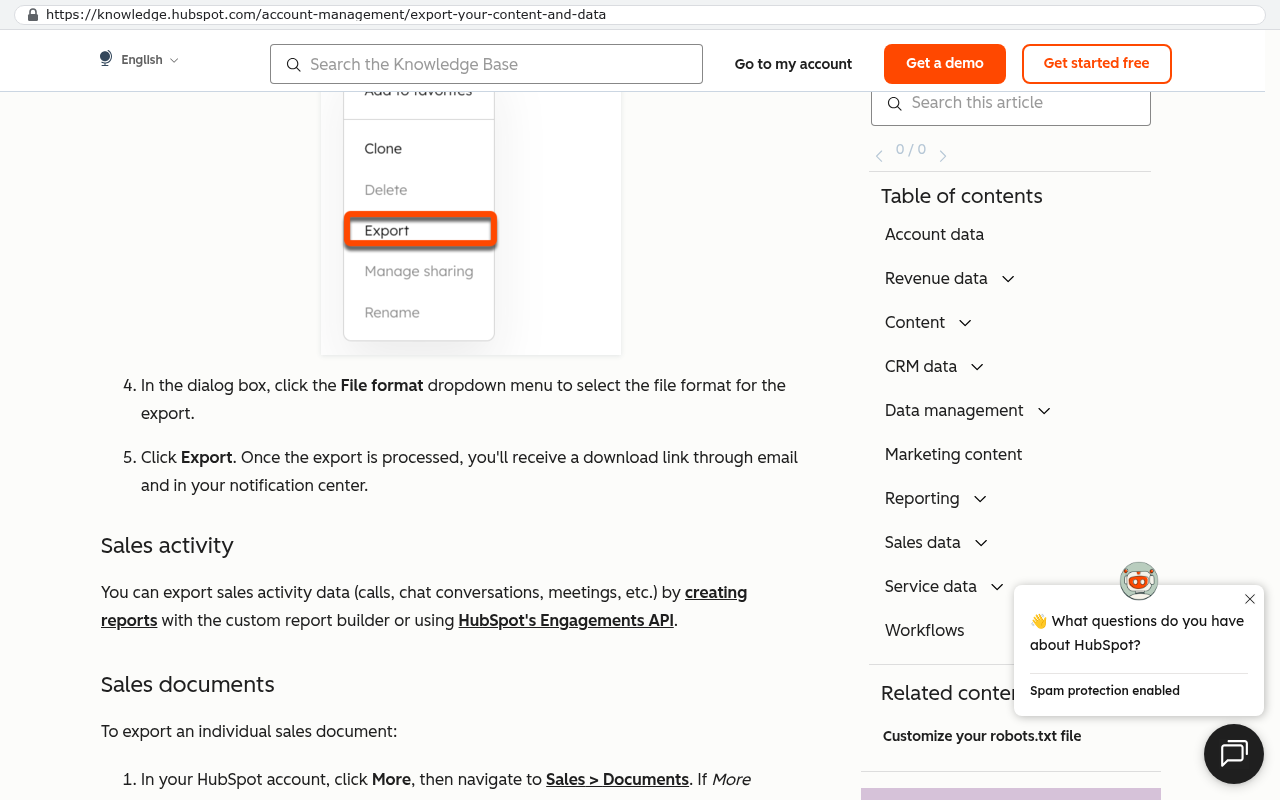
Nobody switches a CRM in one weekend. The path that works starts with extraction, because your data is the asset and the software is the wrapper. You pull everything through the platform's export and its API, which is the programmatic door vendors provide for moving data in and out. Records, notes, attachments, and history. You keep a full copy before you commit to anything.

HubSpot knowledge base export article displaying Export button in menu and table of contents for Account data, Revenue data, Content, CRM data, Data management, Marketing content, Reporting, Sales data, Service data, and Workflows sections.
HubSpot knowledge base article on exporting content and data showing the Export button highlighted and file format options for exporting account data and sales activity. Source: knowledge.hubspot.com/account-management/export-your-content-and-data

Then you model what the business really does, using those shadow spreadsheets as source material. This is where a custom build earns its keep, because the record types match your operation instead of a generic sales funnel. You build the highest pain area first. Usually that is quoting, scheduling, or renewals.

Next comes parallel running. Both systems live for a period, with the new one owning a defined slice of work and the old one still available for reference. Your team compares outputs on real jobs. When the new system produces the same or better numbers for a full cycle, you cut over and downgrade the old subscription to read only or export and close it.

The last piece is documentation and ownership. You hold the source code, the database, and the deployment. No tier gate stands between your business and a change you need next year.

Start the evaluation at least four months before renewal. Vendors negotiate hardest when you have a credible alternative and time to use it. If you begin three weeks out, your only real option is to sign.

Where to start this week

Run the score. Gather the spreadsheets. Write down your real three year cost of the current stack. Those three tasks take an afternoon and they turn a vague frustration into a decision you can defend to your board or your bank.

If the score lands high and the arithmetic is uncomfortable, that is worth a conversation with people who have built replacements and migrated the data out. You can book a free strategy session with our team in Clearwater, and we will tell you plainly whether your problem is configuration or platform.

Read this next: our walkthrough on extracting your data from a CRM before a migration, which covers exports, API pulls, and attachment handling in detail.

Related reading on this site includes the true three year cost of per seat software, how to model field service work that a standard CRM cannot hold, and what parallel running looks like on a real cutover.

FAQ

How do I tell a configuration problem from a platform problem?

Ask whether your best admin, given a month and no budget limit inside the current plan, could fix it. If yes, it's configuration. If the fix needs a higher tier, a record type the platform won't model, or a cap increase, the platform is the constraint.

Isn't a custom CRM riskier than a big vendor?

Different risk, not automatically more. With a vendor you carry price rises, forced tier changes, and product decisions you don't control. With a custom system you carry maintenance responsibility. The risk you can plan for is usually the better one.

Can we keep our existing CRM for sales and build custom for operations?

Yes, and that's often the smart move. Sales teams get real value from mature email and pipeline tools. Operations is where generic products fall down. You integrate the two and stop paying for tiers you only bought to fake an operations feature.

What happens to our historical data?

It comes with you, but not for free in effort. Records and notes export cleanly. Attachments and email threads need scripted extraction through the API. Budget real time for verifying the import against the original, record by record on a sample.

How long should we run both systems?

At least one full business cycle for the work you've moved over. If you close month end, run a full month. The goal is matching numbers twice, not once, before you retire the old system.

Questions

Frequently asked questions

What are the main signs that my CRM has outgrown my business?

The clearest signs are shadow spreadsheets where teams track data the CRM cannot hold, duplicate entry of the same information into multiple systems, fields repurposed to mean something different than their labels suggest, and automations that are disabled because they trigger at the wrong time. These symptoms show where the software stops working for your actual process.

How do I know if my CRM problem is fixable configuration or a hard platform limit?

Bad setup and configuration issues are fixable within weeks through proper customization. Hard platform limits are real constraints that no amount of configuration will overcome. Most mainstream CRMs have ceilings on custom record types, automation runs, and API calls. Before renewing, score the gap between what you need and what the platform can do to determine which category your problem falls into.

Why do mainstream CRM platforms have limitations?

Popular CRMs like Salesforce excel at contacts, companies, deals, and activities but strain when you need record types they never imagined. Custom record types, automation capacity, and integration calls have real limits that vary by pricing tier. Even at higher tiers, reporting on custom objects is thinner than on built-in objects, and you eventually hit ceilings as your team grows.

What does it mean when a CRM has outgrown my business?

A CRM has outgrown your business when your process bends to fit the tool rather than the tool supporting how you work. This happens when process changes are driven by software limits instead of customer or business needs. Your actual workflow now exists mostly outside the system you pay for, and the tool has started making the rules instead of serving them.

How can I measure the real gap between my CRM and my needs?

Collect every shadow spreadsheet your company uses this week without scolding anyone for having one. Count the columns and data shapes in those sheets that have no home in your CRM. That honest count of missing fields and structure tells you the true size of your gap before you decide whether to fix configuration, change platforms, or build a custom system.

What is the risk when one person knows all the CRM configuration?

When one admin holds all configuration knowledge, your risk becomes a person rather than a platform. This dependency forms gradually as one person becomes the fastest route to any change, queuing all requests through them. Within two years, the configuration only makes sense inside their head, creating delays and making the system fragile if that person leaves.

Can I keep my current CRM and build a custom system alongside it?

Yes, a replacement system typically runs in parallel for a while. You do not flip a switch on a Friday and hope for the best. Running both systems simultaneously allows you to migrate gradually and verify that the new system works before fully transitioning away from the old one.

Read this next

When staying on your current platform is the right call

Custom software isn't always the answer. Here's the arithmetic, the warning signs, and the honest caveats that tell you whether to renew your platform or replace it.

If this is your situation

Talk it through on a call

Thirty minutes over video with the person who would run the build. You talk, we ask questions, and you leave with a plain read on whether custom software makes sense for you. If the answer is that your current tool is fine and badly configured, you will hear that.

Book a strategy call

Who wrote this

David Verneuille

David Verneuille

Founder, Black Badger Software Solutions

David Verneuille founded Black Badger after 18 years as a project manager and years implementing Smartsheet, monday.com, Wrike and Zoho for clients. He now builds custom systems that clients own outright, which is why the writing here is specific about where each platform fits and where it stops fitting.

About Black Badger

Drafted with AI assistance, then checked, edited, and approved by a person before publishing. The facts, opinions, and recommendations are ours.

Related

More on crm

More reading

Read this next

Want this looked at properly?

An article can only go so far without knowing your systems. Book a strategy call, walk us through what is breaking, and you will get a straight read on whether custom software is the right answer.