Skip to content
BlackBadger

Blog / CRM

Signs your business has outgrown its CRM subscription

/ 12 min read

HubSpot Developers API usage guidelines page displaying a rate limits table for privately distributed apps with columns for Product Tier, Per 10 Seconds requests per app, and Per Day limits per account across Free and Starter, Professional, and Enterprise tiers

TL;DR

Your CRM isn't broken, it's just stopped fitting your business, and the real cost shows up in workflows that force you to change how you sell, data scattered across systems, and the growing pile of manual workarounds your team handles daily.

Key takeaways

  • Rigid workflows that force your sales process to bend to the software are a platform ceiling, not a training problem, especially when new hires get told to follow unexplained procedures without understanding why.
  • Manual data exports and re-keying between disconnected systems can consume hundreds of hours per year of skilled staff time, making the hidden cost of your current CRM much higher than the subscription fee.
  • Support responses that end with 'that's not supported' or 'logged as a feature request' are the clearest signals that you've hit the platform's actual ceiling.
  • Per-seat pricing models punish business growth and most teams pay for features that large portions of the team never open or use.
  • A custom CRM system can match your actual sales process instead of forcing a generic template, but it requires a dedicated owner and a documented maintenance plan to remain sustainable.
  • Run the total cost of ownership over five years, including hidden labor costs for data migration and workarounds, before committing to another renewal with your current platform.

Your CRM isn't broken. It just stopped fitting. That's a different problem, and it's harder to see, because nothing crashes and nobody files a complaint. The team just gets slower, and the spreadsheets start multiplying again.

Most companies notice the fit problem two or three years too late. By then they've paid for another renewal, trained new hires on workarounds, and built a quiet dependency on exports. Below are the signals that actually mean something, plus how to tell the difference between a platform ceiling and a training problem.

TL. DR

If your team spends more time feeding the CRM than using it, you've outgrown it. The clearest signs are workflows that can't match how you actually sell, data trapped in tools that don't talk to each other, and a growing pile of manual workarounds nobody wants to document. Renewal season is the right time to run the numbers on a system you own instead of rent. But custom isn't the answer for everyone, and a bad fit with a good platform is sometimes just a configuration problem.

Key takeaways

  • Rigid workflows that force your sales process to change shape are a platform limit, not a training gap.
  • Manual exports and re-keying between systems cost real hours every week, and those hours are measurable.
  • Support tickets that end with "that's not supported" are the clearest ceiling signal there is.
  • Per-seat pricing punishes growth, and most teams use a fraction of what they pay for.
  • A custom system matches your sales process instead of a generic template, but it needs an owner and a maintenance plan.
  • Run the subscription math over five years before you sign another renewal.

The workflow bends you instead of the other way around

Here's the tell. Somebody on your team says "we have to mark it as closed-won to get it to the next stage, then change it back." That's not a quirk. That's your business process losing a fight with software.

Every CRM ships with an opinion about how selling works. Lead, qualified, proposal, negotiation, closed. That opinion is fine if you sell one thing to one kind of buyer. It falls apart when you have a quoting stage that loops three times, or a project handoff that needs finance approval before the deal counts, or a service contract that renews on a schedule the deal record can't represent.

Custom fields and custom objects buy you some room. Then you hit the ceiling anyway. Validation rules conflict. Automations fire in the wrong order. The admin who built it all leaves, and nobody knows why stage four is hidden from three user roles.

Watch for the moment a new hire asks a reasonable question and the honest answer is "don't worry about why, just do it this way." That's institutional knowledge covering for a tool that doesn't fit.

Before you blame the platform, check whether anyone has genuinely reconfigured it since go-live. Plenty of CRMs get set up once by an implementation partner, then run untouched for five years while the business changes around them. That's a fixable problem and it's much cheaper than a rebuild.

Your data lives in six places and none of them agree

Ask three people in your company for the current customer count. If you get three different numbers, you don't have a reporting problem. You have a data problem, and the CRM is only part of it.

This happens because CRMs are good at sales and mediocre at everything else. So the finance team runs QuickBooks or NetSuite. Operations runs projects in Smartsheet or Monday. Support runs Zendesk. Marketing runs its own list. Each one holds a version of the customer, and each version drifts.

The glue is usually a person. Somebody exports a CSV on Monday, cleans it up, and pastes it somewhere else. Somebody else re-keys invoice numbers into deal records so the pipeline report looks right. That work is invisible on any org chart and it's expensive.

Count it honestly. If two people each spend four hours a week moving data between systems, that's about 400 hours a year of skilled staff time doing copy and paste. Price that at whatever those people cost you. The number is usually larger than anyone expected, and it grows with headcount.

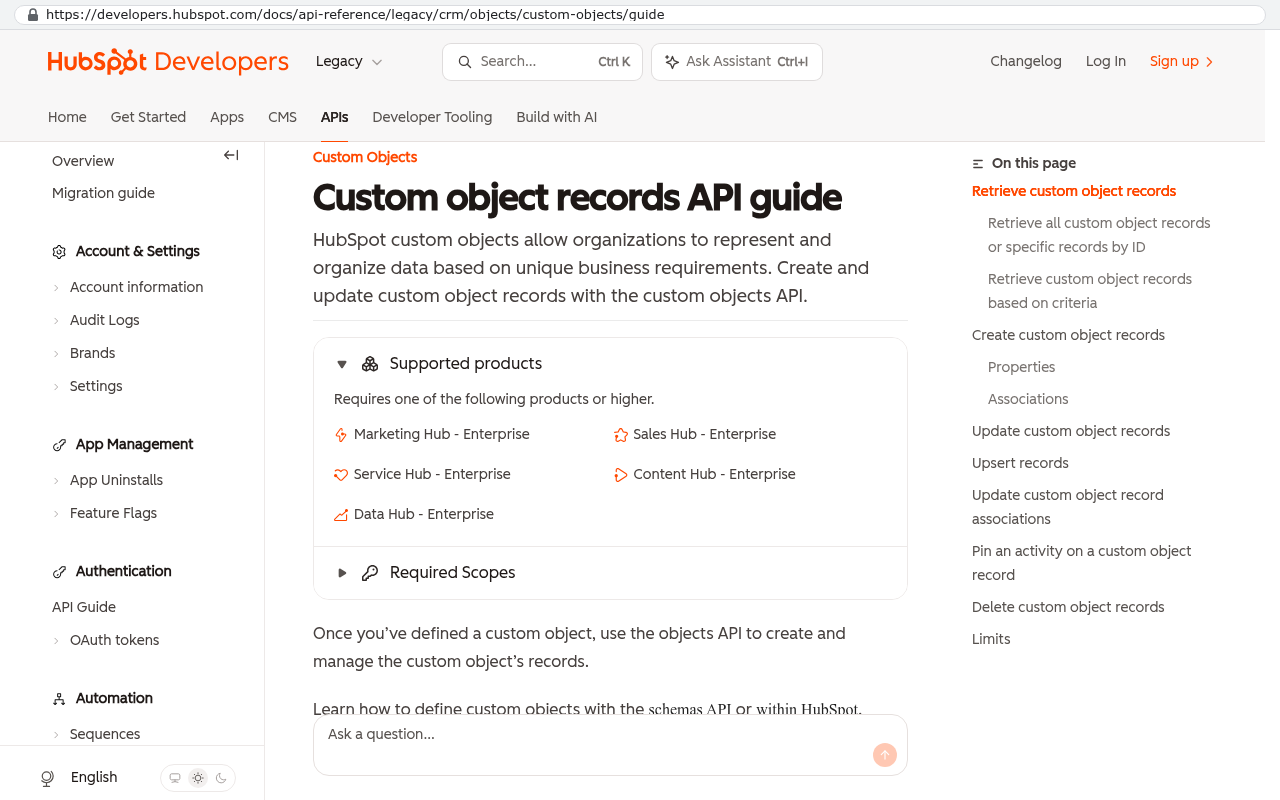
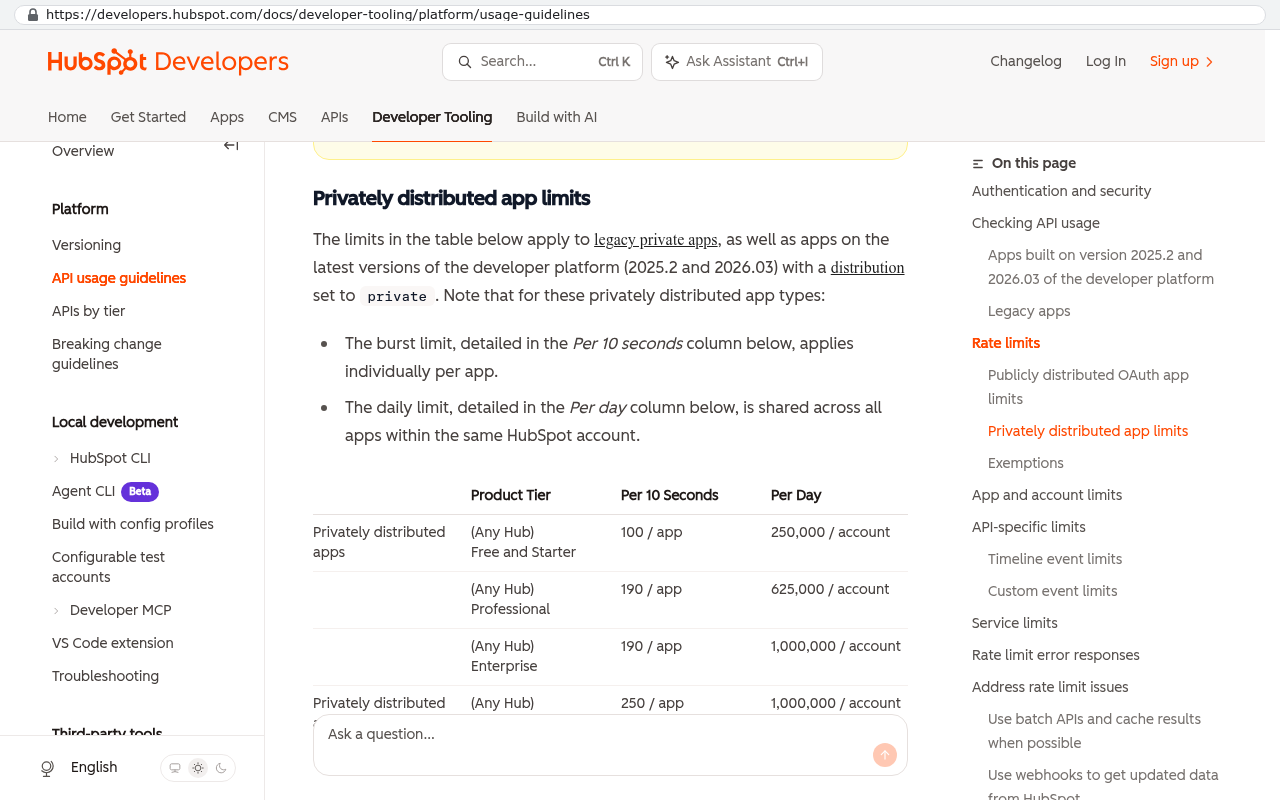
Integrations can solve some of this. Most modern CRMs have an API, which just means a door other software can knock on. The trouble starts when the door only opens partway. Rate limits cap how much data you can move per hour. Some fields are read-only. Custom objects often aren't exposed at all. You find these limits after you've committed, never before.

HubSpot Developers Custom Objects API guide displaying the Supported products section which lists that custom objects require Enterprise tier subscriptions
HubSpot Developers Custom Objects API guide shows that custom objects require one of several Enterprise subscription products including Marketing Hub Enterprise Sales Hub Enterprise Service Hub Enterprise Content Hub Enterprise and Data Hub Enterprise Source: developers.hubspot.com/docs/api-reference/legacy/crm/objects/custom-objects/guide
HubSpot Developers API usage guidelines page displaying a rate limits table for privately distributed apps with columns for Product Tier, Per 10 Seconds requests per app, and Per Day limits per account across Free and Starter, Professional, and Enterprise tiers
HubSpot Developers documentation page showing privately distributed app limits with a table of per-app rate limits and daily caps organized by product tier Source: developers.hubspot.com/docs/developer-tooling/platform/usage-guidelines

Support tickets and workarounds are the real ceiling

There's a specific reply that tells you everything. "That's not currently supported, but I've logged it as a feature request." Translation: this will never happen, and you should plan accordingly.

Every SaaS vendor builds for the average of its customer base. If you're in the middle of that average, you get a great product for a small price. If you're on the edge, you get a roadmap that never serves you. Neither is a moral failing. It's just how the economics work.

The workarounds are the measurable version of this. Start a list. Every time someone says "the system can't do that, so we just...", write it down. Most operations leaders who do this exercise are surprised at the length of the list within two weeks.

  • A shared spreadsheet that holds data the CRM won't store
  • A Slack channel where approvals actually happen because the approval workflow is too slow
  • A monthly report built by hand in Excel because the native reporting can't join two objects
  • A naming convention in a text field that encodes information the system has no field for
  • An offline PDF template because the quoting module doesn't match your pricing model

Each one is small. Together they're a second system, undocumented, running on the memory of whoever built it. When that person leaves, the real cost shows up.

The most dangerous workaround is the one that works well. If a spreadsheet has quietly become the source of truth for revenue forecasting, you have a single point of failure with no backup, no audit trail, and no permissions model. That's a risk your CRM subscription is supposed to be eliminating.

You're paying per seat for features nobody opens

Per-seat pricing is fine at ten people. At eighty it's a tax on growth. You add a warehouse coordinator who needs to look up one address, and that costs the same as your top closer.

Then there's the tier trap. You need one feature. That feature lives in the enterprise plan. So every seat jumps price, including the forty people who only need read access. Vendors design tiers this way on purpose, and it works.

Run the five-year math. Say you have 60 seats at $150 per seat per month. That's $9,000 a month, $108,000 a year, $540,000 over five years. Add the annual uplift most contracts include, plus the implementation consultant you call twice a year, plus the three connector tools you bought to make integrations work. The real five-year total is meaningfully higher than the sticker.

Now get a quote for a system built to your process, owned by you, hosted where you choose. Compare the two numbers directly. Sometimes the subscription still wins, especially at smaller headcounts. Often it doesn't, and nobody had ever done the arithmetic.

What changes when the system matches your actual process

The real gain isn't cost. It's that the software stops arguing with you.

A custom system starts from how your company sells, not from a template. If your pipeline has a re-quote loop, it has a re-quote loop. If a deal can't close until finance signs off, the system enforces that rule. If your customers are hierarchies of parent companies and sites and contracts, the data model reflects that instead of squeezing it into accounts and contacts.

It also owns its own integrations. Your accounting system, your project tool, and your support desk connect through code you control, not a third-party connector that breaks when a vendor changes an endpoint. When a rule changes, you change it. You don't wait for a roadmap.

And the data is yours. Not exportable in theory. Yours, in a database you can query, with no vendor able to deprecate a field you depend on or price you out at renewal.

You don't have to replace everything at once. The pattern that works best is picking the single worst workflow, building that one piece properly, and running it alongside the CRM. You learn whether custom fits your team before you commit to a full migration, and you get relief on the thing that hurts most.

Where custom is the wrong call

Plenty of companies should renew. Being honest about that matters more than winning an argument.

If you're under about fifteen users and your process looks like standard B2B sales, an off-the-shelf CRM is genuinely a better deal. You get years of product development for a small monthly fee. Building that from scratch is poor use of money.

If your problem is adoption, custom software won't fix it. A team that won't update records in HubSpot won't update them in something you paid to build. That's a management issue wearing a technology costume.

Migration is real work, and people underestimate it. Ten years of notes, attachments, email threads, and half-filled custom fields don't move with a copy and paste. It takes scripted exports, field mapping, cleanup decisions, and someone with authority to say which duplicate record wins. Budget for it honestly.

Custom systems also need an owner. Not a full-time developer necessarily, but someone accountable for hosting, backups, security updates, and changes. If nobody inside your company will own that relationship, a subscription's included maintenance has real value.

And you lose the free stuff. Mobile apps, browser plugins, email tracking, third-party marketplace add-ons. Those get built if you need them, and that's a cost. Sometimes the better answer is a custom operations layer that keeps the CRM for what it's actually good at.

A quick self-assessment

Score one point for each honest yes. Answer as your team would, not as you'd like.

  1. Does anyone regularly export data from the CRM to do real work in a spreadsheet?
  2. Has support told you a needed change isn't supported more than twice this year?
  3. Do two systems hold customer records that disagree?
  4. Are you paying for a tier because of one feature?
  5. Does onboarding a new hire require explaining workarounds?
  6. Has a required field been repurposed to store something it wasn't meant for?
  7. Does your monthly reporting involve manual assembly?
  8. Would losing one specific person break a critical process?
  9. Has your seat count grown faster than your revenue?
  10. Would you choose this platform again today?

Three or fewer means you probably have a configuration problem worth fixing in place. Four to six means you're near the ceiling and should price alternatives before your next renewal. Seven or more means you're already paying for a custom system, just in staff hours instead of software.

Time this exercise for 90 days before renewal, not 90 days after. Once you've signed, you've lost your power to negotiate with the vendor and your window to plan a migration without pressure. Calendar it.

What to do next

Start with the workaround list. Two weeks, everyone contributing, no judgment. That list is the most useful document you'll produce this quarter, because it converts a vague feeling into specific, countable problems.

Then attach hours to the top five. Not guesses, actual observed time. Multiply by loaded labor cost. Add that to your subscription total. That's what your CRM really costs.

With that number in hand, the conversation changes from preference to arithmetic. If you want a second set of eyes on whether a custom build genuinely beats another renewal for your situation, you can book a free strategy session and we'll walk through the numbers with you, including the cases where we'd tell you to stay put.

FAQ

How do I know if it's the CRM or just bad training?

Ask whether the thing you want is technically possible in the platform. If a competent admin could configure it and nobody has, that's training or neglect. If support says it isn't supported, that's a ceiling. The distinction is usually clear within one conversation with someone who knows the product well.

Can we keep our CRM and build around it?

Yes, and that's often the smartest move. Keep the CRM for contact management and pipeline, and build a custom layer for the quoting, project handoff, or contract logic it can't handle. The two talk over an API. You get relief without a full migration.

What happens to our data if we switch?

You export it, clean it, and map it into the new structure. The clean-up is the hard part, not the export. Expect to make decisions about duplicates, dead records, and fields that were used for three different things over the years. Plan the migration as its own project.

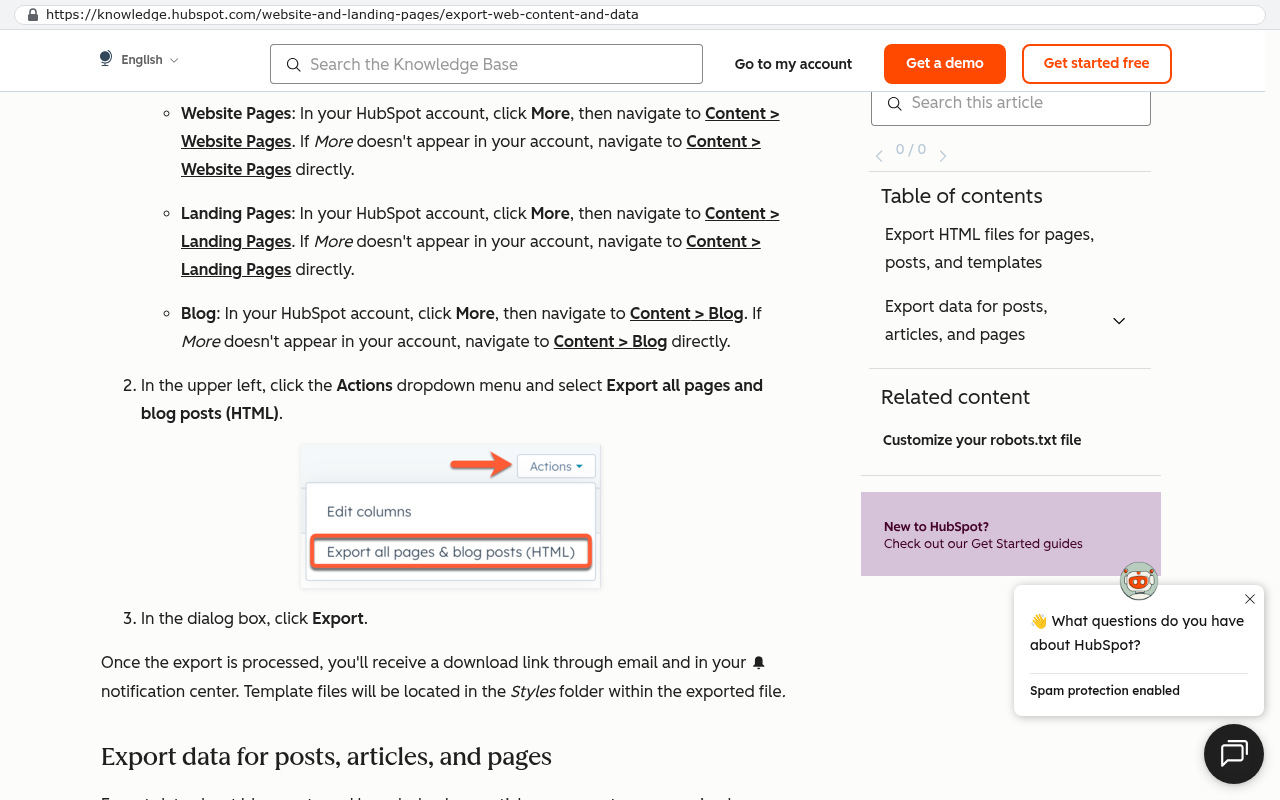
HubSpot knowledge base article displaying the Actions dropdown menu with Export all pages and blog posts HTML option highlighted in red, along with step-by-step instructions for exporting website pages, landing pages, and blog content
HubSpot's knowledge base article on exporting web content shows the Actions menu with the Export all pages and blog posts HTML option and explains the export process. Source: knowledge.hubspot.com/website-and-landing-pages/export-web-content-and-data

Isn't custom software risky if the developer disappears?

It's risky if you don't own the code and the documentation. Make ownership explicit in the contract. You should hold the repository, the hosting credentials, and enough documentation that another firm could pick it up. That's the whole point of owning instead of renting.

How small is too small for a custom CRM?

Under roughly fifteen users with a standard sales process, off-the-shelf usually wins on pure value. The exception is a small team with an unusual business model, where no template fits and the workarounds start on day one.

Read this next

If the subscription math is the part you want to get right, read our breakdown of how to compare a five-year SaaS renewal against a one-time build, including the costs most companies leave out of the comparison.

Related articles

Questions

Frequently asked questions

How do I know if my CRM is truly outgrown versus just needing better training?

If your team's actual sales process requires workarounds to fit the CRM's rigid workflow, that's a platform limit. Check whether anyone has genuinely reconfigured the system since go-live. Many CRMs get set up once then run untouched for years while the business changes around them. That's a fixable training problem. But if new hires ask reasonable questions and the honest answer is just do it this way without explanation, your workflow and software genuinely don't match.

What does it mean when data lives in multiple systems with different numbers?

When you ask three people for your customer count and get three answers, you have a data problem. CRMs are good at sales but mediocre elsewhere, so finance uses QuickBooks, operations uses Smartsheet, support uses Zendesk. Each holds a drifting version of customer data. The glue is usually manual work: CSV exports, re-keying, copy and paste. If two people spend four hours weekly moving data between systems, that's about 400 hours yearly of skilled staff time doing manual entry.

What's the clearest sign my CRM subscription has a hard ceiling?

Support replies that say that's not currently supported, but I've logged it as a feature request. This translation means it will never happen. Every SaaS vendor builds for the average customer. If you're on the edge of that average, the roadmap never serves you. Track every workaround your team invents. Most operations leaders are surprised at how long that list grows within two weeks.

Why is per-seat pricing a problem as my business grows?

Per-seat pricing punishes growth because you pay for every user, even though most teams use only a fraction of available features. As headcount increases, costs climb regardless of actual feature usage. This pricing model doesn't reward efficiency and becomes expensive when your only issue is that the software doesn't fit your process, not that you need more seats.

What are common CRM workarounds that signal I've outgrown the system?

Workarounds include spreadsheets holding data the CRM won't store, Slack channels where approvals happen because the workflow is too slow, Excel reports the native system can't generate, text field naming conventions encoding missing fields, and offline PDF templates because modules don't match your model. Each seems small alone, but together they form a second undocumented system running on whoever built it. When that person leaves, the real cost appears.

Should I rebuild my current CRM with custom configurations before considering a custom system?

Before blaming the platform, confirm whether anyone has genuinely reconfigured it since implementation. Plenty of CRMs get set up once then run untouched for five years. That's much cheaper to fix than a rebuild. A custom system makes sense when your actual sales process genuinely can't fit any standard platform workflow, not when configuration could solve it. But custom needs an owner and a maintenance plan.

What should I consider financially when my CRM renewal is due?

Run the subscription math over five years before signing another renewal. Calculate the actual cost of manual workarounds. If two people spend four hours weekly moving data between systems, that's about 400 hours yearly. Price that at their cost. Also check integration limits: APIs may have rate caps, read-only fields, and custom objects that aren't exposed. These hidden costs often exceed the subscription price.

When is custom software the wrong answer for outgrowing my CRM?

Custom software is wrong when configuration could solve your problem. If the system hasn't been reconfigured since go-live and your business changed around it, that's fixable and much cheaper than rebuilding. Custom only makes sense when your actual sales process fundamentally can't fit any standard platform. Also consider that custom systems need an owner and a maintenance plan, or become unmaintainable when the builder leaves.

Read this next

When staying on your current platform is the right call

Custom software isn't always the answer. Here's the arithmetic, the warning signs, and the honest caveats that tell you whether to renew your platform or replace it.

If this is your situation

Talk it through on a call

Thirty minutes over video with the person who would run the build. You talk, we ask questions, and you leave with a plain read on whether custom software makes sense for you. If the answer is that your current tool is fine and badly configured, you will hear that.

Book a strategy call

Who wrote this

David Verneuille

David Verneuille

Founder, Black Badger Software Solutions

David Verneuille founded Black Badger after 18 years as a project manager and years implementing Smartsheet, monday.com, Wrike and Zoho for clients. He now builds custom systems that clients own outright, which is why the writing here is specific about where each platform fits and where it stops fitting.

About Black Badger

Drafted with AI assistance, then checked, edited, and approved by a person before publishing. The facts, opinions, and recommendations are ours.

Related

More on crm

More reading

Read this next

Want this looked at properly?

An article can only go so far without knowing your systems. Book a strategy call, walk us through what is breaking, and you will get a straight read on whether custom software is the right answer.