
NetSuite is the safe pick if you have complex multi-entity finance, global subsidiaries, or investors who want a name they recognize on the ERP line. Odoo is the best value in packaged ERP for manufacturers under a few hundred users, as long as you can accept its way of doing things and you read the licensing tiers carefully. A custom, client-owned system wins when your competitive edge lives in a workflow no package models well, and when you'd otherwise pay for five years of subscriptions plus heavy customization to get back to where you already are.
NetSuite vs Odoo vs a custom system for growing distributors and manufacturers
/ 10 min read
TL;DR
Key takeaways
- Packaged ERP fits finance and accounting far better than it fits shop floor and warehouse reality.
- Odoo's cheapest tiers hide real constraints, including gated access to the external API on Odoo Online.
- NetSuite's true cost is the license plus modules plus the implementation partner plus the renewal uplift.
- A custom system removes per-user fees but adds an ownership duty you have to staff or contract for.
- SKU complexity and integration count predict the outcome better than headcount does.
On this page
Three systems, three very different bets. NetSuite asks you to buy a mature stack and adapt your operation to it. Odoo asks you to assemble modules and live inside their data model. A custom build asks you to own the thing outright. For a distributor or manufacturer doing real volume, the right answer depends less on features than on how weird your fulfillment process is.
Quick pick
If you run multiple legal entities in multiple currencies and your CFO is the loudest voice in the room, buy NetSuite and budget properly for the implementation. If you're a single-entity manufacturer with 5 to 150 users and standard make-to-stock or make-to-order flows, start with Odoo. If your orders carry configuration rules, custom pricing logic, lot-level traceability quirks, or customer portals that no vendor demo handles without a workaround, build it.
One honest note on credentials. We implemented Odoo and we've integrated plenty of systems around the edges of ERP. We have not run a NetSuite implementation. The NetSuite assessment here comes from its published licensing structure and from what operations leaders tell us after they've lived in it, and we'll flag where that line sits.
The workflows that actually decide this
Feature checklists are useless here. Every one of these systems does inventory, orders, purchasing and reporting. The question is how many clicks and how many exceptions.
Inventory is where distributors get hurt first. If you sell by case and buy by pallet, or you stock the same part under four manufacturer numbers, or you run consignment stock at a customer site, those are data model questions. A system either supports them natively or you end up with a spreadsheet that shadow-tracks the truth. Shadow spreadsheets are the clearest sign the ERP lost.
Order fulfillment is where manufacturers get hurt. Partial shipments, backorder rules, kitting at pick time, drop ship from a supplier on half the line items. Packages handle the common cases well and the fifth case badly.
Reporting and integrations decide whether you ever get calm. You need one number for on-hand stock that your website, your 3PL and your accountant all agree on. Every extra sync is a chance for those three to disagree at 4pm on a Friday.
Before any demo, pick your three ugliest real orders from last quarter. Make the vendor enter them live, on their screen, in front of you. Not a slide. If they say "we'd handle that in a later phase," you just found your implementation overrun.
NetSuite
Overview
NetSuite is Oracle's cloud ERP, sold as an annual license with a base platform, user seats, and separately priced modules. Advanced inventory, warehouse management, demand planning and manufacturing capabilities are usually add-ons rather than included. Almost nobody implements it alone. You buy through a channel partner or Oracle's own services arm, and the implementation is a project of its own.
Pros
- Multi-entity, multi-currency, multi-subsidiary accounting is genuinely strong and audit-ready.
- Deep customization through SuiteScript and SuiteFlow, so skilled developers can reshape a lot.
- A large partner and talent pool, so you're not dependent on one person knowing your system.
- Finance leaders and investors recognize it, which smooths diligence and audits.
Cons
- Cost compounds. Base license, seats, modules, sandbox, partner fees, then renewal increases.
- Customization is real work, and heavy customization makes upgrades more expensive over time.
- Warehouse and shop floor usability trails the finance side by a wide margin.
- You never own it. Stop paying and you lose access to the system running your company.
Best for
Companies with subsidiaries, international operations, or an acquisition strategy that keeps adding entities.
Verdict
Finance 9/10. Inventory depth 8/10. Shop floor usability 5/10. Fit to an unusual process 5/10. Five year cost 4/10. Support burden on you 7/10, because the partner carries a lot of it.
Odoo
Overview
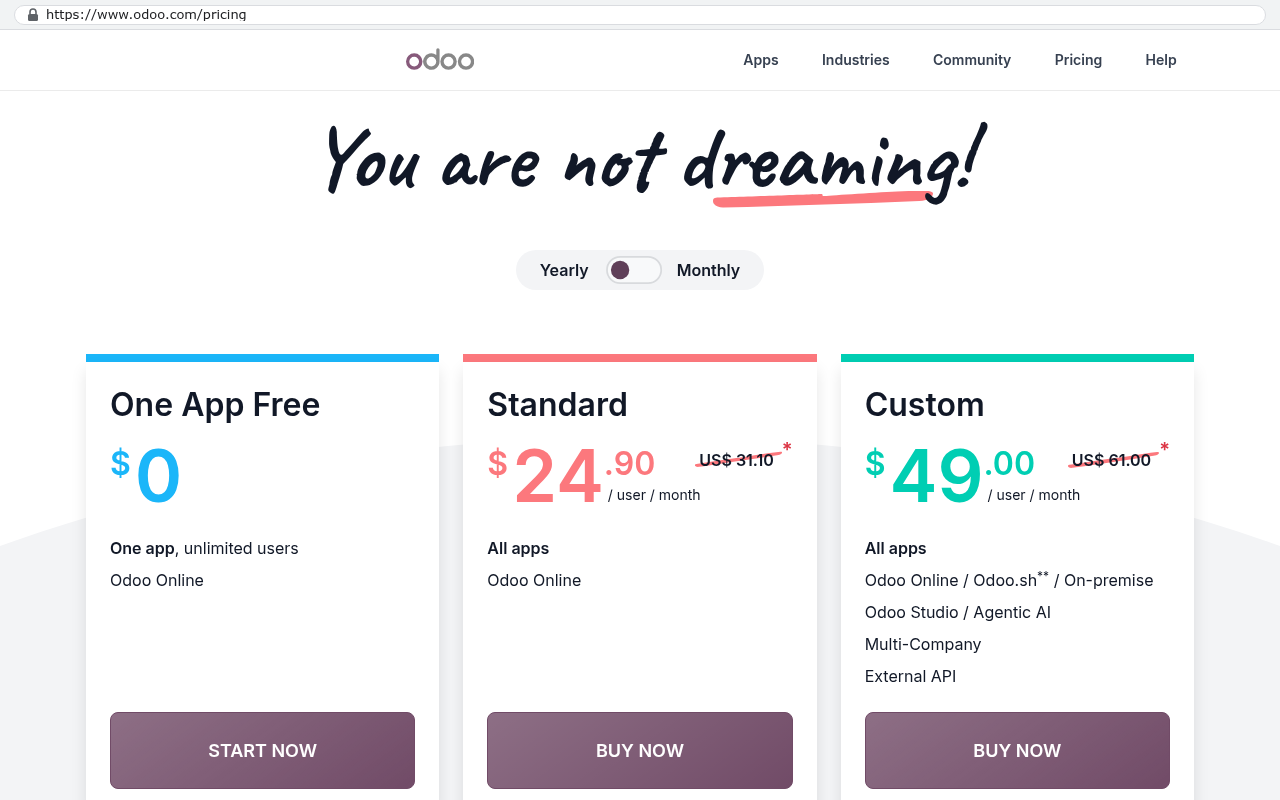
Odoo is a modular suite covering CRM, sales, inventory, manufacturing, accounting and more. There's a free Community edition and a paid Enterprise edition, sold per user per month across tiers. The cheapest paid tier gives you the core apps. The higher tier includes Studio, multi-company, and external API access on Odoo Online.
Pros
- Per user pricing is dramatically lower than NetSuite's for comparable function.
- Manufacturing is well covered, including bills of materials, work orders, routings and quality checks.
- The source is available, so a competent developer can read exactly what the system does.
- You can self-host on your own servers and escape the user-count treadmill entirely.
Cons
- Tier gating bites. Budget an integration on the cheap plan and you may find the API is not included.
- Version upgrades break custom modules. Every yearly release is a small project.
- The accounting is fine, not excellent, and complex multi-entity consolidation is a stretch.
- Implementation quality varies wildly by who you hire, and a bad Odoo build is painful to unwind.
Best for
Single-entity or lightly-grouped manufacturers and distributors who want broad coverage at a sane price.
Verdict
Finance 6/10. Inventory depth 8/10. Shop floor usability 7/10. Fit to an unusual process 6/10, better if you self-host. Five year cost 8/10. Support burden on you 5/10, since upgrades land in your lap.
Check Odoo's current tier table before you sign anything. The features people assume are included, like Studio for building custom screens and the external API for connecting other software, sit on the higher plan. A quote built on the lower tier can be wrong by the entire cost of your integration work.
A custom system you own
Overview
A custom build is software written for your operation, hosted where you choose, with the source code in your name. AI-assisted development changed the math here. Work that used to take a team months now takes far less, which is why we dropped our platform partnerships. We stopped being able to argue honestly that a subscription was the cheaper path for every client.
Pros
- No per-user fee, so adding a warehouse crew of 30 costs nothing in licensing.
- The system matches your process, including the odd rule that wins you accounts.
- Integrations are first-class, not bolted on through a connector you don't control.
- You own it. No renewal letter, no forced version migration, no vendor roadmap decisions.
Cons
- You start with nothing. A package gives you a working general ledger on day one.
- Full double-entry accounting and tax compliance are a poor use of custom development effort.
- You need an internal owner who can decide what the system should do.
- If your requirements are genuinely generic, you're paying to rebuild something you could rent.
Best for
Operations where the differentiator is a workflow, not a ledger. Configure-to-order, complex allocation rules, customer-specific pricing, traceability beyond the standard.
Verdict
Finance 4/10 alone, 8/10 paired with a real accounting package. Inventory depth 9/10, because it's built to your rules. Shop floor usability 9/10. Fit to an unusual process 10/10. Five year cost 8/10. Support burden on you 4/10, you carry it or contract it.
Where each one makes you bend
NetSuite bends your warehouse. Finance gets a system designed for them and the pickers get a screen designed in a conference room. Odoo bends your exceptions. The happy path is clean and the fifth scenario becomes a custom module that you then maintain through every upgrade. A custom system bends your governance. Somebody has to decide what happens when a line ships short, and that person is now you, not the vendor's default setting.
Here's the arithmetic nobody runs. Take your seat count and your quoted per-user monthly price. Forty users at $45 per month is $21,600 a year. Over five years that's $108,000 before implementation, before modules, before renewal increases. Add a typical implementation and you're well past $150,000 for software you'll never own. Compare that total, not the monthly number, against a build.
A simple way to choose
- Under 25 users, standard SKUs, under three integrations, go Odoo.
- Multiple legal entities or international consolidation, go NetSuite.
- High SKU complexity, configured products, or five-plus integrations, build custom.
- Heavy process quirks plus a need for real accounting, build custom and keep a packaged ledger behind it.
Limitations and caveats
A custom build is the wrong answer more often than our business card suggests. If your process genuinely is standard, buy the package. If nobody on your team can own requirements, a build will drift and you'll blame the developer. If you need a certified tax engine and audited financial controls tomorrow, a package gets you there faster.
There's also the migration cost everybody underestimates. Pulling years of transaction history, attachments and open orders out of an existing ERP takes scripted exports and real reconciliation, not a copy and paste. Budget for it honestly in any direction you move.
Hybrid beats purist most of the time. Keep a packaged accounting system for the ledger and build custom for inventory, fulfillment and the customer-facing parts. You get compliance from the package and fit from the build.
What to confirm before you sign
Ask NetSuite for the full line item quote including every module, sandbox, and the contractual renewal uplift percentage. Ask what the implementation partner's fixed scope excludes. Ask Odoo which tier includes the external API and Studio, and whether self-hosting changes your support entitlement. For any custom proposal, including ours, ask who owns the source code, where it's hosted, and what happens if you walk away.
Then do one more thing. Call a reference who runs the same kind of operation you do, and ask them what they still do in a spreadsheet.
Never sign an ERP contract before the data migration plan is written down. The plan, not a promise. More ERP projects die on dirty item master data than on missing features.
Next steps
Write down your five hardest order scenarios before you talk to anyone. That document is worth more than any feature comparison, including this one. Then score each option on how it handles those five, not on how impressive the dashboard looked.
If you want a second opinion from people who implemented these platforms and then stopped reselling them, book a free strategy session. We'll tell you if the package is the right call.
Read this next: our breakdown of when to replace a SaaS subscription with a system you own.
Related articles
- What an ERP implementation really costs beyond the license
- Integrating your CRM with inventory without a brittle connector
- Signs your business has outgrown spreadsheets but not into ERP
Frequently asked questions
Which ERP system is best for a company with multiple subsidiaries and international operations?
NetSuite is the strongest choice for multi-entity, multi-currency, multi-subsidiary accounting. It's genuinely audit-ready and recognized by finance leaders and investors, which smooths diligence and audits. However, budget carefully for implementation, as true costs include the base license, seats, modules, sandbox, partner fees, and renewal increases.
Is Odoo really cheaper than NetSuite?
Per-user pricing for Odoo is dramatically lower than NetSuite's for comparable function. However, watch out for tier gating. The cheapest Odoo tiers hide real constraints like gated access to the external API on Odoo Online. You need to read licensing tiers carefully before committing to calculate your true cost.
When should we build a custom ERP system instead of buying a package?
Build a custom system when your competitive edge lives in a workflow no package models well, such as configuration rules, custom pricing logic, lot-level traceability quirks, or customer portals. A custom build wins when you'd otherwise pay five years of subscriptions plus heavy customization just to return to where you already operate.
What should we test during an ERP vendor demo?
Pick your three ugliest real orders from last quarter and make the vendor enter them live on their screen in front of you, not via a slide presentation. If they say the scenario would be handled in a later phase, you've identified a likely implementation overrun before you sign.
Can Odoo handle manufacturing operations well?
Yes. Odoo manufacturing is well covered, including bills of materials, work orders, routings and quality checks. It's the best value in packaged ERP for manufacturers under a few hundred users, as long as you can accept its way of doing things and you're a single-entity operation with standard make-to-stock or make-to-order flows.
What's the biggest risk of a custom ERP system?
A custom system removes per-user fees but adds an ownership duty you have to staff or contract for. The risk lies in dependency on specific developers and the need to maintain institutional knowledge. You must be prepared for ongoing support and maintenance responsibilities rather than relying on a vendor's support team.
What inventory situations cause problems with packaged ERP systems?
Packaged ERP struggles with data model questions like selling by case but buying by pallet, stocking the same part under multiple manufacturer numbers, or running consignment stock at customer sites. When systems don't support these natively, you end up with shadow spreadsheets that track the truth outside the ERP, signaling that the system has failed to meet your needs.
Share this article
Keep reading
ERP upgrade or replacement? 9 signs and what each path costs in 2026
Upgrade when the software still fits and only the version is old. Replace when the data model no longer matches your work. Nine signs, four paths with 2026 market costs, and the vendor deadlines that decide when.
If this is your situation
Talk it through on a call
Thirty minutes over video with the person who would run the build. You talk, we ask questions, and you leave with a plain read on whether custom software makes sense for you. If the answer is that your current tool is fine and badly configured, you will hear that.
Who wrote this

David Verneuille
Founder, Black Badger Software Solutions
David Verneuille founded Black Badger after 18 years as a project manager and years implementing Smartsheet, monday.com, Wrike and Zoho for clients. He now builds custom systems that clients own outright, which is why the writing here is specific about where each platform fits and where it stops fitting.
Drafted with AI assistance, then checked, edited, and approved by a person before publishing. The facts, opinions, and recommendations are ours.