
Most SaaS contracts are written to make leaving harder than joining. The traps are rarely hidden in one dramatic clause. They show up as weak export tools, automation logic that only runs on the vendor's servers, API limits that throttle your own data, and a renewal notice window you missed by a week. Read the exit path before you sign the entry path. And where the math says a system you own beats a subscription you rent, do the math out loud.
Vendor lock-in tactics to look for before you sign a SaaS contract
/ 10 min read
TL;DR
SaaS contracts often hide vendor lock-in tactics across multiple mechanisms rather than single dramatic clauses, including weak data exports, non-portable automations, API rate limits, and auto-renewal notice windows that trap companies into extended agreements they wanted to leave.
Key takeaways
- Request a real sample export file during your trial period that includes attachments, comments, history, and custom field definitions rather than accepting a demo CSV, then verify it contains everything your team actually depends on.
- Automation logic and conditional rules built within the vendor's platform do not export to other systems, so you must document every automation you create to budget for the significant rebuild effort required during migration.
- API pricing tiers, rate limits measured in calls per minute, and per-call billing structures can turn data extraction into a multi-week project and effectively function as an exit tax on departing customers.
- Auto-renewal clauses paired with 90-day written notice requirements before contract end are the most common lock-in mechanism, and missing the deadline by even one day typically extends your commitment for another full year.
- Native integrations between tools create dependency chains where switching one vendor forces you to rebuild or replace five other connected systems simultaneously.
- Owning your own system eliminates vendor lock-in entirely but requires you to handle hosting, security updates, maintenance, and backup responsibilities that the SaaS vendor previously managed.
TL. DR
Key takeaways
- Ask for a real sample export before signing, including attachments, comments, and history, not a demo CSV.
- Automation logic almost never exports. Screenshot and document every rule you build.
- API rate limits and paid tiers can turn a data migration into a multi-week project.
- Auto-renewal plus a 90-day notice window is the single most common way companies get stuck for another year.
- Native integrations create dependency across tools, so one switch becomes five rebuilds.
- Acquisitions, tier restructures, and forced edition migrations are early warnings of a price increase.
- Owning your system removes the lock-in, but you take on hosting, security, and maintenance in exchange.
The export clause is the whole game
Every vendor says you can export your data. Almost none of them tell you what that actually includes. The export usually covers rows in a table. It often skips file attachments, comment threads, approval history, custom field definitions, user permissions, and anything stored in a rich text editor.
Ask for a sample export file during the trial. Not a screenshot of the export button. An actual file, from an account with attachments and comments in it. Then open it and look for the things your team relies on. If your project managers live in comment threads, and the export gives you a CSV with no comments, you don't have your data. You have a spreadsheet of names and dates.
Check the timing too. Some platforms give you 14 or 30 days after cancellation before the account is wiped. Others require a support ticket to generate a full export, and support tickets from cancelling customers move slowly. One vendor's "self-service export" is another vendor's "contact your account manager."
Run a test export in month two of your subscription, while you're still happy. You'll learn exactly what you'd get on the way out, at a time when nobody is under pressure.
When you own the system, this stops being a question. The database is yours. You can take a full backup any night you want, attachments included. Nobody has to approve it.
Your automations are the part you can't take with you
Here's what surprises people during a migration. The data moves fine. The logic doesn't.
Think about what your team has built inside the platform over three years. Conditional approval routing. Alerts that fire when a job hits a certain status. Formulas that calculate margin across linked sheets. Document templates that merge fields into a quote. Permission rules that hide costs from field crews. None of that exports. There is no file format for it. It lives in the vendor's rule builder and it only runs there.
That is the real switching cost, and it's the one nobody budgets for. Rebuilding forty automations in a new tool takes weeks of someone's attention, and that someone is usually your best operations person.
Document as you go. Keep a simple sheet listing every automation, what triggers it, what it does, and who asked for it. It takes ten minutes a month and it turns a painful rebuild into a checklist. In a system you own, the logic sits in code in a repository you control. You can read it, change it, and hand it to a different developer.
API pricing and rate limits are an exit tax
The API is the pipe you use to pull data out or push data in. Vendors know that, and they price it accordingly.
Three patterns to watch for. First, API access gated behind a higher tier, so the plan you bought can't talk to anything programmatically. Second, hard rate limits, often expressed as calls per minute, which sound generous until you do the arithmetic. If you have 600,000 records and the limit is 100 calls a minute at 100 records per call, that's 100 minutes of pure throughput in perfect conditions. Real migrations retry, fail, and run overnight. Third, per-call or per-credit pricing, where a full extract carries a bill.
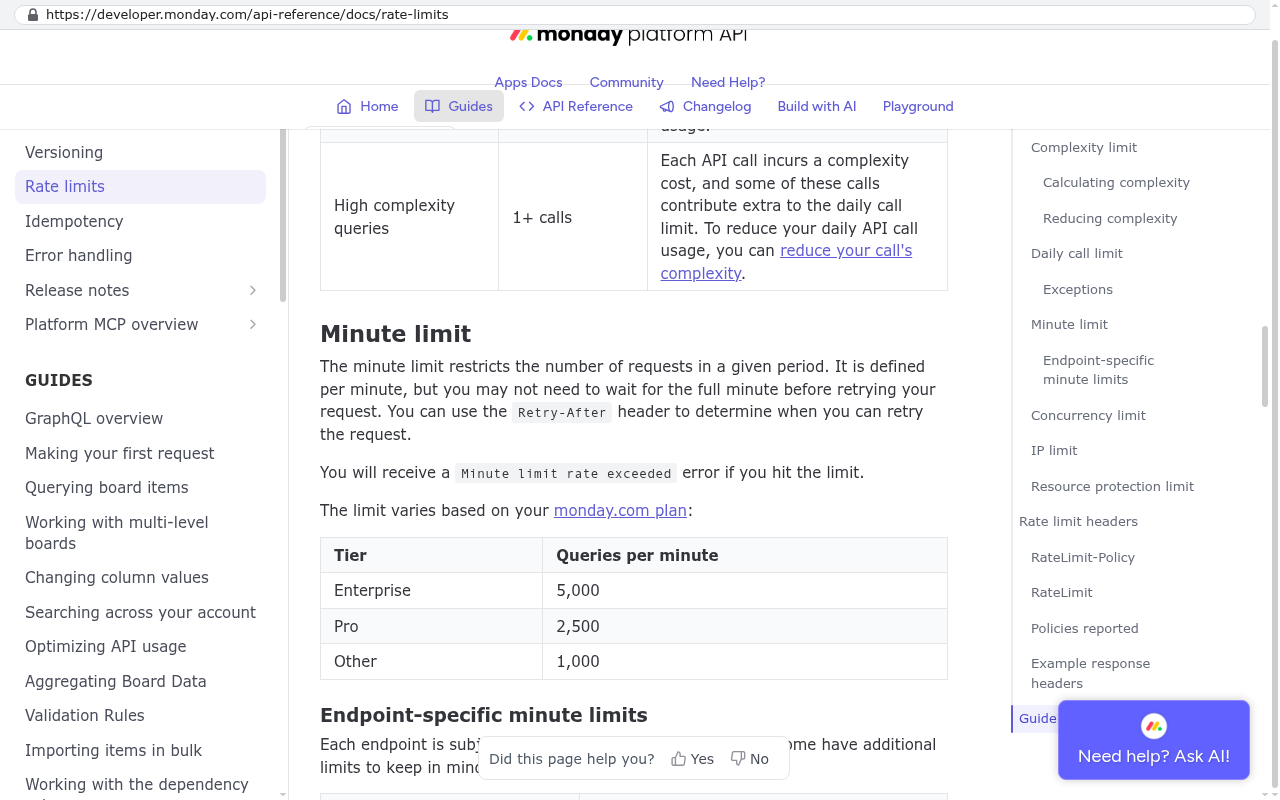
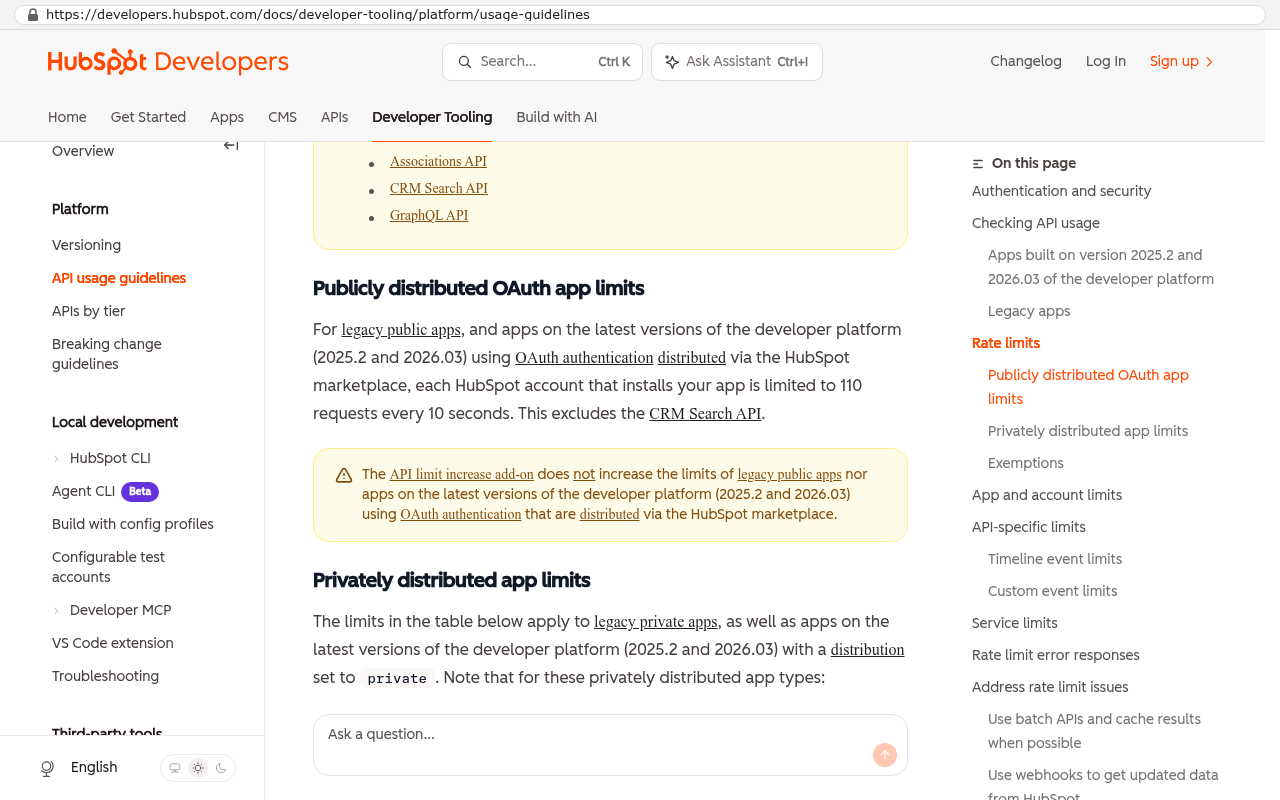
Rate limits also affect the integrations you build while you're a happy customer. If your quoting tool needs live inventory counts, a throttled API means stale numbers or a caching layer someone has to maintain.
Ask whether bulk export uses the same rate limit as the standard API. Some platforms cap bulk operations harder than normal reads, which is exactly backwards from what a departing customer needs.
Contract mechanics that quietly cost you a year
The clause that catches the most companies is boring. Auto-renewal with a long notice period. A three-year term that renews automatically unless you give written notice 90 days before the end date. Miss it by a day and you're committed for another full term at a price you didn't negotiate.
Put every renewal notice date in a shared calendar with a reminder 30 days before the deadline. Owner, not assistant. This is the cheapest risk control in your business.
Then look at the discount structure. A big first-year discount that disappears at renewal isn't a discount. It's a deferred price increase. Ask what the year two and year three price is, in writing, in the order form. Ask about the annual uplift clause, which is the automatic percentage increase baked into multi-year deals. Ask whether seat counts can go down at renewal or only up. Plenty of contracts include a ratchet, where your minimum commitment resets to your peak usage.
Signals that a price hike is coming
You can usually see it before it lands. Private equity acquires the vendor. The pricing page gets restructured and your current plan vanishes from it. Features you use move into a paid add-on. The vendor announces a "new edition" and starts sunsetting the legacy plan you're on. Support quality drops while the roadmap fills with enterprise features you didn't ask for.
None of those guarantee a price increase. All of them raise the odds enough that you should start documenting your automations and testing your export.
One switch becomes five rebuilds
Native integrations are genuinely useful and genuinely sticky. Your CRM syncs to your accounting tool. Your field app pushes into the CRM. Your reporting dashboard reads record IDs that only exist in that CRM. Your single sign-on flows through it.
Now try to replace the CRM. You're not replacing one tool. You're rebuilding four connections, remapping identifiers, and retraining everyone on all five systems at once. That's why companies stay on platforms they've outgrown. The cost isn't the license. It's the web.
The defense is to keep the system of record somewhere you control, and integrate outward from there. If your own database holds the customer, job, and invoice IDs, then swapping a scheduling tool is a small project. If the vendor holds them, every swap is a full migration.
A simple test. Ask your team which system has the ID number everyone quotes on the phone. Whoever owns that number owns your operations, and right now it may not be you.
Questions to ask before you sign
Send these in writing and keep the answers. A vendor who will put it in email will usually put it in the contract.
- Can you send me a full sample export from a populated account, including attachments and comment history?
- Is export self-service, or does it require a support request?
- How long after cancellation can I access the account and my data?
- Is API access included in this tier, and what are the exact rate limits?
- Is there any additional charge for bulk data extraction?
- What is the price in year two and year three, and what is the annual uplift percentage?
- What is the renewal notice period, and does the agreement auto-renew?
- Can I reduce seat count at renewal?
- Has the company been acquired or changed ownership in the last 24 months?
- Are any plans currently being sunset, and is mine one of them?
Red flags are specific. "Export is available on request" means it isn't self-service. "We don't publish rate limits" means they change them. "Pricing is reviewed annually" with no cap means uncapped increases. "Seats can be adjusted at renewal" without the word "reduced" usually means upward only. And any refusal to name the year three price is a refusal you should price into your decision.
What owning your own system doesn't fix
Building your own isn't a magic escape. It moves the responsibility, and you should go in with your eyes open.
You take on hosting, backups, security patching, and support. There's no vendor to call at 2am, so you need a maintenance arrangement and someone who knows the codebase. You also lose the free roadmap. When a SaaS vendor ships a useful feature, everyone gets it. In your own system, every improvement is a decision and a piece of work.
There are categories where a subscription is simply the better buy. Email, payroll, accounting ledgers, e-signature, card processing, and anything with heavy compliance or certification behind it. Don't rebuild those. Buy them and integrate.
And migration is real work regardless. Moving twelve years of attachments out of a locked platform takes a scripted export, not a copy and paste. If your clients log into the vendor's portal today, replacing that portal means retraining them, and some will grumble.
Where the arithmetic tips is usually per-seat pricing at scale. Say you have 60 users at $95 a month. That's $68,400 a year, rising with the uplift clause, forever, with no asset at the end. A one-time build plus ongoing maintenance is a capital cost with a finish line. Run that comparison over five years with the renewal increases included, and add the cost of the workarounds your team runs because the platform won't do what you need. That total is the honest number.
FAQ
Is vendor lock-in always a bad thing?
No. Some stickiness is just the tool being good and your team knowing it well. The problem is when the cost of leaving is artificial, created by export limits and contract mechanics rather than by real value.
Can I negotiate these clauses as a mid-sized company?
More than you'd think, especially at renewal or at the end of the vendor's quarter. The easiest wins are removing auto-renewal, shortening the notice period, capping the annual uplift, and adding a written export assistance commitment.
What if I already signed a bad contract?
Start documenting now. Test the export, list every automation, and note your renewal notice date. You want to be ready to move on your timeline, not theirs.
How do I know if a custom build is worth it?
Look at per-seat cost times headcount over five years, plus the hours your team spends on manual workarounds. If both numbers are big and growing, the build usually wins. If you have twelve users and the tool does the job, stay put.
Next steps
Pick your two most expensive subscriptions. Test the export on both this week, write down the renewal notice dates, and list the automations you'd have to rebuild. That's an afternoon of work and it changes every conversation you have with those vendors.
If the numbers point toward owning the system instead of renting it, we can walk through the comparison with you. Book a free strategy session and bring your current contract.
Read this next: Build versus buy, and how to run the five-year math honestly.
Questions
Frequently asked questions
What should I ask for in a SaaS export before signing a contract?
Request an actual sample export file from an account containing attachments and comments, not just a demo CSV or screenshot. Open the file and verify it includes everything your team relies on: file attachments, comment threads, approval history, custom field definitions, user permissions, and rich text content. Many vendors export only table rows while omitting these critical elements.
Why can't I take my automations when I switch SaaS platforms?
Automations built in a vendor's platform only run on their servers and don't export. There is no file format for conditional routing, alerts, formulas, or permission rules. Rebuilding these automations in a new tool takes weeks of work. Document every automation as you build it, listing triggers and actions, so you have a checklist rather than starting from scratch.
How do API rate limits create an exit tax in SaaS contracts?
Vendors use three tactics to increase switching costs: gating API access behind higher tiers, imposing hard rate limits on calls per minute, and charging per call or credit for bulk exports. If you have hundreds of thousands of records and tight rate limits, a full data migration becomes a multi-week project. Ask whether bulk exports use the same limits as standard API access.
What is the most common contract clause that locks companies in for an extra year?
Auto-renewal with a long notice window, typically requiring 90 days written notice before the end date. Missing the deadline by one day commits you to another full term at an uncontested price. Add every renewal date to a shared calendar with a 30-day reminder, assigned to an owner, not an assistant.
What warning signs suggest a SaaS price increase is coming?
Watch for private equity acquisitions, pricing page restructures where your plan disappears, features moving into paid add-ons, and announcements of new editions with sunsetting of older plans. These signals typically precede price increases. Also review discount structures: a big first-year discount that vanishes at renewal is actually a deferred price increase, not a true discount.
Should I ask about price increases before signing a multi-year SaaS contract?
Yes. Request the year two and year three pricing in writing on your order form. Ask about annual uplift clauses, which apply automatic percentage increases to multi-year deals. Also confirm whether seat count minimums can decrease at renewal or only increase, as many contracts include ratchets that reset minimums to peak usage.
When should I run a test export on my SaaS account?
Run a test export in month two of your subscription while you're still happy and under no pressure. This reveals exactly what you'll receive on the way out. Also check the timing: some platforms wipe accounts 14 or 30 days after cancellation, while others require support tickets for full exports, which move slowly from departing customers.
Read this next
What happens to your data when you stop paying a SaaS vendor
Cancel a SaaS subscription and your data doesn't vanish, it gets locked behind a login. Here's what an export really gives you, what never comes out, and when owning the system is cheaper.
If this is your situation
Talk it through on a call
Thirty minutes over video with the person who would run the build. You talk, we ask questions, and you leave with a plain read on whether custom software makes sense for you. If the answer is that your current tool is fine and badly configured, you will hear that.
Who wrote this

David Verneuille
Founder, Black Badger Software Solutions
David Verneuille founded Black Badger after 18 years as a project manager and years implementing Smartsheet, monday.com, Wrike and Zoho for clients. He now builds custom systems that clients own outright, which is why the writing here is specific about where each platform fits and where it stops fitting.
Drafted with AI assistance, then checked, edited, and approved by a person before publishing. The facts, opinions, and recommendations are ours.