Skip to content
BlackBadger

Blog / General

The hidden cost of per seat pricing as your team grows

/ 11 min read

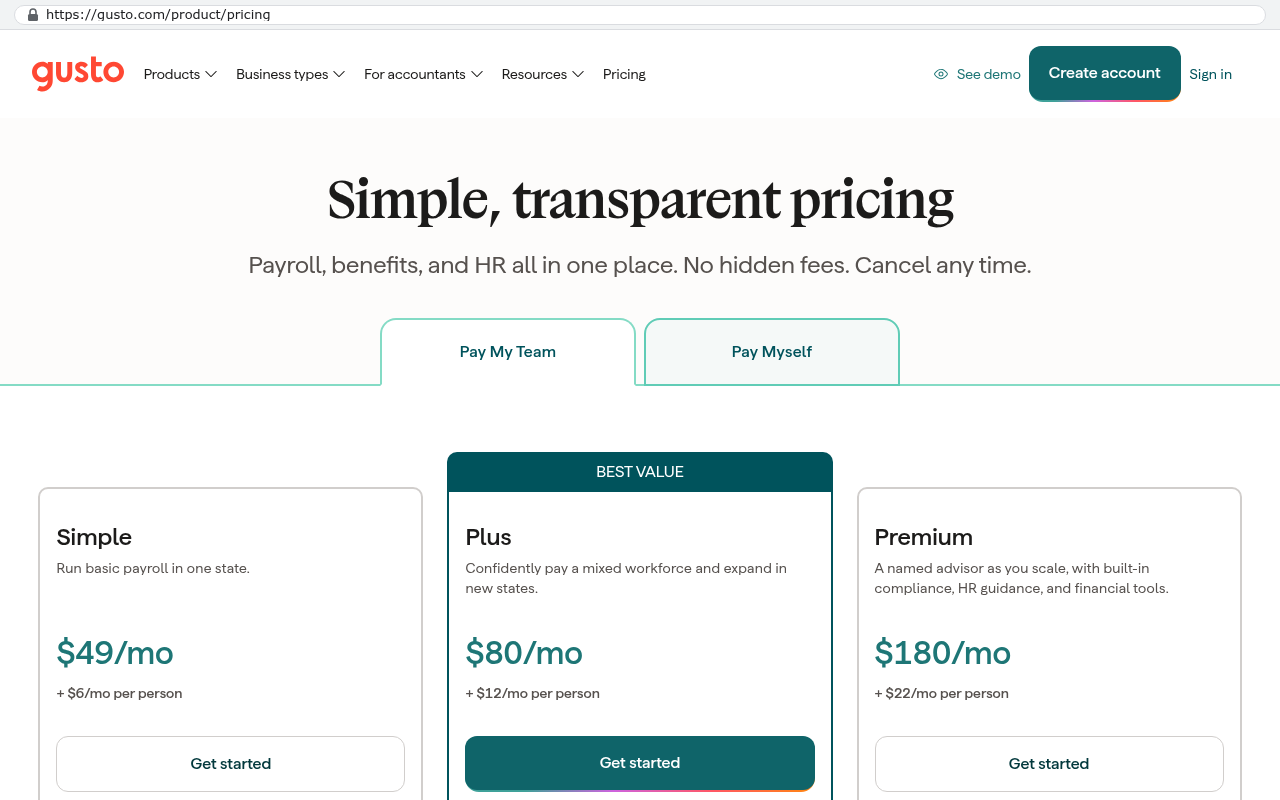
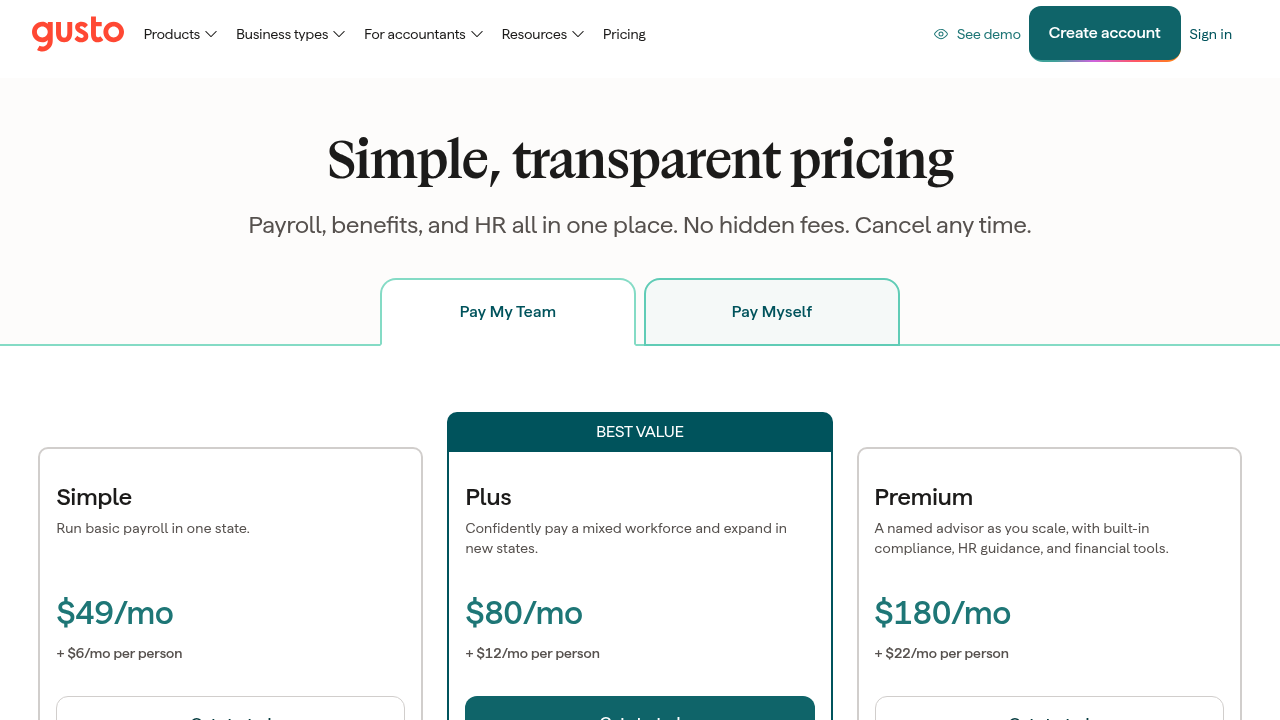
Gusto pricing page showing Simple plan at $49 per month plus $6 per person, Plus plan at $80 per month plus $12 per person marked as best value, and Premium plan at $180 per month plus $22 per person

TL;DR

Per seat software pricing compounds through simultaneous growth in headcount, tier upgrades, and annual price increases, causing teams to spend well over $150,000 in five years while owning nothing, making it essential to compare this cost against building custom solutions.

Key takeaways

  • Seat costs compound through three simultaneous mechanisms: more people joining, tier upgrades for new features, and yearly price increases that stack on top of each other.
  • A realistic scenario shows a team growing from 10 to 50 people spending approximately $150,000 to $160,000 over five years on a typical project and CRM stack, with year six starting over at full price and no ownership of code or data models.
  • Low monthly numbers like $30 per seat hide the true financial impact by framing software as a minor expense rather than a capital investment, making it harder to justify formal evaluation and comparison with custom solutions.
  • Seat limits create shadow systems where teams resort to shared logins and side spreadsheets when constrained by pricing tiers, indicating a structural problem with the pricing model rather than staff inefficiency.
  • Custom development can win on stable, core, high-headcount workflows but loses on commodity functions like payroll and accounting where established per seat solutions are more cost-effective.
  • Automatic annual price increases of five to ten percent, combined with the ratchet effect that allows mid-term seat additions but rarely mid-term removals, lock teams into escalating costs that never decrease.

Per seat pricing looks harmless when you sign it. Twelve people, thirty dollars a month each, and you're out the door for less than a car payment. Four years later you have forty-one people, three tools with three separate seat counts, and an annual software bill that makes your controller wince. Nobody made a bad decision along the way. The pricing model just did exactly what it was designed to do.

TL. DR: Per seat software bills grow faster than your headcount because seats, tier upgrades, and annual price increases stack on top of each other. A team going from 10 to 50 people can easily spend well over six figures on one stack in five years and own nothing at the end. Run the five year number before you renew, then compare it to a one time build you own. For some teams custom wins clearly. For others it doesn't, and this article covers both.
Key takeaways

  • Seat costs compound three ways at once. More people, higher tiers, and yearly price increases all hit the same invoice.
  • A 10 to 50 person team on a typical project and CRM stack can spend around $130,000 to $160,000 over five years, and year six starts over at full price.
  • Low monthly numbers hide the real figure. Always multiply by twelve, then by five, then add your growth curve.
  • Seat limits cause shadow systems. Shared logins and side spreadsheets are a symptom of pricing, not of lazy staff.
  • Custom isn't automatically cheaper. It wins on stable, core, high-headcount workflows and loses on commodity functions like payroll and accounting.

Why the bill grows faster than the team

Most owners assume software cost tracks headcount in a straight line. Double the people, double the bill. That's not what happens.

Three things move at the same time. Your seat count goes up as you hire. Your plan tier goes up as you need features the starter plan doesn't have. And the vendor raises prices, usually five to ten percent at renewal, sometimes more when they roll a new AI feature into your plan and reprice the whole thing.

The tier jump is the one that stings. You add one person in finance who needs approval workflows. That feature lives on the next plan up. The vendor doesn't charge you extra for that one user. You upgrade every seat in the account. Forty people move from $30 to $55 because one person needed a checkbox. I've watched this happen to operations teams more than once, and it never shows up in the original budget.

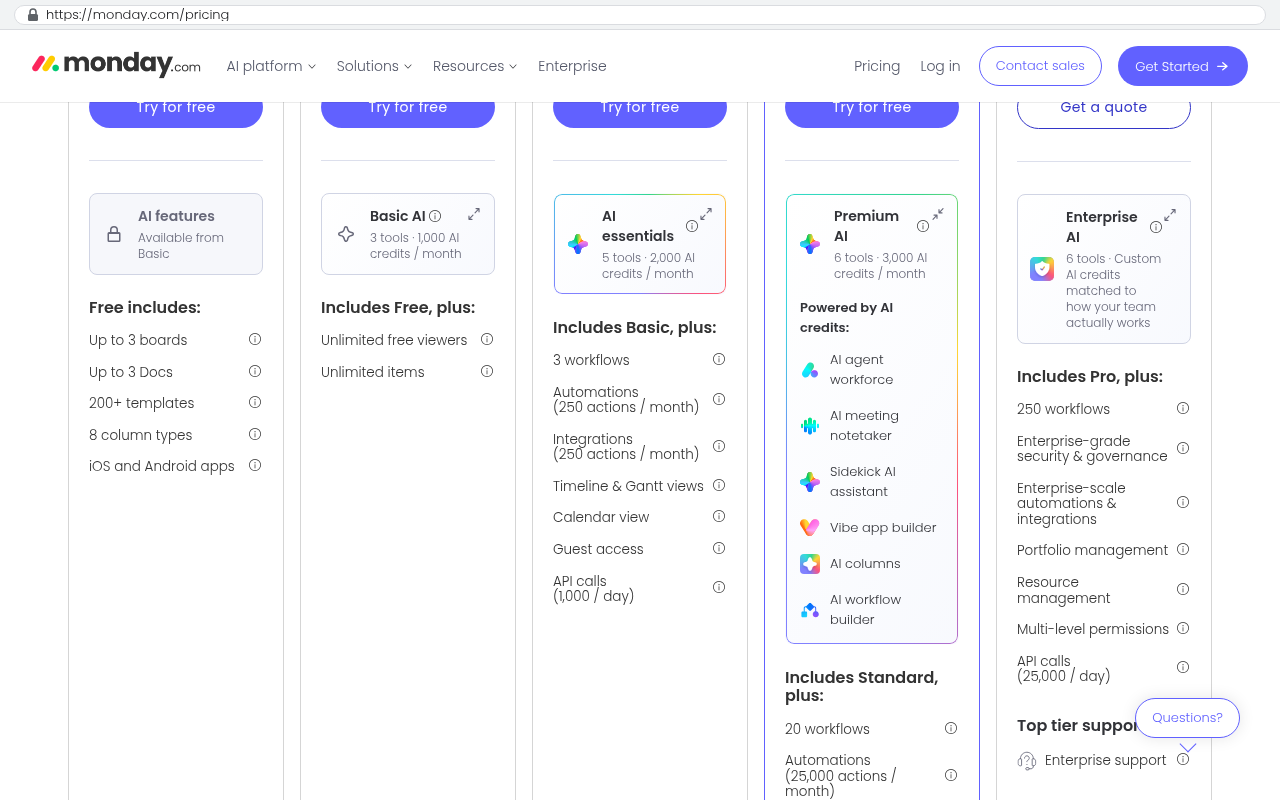
monday.com pricing page showing Free, Basic, AI essentials, Premium AI, and Enterprise AI tiers with feature comparisons including AI credits, workflows, automations, integrations, and various AI-powered tools distributed across the plans
monday.com pricing page displays five pricing tiers with feature comparison details showing AI essentials on Basic, Premium AI with more credits and powered by AI features on higher tiers, and Enterprise AI with custom credits on the top tier. Source: monday.com/pricing

Then there's the ratchet. Almost every annual contract lets you add seats mid-term at a prorated rate. Very few let you remove them before renewal. So a seasonal hiring bump in March becomes a floor you pay through February. Your bill goes up quickly and comes down slowly, if at all.

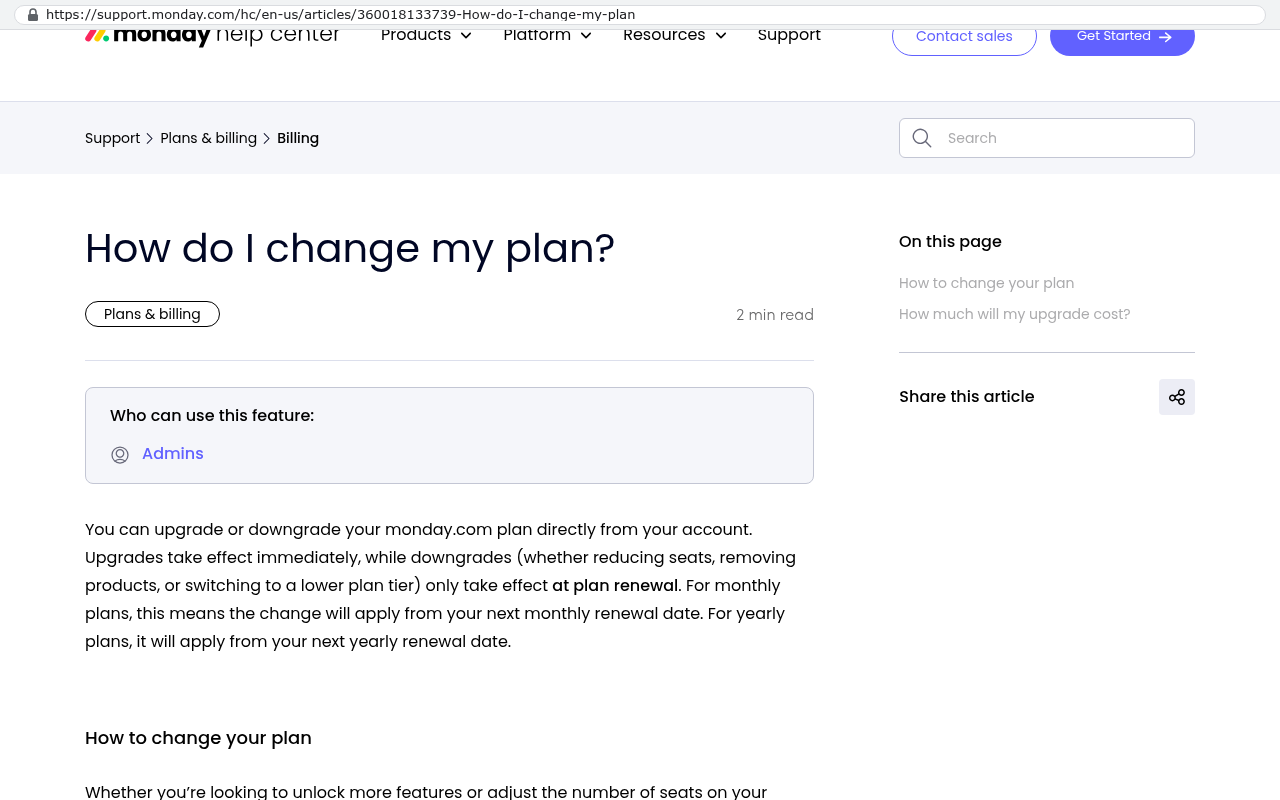
Monday.com support page showing how to change plans with text explaining that downgrades take effect at plan renewal for both monthly and yearly plans
Monday.com help center article about changing plans explains that upgrades take effect immediately while downgrades only apply at the next renewal date Source: support.monday.com/hc/en-us/articles/360018133739-How-do-I-change-my-plan

The five year arithmetic, run honestly

Here's a realistic scenario. You're at 10 people today and you plan to be at 50 in five years. You run a project management tool and a CRM, plus a handful of add-ons. A blended cost of about $75 per person per month across that stack is normal once you're past the free tiers and into plans that do real work.

Year by year, using average seat count for each year:

  • Year 1, 10 seats, about $9,000
  • Year 2, 18 seats, about $16,200
  • Year 3, 28 seats, about $25,200
  • Year 4, 38 seats, about $34,200
  • Year 5, 50 seats, about $45,000

That's roughly $129,600 in base cost. Now add a seven percent annual price increase and one mid-stream tier upgrade, which is conservative for a five year window. You land somewhere around $150,000 to $160,000.

Two things about that number matter more than its size. First, year six opens at $45,000 and climbs from there. The spend never ends. Second, at the end of five years and $150,000, you own nothing. Not the code, not the workflow logic, not the data model. You own an export file and the right to keep paying.

Check whether your current per seat plan counts light users. Some vendors bill a warehouse worker who only marks tasks complete at the same rate as a project manager. Others sell cheap viewer seats but strip out the one permission those users actually need. Audit what each seat does before you count the money you're saving.

Why small monthly numbers fool smart people

Thirty dollars a month doesn't feel like a purchase. It feels like a rounding error. That's the point.

Your brain processes it against a coffee budget instead of a capital budget. Nobody convenes a meeting over thirty dollars. So the tool gets approved by a department head on a company card, and it renews automatically, and eighteen months later it's load-bearing infrastructure that nobody ever formally evaluated.

Multiply by your team and by the year and the framing changes fast. Thirty dollars becomes $18,000 a year at 50 seats. Still a small monthly number. Now a real line item.

The other trick is stack fragmentation. You don't have one per seat bill. You have six. Project tool, CRM, e-signature, time tracking, file storage, and the reporting add-on somebody bought because the native dashboards were weak. Each one is defensible alone. Together they're often the third or fourth largest expense in the business after payroll, rent, and insurance. Most owners I talk to have never added them up on one page. When they do, the conversation changes in about ten minutes.

What you're actually comparing when you consider a build

A custom system flips the shape of the cost. Subscription spend is small, forever, and rising. A build is larger up front, then drops to hosting and maintenance.

Hosting a business application of this size on a mainstream cloud provider generally runs in the low hundreds of dollars a month, and it doesn't care whether you have 12 users or 200. That's the structural difference that matters. Adding your 51st employee to a system you own costs nothing. Adding them to a per seat tool costs $900 a year, every year, until they leave.

Maintenance is real and you should budget for it. Security patches, dependency updates, occasional changes when your process changes. It's a smaller, more predictable number than a renewal cycle you don't control, but it isn't zero, and anyone telling you custom software is a one time expense is selling you something.

The comparison to run is straightforward. Take your five year subscription total. Put it next to build cost plus five years of hosting and maintenance. Then ask what happens in year six, seven, and eight, because that's where owning something starts to compound in your favor instead of the vendor's.

The break-even point usually arrives faster than people expect, and it isn't driven by the build cost. It's driven by headcount growth. A flat 15 person team on cheap tools may never break even. A 40 person team growing to 80 often breaks even in year two or three on the seat math alone.

Seat limits create shadow systems

Pay attention to who isn't in your software. That list tells you more about your operation than the org chart does.

When seats cost money, someone decides who gets one. Field techs don't. Warehouse staff don't. Part-time admins don't. Subcontractors definitely don't. So the work those people do gets tracked somewhere else, and "somewhere else" is a text thread, a printed sheet on a clipboard, or a spreadsheet on one person's desktop.

Then the workarounds start. Two people share a login, which destroys your audit trail and breaks any hope of knowing who changed what. A manager exports a PDF every Friday and emails it to the people without access. Someone builds a Google Sheet that mirrors the real system, and within a month it's out of sync and people trust the sheet more.

None of this is a discipline problem. Your team is routing around a cost constraint you put in place. The data you're missing, the data that would tell you where jobs actually slow down, lives in exactly those gaps. You're paying for software and still guessing, because the pricing model made full adoption too expensive to justify.

A framework to calculate your own exposure

Give this an hour with your controller and a spreadsheet. It's not complicated and the number tends to be persuasive on its own.

  1. List every per seat tool you pay for. Pull it from the card statement, not from memory. You will find at least one you forgot about.
  2. Write down current seats and current cost per seat per month for each.
  3. Add your honest headcount plan for years one through five. Use your growth plan, not your best case.
  4. Apply a seven percent annual increase to every line. That's roughly the market average and it's lower than what many vendors have actually done recently.
  5. Add one tier upgrade per tool somewhere in the five years. You will hit at least one.
  6. Count the people who need the system but don't have a seat today. Price them in at full rate. That's your true adoption cost.
  7. Total it. Then write down what you own on the last day of year five.

That last line is the whole exercise. If the answer is "an export file," you now have the real comparison in front of you.

Where custom is the wrong answer

Building isn't the right call for everything, and it would be dishonest to pretend otherwise.

Don't build accounting, payroll, or email. Those are solved, regulated, and cheap relative to the risk of getting them wrong. QuickBooks and Gusto earn their money.

Gusto pricing page showing Simple plan at $49 per month plus $6 per person, Plus plan at $80 per month plus $12 per person marked as best value, and Premium plan at $180 per month plus $22 per person
Gusto's pricing page displays three payroll plan tiers with monthly base prices of $49, $80, and $180 plus per-person fees of $6, $12, and $22 respectively. Source: gusto.com/product/pricing

Don't build if your team is small and staying small. Fifteen people on a $30 seat is $5,400 a year. No build pays that back in a reasonable window, and you'd be trading a manageable expense for a project.

Don't build if the vendor's network is the product. If your clients already log into your portal inside that platform, and they like it, moving them is a genuine cost you have to weigh. Same with tools where the value comes from an ecosystem of integrations you actively use.

Be clear-eyed about migration too. Exporting twelve years of files, attachments, and comment history out of a hosted tool is a scripted job, not a copy and paste. Custom fields rarely map one to one. Budget real time for it.

And the ownership risk is real. If you own the code, you need the source in your repository, documentation a new developer can read, and a mainstream technology stack so you're never dependent on one person. Ask for all three in writing before anyone starts building.

Questions to ask before you renew

Renewal season is the only time you can negotiate all year. Use it.

Ask the vendor what the per seat price will be in three years, in writing. Ask whether you can reduce seats mid-term. Ask what happens to your data and your automations if you leave, and what format the export comes in. Ask which of your current features move to a higher tier next year.

Then ask yourself the harder ones. How many people on your team should be in this system but aren't, and why? What does your team do outside the tool because the tool won't bend? And if you added up every per seat line across the business, would you be comfortable showing that number to your board?

If the answers make you uneasy, the math is worth running properly. We're happy to sit down and run it with you. You can book a free strategy session and we'll go through your actual numbers, including the cases where staying on your current stack is the right move.

FAQ

Is per seat pricing always a bad deal?

No. For small teams and for commodity software it's efficient and low risk. It turns against you when headcount grows, when you need the whole company in the system, or when tier upgrades force you to pay for features most of your staff never touch.

How do I estimate my break-even point?

Take your projected five year subscription total, including growth and price increases. Compare it to build cost plus hosting and maintenance for the same period. Where the two lines cross is your break-even. Headcount growth moves that point more than anything else.

What about hybrid approaches?

They work well and they're often the right first step. Keep your accounting and payroll on commercial software. Build the operational core, the part that's specific to how you actually run jobs, and connect it to the rest through integrations. You cut the largest seat counts without rebuilding everything.

Who owns the code if we build custom?

You should, completely, and it should say so in the contract. You want the source code in a repository your company controls, documentation, and a common technology stack. Without those three things you've swapped one dependency for another.

What if we grow slower than planned?

Then the payback takes longer, which is a genuine argument for waiting. Run the model with a conservative growth number as well as an optimistic one. If custom only makes sense in the optimistic case, renew and revisit next year.

Read this next

If the seat math pushed you toward evaluating a build, the next question is scope. Start with how to scope a custom system without blowing the budget, which covers what to build first and what to leave on commercial software.

Related articles

Questions

Frequently asked questions

How much does per seat software pricing typically cost a growing team over five years?

A team growing from 10 to 50 people on a typical project management and CRM stack can expect to spend around $150,000 to $160,000 over five years when accounting for seat count increases, tier upgrades, and annual price increases. At year six, the spending cycle starts over at full price, and you own nothing of the code or data at the end.

Why does my software bill grow faster than my headcount?

Three factors compound simultaneously. Your seat count rises as you hire, your plan tier increases when you need features from higher tiers, and vendors raise prices annually by five to ten percent. A single employee needing one feature can force your entire team to upgrade tiers, raising costs for all seats at once.

What are shadow systems and why do they happen?

Shadow systems are shared logins and side spreadsheets that emerge when teams hit seat limits. They're a symptom of pricing constraints, not lazy staff. When per seat pricing makes it expensive to add users, teams find workarounds to stay within budget.

How should I compare custom software builds to per seat subscriptions?

Subscriptions cost small monthly amounts that grow with headcount and never end. Custom builds have larger upfront costs but hosting typically runs a few hundred dollars monthly regardless of team size. Adding an employee to owned software costs nothing, while adding them to a per seat tool costs $900 annually per person.

Why do small monthly software costs hide the true expense?

Your brain treats thirty dollars monthly as a rounding error against a coffee budget rather than a capital expense. Thirty dollars per seat becomes $18,000 annually at 50 people. Most teams never add their multiple software subscriptions together, so the combined expense often becomes their third or fourth largest cost after payroll, rent, and insurance.

Can I remove seats mid-contract if I need to reduce my software costs?

Almost every annual contract allows you to add seats at a prorated rate mid-term, but very few let you remove them before renewal. A seasonal hiring bump in March becomes a cost floor you pay through February, so your bill goes up quickly and comes down slowly, if at all.

Read this next

When staying on your current platform is the right call

Custom software isn't always the answer. Here's the arithmetic, the warning signs, and the honest caveats that tell you whether to renew your platform or replace it.

If this is your situation

Talk it through on a call

Thirty minutes over video with the person who would run the build. You talk, we ask questions, and you leave with a plain read on whether custom software makes sense for you. If the answer is that your current tool is fine and badly configured, you will hear that.

Book a strategy call

Who wrote this

David Verneuille

David Verneuille

Founder, Black Badger Software Solutions

David Verneuille founded Black Badger after 18 years as a project manager and years implementing Smartsheet, monday.com, Wrike and Zoho for clients. He now builds custom systems that clients own outright, which is why the writing here is specific about where each platform fits and where it stops fitting.

About Black Badger

Drafted with AI assistance, then checked, edited, and approved by a person before publishing. The facts, opinions, and recommendations are ours.

Related

More on general

More reading

Read this next

Want this looked at properly?

An article can only go so far without knowing your systems. Book a strategy call, walk us through what is breaking, and you will get a straight read on whether custom software is the right answer.