
Yes. A custom system can replace Smartsheet, including the sheets, the reports, the dashboards, the automations and the forms your team touches every day. The migration is scripted work, not a copy and paste. For a lot of mid-sized companies, the arithmetic now favors owning it.
Replacing Smartsheet with custom software
/ 28 min read

TL;DR
Smartsheet becomes an expensive tool as companies grow and their processes outgrow grid-based structures, but custom software can replace it by converting sheets into real tables, reports into queries, dashboards into live pages, and automations into owned rules that run alongside Smartsheet until cutover.
Key takeaways
- Smartsheet pricing scales from affordable at small team sizes to painful at larger headcounts, with costs growing per member per month as your organization expands.
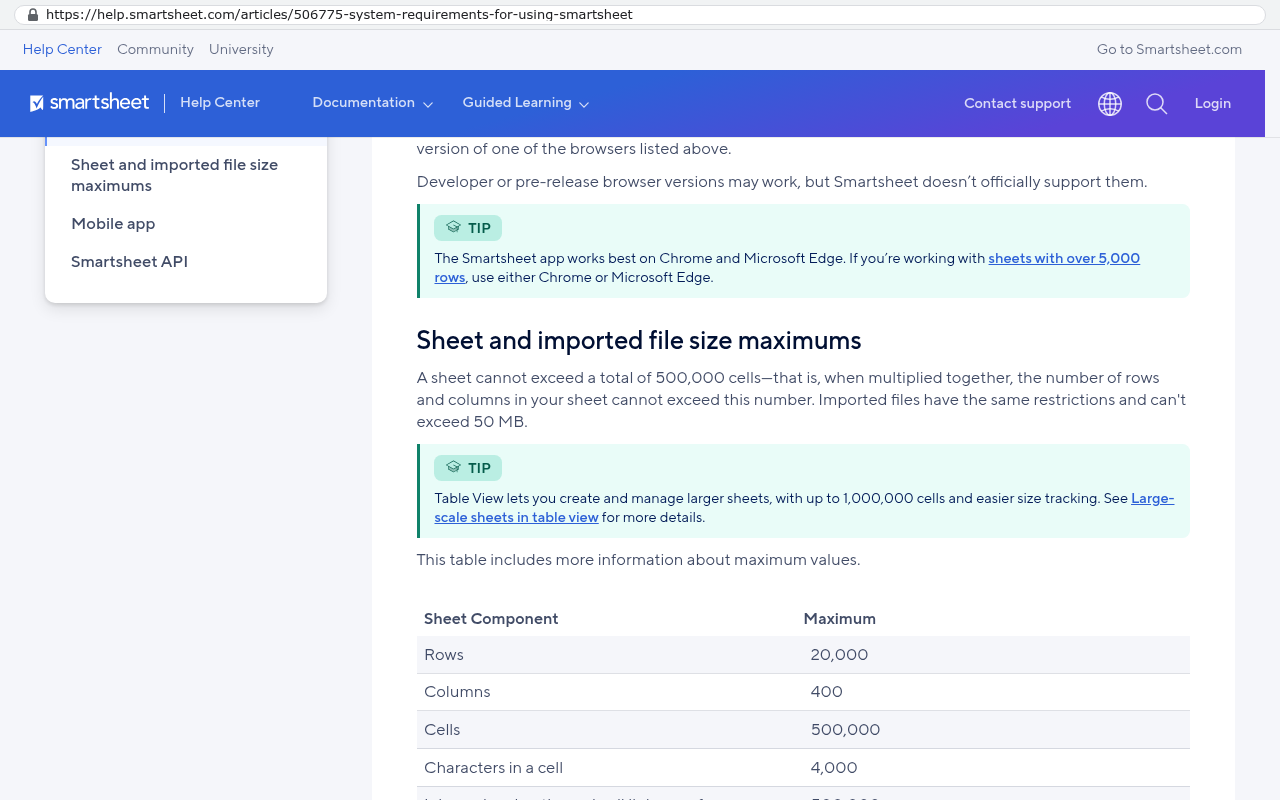
- Smartsheet imposes hard technical limits including 20,000 rows and 500,000 cells per sheet, which shape how teams design their processes and create workarounds.
- Custom systems fix permission issues by assigning visibility at the field level rather than the sheet level, eliminating the need for duplicate sheets created solely to hide columns from certain users.
- Smartsheet's grid-based structure encourages workarounds like helper columns, linked sheets, and manual Excel files that create maintenance burden and single points of failure in your operations.
- A real migration from Smartsheet uses the API rather than Excel export to preserve attachments, comments, and cell history that are lost in standard exports.
- Running both systems side by side for a defined transition period is the standard safe approach to cutover, allowing your team to validate the new system before fully switching.
- After launch, a custom system costs approximately 100 to 200 dollars monthly for smaller companies and 2,000 to 3,000 dollars monthly at enterprise scale, paid directly to hosting providers with no per-user licensing fees.
TL. DR
Smartsheet is a good tool that becomes an expensive tool once your headcount grows and your process stops looking like a grid. A custom replacement rebuilds the sheets as real tables, the reports as queries, the dashboards as live pages, and the automations as rules you own, then runs beside Smartsheet until cutover day. Black Badger was a Smartsheet partner for years and cancelled that partnership, and it does not configure, patch or administer Smartsheet for anyone.
Key takeaways
- Smartsheet's public pricing page lists Pro at $9 per member per month billed yearly and Business at $19 per member per month billed yearly, which is cheap at ten people and painful at two hundred.
- Smartsheet's help center documents hard sheet limits, including 20,000 rows and 500,000 cells in a single sheet, and those limits shape how your team builds.
- An Excel export does not bring attachments, comments or cell history with it, so a real migration uses the Smartsheet API instead.
- Everything your team uses has a direct equivalent in a custom build, including forms, conditional alerts, approval flows and dashboards.
- Running both systems side by side for a defined period is the normal, safe way to cut over.
- After launch the system costs roughly $100 to $200 a month to run for a smaller company, and $2,000 to $3,000 a month at enterprise scale, paid to the hosting providers directly, with no license and no per user fee.
- If most of your value comes from sharing live sheets with clients who already live in Smartsheet, staying put can be the right call.
Why replace Smartsheet with custom software?
Because at some point the sheet stops matching the work. Smartsheet is excellent at the thing it was built for. You open a grid, you add columns, you share it, and six people are coordinating within an hour. No developer, no ticket, no wait. That speed is the whole product, and it is genuinely good.
The trouble starts later. Your operations lead builds a sheet. Then a second sheet feeds it. Then a third sheet exists only to hold lookup values. Then someone adds a helper column with a formula nobody can read. A year on, the company's core process lives inside a stack of linked grids that one person understands, and that person is now a single point of failure.
The failure mode is not that Smartsheet broke. It is that your process outgrew a grid, and a grid is what you have.
A few specific pressure points show up again and again in Smartsheet shops.
- Permissions are set at the sheet level, so you cannot hide a cost column from a subcontractor who needs to see the schedule. Teams solve this by creating a second sheet and linking cells across, which doubles the maintenance.
- Cross sheet formulas break quietly when someone renames a column or inserts a row in the wrong place.
- Automations fire more often than people expect, and inboxes fill with change notifications until everyone mutes them.
- Reports pull rows together well, but doing arithmetic across many sheets is awkward, so the real numbers end up in a monthly Excel file somebody builds by hand.
- There is no version history for the structure itself. You can see cell history. You cannot roll back a workflow somebody rewired on Tuesday.
A custom system fixes those by changing the shape of the data. A project is a record. A task belongs to a project. A cost code belongs to a task. A field can be visible to one role and invisible to another, because permission is a property of the field, not of the file. That sounds like a small distinction. It removes about half the helper sheets in a mature Smartsheet account.
If your Smartsheet environment contains sheets whose only job is to hide columns from certain people, count them before you price a renewal. Those sheets are not work product. They are a workaround for a permissions model, and you pay for them twice, once in licenses and once in the hours someone spends keeping the cell links alive.
What did Black Badger learn as a Smartsheet partner, and why did it leave?
The lesson was that most of the partner work was making the tool hold a shape it did not want to hold. Black Badger was a Smartsheet partner for years. The work was configuration, training, control sheet design, automation builds and the ongoing repair that follows. The partnership is cancelled. Black Badger does not configure, patch or administer Smartsheet for anyone, and does not resell it.
Here is the honest version of what that job looked like. A client would describe a process in plain English. The process was reasonable. Then the build would begin, and about a third of the requirements would turn into a negotiation about what the platform permits. Not what makes sense for the business. What the platform permits.
You end up saying sentences like these out loud. We can do that, but it needs a second sheet. We can do that, but the approver has to be a licensed user. We can do that, but the alert will go to everyone on the row. We can do that, but it breaks if the sheet passes the row limit. Every one of those is a small tax on the client's process, and the client pays it forever.
The reason to leave was arithmetic, not spite. Building custom software used to be slow and expensive enough that bending your process to fit a subscription was the rational choice. AI assisted development changed that. The same scope that once justified a five year license now gets built, owned and handed over. 467 projects are delivered. The pattern holds often enough that staying a partner meant selling the worse option.
None of that makes Smartsheet a bad product. It makes it the wrong container for a company whose process has become the product. There is a real line, and it moves with headcount, complexity and how much of your margin depends on the system being exactly right.
Want to go deeper? Read our full guide: Why platform implementations ask you to change your process
What does Smartsheet cost as a team grows?
It costs per person, per month, and that is the whole story. Smartsheet's public pricing page lists Pro at $9 per member per month billed yearly and Business at $19 per member per month billed yearly. The same page sells Pro for one to ten members with unlimited contributors, so the eleventh member means moving to Business. Enterprise pricing is quoted, not published.
Run the arithmetic for a mid-sized operation. Eighty people on Business at $19 per member per month billed yearly is $18,240 a year. Over five years that is $91,200, assuming the price never moves and your headcount never grows. Both of those assumptions are wrong in most companies.
Then come the add-ons. Smartsheet's own pricing page separates the core plans from its advanced capabilities, the ones sold in Advance packages. Those are the features that serious Smartsheet shops end up needing, including project provisioning, controlled external views, data import automation and the integration layer. They are priced on request. A company that has adopted those is not on a $19 per seat bill anymore.
That is how a project management subscription turns into a six figure annual line. A Texas contractor was facing a $1.3 million five year Smartsheet contract. That number is not a seat count problem. It is a seat count plus add-ons plus renewal escalator problem, and it kept growing with the business.
Two more things inflate the real number, and neither appears on an invoice. The first is the administrator. Somebody in your company spends a chunk of every week keeping the sheets alive, and that salary belongs in the comparison. The second is the workaround labor, the monthly Excel export somebody rebuilds because the report cannot do the math.
Before any renewal conversation, pull your actual license count and compare it to the list of people who log in weekly. Dormant seats are common in Smartsheet accounts because licenses get assigned when somebody needs to edit one sheet once. That single audit usually finds enough slack to fund an honest evaluation of the alternative.
Want to go deeper? Read our full guide: Questions to ask before your Smartsheet or monday.com renewal
What does a Smartsheet replacement include?
Everything your team opens in a normal week, rebuilt as software instead of as a grid. The mistake people make is picturing a replacement as one giant app that does everything Smartsheet does. That is not the goal. The goal is to rebuild what your company uses, which is almost always a fraction of the platform's feature list, and to rebuild it in a shape that fits how you work.
Here is what each Smartsheet object becomes.
Sheets become tables with rules
A sheet is a flat grid where every row is independent and every rule is a formula. In a custom system, a sheet becomes a table with defined fields and relationships. A job row knows which customer it belongs to. A task knows its job. A change order knows its task.
That matters for the thing Smartsheet users complain about most, which is duplicate data. In a grid, the customer name is typed into forty rows across six sheets. Rename the customer and you fix forty cells. In a relational system the customer exists once and everything points at it. You rename it in one place.
Field level validation replaces the helper column. If a cost code must exist before a line is saved, the system refuses the save. You do not need a conditional format that turns the cell red and hopes somebody notices.
Reports become saved views and real queries
Smartsheet reports pull rows from multiple sheets based on filters, which is useful and limited. The limit shows up the moment you want a number that requires grouping and math across sources, like margin by project manager by month, with change orders included and cancelled jobs excluded.
In a custom build, that is a query. It runs against the database directly, it can do the arithmetic, and it can be saved as a view that anyone with the right role can open. Nobody exports to Excel to get the real number, which is the single clearest sign that a reporting layer is working.
Dashboards become pages your team actually opens
Smartsheet dashboards are widget based, and they are fine for a status roll-up. What they struggle with is drilling down. You see a chart, you want the underlying rows filtered to the slice you clicked, and the widget does not do that.
A custom dashboard is a page. Click the bar, see the records behind it, open one, edit it, go back. That interaction loop is why custom dashboards get used daily and platform dashboards get screenshotted for a monthly meeting.
Automations become rules with a log
Smartsheet automations are triggers and actions, and they handle alerts, approvals and row movement well. The two problems are visibility and precision. When something fires wrongly, finding out why takes detective work. And the trigger conditions are coarse enough that teams over-notify to be safe.
Custom automation is the same idea with two additions. Every run is logged with inputs and outputs, so you can answer why an email went out at 2am. And the conditions can be as specific as the business is, including conditions that reference data in another system, like whether the invoice has cleared in QuickBooks.
Forms become intake that validates before it saves
Smartsheet forms are one of the genuinely good parts of the product. They are quick to build and easy to share. The gap is logic. A form can show and hide fields, and it writes a row. It cannot check the submitted data against your other records before accepting it.
A custom intake form can. It can confirm the job number exists, pull the customer details automatically, reject a duplicate submission, route the request to the right approver based on dollar value, and send the submitter a reference number. Same five minutes of filling out a form for the person on site. Far less cleanup behind it.
Attachments become documents with a place to live
This is the part people underestimate. In Smartsheet, attachments hang off rows and comments. Photos from the field, signed change orders, permit PDFs, certificates of insurance. After a few years there are thousands of them, and they are only findable by remembering which row they sat on.
In a custom system, files attach to the records that make sense, and they get searchable metadata. A certificate of insurance belongs to a subcontractor and has an expiry date, which means the system can warn you thirty days out. That is not possible when the file is a nameless PDF stuck to row 412.
Do not scope a replacement by reading the Smartsheet feature list. Scope it by watching five people do their jobs for an hour each. Teams routinely discover that two of their fourteen sheets carry 90 percent of the value, and that the critical daily workflow is a shared view nobody documented.
How does your Smartsheet data move into the new system?
Through the API, with a script, not through Excel. This is the single most misunderstood part of leaving a platform, and getting it wrong costs you years of records.
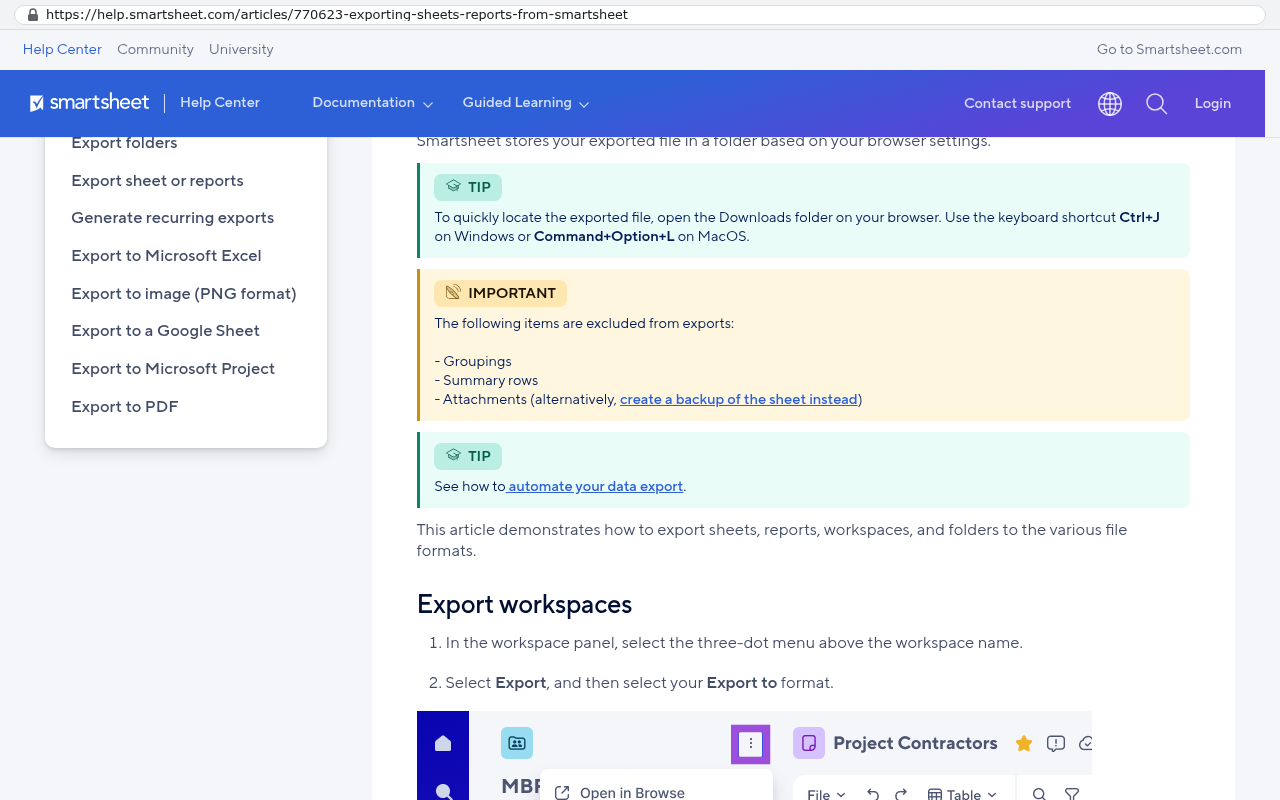
Smartsheet's help center documentation on exporting is clear about what an export contains. Export a sheet to Excel and you get the cell values and the structure of the grid. You do not get the attachments, the comments and conversations, or the cell history that shows who changed what and when. Those live in the platform and they come out another way.
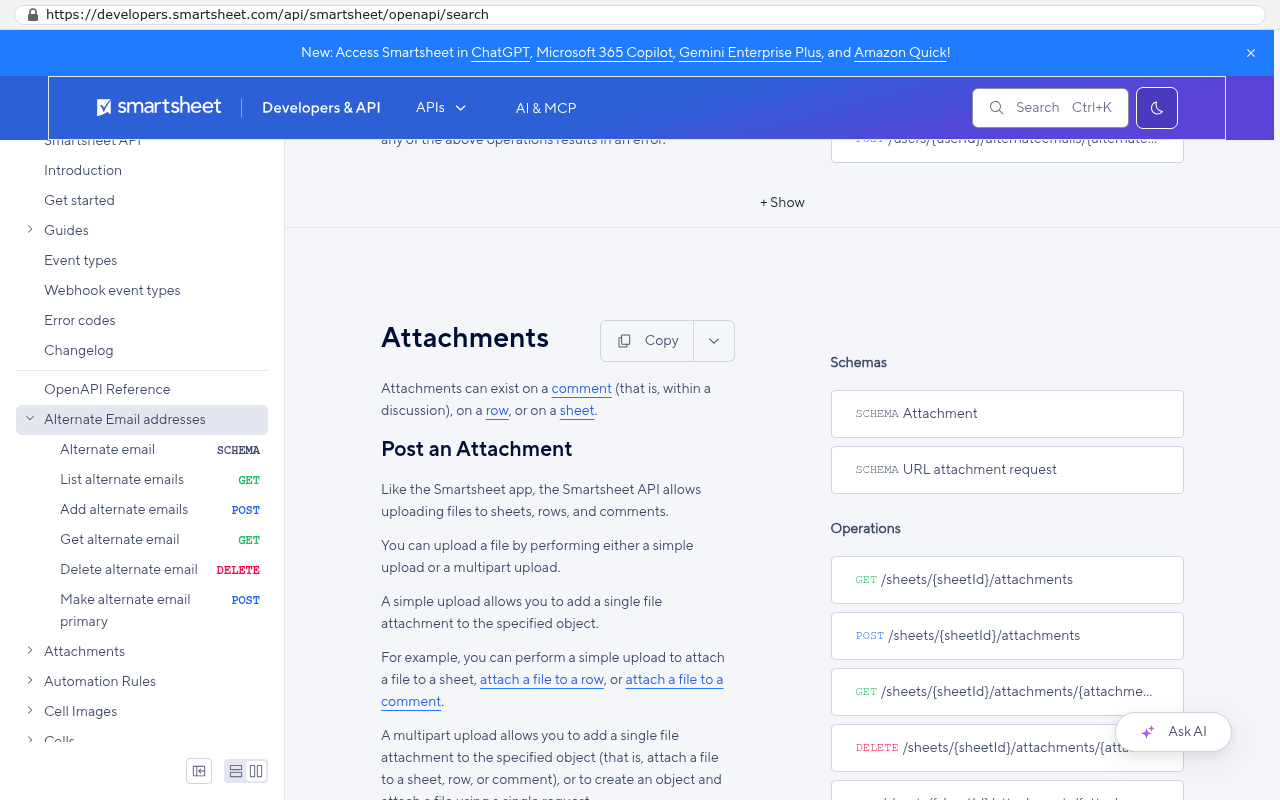
The other way is the API. Smartsheet's developer documentation lists endpoints for sheets, rows, columns, attachments, discussions and cell history. That means a proper migration is a program. It walks every sheet, pulls every row with its identifiers, downloads every attachment file, pulls the comment threads, and records which row each file and comment belonged to. Then it loads all of that into the new structure.
Three things usually surprise people during this.
- Attachment volume is far higher than anyone guesses. A field-heavy operation with five years of photos can hold tens of thousands of files, and downloading them is a rate limited, multi-day job that a script has to handle patiently.
- Cross sheet references do not survive as references. They have to be read, understood, and rebuilt as real relationships. This is design work, and it is where the quality of the new system is decided.
- Data quality problems become visible. A grid tolerates three spellings of the same vendor. A database with a vendor table does not. Cleaning that up is unglamorous and it is the reason the new reports are trustworthy.
The practical sequence is to export structure first, then current open work, then history. Open work has to be perfect because people depend on it tomorrow. History has to be complete because auditors and lawsuits do not care how long ago it was.
Want to go deeper? Read our full guide: How do you migrate ten years of data out of a SaaS platform
What happens between the decision and the cutover?
Both systems run at the same time, on purpose. Nobody flips a switch on a Friday and hopes. The pattern that works is parallel running, and it looks like this.
First, the new system gets built and loaded with a full copy of the Smartsheet data. Your team logs into it and compares. Does the project list match. Does the open task count match. Does last quarter's revenue number come out the same. If anything differs, you find out while Smartsheet is still the source of truth, which is exactly when you want to find out.
Second, one team or one workflow moves first. Usually it is the group with the clearest process and the most pain. They work in the new system for real while everyone else stays put. Their feedback is worth more than any requirements document, because it is based on a Tuesday rather than a workshop.
Third, the rest follows in waves, and the Smartsheet account goes read only before it gets cancelled. Read only is important. It keeps the old environment available for reference without letting anyone quietly keep working in it, which is the main way a parallel run turns into a permanent two-system mess.
The timing question depends on your renewal date, not on the build. If your contract renews in four months, the plan is built backwards from that date. If your renewal just passed, you have a year of runway and the sensible move is to use it rather than rush.
One caution about parallel running. It costs real effort from your team, because for a stretch they are checking two places. Keep the overlap period defined and short. An open-ended parallel run is how projects stall, because nobody is ever forced to trust the new thing.
Want to go deeper? Read our full guide: How long does it take to replace a project management platform
What does the system cost to run once Smartsheet is gone?
Hosting bills, and nothing else. After launch the system costs roughly $100 to $200 a month to run for a smaller company, and $2,000 to $3,000 a month at enterprise scale, paid to the hosting providers directly, with no license and no per user fee.
That last part is the structural difference. Add thirty people next year and the hosting bill moves by a rounding error. Add thirty people to a per member subscription and the invoice moves by thirty times the seat price, every month, forever.
You should also plan for change. Software is never finished, because your business is never finished. Budget for a modest stream of improvements each year, the same way you budget for anything else that the company depends on. The difference is that those changes are yours. They go into the queue you control instead of a feature request portal where you wait and hope.
On the question of what a build costs, the honest answer is a process rather than a price list. It starts with a scoping conversation, turns into a fixed scope, and then a fixed quote against that scope. Every feature request gets four honest answers. Yes and it is in scope. Yes and here is what it adds. No and here is why it will not work. Or not yet, because it should wait until the first version is live and you have learned something.
For reference on real outcomes, a company paying $125,000 a year in licensing had its system replaced in six weeks for $85,000, owned outright. The licensing line went away. That is the arithmetic that makes these projects obvious when they are obvious.
Insist that every account the system runs on is created in your company's name. Code hosting, database, application hosting, email sending. The builder gets invited in and can be removed at any time. If a software firm will not do it that way, you are not buying a system, you are renting one with extra steps.
When should you stay on Smartsheet?
More often than a replacement firm's website usually admits. There are clear cases where renewing is the right business decision, and pretending otherwise would be dishonest.
Stay if your team is small and the total license bill is genuinely modest. Ten people on Pro at $9 per member per month billed yearly is about $1,080 a year. No custom build competes with that on pure cost, and it should not try to.
Stay if your value comes from sharing live sheets with clients and partners who already use Smartsheet. If your biggest customer's project manager lives in your shared sheet, pulling that away is a relationship cost, not just a technical one. You can replace the function with a client portal. You cannot make their habit disappear on your schedule.
Stay if your processes genuinely change every quarter and nobody can describe them twice the same way. Custom software is built against decisions. If the decisions are not made, you will build the wrong thing, and a flexible grid is the better place to be while you figure it out.
Stay if you have no internal owner. Someone at your company has to care about this system, make calls about priorities, and answer questions during the build. Without that person, any custom project drifts, no matter how good the builder is.
And stay if the renewal is next week and nothing is prepared. Sign a shorter term, buy yourself runway, and do the evaluation properly. Panic is an expensive reason to change platforms.
Want to go deeper? Read our full guide: When staying on your current platform is the right call
What can a custom replacement not do?
It cannot give you a marketplace, and it cannot give you somebody else's roadmap. Those are real losses and they deserve a straight accounting.
You lose the app directory. Smartsheet has prebuilt connectors to a long list of tools, and if your workflow depends on one of those being clicked into place, a custom system has to integrate deliberately instead. That is normal work, and it is usually a better integration in the end, because it does what you want rather than what the connector author assumed. But it is work, and it belongs in scope rather than in a feature comparison.
You lose instant self-service sheet creation. In Smartsheet, your operations manager spins up a new tracker in ten minutes without asking anyone. In a custom system, a new structure is a change request. Good builds mitigate this by including flexible areas where users can define their own fields, lists and views. The mitigation is partial. Be honest with yourself about how much ad hoc sheet building your team does, because that habit is real value and losing it has a cost.
You lose someone else's QA department. A platform with thousands of customers finds bugs you never hit. Your system has one customer. That is why a build should ship with automated tests and a staging environment, which are the plain-English equivalents of a practice copy where changes get checked before they reach the real one.
You take on ownership. Hosting accounts exist in your name, which is the point, and they also need somebody to pay attention. Not a lot of attention. More than zero.
And some Smartsheet capabilities are genuinely mature. Its Gantt and dependency handling, resource management views and the project provisioning in its advanced packages represent years of development. Rebuilding all of that from scratch is not sensible. Rebuilding the 20 percent your team uses is. Know which one you are buying.
The single biggest risk in a platform replacement is not technical. It is scope creep driven by people who were never asked. If three departments discover halfway through that they want their wish lists included, the project doubles. Fix the scope in writing first, keep a parking lot for version two, and move the launch date for nothing.
What did it look like for a Texas contractor?
A $1.3 million five year contract turned into a system the company owns. The contractor was running its project operations in Smartsheet. Scheduling, field reporting, change orders, subcontractor coordination, the usual stack of linked sheets that grows with a construction business.
The renewal on the table was a five year Smartsheet contract worth $1.3 million. That is the number that forced the question. At that size, the subscription stops being a tool expense and becomes a capital decision, and capital decisions get compared against alternatives.
The replacement was built in 16 weeks for $375,000, and the license bill went to zero. The sheets became proper tables for jobs, tasks, crews and change orders. The field forms became mobile intake that validates the job number before it saves. The dashboards became pages the project managers open every morning. The attachments, years of site photos and signed documents, moved with their records rather than being left behind in an export.
The part worth noting for your own evaluation is the five year comparison. $375,000 once, against $1.3 million over five years, with hosting costs afterward instead of license costs, and the system belongs to the contractor. The payback math did not need a spreadsheet full of soft benefits. It worked on the licensing line alone.
Your numbers will differ. The method does not. Take your real five year subscription cost including expected growth and add-ons. Compare it to a fixed quote for a fixed scope plus a run cost. If the gap is small, renew and get on with your day. If the gap looks like the contractor's gap, the conversation is worth having.
Who owns the system, the code and the accounts?
You do, and the account setup is where that gets proven. Ownership is easy to claim in a contract and easy to undermine in practice. The test is whose name is on the infrastructure.
Every account the system runs on is created in the client's own name. The code repository, the database, the application hosting, the email sending service. The builder is invited in as a collaborator and can be removed at any time. That means a disagreement about future work is a business conversation, not a hostage situation.
This is the opposite of the SaaS position, and it is worth being precise about the difference. When you stop paying a subscription, your access ends on a date set by the vendor, and what you can extract before that date is defined by their export tools. When you stop paying a development firm, the system keeps running, because it runs on your accounts with your credentials.
Ask for three specific things in writing. The code repository under your organisation. Documentation good enough for another developer to pick it up. And a plain description of every third party service the system calls, with the account owner named for each one.
Want to go deeper? Read our full guide: What happens to your data when you stop paying a SaaS vendor
How do you start before the renewal?
Start with your own usage data, not with a vendor conversation. Three weeks of honest internal work puts you in a position to make the decision properly, whichever way it goes.
Begin by listing what you pay. Your current Smartsheet invoice, broken out by plan and add-on, plus the renewal quote with any escalator. Then the headcount trend. If you added fifteen people last year, the five year number is not today's number times five.
Next, inventory what you use. Pull a list of every sheet, report, dashboard and workflow in the account, then mark each one as daily, monthly or dead. Most accounts are 60 percent dead weight. The live portion is your real scope.
Then find the workarounds. Ask each team what they do outside Smartsheet to make Smartsheet work. The monthly Excel export. The second sheet built for permissions. The text message that has to go out because the alert fires for everyone. Those are the requirements nobody writes down, and they are usually the ones that justify the project.
Finally, check your contract terms. Auto renewal clauses, notice periods and the date your data access ends if you leave. Read that before any negotiation, because the notice window closing is what turns a choice into a renewal.
With those four things in hand, you can have a useful conversation with anyone, including Smartsheet. You might find that a plan change and a seat cleanup solves it. You might find a five year number that makes a build obvious. Either outcome beats renewing by default.
Want to go deeper? Read our full guide: What questions should you ask before signing a five year software contract
Frequently asked questions
Can a custom system really replace Smartsheet dashboards and reports?
Yes, and usually with more capability, because the reports run as queries against a real database instead of filters across grids. The thing people miss is interactivity. A custom dashboard lets you click a chart and see the underlying records, which Smartsheet widgets do not. The honest caveat is that someone has to decide what the dashboards should show. Platform dashboards let you build something quickly and tune it later. A custom one benefits from knowing the questions up front.
What happens to our Smartsheet attachments and comments?
They move, but not through an Excel export. Smartsheet's help center documentation makes clear that exporting a sheet gives you the cell data, while attachments, comments and cell history stay in the platform. The migration pulls those through the API instead, downloading each file and recording which row it belonged to. For an account with years of field photos, that is a multi-day scripted job. It is routine work, and it is the part to ask hard questions about before you sign anything.
Do we have to stop using Smartsheet on day one?
No, and you should not. The normal pattern is parallel running. The new system gets loaded with your data, your team compares the numbers, one group moves first, then the rest follow in waves. Smartsheet goes read only before cancellation so the history stays reachable. The one rule is to set an end date for the overlap. Open-ended parallel running means two sources of truth, and that is worse than either system alone.
Will Black Badger help us fix our existing Smartsheet setup instead?
No. Black Badger was a Smartsheet partner for years and cancelled that partnership. It does not configure, patch, administer or resell Smartsheet or any other platform. If your situation calls for staying on Smartsheet and tuning it, that is a legitimate answer and it is one you will hear plainly, along with a recommendation to find someone who does that work well. The build conversation only makes sense when a build is the right answer.
How much does Smartsheet cost per user?
Smartsheet's public pricing page lists Pro at $9 per member per month billed yearly and Business at $19 per member per month billed yearly, with Pro sold for one to ten members and unlimited contributors. Enterprise and the advanced capability packages are quoted rather than published. Check the page yourself before you plan around those numbers, because Smartsheet has changed its user model and pricing before.
What if our clients use Smartsheet to work with us?
Then you have a genuine migration cost that goes beyond your own team, and you should price it honestly. A custom client portal can do more than a shared sheet, including showing each client only their own work and giving them a clean place to approve things. But you are asking an external party to change a habit, and some will push back. If live sheet sharing with clients is most of the value you get from the platform, staying is a defensible decision.
How long do these projects take?
It depends on scope, and real examples are the best guide. A Texas contractor facing a $1.3 million five year Smartsheet contract had its replacement built in 16 weeks. A company paying $125,000 a year in licensing had its system replaced in six weeks for $85,000, owned outright. The driver is how many live workflows you actually have, not how many sheets exist in the account. Scoping starts with that inventory.
What happens if the developer disappears?
The system keeps running, because it runs on accounts in your company's name. Code hosting, database, application hosting and email are all created under your organisation, and the builder is invited in as a collaborator who can be removed at any time. Combined with documentation and the code in your repository, that means another developer can pick it up. Ask for exactly this arrangement from anyone you hire, including firms other than this one.
Next steps
Pull your Smartsheet invoice, your renewal quote and a list of every sheet somebody opened last month. That is the entire input you need to make this decision well. If the five year number is small, renew and spend your energy elsewhere. If it looks like a capital decision, treat it as one.
When you want a second opinion, book a free strategy session. It is a conversation about whether a build makes sense for your situation, including the cases where it does not, and you will get a straight answer either way. Black Badger is in Clearwater, Florida, at 1221 Turner St, STE 206, Clearwater, FL 33756, and works with companies across Pinellas and Hillsborough counties. The phone number is (727) 306-3202.
Read this next
How long does it take to replace a project management platform, which covers the timeline question in detail and shows how a cutover plan gets built backwards from a renewal date.
Related articles and pages
- Moving from Smartsheet to a custom AI assisted system
- Smartsheet replacement overview
- Questions to ask before your Smartsheet or monday.com renewal
- How do you migrate ten years of data out of a SaaS platform
- When staying on your current platform is the right call
- Is a client portal worth building or should you buy one
- Do you need custom software
- Project record and outcomes
Questions
Frequently asked questions
At what point does Smartsheet become too expensive for a growing team?
Smartsheet's public pricing lists Pro at $9 per member per month and Business at $19 per member per month when billed yearly. This is affordable at ten people but becomes painful at two hundred. As your headcount grows and your process becomes more complex, the per-user cost accumulates quickly, making replacement economics favorable for mid-sized companies.
What are the main limitations of Smartsheet that drive teams to replace it?
Smartsheet has hard sheet limits of 20,000 rows and 500,000 cells per sheet, and permissions are set at the sheet level rather than the field level. This forces teams to create helper sheets just to hide columns from certain users. Cross-sheet formulas break when columns are renamed, automations fire too often, and there is no version history for workflow changes.
Can a custom system truly replace Smartsheet's dashboards and reports?
Yes. A custom replacement rebuilds sheets as real tables, reports as queries, dashboards as live pages, and automations as rules you own. Everything your team uses in Smartsheet, including forms, conditional alerts, approval flows and dashboards, has a direct equivalent in a custom build. The migration uses the Smartsheet API for data integrity.
How much does it cost to run a custom system after leaving Smartsheet?
After launch, the system costs roughly $100 to $200 per month to run for a smaller company and $2,000 to $3,000 per month at enterprise scale. These costs go directly to hosting providers with no license fees and no per-user charges, unlike Smartsheet's subscription model.
What happens to Smartsheet attachments and comments during migration?
A simple Excel export does not bring attachments, comments, or cell history with it. A real migration uses the Smartsheet API instead to preserve this information properly and maintain complete data integrity during the transition.
Is it safe to run both Smartsheet and the new system at the same time?
Yes. Running both systems side by side for a defined period is the normal and safe way to cut over. This approach allows your team to validate the new system while maintaining operations in Smartsheet until you are confident in the replacement, then switching on cutover day.
When should a company stay on Smartsheet instead of replacing it?
If most of your value comes from sharing live sheets with clients who already use Smartsheet, staying put can be the right call. Replacement makes sense when your internal process has outgrown a grid, not when your primary benefit is collaboration within the Smartsheet ecosystem itself.
Read this next
How long does it take to replace a project management platform?
The timeline for replacing a project management platform is set by your data, your integrations, and your team's decisions, not by the code. Here's what actually speeds it up or slows it down.
If this is your situation
Talk it through on a call
Thirty minutes over video with the person who would run the build. You talk, we ask questions, and you leave with a plain read on whether custom software makes sense for you. If the answer is that your current tool is fine and badly configured, you will hear that.
Who wrote this

David Verneuille
Founder, Black Badger Software Solutions
David Verneuille founded Black Badger after 18 years as a project manager and years implementing Smartsheet, monday.com, Wrike and Zoho for clients. He now builds custom systems that clients own outright, which is why the writing here is specific about where each platform fits and where it stops fitting.
Drafted with AI assistance, then checked, edited, and approved by a person before publishing. The facts, opinions, and recommendations are ours.