
Lock-in doesn't happen to you by accident. Somebody designed it. A product manager decided that bulk export would be a paid add-on. A lawyer decided the cancellation notice window would be ninety days instead of thirty. None of that is a bug. It's a retention strategy, and it's written down in places you can read before you sign.
Vendor lock-in is a design choice, and here is how to spot it in a contract
/ 11 min read
TL;DR
Vendor lock-in is an intentional business design choice built into contracts and product features, and you can identify all five mechanisms that keep you trapped before signing by examining data formats, export tools, workflow logic, contractual terms, and integration dependencies.
Key takeaways
- If you cannot export every record, file, and automation rule today, you do not control your data but rather rent temporary access to it.
- The contract clauses that matter most are notice period, price uplift cap, termination assistance, and post-cancellation data retention duration.
- Lock-in mechanisms appear in five consistent forms: data format restrictions, API paywalls, workflow logic stored server-side, missing bulk export for attachments, and auto-renewal with long notice windows.
- Switching costs compound significantly over time, with each new integration making the platform harder to leave and the difficulty curve steepening after year two.
- Run an annual export drill by downloading everything and confirming a human can actually use the exported data in its original form.
- Owning your own system eliminates renewal risk and export paywalls but does not eliminate maintenance costs, hosting responsibility, or the need for someone to manage it.
- You should test all five lock-in mechanisms in an afternoon before signing any contract and again every year afterward, regardless of whether you plan to leave.
TL. DR
Vendor lock-in is built, not discovered. It lives in five places: your data format, the export tools, where your workflow rules are stored, the contract's renewal and notice clauses, and how many other systems now depend on the platform. You can test all five in an afternoon. Do it before you sign, and again every year after, whether or not you plan to leave.
Key takeaways
- If you can't export every record, file, and automation rule today, you don't control your data. You rent access to it.
- The contract clauses that matter most are notice period, price uplift cap, termination assistance, and post-cancellation data retention.
- Switching cost compounds. Every new integration makes the platform harder to leave, and the curve steepens after year two.
- Run an annual export drill. Download everything, open it, and confirm a human can use it.
- An owned system removes the renewal risk and the export paywall. It doesn't remove maintenance, hosting, or the need for someone to own it.
The five mechanisms that keep you put
Lock-in shows up in the same handful of shapes across almost every platform. Once you know the shapes, you spot them fast.
The first is data format. Your records live in a structure the vendor invented. Custom fields, picklists, object relationships, permission groups. When you export, you get flat spreadsheets that lost the relationships between things. A quote that was linked to a job that was linked to three change orders comes out as three unrelated files.
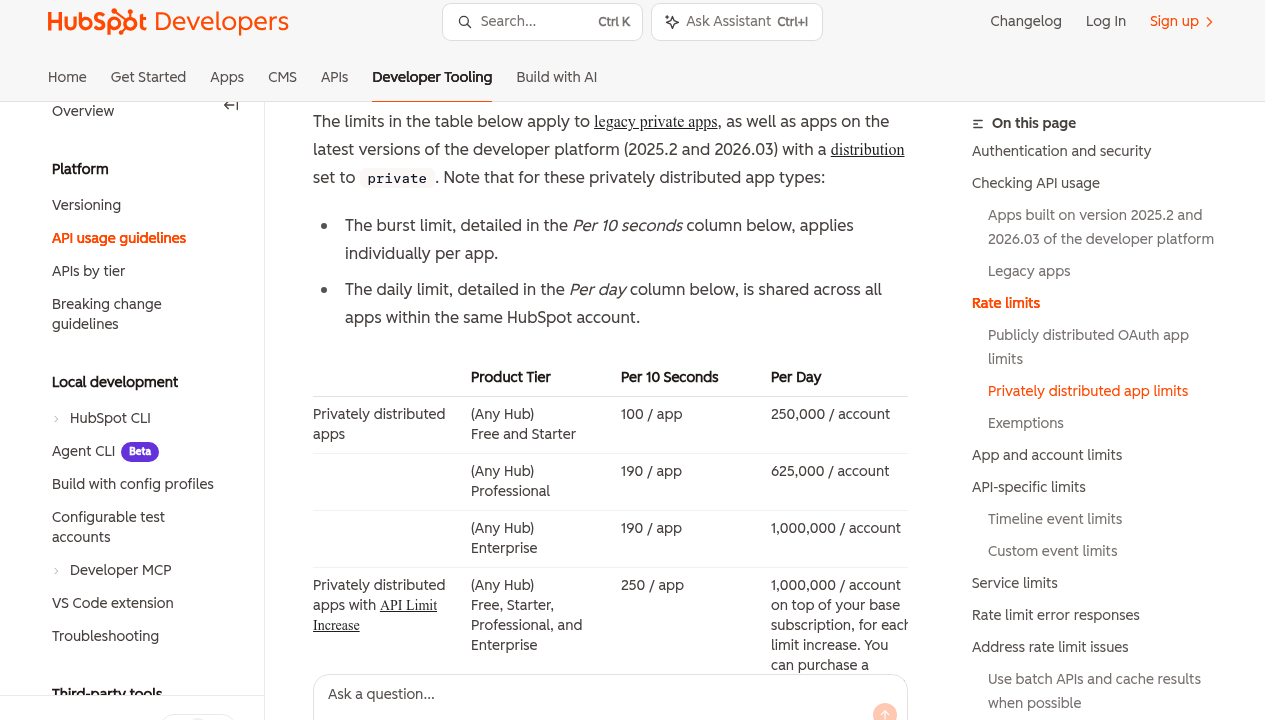
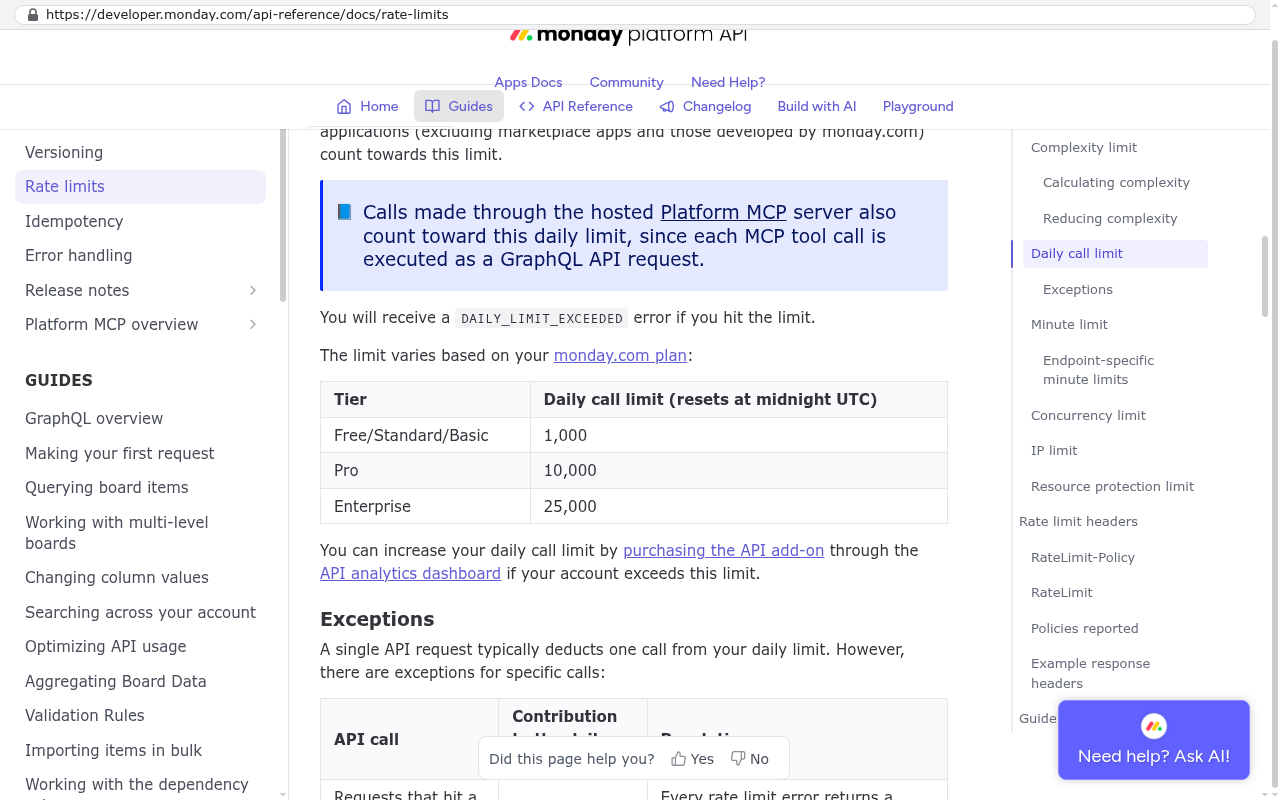
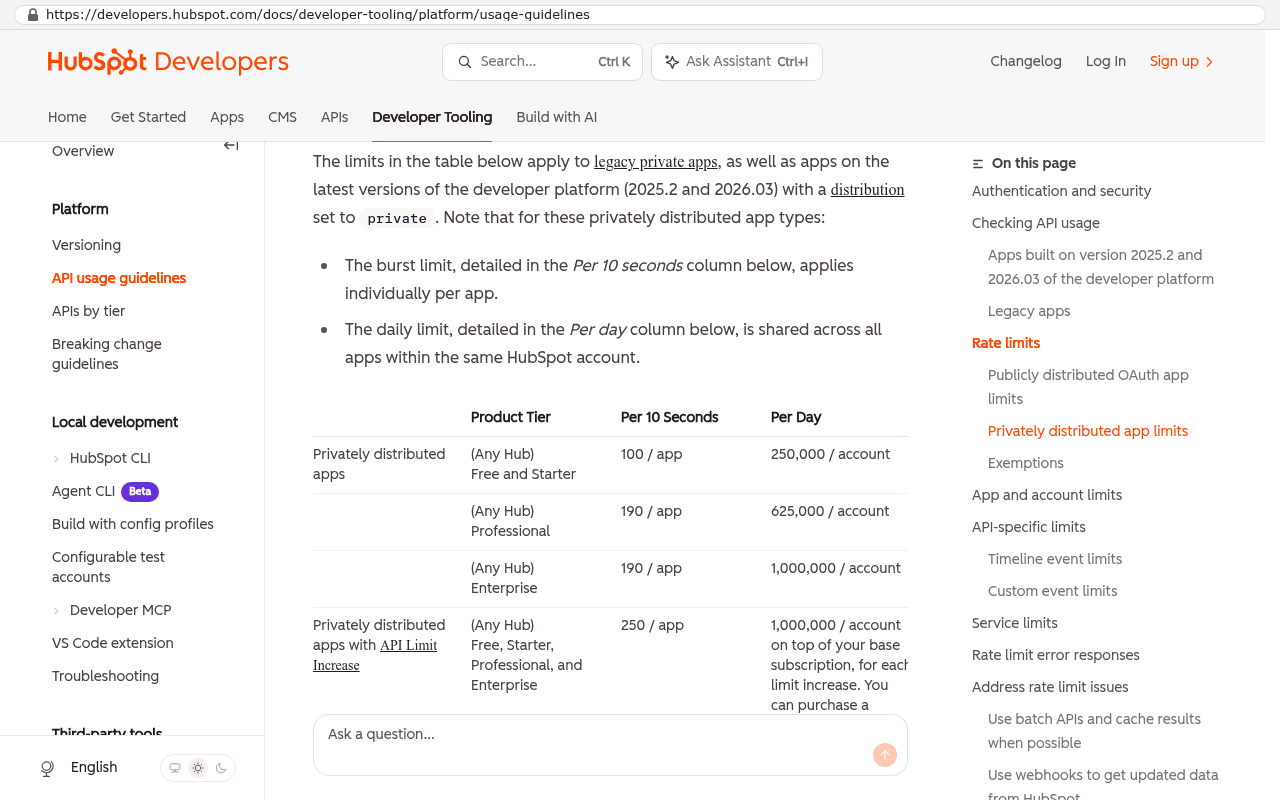
The second is the API paywall. An API is just a door that lets one system talk to another. Plenty of vendors put that door on a higher pricing tier. Others cap how many requests you can make per day, which sounds technical until you realise it means a full data pull takes eleven days instead of twenty minutes.
The third is workflow logic stored on their side. Your approval chains, your alert rules, your calculated fields, your report filters. That work was real. Someone on your team spent months tuning it. And in most platforms there is no way to export any of it. You can screenshot it. That's the migration plan.
Fourth is missing bulk export for attachments. Records export fine. The twelve years of signed PDFs, site photos, and scanned delivery notes attached to those records do not. Getting those out usually means a script that walks every record and pulls each file one at a time.
Fifth is contractual. Auto-renewal with a long notice window is the quietest one, and the most effective.
A ninety day notice period on an annual contract means your real decision deadline is nine months into the term. Miss it by a week and you've bought another year. Put the date in a shared calendar with a reminder six weeks ahead of it, not the day of.
The clauses to read before you sign
Most software contracts are short. The parts that decide whether you're free in three years take about ten minutes to find.
Start with data portability. You want a sentence that says you can export your data, in a machine-readable format, at any time, at no extra charge, including attachments. If the contract is silent, that isn't neutral. It means whatever the product happens to support that quarter.
Next, the notice and renewal terms. Look for the renewal trigger, the notice window, and whether notice must be in writing to a specific address. Some vendors still require certified mail. That's a design choice too.
Then price uplift. Ask for a cap in writing. Something like "renewal increases limited to 5% or CPI, whichever is lower." Without a cap, your third-year price is whatever the market will bear, and by then you've built your operation around the tool.
Termination assistance is the clause nobody asks for and everybody wishes they had. It commits the vendor to give you a full data dump in an agreed format within an agreed number of days after you cancel. Name the format in the contract. "Reasonable assistance" means nothing.
Finally, post-cancellation retention. Find out how long they keep your data after you leave, and how long you can still reach it. Thirty days of read-only access after termination is a fair ask. Some contracts cut access the moment the term ends, which turns a planned migration into a fire drill.
The export test you can run this week
Forget what the sales engineer said in the demo. Log in and try it.
Pick your busiest record type. A job, a deal, a work order. Export a year of them. Then check four things in the file you got back. Are all your custom fields there? Are the links between records preserved, or did you get orphaned rows? Did any dates, currencies, or long text fields get mangled? And did the attachments come with it?
Then try the harder half. Export your automation rules, your permission structure, and your audit history. Audit history is the one people forget. If you're in construction, healthcare, or anything with a compliance obligation, you may need to prove who changed what and when, five years from now. If that trail only exists inside a platform you no longer pay for, you have a problem that no amount of contract language fixes retroactively.
Do the export test during a free trial or a pilot, before money changes hands. That's the only moment you can make real demands. Ask for a sample export of a populated demo account and open it in Excel yourself. Vendors who are comfortable with portability will hand it over the same day.
The integration trap
The expensive kind of lock-in isn't in the contract at all. It builds up quietly as the platform becomes the place everything else looks up.
It goes like this. You buy a CRM. Then your quoting tool starts pulling customer records from it. Then your accounting system syncs invoices against its job numbers. Then your field app reads schedules out of it. Then a Power BI dashboard the CFO checks every Monday points at its API. Now the CRM isn't one of your systems. It's the source of truth for six of them.
Switching cost multiplies, not adds. Replacing the CRM now means rebuilding five integrations, re-mapping every ID, and running both systems in parallel while you prove the new one matches. That's why a platform that felt like a $900 a month decision behaves like a $200,000 decision three years in.
The defence is boring and it works. Keep your own copy. Sync the records you care about into a database you control, on a schedule, including attachments. It costs very little to run and it means your history never lives in one vendor's account. When you do decide to move, you're migrating from your own warehouse, not begging for an export.
Why the cost curve steepens
Migration cost isn't flat over time. It rises, and the slope gets worse.
Year one, you have a few thousand records, two integrations, and the people who set it up are still around. Year four, you have five years of attachments, eleven automations nobody remembers writing, three departments using it differently, and the person who configured it has left. Nothing about the software changed. The cost of leaving tripled.
Here's the arithmetic that usually decides it. Say you pay $38 per user per month for 60 users. That's $27,360 a year. Add a 7% uplift each renewal and five years costs roughly $157,000. Add the API tier you needed, the implementation partner's hours, and the two integrations you pay separately for, and the five-year number climbs well past that. Now go get a fixed quote to build the 30% of that platform your team actually uses, hosted on infrastructure in your own cloud account, with the source code in your own repository. Compare total five-year cost, and compare what you own at the end. In one column you own nothing and face a sixth renewal. In the other you own an asset with no renewal at all.
The comparison only works if you're honest about scope. Most companies use a fraction of what a big platform ships. Before you price a build, list the screens your team touches weekly. That list, not the vendor's feature matrix, is what you're replacing.
An annual exit readiness routine
Run this once a year even if you love the product. It takes a morning and it keeps your options open.
- Pull a full export of every record type, plus attachments, and store it somewhere you control.
- Open three of the files. Confirm a person can read them and the relationships survived.
- Screenshot or document every automation rule, approval chain, and custom report.
- List every other system that reads from or writes to the platform, and who owns each one.
- Re-read the renewal clause. Diary the true notice deadline, not the renewal date.
- Ask the vendor in writing what happens to your data thirty days after cancellation. Keep the reply.
Two side effects are worth more than the exercise itself. You end up with a real inventory of how your business runs. And your renewal conversations change, because you can leave, and the vendor can tell.
What an owned system changes, and what it doesn't
On every dimension above, a custom system you own behaves differently. The database is yours, so export is a query, not a support ticket. The workflow logic sits in source code you hold, so it's documented by definition. There's no API tier, because there's no vendor deciding who gets a door. There's no auto-renewal, so there's no notice deadline to miss. And price increases don't happen because a sales team hit a quarterly target.
Now the honest part.
Where owning it is the wrong call
Owning software doesn't mean the cost stops. Hosting, security patching, dependency updates, and backups all still need doing, and somebody has to be accountable for them. That's real money every year, just a smaller and more predictable number than a per-seat licence.
Some things you shouldn't build. Accounting ledgers, payroll tax tables, and payment processing are all deeply regulated and already solved well by vendors who employ compliance teams. Buy those. Integrate them.
You also lose the free ride on the vendor roadmap. When a platform ships a feature, you get it. With your own system, new capability happens because you decide to fund it. For a workflow that's core to how you make money, that's the point. For a commodity function, it's a chore.
And if a big part of the platform's value is that outside parties already live in it, moving carries a genuine cost. Clients who review documents in your project tool, subcontractors who submit through your portal, auditors who expect a familiar report format. Those people need retraining and reassurance, and pretending otherwise wastes everyone's time. Sometimes the right answer is keeping the shared surface and moving everything behind it.
FAQ
Is vendor lock-in always bad?
No. Depth costs something, and a tool that's genuinely woven into your operation is doing its job. The problem is unpriced lock-in, where you can't leave and you didn't know that when you signed.
What's the single most important clause to negotiate?
Termination assistance with a named export format and a deadline. It converts a vague promise into an obligation, and it's usually easier to get than a price cap.
Can I ask for changes to a standard SaaS agreement?
Yes, and you'd be surprised how often it works at mid-market deal sizes. Ask for a shorter notice period, an uplift cap, and export language. Sales reps will trade contract terms for a signature at quarter end.
How do I keep my own copy of data in a hosted platform?
A scheduled job pulls records and files through the API into your own cloud storage or database. It's a small, unglamorous piece of software. It's also the cheapest insurance you'll ever buy against a renewal you don't want.
We're already deep in a platform. Is it too late?
It isn't, but the order matters. Start syncing your data out now, map the integrations, and replace one workflow at a time rather than attempting a single cutover. The compounding works in reverse once you begin.
What to do next
Pick your most expensive subscription. Run the export test on it this week, find the notice deadline, and write both results down. If what you find makes you uncomfortable, that's useful information, and there's a path out of it. When you want a second opinion on whether the workflow behind that subscription is worth owning, book a free strategy session and we'll walk the numbers with you.
Read this next: "Buy versus build in 2026, and the five-year arithmetic nobody shows you".
Related articles
- How to migrate off a SaaS platform without stopping work for a month
- What "you own the source code" actually needs to say in writing
- Integration patterns that keep your data yours
Questions
Frequently asked questions
What are the five main mechanisms of vendor lock-in?
Vendor lock-in operates through five mechanisms: your data format and how it's structured by the vendor, API paywalls that restrict data access, workflow logic stored only on the vendor's platform, missing bulk export for attachments, and contractual terms like auto-renewal with long notice periods. Understanding these five areas lets you spot lock-in before you sign any agreement.
How can I test for vendor lock-in before signing a contract?
Run an export test during a free trial or pilot. Export your busiest record type and check if all custom fields are present, if links between records are preserved, and if attachments come with it. Also export your automation rules, permission structure, and audit history. This real-world test reveals the actual portability of your data before money changes hands.
What contract clauses matter most for avoiding lock-in?
The critical clauses are data portability (allowing export in machine-readable format with attachments at no extra charge), notice and renewal terms, price uplift caps on renewals, termination assistance (committing to a full data dump in an agreed format), and post-cancellation retention terms. Read these carefully and negotiate specific terms rather than vague language like reasonable assistance.
What should I know about auto-renewal terms?
Auto-renewal with a long notice window is the quietest but most effective lock-in mechanism. A ninety-day notice period on an annual contract means your real decision deadline is nine months into the term. Missing the deadline by a week locks you in for another year. Put cancellation dates in a shared calendar with a reminder six weeks ahead to protect yourself.
What happens when I integrate multiple systems with a platform?
Each new integration makes the platform harder to leave as the system becomes the central place everything else references. This integration trap builds quietly and the switching cost compounds over time, with the curve steepening after year two. This creates expensive lock-in that isn't written in any contract but becomes real through operational dependency.
Can I export my approval chains and workflow rules?
In most platforms, there is no way to export workflow logic like approval chains, alert rules, calculated fields, or report filters. You can screenshot them, but that's typically the migration plan. This is a significant lock-in mechanism because the work invested in tuning these rules cannot be transferred when you leave the platform.
Should I run export tests if I'm not planning to leave the platform?
Yes. We recommend running an annual export drill whether or not you plan to leave. Download everything, open it, and confirm a human can actually use it. This yearly routine maintains your exit readiness, ensures your data portability still works as expected, and catches any changes the vendor has made to export functionality.
Read this next
What happens to your data when you stop paying a SaaS vendor
Cancel a SaaS subscription and your data doesn't vanish, it gets locked behind a login. Here's what an export really gives you, what never comes out, and when owning the system is cheaper.
If this is your situation
Talk it through on a call
Thirty minutes over video with the person who would run the build. You talk, we ask questions, and you leave with a plain read on whether custom software makes sense for you. If the answer is that your current tool is fine and badly configured, you will hear that.
Who wrote this

David Verneuille
Founder, Black Badger Software Solutions
David Verneuille founded Black Badger after 18 years as a project manager and years implementing Smartsheet, monday.com, Wrike and Zoho for clients. He now builds custom systems that clients own outright, which is why the writing here is specific about where each platform fits and where it stops fitting.
Drafted with AI assistance, then checked, edited, and approved by a person before publishing. The facts, opinions, and recommendations are ours.