A practical checklist for migrating off a project management platform without losing data
/ 11 min read
TL;DR
This article provides a practical checklist for migrating off a project management platform while preserving critical data, emphasizing that the real work happens before export through thorough auditing and parallel system running.
Key takeaways
Audit your current system's fields, automations, and integrations before exporting anything, documenting not just what exists but why each element was created and who manages it.
Export processes typically miss attachments, comment threads, and audit history, so you need to handle these separately using API access or manual archiving rather than relying on standard export features.
Run both your old and new systems in parallel for at least one complete billing or reporting cycle to catch workflows and integrations that sample data testing misses.
Permissions and integrations are the two components most likely to break immediately after cutover, so prioritize testing and rebuilding these before your team depends on the new system.
Keep a frozen, readable copy of your old platform data on a read-only tier for at least a quarter after going live, since forgotten records often surface during client disputes.
Custom builds allow you to mirror your current workflow first before improving it, which significantly reduces change management risk compared to forcing your team into a new process immediately.
Some elements genuinely cannot migrate between systems, so identifying and naming these constraints early prevents discovering critical gaps weeks into production.
Most data loss during a platform migration doesn't happen in the export. It happens months earlier, when nobody wrote down what the old system was actually doing. The tasks come over fine. The attachments mostly come over. What disappears is the reason a field existed, the automation that fired every Friday, and the comment thread that explains why a change order got approved.
This is a checklist you can run yourself, whether you're moving to another SaaS tool or to a system you own. The order matters more than the speed.
TL. DR
Audit what you have before you export anything. Map every field, file, and automation to its new home, and decide on purpose what you're leaving behind. Run both systems side by side for at least one full billing or reporting cycle. Expect integrations and permissions to break first. Keep a frozen, readable copy of the old data even after you cancel the subscription.
Key takeaways
An audit of fields, automations, and integrations is the real first step, and it usually takes longer than the export.
Exports rarely include attachments, comments, or audit history in a usable form. Plan for those separately.
Parallel running costs you a month of double entry and saves you a quarter of firefighting.
Permissions and integrations are the two things that break most often after cutover.
A custom build lets you mirror your current workflow first and improve it second, which removes most of the change management risk.
Some things genuinely don't migrate. Name them early instead of discovering them in week three.
Audit what you have before you touch an export button
You cannot move something you haven't catalogued. Open your current platform and write down every custom field, every status, every automation rule, and every place where data leaves the system. Do it in a spreadsheet. Boring works.
The part people skip is the "why" column. A field called Priority 2 means nothing in six months. A note saying "used by the install crew to flag permit delays, set manually by the scheduler" means everything. If the only person who knows why a field exists is leaving, that field is already half lost.
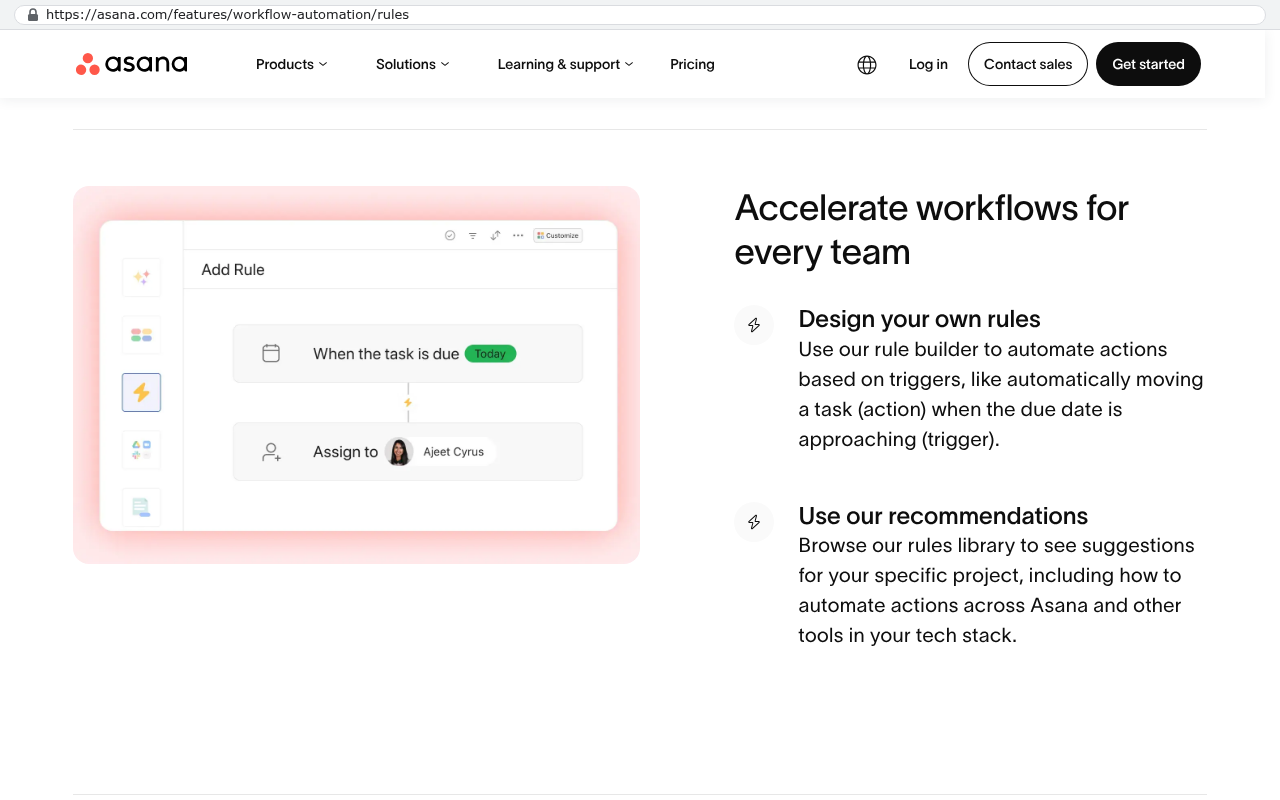
Automations deserve their own pass. In Asana, Monday, Smartsheet, or ClickUp, automations are usually invisible until they stop firing. Somebody built a rule three years ago that emails the warehouse when a job hits "ready to ship." Nobody remembers it exists, because it just works. Then you migrate, and shipments quietly stop going out.
Asana's workflow automation rules page shows a rule builder interface with a task due trigger and an assign action demonstrating background automation with triggers and actions. Source: asana.com/features/workflow-automation/rules
Walk the integrations too. List every connected app, every Zapier or Make scenario, every webhook, every API key. Then find out who owns each one. Half the time the answer is a former employee's personal account, and that's a problem you want to discover now.
Pull a list of every scheduled report and recurring email your platform sends. Those are workflows nobody documented. If a manager gets a Monday morning summary, someone will notice the week it stops arriving.
Export everything, then check what the export left out
Every platform's export is worse than it looks. You'll get a clean CSV of tasks with names, dates, assignees, and statuses. What you usually won't get, in a form you can use, are the attachments, the comment threads, the activity log, and anything stored in a custom field type the exporter doesn't understand.
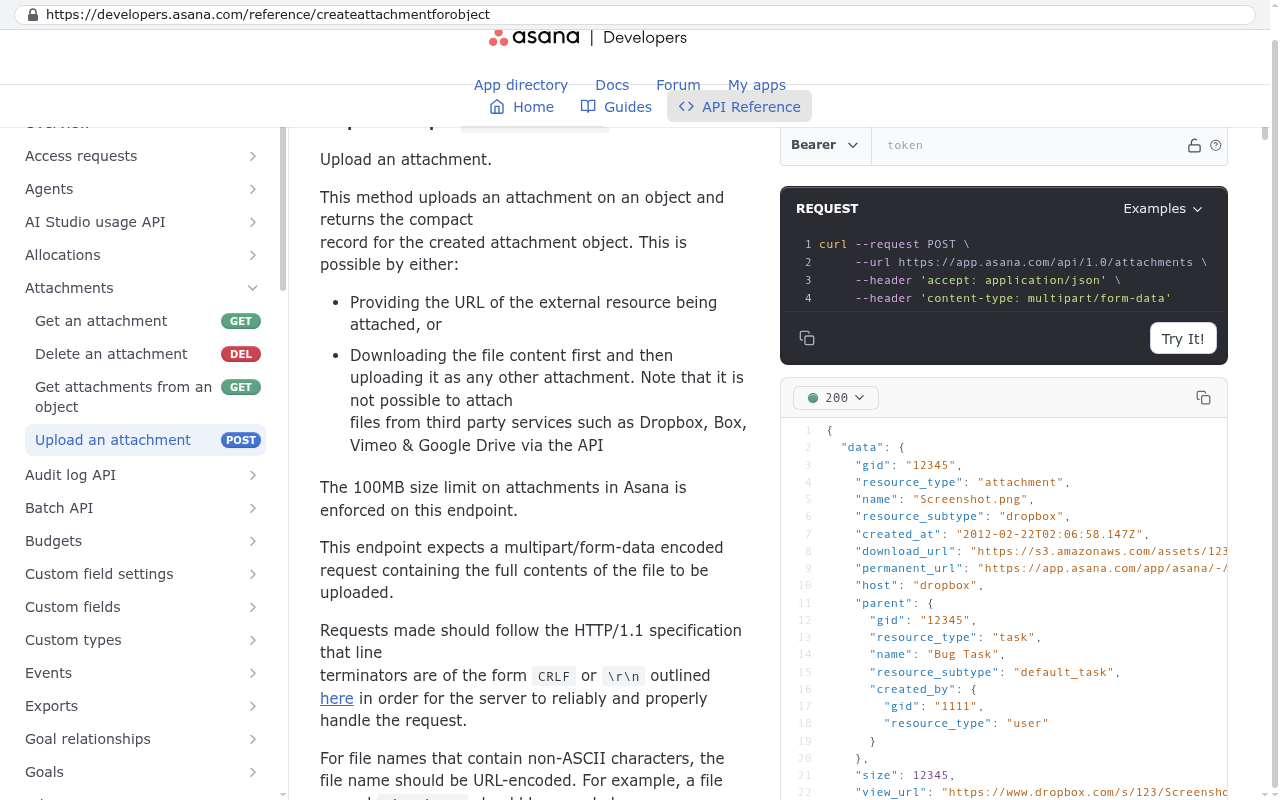
Attachments are the big one. Most tools store files on their own servers and put a link in the export. That link dies when your subscription does. If you have twelve years of signed change orders sitting in task attachments, you need a scripted export through the platform's API, which is the programmatic back door most tools provide for pulling data out in bulk. A copy and paste won't do it.
Asana Developers API Reference page showing the Upload an Attachment endpoint with code examples demonstrating programmatic attachment handling via API calls Source: developers.asana.com/reference/createattachmentforobject
Comments are the second one. Comment history is often where the real project record lives. The approval, the pushback, the client agreeing to the extra scope. If your new system can't hold threaded comments tied to the right record, decide now whether you're importing them as plain text notes or archiving them separately.
Once you have the raw export, build a mapping document. Old field goes to new field. Old status goes to new status. And critically, some old things go nowhere, on purpose. You'll find fields that haven't been filled in since 2021 and statuses used on four records. Leave them. Migrating dead weight is how a clean new system gets cluttered on day one.
Do not cancel the old subscription the day you go live. Downgrade it to the cheapest read-only tier you can and keep it for a full quarter. The one record you forgot will surface during a client dispute, and re-signing up won't give you your data back.
Run both systems in parallel for at least one full cycle
Parallel running means entering the same work in both places for a defined period. It's annoying. Your team will complain. Do it anyway.
The reason is simple. A migration test with sample data proves the import worked. It doesn't prove the system supports how your people actually work at 4pm on a Friday when a job changes. Only real use proves that.
Pick a cycle that matches your business rhythm. If you invoice monthly, run a month so you can compare the invoice run in both systems. If your reporting is quarterly, at minimum get through one month-end close. The test isn't "does the data look right." The test is "do the numbers match."
Keep the parallel period narrow. Pick one team or one project type rather than the whole company. A pilot group of five people who use the system hard will find more problems than fifty people using it lightly. And they'll become your trainers when you roll out wider.
Set a hard end date for parallel running. Without one, teams drift back to the old tool for the things they find easier, and you end up paying for both forever. That's a real failure mode, not a hypothetical. The old system stays alive for two years because three people never stopped using it.
The things that break first
Integrations break before anything else. Your accounting sync, your time tracking tool, your document storage. Each one was configured against the old platform's data structure, and the new one is different. Even a well-planned migration means rebuilding these connections, not repointing them.
Permissions are the second failure. Old platforms accumulate exceptions. One contractor got access to a client folder for a single job in 2022 and still has it. When you migrate, you either copy those exceptions (bad) or rebuild permissions cleanly (better, but people will lose access they expected).
Here's the short list of what to watch in the first two weeks after cutover.
Scheduled reports and digest emails that silently stop sending
Automations that fire twice because both systems are still connected to the same downstream tool
External sharing links you sent clients that now point at nothing
Mobile app access for field staff, which is often configured separately
Anyone whose login came through a single sign-on setup that wasn't replicated
Client-facing links deserve emphasis. If you've been sharing live views with customers, every one of those links dies. Somebody has to send new ones and explain why. That's a communication job, not a technical one, and it needs an owner.
Why a custom build changes the migration math
When you move from one SaaS platform to another, you're fitting your process into somebody else's structure. That's where most migration pain comes from. You spend weeks arguing about which of the new tool's six status options maps to your seven-stage approval process.
A custom system inverts that. You build the target to match what you already do, field for field, then improve it once people are safely landed. The migration stops being a change management project and becomes a data move. That's a meaningfully easier problem.
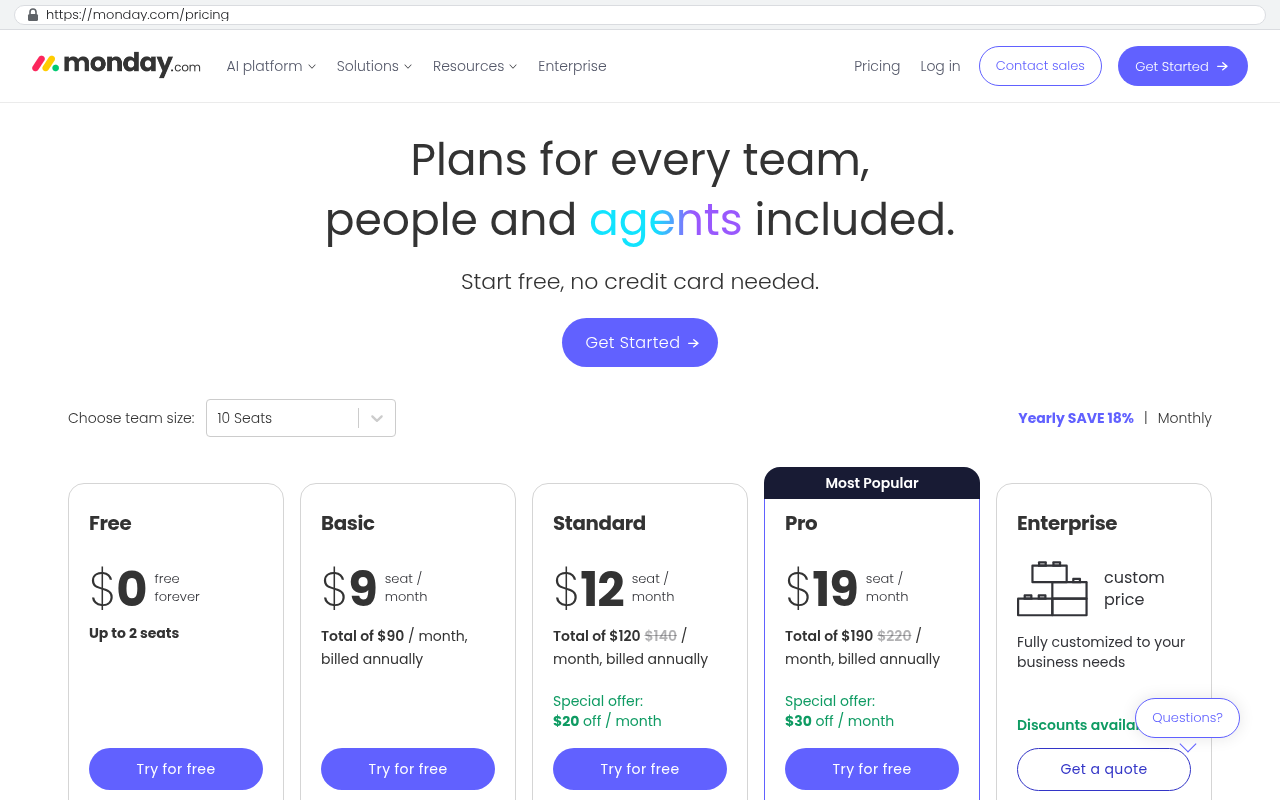
The arithmetic is worth doing honestly. Add up your per-seat subscription cost, times your seat count, times twelve. Then add the connector tools, the premium tier you upgraded to for one feature, and the hours your team spends on workarounds the platform forces. Compare that annual total against a one-time build you own outright, with no renewal, no seat count, and no pricing change announced by email. For a lot of mid-sized operations, the subscription stack passes the cost of a build in a small number of years. The gap widens every time you hire.
Monday.com pricing page shows five plans with per-seat monthly prices ranging from free to 19 dollars per seat and minimum seat counts from 2 to custom Source: monday.com/pricing
Ownership also removes the next migration. The reason you're reading a migration checklist is that a vendor changed something you depended on. That happens again. It doesn't happen with a system that's yours.
Building to mirror your current workflow first sounds like wasted effort. It isn't. It lets you separate two risks that usually hit at once. Get the data moved and proven, then change the process with people who already trust the new system.
A phase breakdown you can plan against
Phases matter more than dates, because every business runs this at a different pace. Here's the sequence that holds up.
Audit. Catalogue fields, statuses, automations, integrations, and reports. Note who owns each one.
Decide. Mark each item as migrate, rebuild, or retire. Retire is a valid and underused answer.
Extract. Pull a full export including attachments and comments. Verify counts against the live system.
Map and load. Move data into the new system. Spot-check a sample by hand, not just by row count.
Parallel run. One team, one full business cycle, both systems. Compare outputs, not just inputs.
Cut over. Switch everyone. Freeze the old system to read-only the same day.
Stabilise. Two to four weeks of watching integrations, permissions, and reports before you change anything else.
Notice that training doesn't have its own phase. It sits inside parallel running, because people learn a system by using it on real work, not by sitting through a demo.
Where this approach falls short
Not everything migrates. Be honest about that up front.
Audit trails usually don't survive intact. Most platforms record who changed what and when, and that history rarely exports in a form another system can import. If you're in a regulated industry where that trail matters, the practical answer is a frozen archive of the old system, not a migration.
Client-side habits are a real cost. If your customers log into your current platform to check status, moving means retraining them too. Some will resist. That's a genuine reason to stay put, and no amount of internal benefit outweighs losing a client relationship over a login screen.
Timestamps get messy. Task creation dates, comment dates, and file upload dates often come across as the import date instead of the original. If your reporting depends on historical trend data, test this specifically before you commit.
And a custom build isn't right for everyone. If your process genuinely matches an off-the-shelf tool, and you're only migrating because of a price increase you can absorb, switching costs may exceed the saving. The case for owning your system is strongest when you're already paying for workarounds, connectors, and seats you don't use.
FAQ
How long should we keep the old platform after going live?
A full quarter at minimum, on the cheapest tier that still lets you read data. Longer if you have annual reporting or open client disputes. The cost of three extra months is trivial next to losing a record you need.
Can we migrate attachments automatically?
Usually yes, but not through the standard export. It takes a script that calls the platform's API, downloads each file, and re-links it to the right record in the new system. Budget real effort for this if you have years of files.
Should we clean up our data before or after migrating?
Before. Always before. Migration is the one moment when everybody is paying attention to data quality. Dirty data that crosses over becomes permanent, because nobody goes back.
What if our team pushes back on parallel running?
Shrink the scope, don't skip the step. One team, one project type, one cycle. The pushback is usually about volume, and a tight pilot answers it.
Do we need a developer to run this checklist?
The audit and mapping phases are business work, not technical work. You want your operations people doing those. The extraction and load steps need someone technical, especially for attachments and API access.
Next step
Run the audit this week, before you've picked a destination. The catalogue you build is useful no matter where you land, and it's the single thing that determines whether the migration goes smoothly. If you want a second set of eyes on what you find, you can book a free strategy session with us in Clearwater. We'll look at your field list and tell you honestly whether a move is worth the disruption.
How to audit your current project management workflows before replacing them
What it really means to own your software instead of renting it
Integration patterns that survive a platform change
Questions
Frequently asked questions
What should I audit before exporting data from my project management platform?
Audit every custom field, status, automation rule, and integration in your current platform. Document not just what exists, but why each field exists and who owns each integration. Include a note on every automation rule explaining its purpose, since automations are often invisible until they stop working. This prevents critical functionality from disappearing during migration.
Why do exports from project management tools leave out important data?
Most exports provide clean task data but miss attachments, comment threads, activity logs, and custom field types. Attachments are particularly problematic because platforms store files on their own servers, and links die when your subscription ends. You need a scripted API export to pull attachments in usable form, not a simple CSV download.
How long should I run both systems in parallel?
Run both systems side by side for at least one full business cycle. If you invoice monthly, run for a month so you can compare invoice runs. If reporting is quarterly, run through at least one month-end close. The goal is to test whether the system supports how your team actually works, not just whether data looks correct in sample tests.
What typically breaks first after migrating to a new platform?
Integrations and permissions break most often after cutover. Integrations fail because connections depend on proper setup and API keys. Permissions break because role mappings don't always transfer cleanly between platforms. Plan for these to fail first and have mitigation ready before you go live.
Should I keep my old platform after switching to a new one?
Yes. Do not cancel your old subscription immediately after going live. Downgrade to the cheapest read-only tier and keep it for a full quarter. If a forgotten record surfaces during a client dispute later, you'll need access to it. Resubscribing won't restore your data, so maintaining archive access is essential.
What data should I intentionally leave behind during migration?
Leave behind fields that haven't been used since 2021 and statuses that only appear on four records. Migrating dead weight clutters your new system on day one. Build a mapping document where you explicitly decide what goes nowhere on purpose. This prevents unnecessary complexity in your new platform.
Do I need a developer to complete this migration checklist?
The core audit and planning steps do not require a developer and you can run them yourself. However, you will need programmatic access through your platform's API to properly export attachments and bulk data, which may require technical help. The order and discipline of the checklist matter more than the speed of execution.
Cancel a SaaS subscription and your data doesn't vanish, it gets locked behind a login. Here's what an export really gives you, what never comes out, and when owning the system is cheaper.
If this is your situation
Talk it through on a call
Thirty minutes over video with the person who would run the build. You talk, we ask questions, and you leave with a plain read on whether custom software makes sense for you. If the answer is that your current tool is fine and badly configured, you will hear that.
David Verneuille founded Black Badger after 18 years as a project manager and years implementing Smartsheet, monday.com, Wrike and Zoho for clients. He now builds custom systems that clients own outright, which is why the writing here is specific about where each platform fits and where it stops fitting.
Per-seat software bills you for hiring, not for value. Here's the five-year arithmetic on a team growing from 10 to 50 people, and when owning the system actually pays off.
Marine, construction, healthcare, logistics and hospitality operators around Tampa Bay outgrow their software in the same few places. Here is where it breaks, what a custom build fixes, and where it isn't worth it.
Parallel running lets you replace a platform one workflow at a time without a weekend cutover that breaks invoicing. Here's how to pick the pilot, sync data safely, and shut the old system down cleanly.
When browsing the internet, you may have noticed that some websites have "https" in their URLs instead of "http". But have you ever wondered what that extra "s" means?
Enterprise Performance Management (EPM) is a management approach used by organizations to analyze their business performance and make informed decisions based on data.
Want this looked at properly?
An article can only go so far without knowing your systems. Book a strategy call, walk us through what is breaking, and you will get a straight read on whether custom software is the right answer.