Skip to content
BlackBadger

Blog / Integrations

The hidden cost of the spreadsheet layer nobody planned for

/ 9 min read

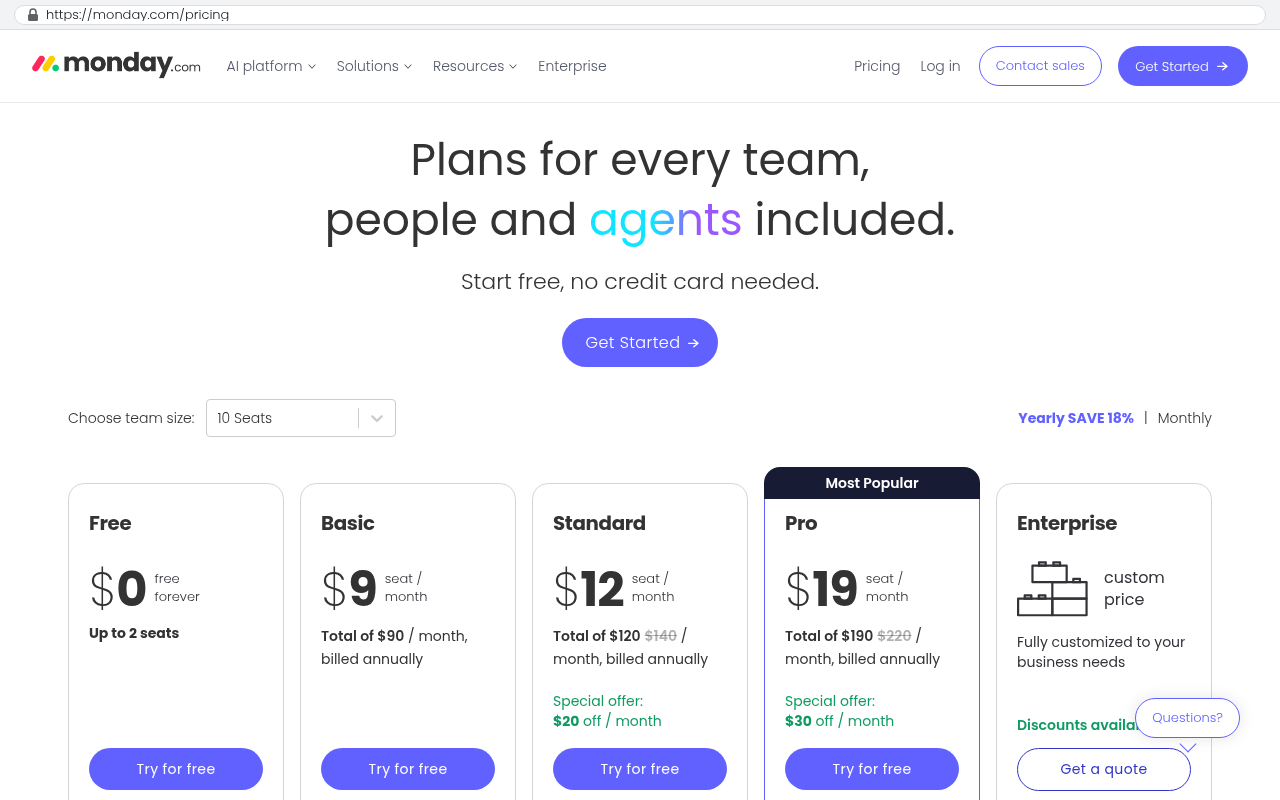
monday.com pricing page showing Free at zero dollars forever for up to two seats, Basic at nine dollars per seat per month, Standard at twelve dollars per seat per month with a special offer of twenty dollars off, Pro at nineteen dollars per seat per month marked most popular with thirty dollars off, and Enterprise with custom pricing, along with a team size selector set to ten seats

TL;DR

Companies accumulate hidden spreadsheet layers that run critical operations like payroll and scheduling, costing tens of thousands annually in labor, errors, decision delays, and key person risk while remaining invisible on financial statements.

Key takeaways

  • Most mid-sized companies have 30 to 60 spreadsheets running between their official systems, with each significant spreadsheet costing between 20,000 and 80,000 dollars per year when accounting for maintenance labor, errors, and delayed decisions.
  • Spreadsheet failures happen silently through formula errors, hidden filters, or data overwrites, often discovered only when customers dispute invoices or year-end numbers fail to reconcile.
  • Decision lag from outdated spreadsheet data creates real business risk, such as missing job cost overruns on tight margin projects when reports arrive days after the week ends.
  • Buying larger software platforms rarely eliminates spreadsheet layers because off-the-shelf tools are built for average processes, not competitive advantages, and teams typically recreate spreadsheets within the new system.
  • Every spreadsheet layer depends on one or two key people who understand its structure and workarounds, creating severe operational risk when those employees leave or take time off.
  • Before investing in new software to replace spreadsheets, vendors should demonstrate actual calculations with your specific columns and data, not export-to-Excel workarounds that perpetuate the problem.

Every company we work with has a spreadsheet layer. Nobody bought it. Nobody approved it. It grew because the real system couldn't do something, and somebody smart opened Excel to fill the gap. Ten years later that spreadsheet runs payroll allocation, or quoting, or the production schedule. And the person who built it is the only one who understands it.

This layer is expensive. The cost just doesn't show up on any invoice, so nobody adds it up.

What the spreadsheet layer actually looks like

It's rarely one file. It's a cluster of them, sitting between the systems you paid for. A typical mid-sized company has an ERP for accounting, a CRM for sales, maybe a project tool, and then twenty to forty spreadsheets doing the work those tools don't do.

We saw this at a specialty contractor in Pinellas County. Their accounting system handled invoices fine. But it couldn't produce a job cost report the way the owner wanted to see it. So the controller exported to Excel every Monday, pasted in labor hours from the time tracking app, applied a markup formula, and emailed a PDF to five project managers. Four hours a week, every week, for six years.

That's roughly 1,250 hours. At a controller's loaded rate, you're well past six figures of salary spent on copy and paste.

The pattern repeats everywhere. Sales uses a pipeline sheet because the CRM's forecast fields don't match how they actually sell. Ops runs a scheduling board in Google Sheets because the project tool can't handle their crew constraints. Finance keeps a commission calculator that nobody else can open without breaking it.

Count your spreadsheets before you do anything else. Ask each department head to list every file that gets updated weekly or more often and that someone outside their team relies on. Most owners are shocked by the number. Thirty is normal. Sixty happens.

The four costs nobody puts on a line item

The labor cost is the obvious one, and it's the smallest. Rekeying data is boring, but it's measurable and it's usually a few hours a week per person. The real money is in the other three.

First is the error cost. Spreadsheets fail silently. A formula gets dragged one row short. Someone types a number over a formula. A filter is left on and half the data disappears from a total. Nobody gets an alert. You find out when a customer disputes an invoice or when the year-end numbers don't tie.

Second is the decision lag. If your job cost report comes out Monday for the week that ended Friday, you're making Tuesday's decisions on nine-day-old data. On a job with a tight margin, that lag is the difference between catching an overrun and eating it.

Third is the key person risk. Every spreadsheet layer has one or two people who hold it together. They know which tab feeds which, which cells not to touch, and what the weird workaround in column AF is for. When that person leaves, or takes a real vacation, the layer degrades fast. We've walked into companies where nobody could explain how the pricing sheet worked because the woman who wrote it retired in 2019.

A rough way to price it out

Take one spreadsheet that matters. Estimate the hours per week spent maintaining it, including the person who prepares it and everyone who fixes it downstream. Multiply by 52. Multiply by a loaded hourly cost, meaning salary plus benefits plus overhead, usually 1.3 times base pay.

Then add one error event per year. Pick a realistic one. A wrong invoice you had to eat. A job you underbid. A duplicate order. Put a dollar figure on it.

For most companies, one significant spreadsheet lands somewhere between twenty and eighty thousand dollars a year in real cost. And you probably have five that matter.

Why buying more software usually doesn't fix it

The instinct is to buy a bigger platform. If the CRM can't forecast the way you sell, buy the enterprise tier. If the project tool can't handle crew scheduling, move to a construction-specific suite.

Sometimes that works. Often it doesn't, and here's why. The spreadsheet exists because your process is specific to you. Off-the-shelf software is built for the average of a thousand companies. The closer you get to your actual competitive advantage, the less likely a packaged tool matches it.

So you buy the bigger platform. Migration takes months. Your team learns new screens. And within a quarter, someone opens Excel again to handle the thing the new system still can't do. Now you're paying more per seat and you still have the spreadsheet layer.

We've seen this cycle three times at the same company. Each platform change cost real money and real disruption. The spreadsheets survived all three.

Before you buy a replacement platform, take your top three spreadsheets to the demo and ask the vendor to reproduce them live. Not a slide. The actual calculation with your actual columns. If the answer involves "you can export to Excel and" then you haven't solved anything.

When a custom build is the honest answer

A custom system makes sense when the spreadsheet encodes real business logic that no vendor will ever build for you. Your pricing model. Your allocation rules. Your scheduling constraints. That logic is already written. It's sitting in the formulas.

That's the part people miss. A well-used spreadsheet is a finished specification. Somebody already worked out the rules through years of trial and error. Turning it into software isn't a discovery project, it's a translation project. That makes it faster and less risky than a blank-page build.

Here's the arithmetic that actually matters. Say you're paying for a platform at seat-based pricing, and you're spending fifteen hours a week across the team maintaining the spreadsheets that platform couldn't cover. The subscription is a permanent expense that rises every renewal. The labor is a permanent expense that rises with wages.

monday.com pricing page showing Free at zero dollars forever for up to two seats, Basic at nine dollars per seat per month, Standard at twelve dollars per seat per month with a special offer of twenty dollars off, Pro at nineteen dollars per seat per month marked most popular with thirty dollars off, and Enterprise with custom pricing, along with a team size selector set to ten seats
monday.com pricing page displays five plan tiers from free to enterprise with per-seat monthly pricing and a ten-seat team size selector at the top Source: monday.com/pricing

A custom build is a one-time cost plus hosting and occasional changes. You own the code. There's no per-seat charge when you hire ten more people. There's no renewal negotiation. If the subscription plus the manual labor exceeds the amortized cost of the build over three years, building wins on math alone, before you count the error reduction and the faster decisions.

We ran exactly this for a distributor whose order allocation lived in a shared workbook. Two people spent most of Monday on it. The replacement was a web app that read from their existing inventory system, applied the same allocation rules, and produced the same output automatically. Same logic, no typing. Those two people now handle vendor relationships instead.

Where custom is the wrong call

Not every spreadsheet deserves a system. Some of them should stay exactly where they are, and we'll tell clients that.

If the spreadsheet is genuinely ad hoc, leave it. Modeling a one-time acquisition, testing a new pricing idea, running a quick what-if on headcount. Excel is excellent at exploratory math. Building software for a question you'll ask once is a waste.

If the process is still changing weekly, wait. Software makes a process permanent. If you're still figuring out how you want to schedule crews, freezing the current version into an application locks in a decision you haven't made yet. Let it stabilize first.

If a well-configured off-the-shelf tool covers ninety percent of it, buy the tool. Custom development is not automatically better. It's better when the fit gap is large and permanent.

And be honest about the real costs of building. You take on ownership. Somebody has to host it, monitor it, and change it when the business changes. That's a smaller ongoing cost than subscriptions for most mid-sized companies, but it isn't zero. If your organization has no appetite for owning anything technical, a custom system will drift and rot the same way the spreadsheets did.

There's also the collaboration question. If half a spreadsheet's value is that your customers or vendors open it directly, moving to a custom system means either giving them logins or building an export. That's solvable, but it's real work and it belongs in the plan from day one.

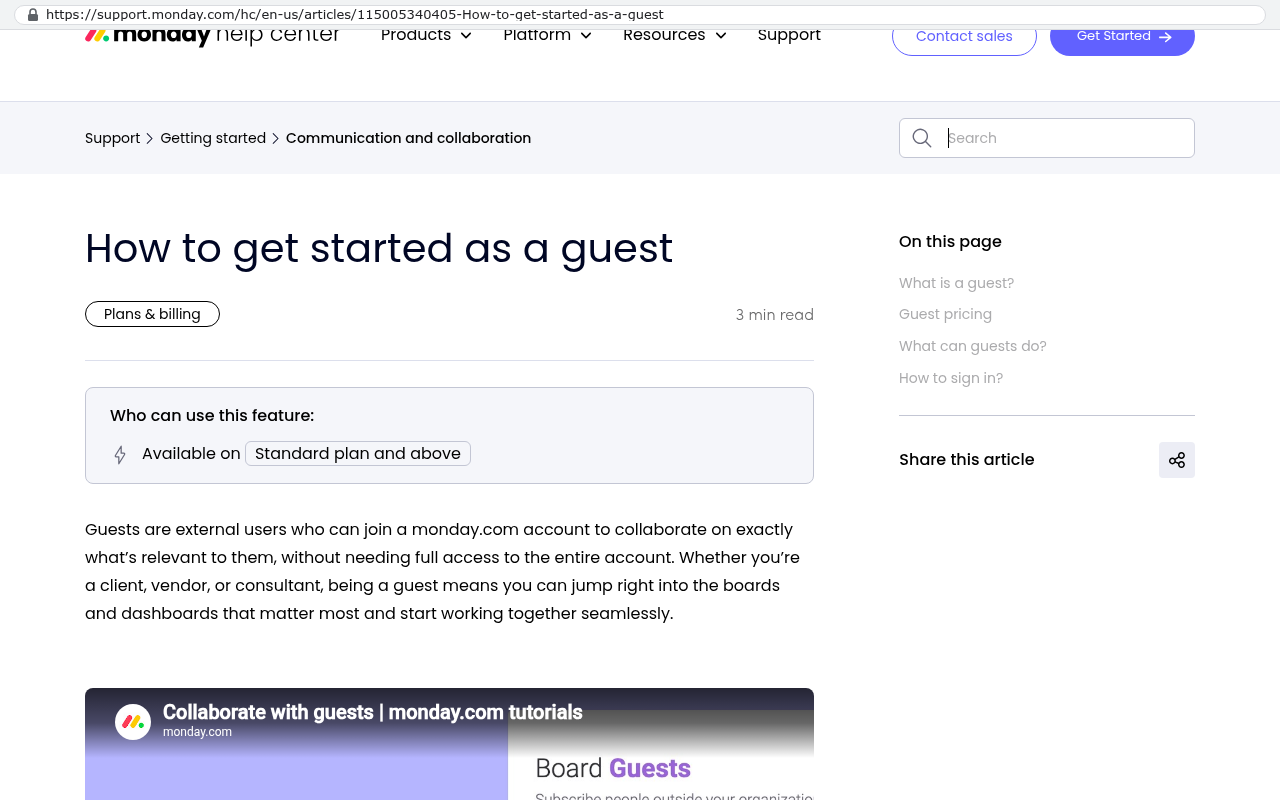
Monday.com help center article titled How to get started as a guest displaying feature availability on Standard plan and above with explanation that guests are external users who can join to collaborate on specific boards and dashboards
Monday.com help center article explaining how to get started as a guest shows that guests are external users who can join a monday.com account to collaborate on specific boards and that this feature is available on Standard plan and above. Source: support.monday.com/hc/en-us/articles/115005340405-How-to-get-started-as-a-guest

Pick your first build by frequency and pain, not by size. The spreadsheet touched daily by four people beats the complicated quarterly one every time. Fast wins fund the next project and build trust with the team that has to change how they work.

How to start without blowing anything up

Don't try to eliminate the whole layer at once. That's how these projects die. Take the single most expensive spreadsheet and replace that one.

Start by documenting what it actually does. Sit with the person who maintains it and have them walk through a full cycle. Where does the data come from? What does the calculation do? Who reads the output and what do they do with it? Write it down in plain language, not formulas.

You'll find things nobody knew. Hidden tabs. Manual adjustments applied every month that no one can justify. Rules that stopped being true two years ago. That cleanup has value on its own, whether you build anything or not.

Then decide the boundary. The new system should pull data from where it already lives, apply the logic, and put the output where people already look. Don't rebuild your accounting system. Connect to it.

Run both in parallel for a cycle or two. Compare the numbers. When they match and the team trusts the new output, retire the spreadsheet properly. Archive it, don't delete it, and stop updating it. A half-retired spreadsheet is worse than either state.

What to do this week

Get the inventory. One list, every department, every recurring spreadsheet with an owner name and an estimated weekly time cost. That list is usually the most useful operations document a company produces all year.

Then rank it. Frequency times headcount times consequence of an error. The top two or three will be obvious once the numbers are on paper.

Some of what's on that list should stay in Excel forever. Some of it is costing you more than a system would. You can't tell which is which until you write it down.

If you want a second set of eyes on that list, book a free strategy session at /contact. We'll tell you which spreadsheets are worth replacing and which ones you should leave alone.

Questions

Frequently asked questions

What is the spreadsheet layer and why do companies have it?

The spreadsheet layer is a cluster of Excel files that grew organically between systems a company purchased. It exists because the main systems couldn't handle specific tasks, so someone created spreadsheets to fill the gaps. No one planned or approved it, but over time it becomes critical to operations like payroll, quoting, or production scheduling.

How much does the spreadsheet layer actually cost?

The costs include labor for maintenance, errors that slip through silently, decision lag from outdated data, and key person risk when someone irreplaceable leaves. A single significant spreadsheet typically costs between twenty and eighty thousand dollars annually in real costs, including salary, benefits, overhead, and error events.

Why doesn't buying a bigger software platform solve the spreadsheet problem?

Packaged software is built for the average of many companies, not your specific competitive advantages. When you buy a larger platform, your custom processes still don't fit, so people open Excel again within a quarter. You end up paying more per seat while maintaining the same spreadsheet layer underneath.

When does a custom build make sense instead of buying software?

A custom build makes sense when spreadsheets encode unique business logic like your pricing model, allocation rules, or scheduling constraints that vendors will never build. Well-used spreadsheets are finished specifications with years of trial and error baked in, making them faster translation projects rather than risky blank-page builds.

How should you measure which spreadsheets matter most?

Ask department heads to list files updated weekly or more often that others depend on. Count the spreadsheets, then estimate weekly hours spent maintaining each one. Most mid-sized companies have thirty to sixty spreadsheets that matter, and many owners are shocked by the number.

What is key person risk in the spreadsheet layer?

Key person risk occurs when one or two people understand how the spreadsheet layer works: which tabs feed which, which cells shouldn't be touched, and undocumented workarounds. When that person leaves or takes vacation, the layer degrades fast, and the company loses critical operational knowledge.

Should you demo your spreadsheets with new software vendors?

Yes. Before buying a replacement platform, bring your top three spreadsheets to the demo and ask the vendor to reproduce them live with your actual calculations and columns. If their answer involves exporting to Excel, you haven't solved the underlying problem.

Read this next

When staying on your current platform is the right call

Custom software isn't always the answer. Here's the arithmetic, the warning signs, and the honest caveats that tell you whether to renew your platform or replace it.

If this is your situation

Talk it through on a call

Thirty minutes over video with the person who would run the build. You talk, we ask questions, and you leave with a plain read on whether custom software makes sense for you. If the answer is that your current tool is fine and badly configured, you will hear that.

Book a strategy call

Who wrote this

David Verneuille

David Verneuille

Founder, Black Badger Software Solutions

David Verneuille founded Black Badger after 18 years as a project manager and years implementing Smartsheet, monday.com, Wrike and Zoho for clients. He now builds custom systems that clients own outright, which is why the writing here is specific about where each platform fits and where it stops fitting.

About Black Badger

Drafted with AI assistance, then checked, edited, and approved by a person before publishing. The facts, opinions, and recommendations are ours.

Related

More on integrations

Integrations /

Can a custom system connect to QuickBooks Online?

Yes, and the connection is well-trodden ground. Here's what the QuickBooks Online API actually supports, where it hits real limits, and how to decide if a custom integration beats an off-the-shelf connector.

Read it

More reading

Read this next

Want this looked at properly?

An article can only go so far without knowing your systems. Book a strategy call, walk us through what is breaking, and you will get a straight read on whether custom software is the right answer.