Skip to content
BlackBadger

Blog / General

How to calculate the true cost of per-seat licensing before your next renewal

/ 11 min read

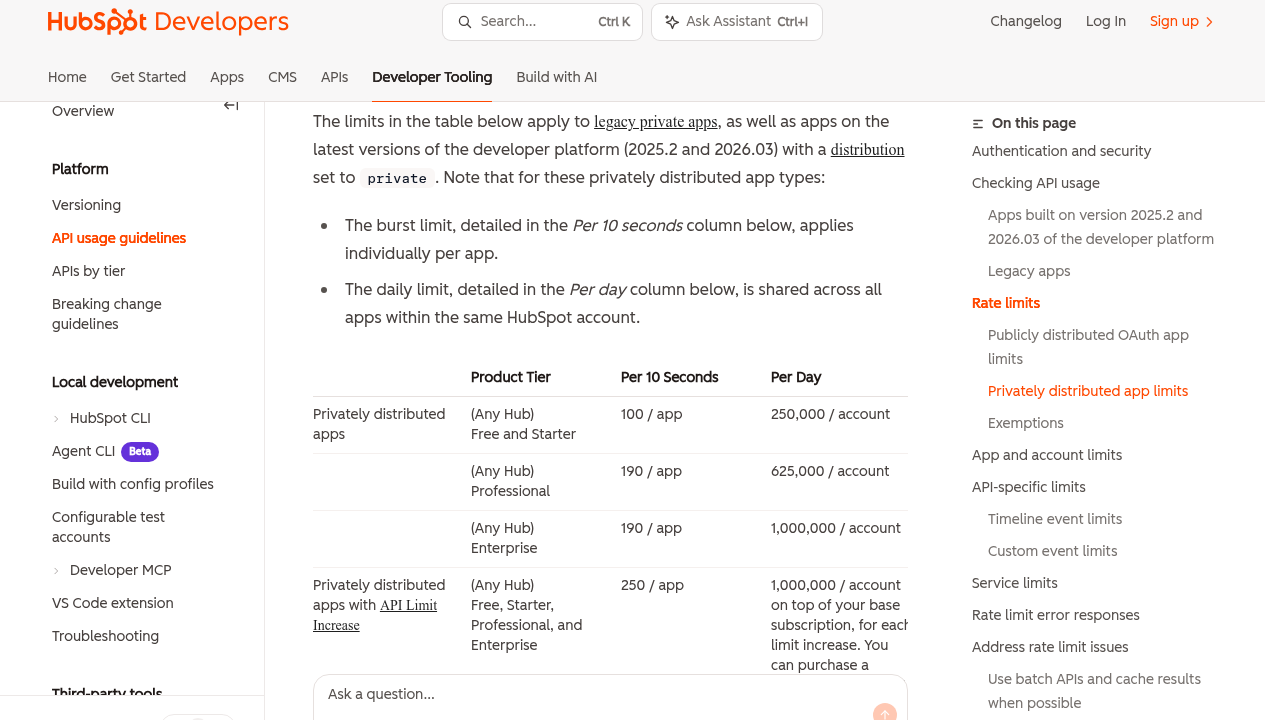
HubSpot Developers API usage guidelines page displaying a rate limits table with Product Tier, Per 10 Seconds, and Per Day columns showing daily API call caps for Free, Starter, Professional and Enterprise plans.

TL;DR

Per-seat pricing hides multiple cost layers behind a single advertised price, making the true annual cost typically 40 to 60 percent higher than the displayed seat rate when you add tier minimums, required modules, admin time, and integration fees to your calculation.

Key takeaways

  • The per-seat price shown in quotes excludes tier minimums, add-on modules, sandbox fees, premium support, and internal admin labor that collectively represent the majority of actual spending.
  • Unused licensed seats represent the fastest savings opportunity for most companies since nobody systematically audits which seats are actually being used each month.
  • Internal administrative time spent maintaining the platform, managing permissions, and cleaning up data must be calculated with a dollar figure or the true cost will be significantly underestimated.
  • Per-seat pricing automatically increases your software costs whenever you hire new employees, meaning your expense curve rises continuously with headcount rather than with actual usage changes.
  • Auto-renewal clauses and 30 to 60 day notice requirements limit your power to negotiate before renewal conversations can begin, so you must calculate break-even analysis before these windows close.
  • Break-even analysis requires a five-year spending horizon rather than a one-year view to accurately compare per-seat licensing against alternative solutions like custom or scope-based pricing models.
  • Scope-based pricing models charge for functionality rather than headcount, which means your costs flatten after implementation instead of rising indefinitely with each new hire.

Your renewal quote says $75 per user per month. That number is almost never what you actually pay. By the time the invoice clears, you're also paying for a tier jump you didn't ask for, an integration tool that glues the platform to your accounting system, and roughly two days a month of somebody's time keeping the thing tidy. None of that shows up in the per-seat line item.

So before you sign another three-year deal, do the math properly. It takes about two hours and a spreadsheet.

TL. DR: Per-seat pricing hides four or five cost layers behind one friendly number. Add tier minimums, required add-on modules, API limits, middleware subscriptions, premium support, and internal admin hours, and the real annual cost is often 40 to 60 percent above the seat math. Seat pricing also charges you for hiring, which means the cost curve rises forever. A custom system prices on scope instead of headcount, so the curve flattens. Run the break-even before the auto-renew window closes.
Key takeaways

  • The per-seat price is the visible layer. Tier minimums, add-on modules, sandbox fees, and premium support sit underneath it.
  • Seats billed but unused are the single fastest saving most companies find, and nobody audits them.
  • Internal admin time is a real cost. Put a dollar figure on it or you'll undercount by thousands.
  • Seat pricing means every hire raises your software bill. Scope pricing doesn't.
  • Auto-renew clauses and 30 to 60 day notice windows remove your power to negotiate before the conversation starts.
  • Break-even is the only honest comparison, and it needs a five year horizon, not one.

The seat price is the smallest number on the invoice

Software vendors price the part you'll compare against competitors. Everything else gets moved somewhere less visible. Once you start reading invoices line by line, the same layers keep showing up.

Tier minimums are the most common. You need one feature, maybe granular permissions or a custom field type, and it only exists on the next plan up. That plan also has a minimum seat count. You have 32 users and the tier starts at 50, so you're paying for 18 people who don't exist.

Then come the modules. Time tracking, resource planning, advanced reporting, document storage beyond a cap. Each one is priced per user, per month, on top of the base seat. A platform advertised at $30 a head can land near $70 once you've switched on the three things your team needs to do its job.

API limits are the sneaky one. An API is just the doorway other software uses to talk to your platform. Vendors cap how many times a day that doorway opens. Hit the cap and your nightly sync to accounting stalls, and the fix is a higher plan. Add sandbox fees for a test copy of your data, premium support if you want a human inside four hours, and the mandatory annual uplift of five to eight percent written into most renewal terms.

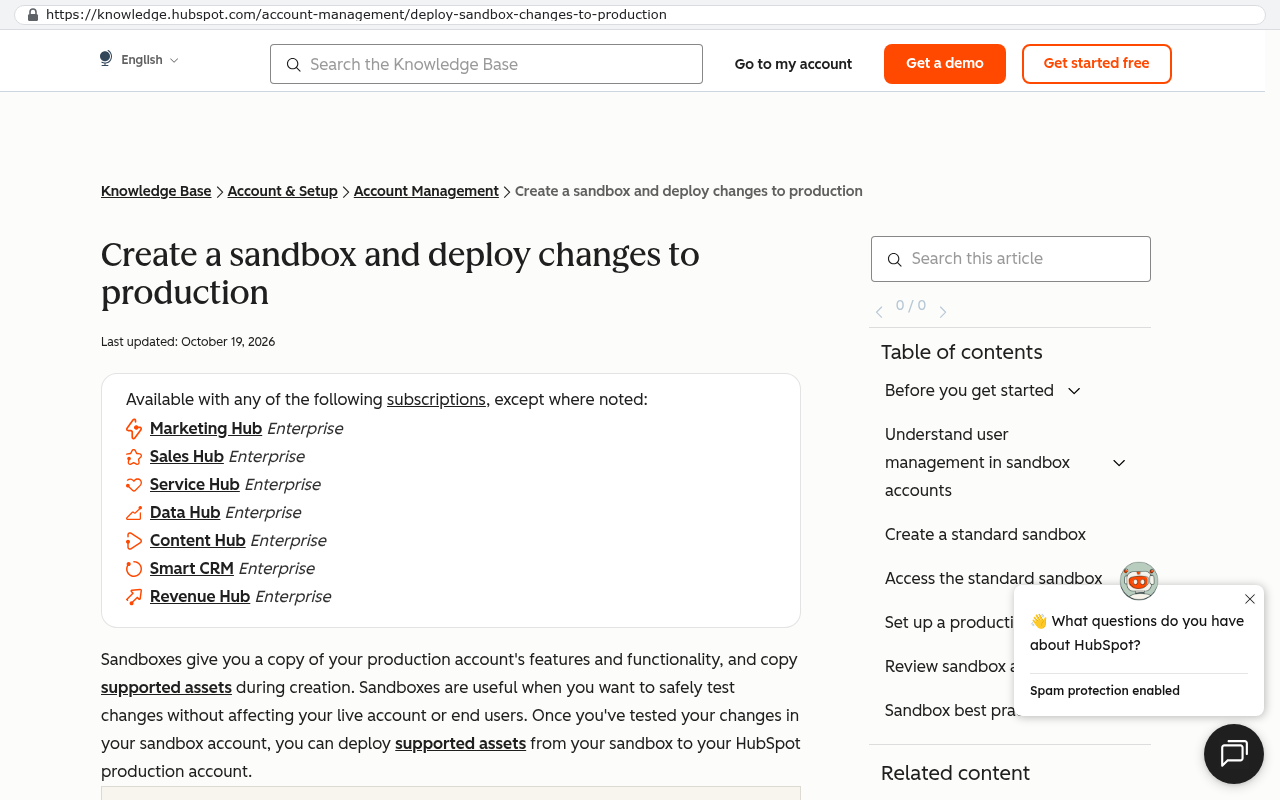
HubSpot knowledge base page listing Enterprise subscriptions that include sandbox functionality with Marketing Hub, Sales Hub, Service Hub, Data Hub, Content Hub, Smart CRM and Revenue Hub labeled
HubSpot knowledge base article shows that sandboxes are available with Enterprise subscriptions including Marketing Hub, Sales Hub, Service Hub, Data Hub, Content Hub, Smart CRM and Revenue Hub Source: knowledge.hubspot.com/account-management/deploy-sandbox-changes-to-production
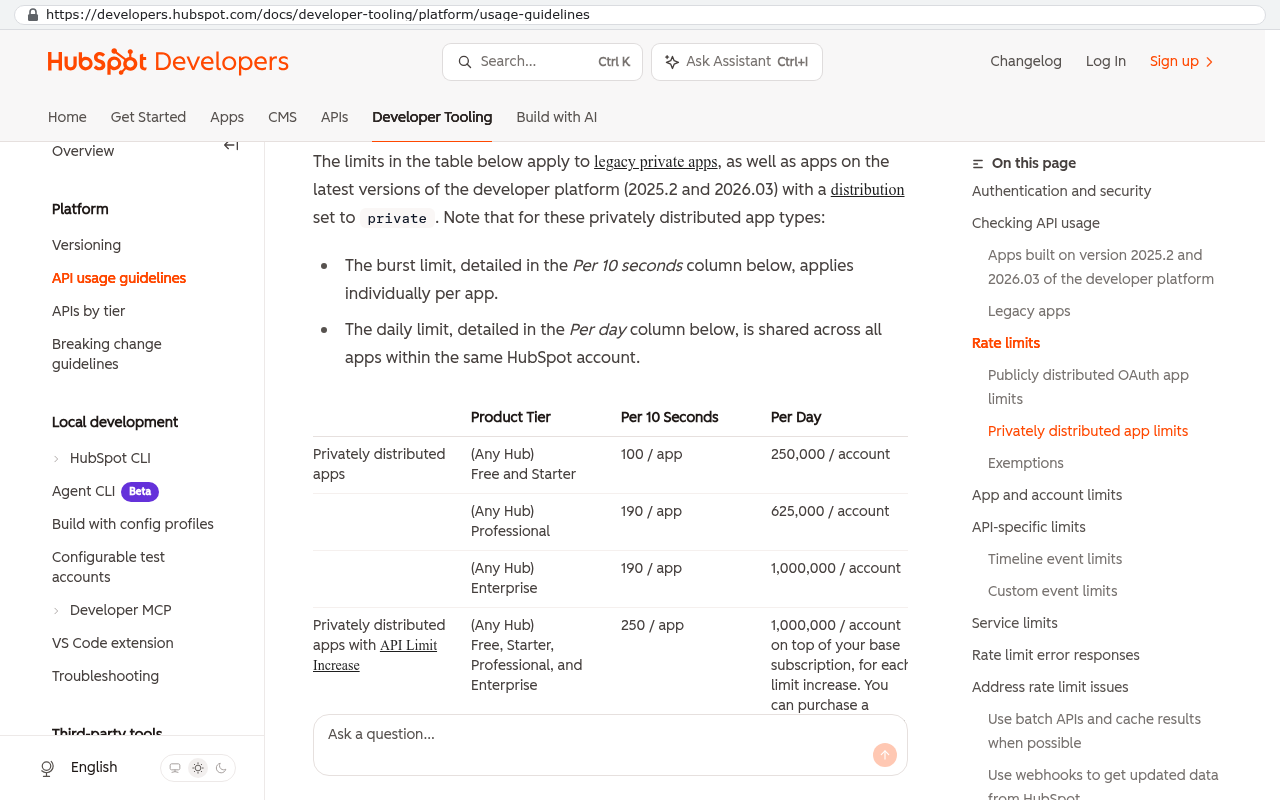
HubSpot Developers API usage guidelines page displaying a rate limits table with Product Tier, Per 10 Seconds, and Per Day columns showing daily API call caps for Free, Starter, Professional and Enterprise plans.
HubSpot Developers API usage guidelines page shows a table with daily rate limits per product tier ranging from 250,000 to 1,000,000 calls per account per day. Source: developers.hubspot.com/docs/developer-tooling/platform/usage-guidelines

Pull twelve months of invoices, not the current quote. Vendors quote the base plan and bill the real configuration. The gap between those two documents is the number you've been missing.

Fill in this worksheet before you talk to anyone

Six rows, one spreadsheet. Do this for each platform you're renewing.

  1. Current licensed seats, and current seats that logged in during the last 30 days. The gap is money you're setting on fire.
  2. Projected headcount in 24 months, from whoever owns the hiring plan.
  3. Total 12 month invoice spend, including modules, storage overages, support plans, and any one-off professional services charges.
  4. Integration or middleware subscriptions. Anything you pay for solely to connect this platform to another one counts against this platform.
  5. Internal admin hours per month. Ask the person who actually maintains it. Multiply by their loaded hourly cost.
  6. Rework hours caused by the platform. Rekeying, exporting to a spreadsheet to get a report the tool won't produce, chasing status updates the tool should show.

That last pair is where most finance teams undercount. Say your operations manager spends 20 hours a month on template upkeep, permission changes, and cleaning up bad data. At a loaded cost of $60 an hour, that's $14,400 a year of labour attached to a piece of software. It never appears on a vendor invoice, and it's real.

Seat pricing charges you for hiring

Here's the structural problem. Your software bill is tied to your headcount, so growth makes it worse. Hire twelve people and your platform cost rises whether or not those twelve people use the platform differently than the last twelve.

Work through it with round numbers. Sixty users at $75 a month is $54,000 a year in seats. Add $6,000 for the middleware connector, $10,800 for premium support at 20 percent of the base, and $14,400 of admin labour from the worksheet. This totals roughly $85,000 a year for a tool most teams describe as the project management system they use.

Now grow. Ninety users in three years, with a seven percent uplift each renewal, and you're comfortably past $130,000 annually. Five years of that spend clears half a million dollars, and you own nothing at the end. You're renting the same functionality you rented on day one, at a higher price, because you hired well.

A custom system prices on scope. The build cost is driven by how many workflows, screens, reports, and integrations it needs, not by how many people open it. Add forty users to a system you own and your hosting bill moves a little. That's the whole change. The cost curve goes flat while the subscription curve keeps climbing.

The contract clauses that do the real damage

Most renewal negotiations are lost before they start, on paperwork nobody reread. Three clauses do most of the work.

Auto-renew is the first. Your agreement rolls into another full term unless you give written notice. Second, that notice window is usually 30 to 60 days before the term ends, and sometimes 90. Miss it by a week and you've committed to another year. Third, the discount. Year one had 25 percent off to win the deal. Year two quietly returns to list, and the renewal quote gets described as "standard pricing" rather than a 33 percent increase.

Multi-year deals add price protection language that protects the vendor more than you. Read the uplift cap. If it says "up to 8 percent annually," assume 8 percent every year and model it that way.

Put every renewal date and notice deadline in a shared calendar with a reminder 120 days out. That single habit is worth more than any negotiation tactic, because you only have power to walk away while you still have the option to leave.

What finance should ask before signing a multi-year agreement

  • What is the total contract value across the full term, including all uplifts, as one number?
  • Can we reduce seat count mid-term, or is the count a floor?
  • Which features we use today sit on this tier, and what happens if they move to a higher one?
  • What are the API call limits, and what does a nightly sync to our accounting system actually consume?
  • What is the notice period, in writing, and who at your company receives the notice?
  • If we cancel, in what format do we get our data back, and do attachments come with it?

That last question matters more than it sounds. Plenty of platforms will export your records as a CSV file and leave every uploaded document behind. Getting twelve years of attachments out takes a scripted export against the API, not a copy and paste.

Break-even, with the arithmetic

The comparison that matters is simple. On one side you have five years of subscription spend, including uplifts, growth, middleware, and admin labour. On the other you have a one-time build cost, plus annual hosting and support, plus the internal admin hours the new system still needs.

Write it as a formula so you can argue about the inputs instead of the conclusion. Subscription total equals the sum of each year's seats times price times uplift, plus middleware, plus labour. Owned total equals build cost, plus five years of hosting and support, plus five years of labour. Break-even is the year those two lines cross.

Using the example above, the subscription line is around $85,000 in year one and rising. Any owned system whose build cost plus five years of running cost lands under that five year subscription total pays for itself inside the term. Get a fixed-scope quote, drop it into the same spreadsheet, and the answer stops being a matter of opinion. If the crossover lands in year four or five, renew and revisit later. If it lands in year two, you've been renting something you should own.

When an owned system is the wrong call

Custom isn't the answer for everything, and pretending otherwise wastes your money and our time.

Don't build your accounting ledger. Don't build payroll or tax filing. Those are solved, heavily regulated, and cheap as subscriptions. Same for email, document editing, and video calls. Nobody should build a commodity.

Be honest about external users too. If a real part of your value comes from sharing live views with clients who already work inside your current platform, replacing it carries a training and adoption cost on their side, not just yours. That's a genuine reason to stay.

Migration is work, not a switch. Historical records, attachments, user permissions, and the six automations somebody built in 2019 that nobody documented all have to move. An owned system also means you own maintenance. Hosting, security updates, browser changes, and a developer relationship for the next change request. The bill gets smaller and more predictable. It does not go to zero.

And if your headcount is small and stable, seat pricing is fine. The math only turns decisively when you're paying for a lot of seats, a lot of modules, or a lot of workarounds.

A useful gut check. If you'd struggle to name three things your platform does that a competitor's platform doesn't, you're paying for a category, not a capability. That's the situation where ownership tends to win.

Take this checklist into the renewal meeting

  • Twelve months of invoices, totalled, with every line item named.
  • Licensed seats versus active seats in the last 30 days.
  • Headcount projection for 24 months from the hiring plan.
  • Middleware and connector subscriptions tied to this platform.
  • Monthly admin and rework hours, converted to dollars.
  • Notice deadline date, circled, with the renewal date next to it.
  • Five year total contract value including maximum uplifts.
  • Data export terms, including attachments.
  • A fixed-scope quote for the owned alternative, for comparison.
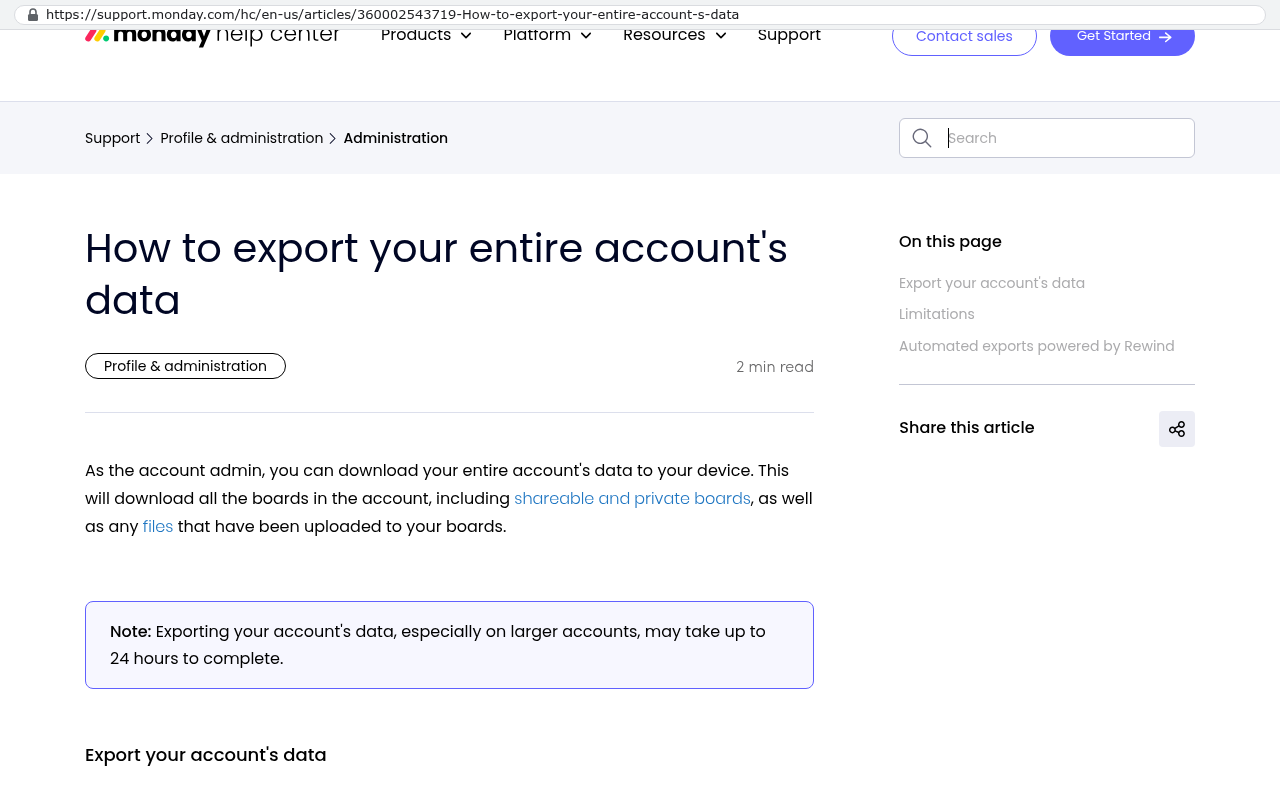
Monday.com help center page displaying instructions for exporting account data with information about included boards and files
Monday.com support article showing how to export entire account data including boards and files with a note that exports may take up to 24 hours Source: support.monday.com/hc/en-us/articles/360002543719-How-to-export-your-entire-account-s-data

Walk in with those nine items and the conversation changes. You're no longer discussing a per-seat rate. You're discussing a five year commitment against a real alternative, which is the only frame where you have room to negotiate.

FAQ

How do I find seats we're paying for but nobody uses?

Most platforms have a last-login or last-active report in the admin area. Export it, filter for anyone inactive over 30 days, and check the list against your current staff roster. Former employees whose accounts were never deactivated are common, and you've probably been billed for them for months.

Our vendor says we can't reduce seats mid-term. Is that normal?

It's normal, and it's negotiable at renewal rather than during the term. Ask for a downward flex clause that lets you cut a percentage of seats at each anniversary. Vendors grant it more often than people expect, because they'd rather keep the account.

Should I include staff time in the cost comparison? It feels like double counting.

Include it. That time is paid for either way, but the amount changes depending on the tool. If the platform forces 20 hours of monthly babysitting and a purpose-built system needs three, the 17 hour difference is a genuine saving, and ignoring it biases the comparison toward the status quo.

What if we're mid-way through a three-year deal?

Then you have time, which is the good version of this problem. Run the worksheet now, start the build conversation well before the notice window, and aim to have the replacement live before the term ends. Rushing a migration into a 45 day window is how projects go badly.

Can we replace part of a platform instead of all of it?

Often, yes, and it's frequently the smarter first move. Pull the workflow causing the most pain into a system you own, keep the subscription for the rest, and drop to a lower tier or fewer seats. You get a real saving and a smaller project at the same time.

Next steps

Start with the invoices. Everything else in this article depends on knowing what you actually pay, and that number is almost always higher than the one in your head. Once you have it, you can decide whether renewing is a choice or a habit.

If the five year total surprises you, we're happy to look at it with you. You can book a free strategy session and walk through the arithmetic with someone who builds the alternative.

Read this next: our breakdown of how to decide between renewing a SaaS platform and building a system you own.

Related articles

  • What it really costs to own your software, including hosting and maintenance
  • How to export your data before you cancel a SaaS contract
  • Replacing one workflow at a time instead of ripping out a whole platform

Questions

Frequently asked questions

What hidden costs are included in per-seat software pricing?

Per-seat pricing hides multiple cost layers behind the advertised seat price. Beyond the base fee, you typically pay for tier minimums, required add-on modules, API limits, sandbox fees, premium support, middleware subscriptions, and mandatory annual price increases of 5 to 8 percent. Internal admin time for system maintenance is another real cost that rarely appears on invoices. Together, these layers often push your actual annual cost 40 to 60 percent above the quoted per-seat number.

How do tier minimums increase software costs?

Tier minimums require you to purchase a minimum seat count even if you don't need all of them. For example, if you need a feature like granular permissions that only exists on a higher plan tier starting at 50 seats, but you only have 32 users, you pay for 18 phantom seats. This is one of the most common hidden costs embedded in per-seat licensing agreements.

How does per-seat pricing affect growing companies?

Per-seat pricing ties your software costs directly to headcount, so every new hire increases your platform expenses regardless of whether they use the software differently. Sixty users at $75 monthly plus overhead totals roughly $85,000 annually, but growing to 90 users in three years with standard renewal uplifts pushes costs past $130,000 annually. Over five years, this model can easily exceed half a million dollars spent on rented functionality.

What should I measure when calculating true software costs?

Create a spreadsheet with six key rows: current licensed seats versus actually logged-in seats, projected headcount in 24 months, total 12 month invoice spend including all modules and fees, integration or middleware subscriptions, internal admin hours per month at loaded hourly cost, and rework hours spent on manual tasks the platform should handle automatically. This reveals the genuine total cost of ownership beyond the quoted per-seat price.

What contract clauses create the biggest problems at renewal time?

Three clauses typically undermine renewal negotiations. Auto-renew automatically extends your agreement unless you provide written notice. The notice window is usually 30 to 60 days before term end, and missing it by a week commits you to another full year. Third, initial discounts like 25 percent off year one quietly revert to list price at renewal, raising your costs significantly without renegotiation.

What is the difference between seat-based and scope-based pricing?

Seat-based pricing charges per user regardless of actual usage, so headcount growth automatically raises costs. Scope-based pricing charges based on the number of workflows, screens, reports, and integrations needed, not how many people access it. With a scope-based system you own, adding 40 users barely changes hosting costs. The cost curve flattens instead of climbing continuously with each new hire.

How do I find seats I'm paying for but nobody uses?

Compare your current licensed seats against the number of seats that actually logged in during the last 30 days. The gap between these two numbers represents phantom seats you're paying for but nobody uses. This is often the single fastest savings opportunity most companies find, yet vendors rarely audit unused seats on their own.

Should I include internal admin time when comparing software costs?

Yes, internal admin time is a real cost that should always be included. Calculate the actual hours per month your team spends on system maintenance, template upkeep, permission changes, and data cleanup. Multiply by their loaded hourly cost. Operations managers often spend 20 or more hours monthly on these tasks, which at $60 per hour equals $14,400 annually in labor costs never appearing on vendor invoices.

How long does it take to calculate true software licensing costs?

It takes approximately two hours and a spreadsheet to properly calculate the true cost of per-seat licensing. The worksheet has six key rows covering licensed versus active seats, projected headcount, total invoice spend, integration costs, internal admin hours, and rework hours. Pulling 12 months of actual invoices instead of relying on quotes is essential for accuracy.

What is break-even analysis in software licensing decisions?

Break-even analysis compares the total five year cost of staying with per-seat subscription software against building or buying a custom system. You must run this calculation with a five year horizon, not just annual costs, because ownership models have different cost curves than rental models. Break-even is the only honest comparison and should be completed before auto-renew windows close and your ability to negotiate disappears.

Read this next

When staying on your current platform is the right call

Custom software isn't always the answer. Here's the arithmetic, the warning signs, and the honest caveats that tell you whether to renew your platform or replace it.

If this is your situation

Talk it through on a call

Thirty minutes over video with the person who would run the build. You talk, we ask questions, and you leave with a plain read on whether custom software makes sense for you. If the answer is that your current tool is fine and badly configured, you will hear that.

Book a strategy call

Who wrote this

David Verneuille

David Verneuille

Founder, Black Badger Software Solutions

David Verneuille founded Black Badger after 18 years as a project manager and years implementing Smartsheet, monday.com, Wrike and Zoho for clients. He now builds custom systems that clients own outright, which is why the writing here is specific about where each platform fits and where it stops fitting.

About Black Badger

Drafted with AI assistance, then checked, edited, and approved by a person before publishing. The facts, opinions, and recommendations are ours.

More reading

Read this next

Want this looked at properly?

An article can only go so far without knowing your systems. Book a strategy call, walk us through what is breaking, and you will get a straight read on whether custom software is the right answer.